
1. Introdução
This manual provides essential information for the safe and effective use of your TOPUTURE TP4 Foldable Walking Pad Treadmill with Incline. Please read this manual thoroughly before initial use and retain it for future reference. This treadmill is designed for walking and light running in home and office environments, offering a compact and versatile fitness solution.
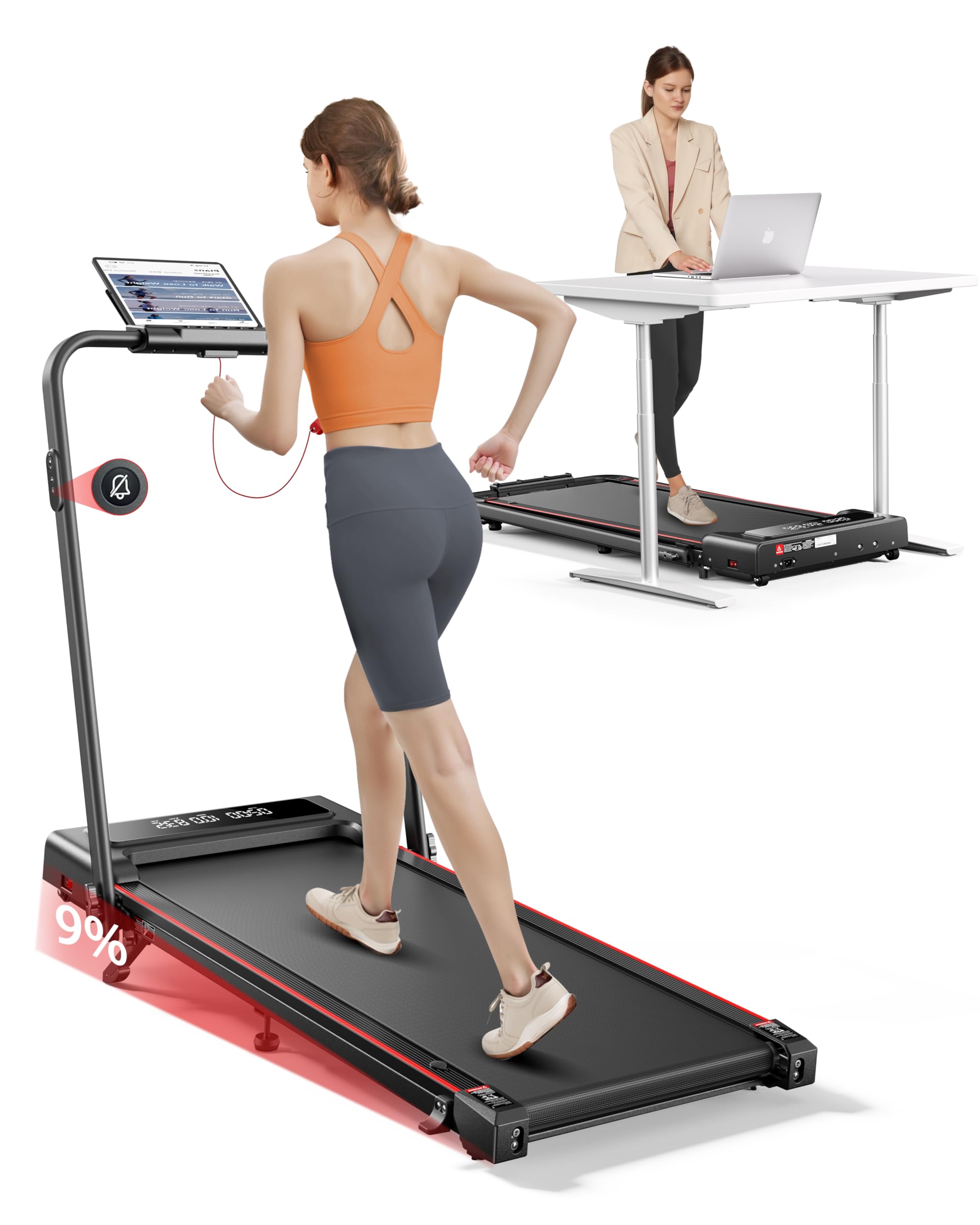
Image 1.1: The TOPUTURE TP4 Foldable Walking Pad Treadmill in both walking pad and treadmill configurations.
2. Instruções importantes de segurança
Para reduzir o risco de lesões graves, leia todas as instruções antes de usar este equipamento. O fabricante não se responsabiliza por lesões pessoais ou danos materiais causados pelo uso deste produto.
- Sempre coloque a esteira em uma superfície plana e estável.
- Assegure-se de que haja espaço suficiente ao redor da esteira (pelo menos 2 metros atrás e 0.6 metros em cada lado).
- Mantenha crianças e animais de estimação longe da esteira durante a operação.
- Não utilize a esteira se o seu peso for superior à capacidade máxima suportada (300 lbs / 136 kg).
- Use calçado desportivo apropriado.
- Se sentir dor, tontura ou falta de ar, pare de se exercitar imediatamente.
- Desligue a esteira da tomada quando não estiver em uso ou antes de limpá-la/realizá-la.
- Não opere a esteira se o cabo de alimentação ou o plugue estiverem danificados.
- Este aparelho não se destina ao uso por pessoas com capacidades físicas, sensoriais ou mentais reduzidas, ou com falta de experiência e conhecimento, a menos que tenham recebido supervisão ou instruções sobre o uso do aparelho por uma pessoa responsável pela sua segurança.

Image 2.1: Illustration of the multi-layer running belt designed for shock absorption and joint protection.
3. Conteúdo da embalagem
Carefully unpack the box and ensure all items are present and undamaged. If any parts are missing or damaged, contact customer support.
- TOPUTURE TP4 Walking Pad Treadmill
- Cabo de alimentação
- Controle remoto
- Chave de segurança
- Kit de ferramentas (para pequenos ajustes)
- Manual do usuário (este documento)
- Óleo lubrificante
4. Configuração
4.1 Desdobrando a esteira
The TOPUTURE TP4 comes pre-assembled. Simply remove it from the packaging and unfold it according to the following steps:
- Place the treadmill on a flat, hard surface.
- Levante a alça com cuidado até que ela trave na posição vertical.
- Certifique-se de que todos os mecanismos de travamento estejam firmemente encaixados antes do uso.

Image 4.1: Illustration of the treadmill's folding mechanism and compact storage dimensions.
4.2 Ajustando a inclinação
The treadmill features a manual incline adjustment to simulate uphill walking, increasing calorie burn and workout intensity. The incline can be set up to 9%.
- Unfold the Footpad: Locate the adjustable footpads at the rear of the treadmill.
- Insira o pino: Use the provided pin to secure the footpad at the desired incline level.
- Adjust Middle Footpad: Ensure the middle footpad is also adjusted to provide stable support.

Image 4.2: Visual representation of the 9% manual incline feature and its effect on calorie expenditure.

Image 4.3: Step-by-step instructions for adjusting the treadmill's manual incline.
5. Instruções de operação
5.1 Ligar/Desligar
Connect the power cord to a grounded outlet. Flip the power switch located at the front of the treadmill to the 'ON' position. The LED display will illuminate.
5.2 Usando o controle remoto
The treadmill is operated via a silent remote control. Ensure the safety key is in place before starting. The remote allows you to:
- Start/Stop the treadmill.
- Adjust speed (increase/decrease).
- Switch between modes (Walking, Running, Climbing, Working).
- Activate mute function for quiet operation.

Image 5.1: The dual LED display showing real-time data and the remote control for easy adjustments.
5.3 Compreendendo o visor
The dual LED display provides real-time workout data:
- Tempo: Duração do seu treino.
- Velocidade: Current speed in MPH or KM/H.
- Distância: Distância total percorrida.
- Calorias: Calorias estimadas queimadas.
Modos de Operação 5.4
The TOPUTURE TP4 offers four distinct modes to suit various fitness needs:
- Walking Mode (0.6-5 MPH): Ideal for casual walking or under-desk use.
- Running Mode (5-7.6 MPH): For more intense cardio workouts.
- Climbing Mode (0.6-3 MPH): Utilizes the incline feature for uphill simulation.
- Working Mode (0.6-1.5 MPH): Low speed for active work at a standing desk.

Image 5.2: Demonstrates the versatility of the treadmill in both walking and running configurations.
5.5 Conexão Inteligente de Aplicativos
Enhance your workout experience by connecting the treadmill to the dedicated smart app via Bluetooth.
- Baixe o aplicativo na loja de aplicativos do seu dispositivo.
- Habilite o Bluetooth em seu smartphone ou tablet.
- Abra o aplicativo e siga as instruções na tela para emparelhá-lo com sua esteira.
O aplicativo permite que você:
- Sync exercise data in real-time.
- Access personalized training plans.
- Track your progress and set goals.
- Participate in running challenges.

Image 5.3: The smart app interface displaying workout statistics and training programs.
6. Manutenção
A manutenção regular garante a longevidade e o desempenho ideal da sua esteira.
6.1 Lubrificação
The running belt requires periodic lubrication to reduce friction and wear. Use the provided lubricating oil.
- Desconecte a esteira.
- Levante a borda da esteira.
- Apply a small amount of lubricating oil evenly under the belt, about 10-20ml.
- Run the treadmill at a low speed (e.g., 1 MPH) for 5 minutes to distribute the oil.
- Lubrifique a cada 3 a 6 meses, dependendo do uso.

Image 6.1: Instructions for lubricating the running belt and adjusting its tension.
6.2 Limpeza
Limpe as superfícies da esteira com um pano úmido.amp Limpe o pano após cada uso. Não utilize produtos de limpeza abrasivos ou solventes.
6.3 Ajuste da Correia
If the running belt shifts or slips, it may need adjustment. Use the included tool kit to adjust the tension bolts at the rear of the treadmill. Refer to the detailed instructions in the tool kit for precise adjustment.
7. Solução De Problemas
Se você tiver problemas com sua esteira, consulte os problemas comuns e suas soluções a seguir:
| Problema | Possível causa | Solução |
|---|---|---|
| A esteira não liga. | Cabo de alimentação não conectado, interruptor de energia desligado, chave de segurança não inserida. | Check power cord connection, ensure power switch is ON, insert safety key. |
| A esteira escorrega ou para de funcionar. | Correia muito frouxa, lubrificação insuficiente. | Adjust belt tension (refer to 6.3), apply lubricating oil (refer to 6.1). |
| Ruído incomum durante a operação | Loose parts, motor issue, belt friction. | Check for loose screws, lubricate belt, contact support if noise persists. |
| Controle remoto não responde | Battery low, interference. | Replace remote control battery, ensure no obstructions between remote and treadmill. |
8. Especificações
| Recurso | Detalhe |
|---|---|
| Número do modelo | TP4 |
| Dimensões do produto (desdobrado) | 126 x 62 x 106.7 cm (50 x 23 x 42 polegadas) |
| Tamanho dobrável | 126 x 58.4 x 11.4 cm (50 x 23 x 4.5 polegadas) |
| Peso do item | 25.4 kg (56 libras) |
| Material | Liga de aço |
| Potência do motor | 2.5 HP |
| Faixa de velocidade | 0.6 - 7.6 MPH (approx. 1 - 12.2 km/h) |
| Porcentagem máxima de inclinaçãotage | 9% (Manual) |
| Peso máximo do usuário | 300 libras (136 kg) |
| Exibir métricas | Calorias queimadas, distância, velocidade, tempo |
| Características especiais | Compact Design, Foldable, Lightweight, Manual Incline, Shock Absorbent, App Control, Remote Control |
9. Garantia e Suporte
9.1 Informações de garantia
The TOPUTURE TP4 Foldable Walking Pad Treadmill is covered by a TWO-YEARS warranty A garantia é válida a partir da data da compra. Esta garantia cobre defeitos de fabricação e mão de obra em condições normais de uso. Não cobre danos causados por uso indevido, acidentes, modificações não autorizadas ou manutenção inadequada.
9.2 Suporte ao cliente
For any questions, technical assistance, or warranty claims, please contact our customer support team. To expedite your request, please have your order ID and product model number (TP4) ready.
How to Contact Seller:
- Entre na sua conta Amazon.
- Go to "Your Orders."
- Find the relevant order ID for your TOPUTURE TP4 Treadmill.
- Clique em "Contatar o vendedor".