
1. Produto acabadoview
The darkFlash DB330M MESH is a Micro-ATX PC case designed for high heat dissipation and optimal airflow. It features a full mesh front panel and comes with three pre-installed PWM ARGB fans to ensure efficient cooling and dynamic lighting effects. This case supports various components, offering a user-friendly experience for PC builders.
2. Principais características
- High Airflow Mesh Front Panel: Provides superior intake and lower temperatures compared to panoramic cases.
- Pre-installed 3x DR08 PWM ARGB Fans: Ensures powerful cooling and vibrant RGB effects right out of the box.
- Vertical Airflow Cooling: Two fan positions above the power supply direct airflow to the graphics card for improved cooling.
- Design inteligente: Includes magnetic dust filters on the top and panel to keep components clean.
- Fácil instalação: User-friendly design facilitates hassle-free cable management and component access.
3. Especificações
| Recurso | Detalhe |
|---|---|
| Marca | Flash escuro |
| Nome do modelo | DB330 MESH |
| Compatibilidade da placa-mãe | Micro ATX |
| Tipo de caso | Torre Midi |
| Cor | Preto |
| Material | Plástico, Vidro Temperado |
| Dimensões do produto (P x L x A) | 8.58" x 13.11" x 15.75" |
| Tipo de montagem da fonte de alimentação | Montagem inferior |
| Método de resfriamento | Ar, Água |
| Total USB 3.0 Ports | 1 |
| Características especiais | Ventoinha integrada, filtro de poeira, iluminação RGB |
| Internal Bays Quantity | 3 |
| Comprimento máximo da GPU | 305 mm |
| Altura máxima do cooler da CPU | 180 mm |
| Suporte para radiador | Up to 240mm on top |
4. Configuração e instalação
This section provides a general guide for installing components into your darkFlash DB330M MESH PC case. Always refer to your component manuals for specific installation instructions.
4.1 Preparando o Caso
Before installing components, ensure the case is placed on a stable, flat surface. Remove the side panels and any protective films.

Figure 4.1: The darkFlash DB330M MESH PC Case with side panels and front mesh removed, illustrating the ease of access for component installation.
4.2 Component Compatibility and Placement
- Placa-mãe: Supports Micro ATX and ITX motherboards. Install the motherboard onto the standoffs provided.
- Placa de vídeo: Maximum length of 305mm. Ensure your GPU fits within this specification.
- Resfriador de CPU: Maximum height of 180mm for air coolers.
- Fonte de alimentação (PSU): Supports standard size PSUs with a maximum length of 180mm, mounted at the bottom.
- Radiador: Up to 240mm AIO liquid cooling systems can be installed on the top panel.
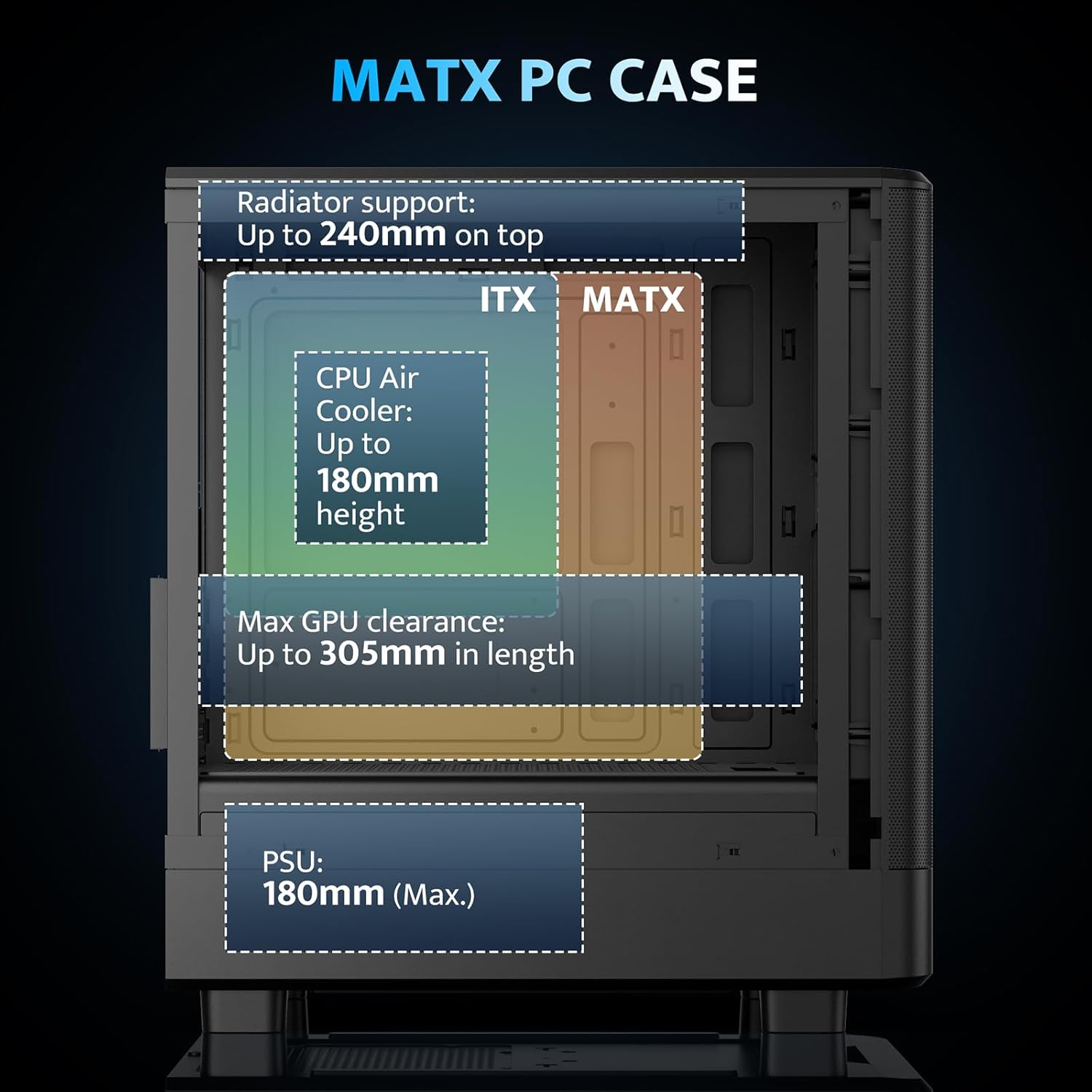
Figure 4.2: Internal layout and maximum dimensions for motherboard (ITX, MATX), CPU air cooler, GPU, and PSU.
4.3 Configuração da ventoinha
The case comes with three pre-installed 120mm PWM ARGB fans. Two are located at the front for intake, and one at the rear for exhaust. Additional fan positions are available at the top (up to 2x 120mm/140mm) and bottom (up to 2x 120mm) for enhanced cooling.

Figure 4.3: Illustration of the pre-installed 120mm PWM ARGB fans and their placement within the case.

Figure 4.4: Optimized airflow channels demonstrating natural vertical air ducts for efficient heat dissipation.
5. Instruções de operação
5.1 Funções do painel de E/S
O painel de E/S frontal oferece acesso conveniente às portas e controles essenciais:
- Botão de energia: Para ligar ou desligar o sistema.
- HD Audio Ports: Para conectar fones de ouvido e microfones.
- Portas USB 2.0: Para conectar periféricos.
- Porta USB 3.0: Para transferência de dados em alta velocidade.
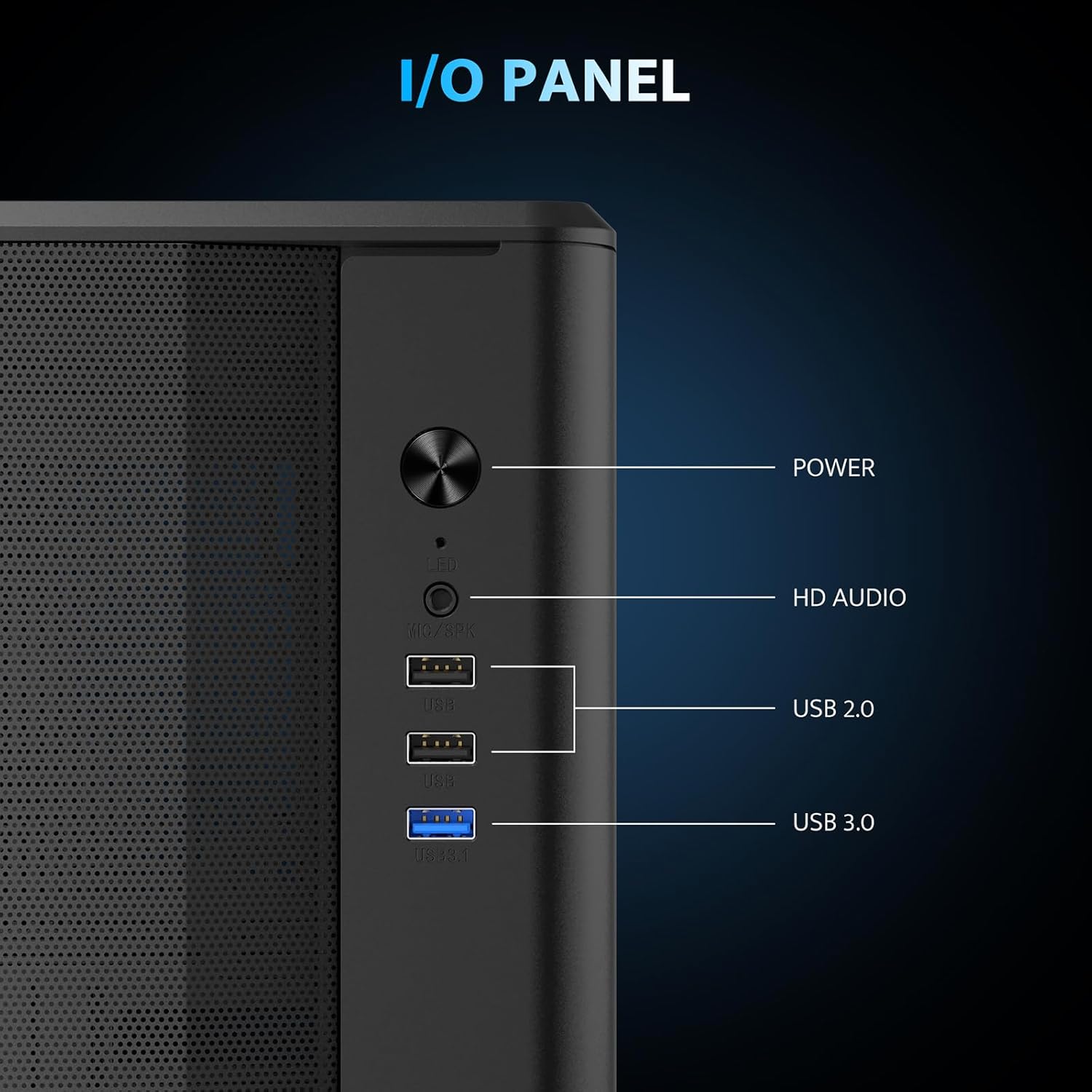
Figura 5.1: Detalhado view of the I/O panel and its functionalities.
5.2 Controle de ventoinha ARGB
The pre-installed fans are PWM ARGB fans. Their lighting effects can be controlled via your motherboard's ARGB software if your motherboard supports it. Please note that an ARGB Hub Controller is not included with the case.
6. Manutenção
6.1 Limpeza do filtro de poeira
The darkFlash DB330M MESH PC case is equipped with magnetic dust filters on the top and a panel dust filter to prevent dust accumulation. Regularly clean these filters to maintain optimal airflow and cooling performance.
- To clean the top dust filter, gently lift and detach the magnetic filter.
- Use a soft brush or compressed air to remove accumulated dust.
- Reattach the filter once clean.

Figure 6.1: Top panel with magnetic dust filter and large cooling holes for AIO support.

Figure 6.2: High-airflow dustproof mesh front panel, which also acts as a dust filter.
6.2 Limpeza Geral
Use a soft, dry cloth to wipe down the exterior of the case. Avoid using harsh chemicals or abrasive materials that could damage the finish.
7. Solução De Problemas
Se você encontrar problemas com a montagem do seu PC, considere as seguintes etapas gerais de solução de problemas:
- Sem energia: Ensure all power cables (PSU to wall, PSU to motherboard, CPU, GPU) are securely connected. Check the power button connection to the motherboard.
- Ventoinhas não giram/Sem RGB: Verify fan power connections to the motherboard or fan controller. Check ARGB connections for lighting issues. Ensure your motherboard's BIOS/UEFI settings or software are configured correctly for fan control and RGB.
- Superaquecimento: Confirm all fans are spinning in the correct direction for optimal airflow. Ensure dust filters are clean and not obstructing airflow. Check CPU cooler and GPU cooler installations.
- Portas USB não funcionam: Verifique as conexões do conector USB do painel frontal de E/S até a placa-mãe.
For more specific issues, consult the manuals for your individual components (motherboard, GPU, PSU, etc.) or seek assistance from a qualified technician.
8. Garantia e Suporte
The darkFlash DB330M MESH PC Case comes with a Garantia de 1 ano. For warranty claims or technical support, please contact darkFlash customer service through their official website ou loja onde o produto foi adquirido. Guarde o comprovante de compra para validação da garantia.