
1. Introdução
Thank you for choosing the YESIMOM Baby Monitor Indoor WiFi Camera 8SM. This device is designed to provide reliable monitoring of your baby or indoor space with advanced features such as 360° pan-tilt-zoom, two-way audio, and app control. This manual will guide you through the setup, operation, and maintenance of your camera to ensure optimal performance and safety.
2. Conteúdo da embalagem
Por favor, verifique o conteúdo da embalagem ao desembalar. Se algum item estiver faltando ou danificado, entre em contato com o suporte ao cliente.
- 1 × YESIMOM Baby Monitor Camera
- 1 × Adaptador de energia
- 1 × cabo de alimentação
- 3 × parafusos
- 3 x Tomadas de Parede
- 1 × Reset Pin
- 1 × Multilingual Instruction Manual (this document)
- 1 × Cartão Guia em Vídeo
3. Produto acabadoview e Características
The YESIMOM 8SM camera offers a range of features for comprehensive indoor monitoring.
3.1 Principais Características
- Resolução Full HD 1080p: Fornece vídeos claros e detalhadostage.
- 360° Pan-Tilt-Zoom (PTZ): Horizontal 355° and vertical 60° rotation for complete room coverage.
- Áudio bidirecional: Communicate with your baby or family members through the camera.
- Detecção de movimento e som: Receive instant notifications on your smartphone for detected activity.
- Invisible Night Vision: Monitor in low-light conditions without disturbing sleep.
- Armazenamento flexível: Supports local TF card storage (up to 256GB, not included) and cloud storage options.
- Controle de aplicativo: Gerenciar e view live feed from your iOS or Android device.
- One-Click Call Function: Initiate a call directly from the camera.
3.2 Componentes da câmera
Familiarize yourself with the camera's physical components.

Imagem: Frente view of the YESIMOM Baby Monitor Camera. This image displays the camera's lens, microphone, and speaker, along with its distinctive rabbit ear design.
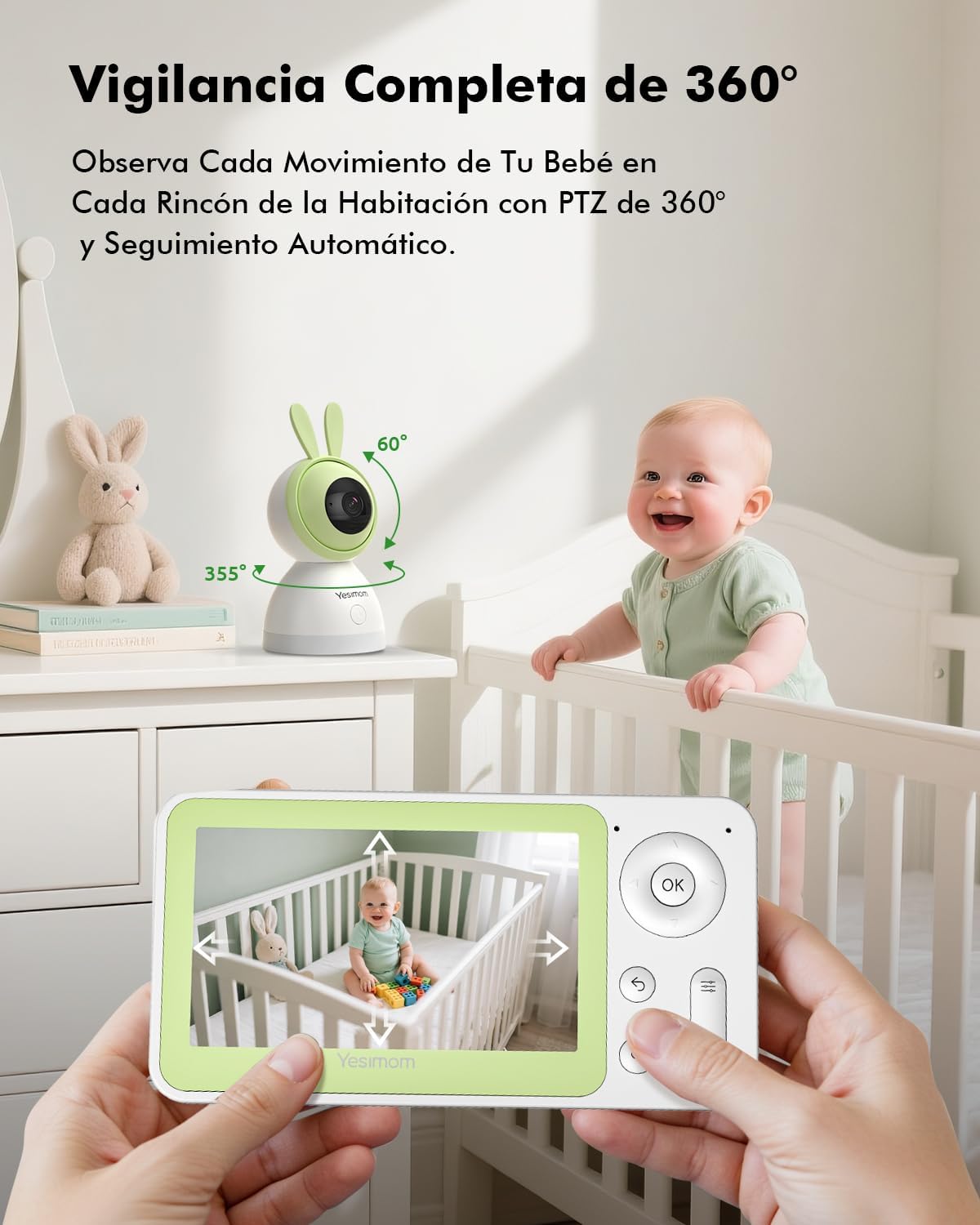
Imagem: Illustration of the camera's 360-degree pan and tilt capabilities. The image shows arrows indicating 355 degrees horizontal rotation and 60 degrees vertical tilt, demonstrating the camera's wide coverage.

Imagem: Depiction of the camera's flexible storage options, including a visible TF card slot. This image highlights the ability to record and store footage locally or via cloud services.

Imagem: Visual representation of the camera's 4X digital zoom capability. The image shows a zoomed-in section of a larger scene, illustrating the clarity maintained even when magnified.
4. Guia de configuração
Follow these steps to set up your YESIMOM Baby Monitor.
4.1 Instalação Física
- Escolha um local: Place the camera on a flat surface like a table or shelf, or mount it to a wall using the provided screws and wall plugs. Ensure it has a clear view da área que você deseja monitorar.
- Conexão de energia: Connect the power cable to the camera's power port and plug the adapter into a power outlet. The camera will power on and initiate its startup sequence.
- Insira o cartão TF (opcional): If you plan to use local storage, gently insert a TF card (up to 256GB, not included) into the designated slot on the camera.
4.2 Download do aplicativo e cadastro de conta
- Baixe o aplicativo: Procurar the official YESIMOM app in the Apple App Store (for iOS devices) or Google Play Store (for Android devices).
- Cadastre-se/Faça login: Abra o aplicativo e siga as instruções na tela para registrar uma nova conta ou fazer login, caso já possua uma.
4.3 Conexão Wi-Fi
A câmera suporta Somente redes Wi-Fi de 2.4 GHz. It is not compatible with 5GHz Wi-Fi networks. Ensure your router is configured to use 2.4GHz or has a mixed mode enabled.
- Adicionar dispositivo: In the app, tap the "+" icon or "Add Device" to begin the pairing process.
- Selecione o tipo de câmera: Choose the appropriate camera model from the list.
- Emparelhamento Bluetooth: The camera uses Bluetooth for initial setup. Ensure Bluetooth is enabled on your smartphone. The app will guide you through connecting to the camera via Bluetooth.
- Configuração Wi-Fi: Once connected via Bluetooth, the app will prompt you to select your 2.4GHz Wi-Fi network and enter the password.
- Confirmação: Follow any further on-screen instructions to complete the connection. The camera will indicate a successful connection (e.g., a specific LED light pattern or voice prompt).
5. Instruções de operação
Once set up, you can utilize the camera's features through the YESIMOM app.
5.1 Ao vivo View e controle PTZ
- Acesse a transmissão ao vivo: Abra o aplicativo e selecione sua câmera na lista de dispositivos para view a transmissão de vídeo ao vivo.
- Pan e Tilt: Use os controles direcionais do aplicativo para girar remotamente a câmera horizontalmente (355°) e verticalmente (60°) para ajustar o enquadramento. viewângulo de engate.
- Zoom digital: Pinch to zoom in or out on the live feed to get a closer look (up to 4X digital zoom).
Áudio bidirecional 5.2
- Ouvir: The camera's microphone captures audio from the monitored area, which you can hear through the app.
- Falar: Tap the microphone icon in the app to speak. Your voice will be transmitted through the camera's speaker, allowing you to communicate with your baby or anyone near the camera.
5.3 Detecção de Movimento e Som
- Ativar alertas: In the app settings, navigate to "Detection Settings" to enable motion and sound detection.
- Sensibilidade: Ajuste a sensibilidade de detecção para minimizar alarmes falsos.
- Notificações: When motion or sound is detected, you will receive instant push notifications on your smartphone.
- Rastreamento automático: A câmera pode rastrear automaticamente o movimento detectado dentro de seu campo de visão. view.
5.4 Gravação e Armazenamento
- TF Card Recording: If a TF card is inserted, the camera will automatically record events or continuous footage based on your settings. You can review gravações diretamente do aplicativo.
- Armazenamento em nuvem: The app offers optional cloud storage services (subscription may be required). Refer to the app for details on plans and activation.
- Reprodução do evento: Access recorded events and playback history through the app's timeline or event list.
5.5 One-Click Call
The camera features a physical button that can be configured for a one-click call function. This allows a person near the camera to initiate a call to a pre-set contact via the app.
- Configuração: In the app settings, locate the "One-Click Call" or similar option.
- Set Contact: Assign a contact from your app's contact list to the one-click call button.
- Uso: Press the button on the camera to initiate a call to the configured contact.
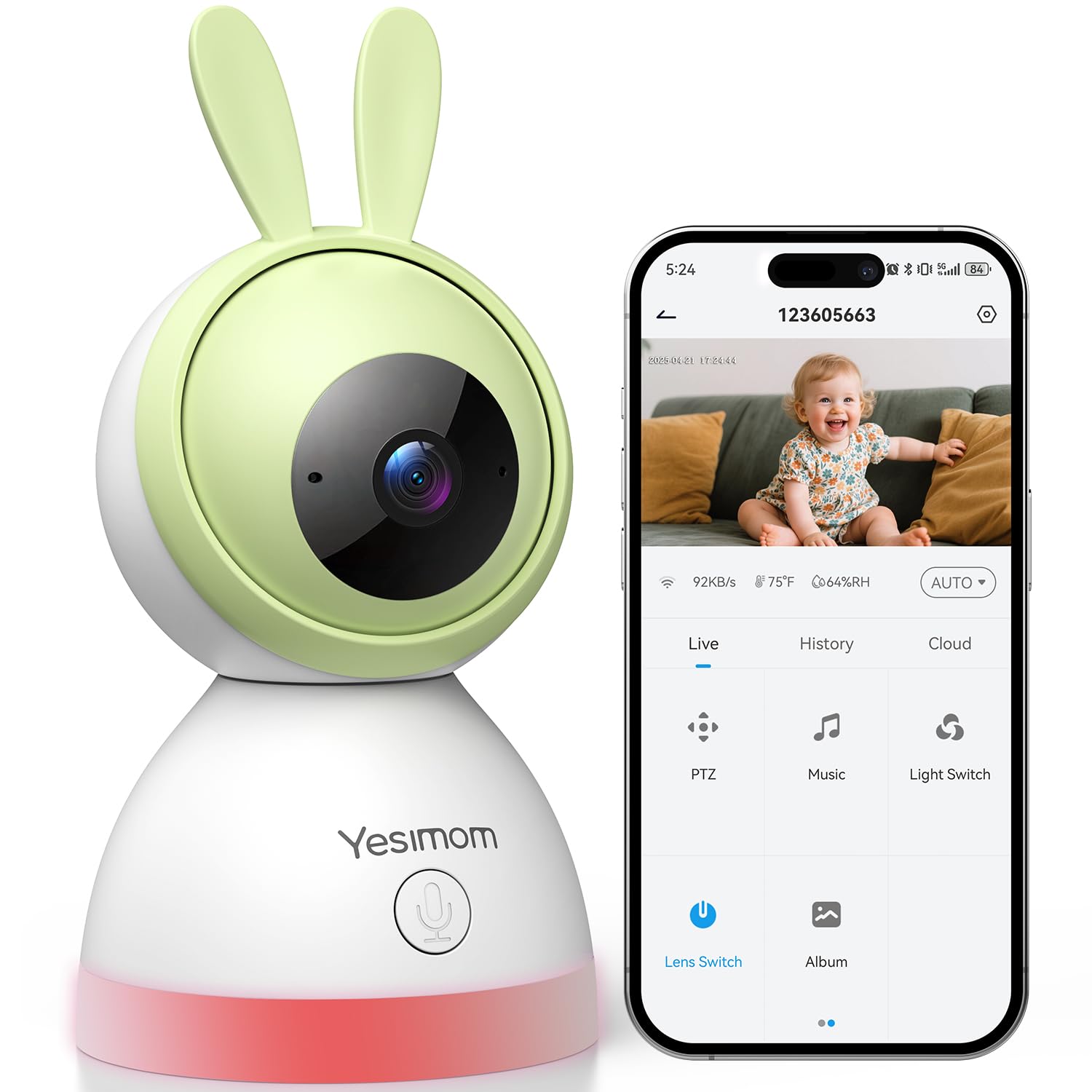
Imagem: Illustration of the camera's one-click call button and its interaction with a smartphone app. The image shows a finger pressing the button on the camera and a phone screen displaying an incoming call, demonstrating the ease of communication.
6. Manutenção
A manutenção adequada garante a longevidade e o desempenho ideal da sua câmera.
- Limpeza: Use um pano macio e seco para limpar a lente e o corpo da câmera. Evite usar produtos químicos agressivos ou materiais abrasivos.
- Atualizações de software: Regularly check the app for firmware updates for your camera. Updates often include performance improvements and security enhancements.
- Colocação: Certifique-se de que a câmera esteja posicionada em um ambiente estável, longe da luz solar direta, temperaturas extremas e umidade.
7. Solução De Problemas
Caso encontre algum problema, consulte as seguintes soluções comuns.
| Problema | Solução possível |
|---|---|
| Câmera não conecta ao Wi-Fi |
|
| Sem transmissão de vídeo ao vivo |
|
| Motion/Sound detection not working |
|
| Problemas de áudio bidirecional |
|
8. Especificações
| Recurso | Detalhe |
|---|---|
| Nome do modelo | 8SM |
| Marca | YESIMOM |
| Tecnologia de Conectividade | Wired (Power), Bluetooth & 2.4G WiFi (Data) |
| Resolução de captura de vídeo | 1080p |
| Formato de captura de vídeo | MPEG-4 |
| Características especiais | Two-way audio, Motion Detection, Sound Detection, Automatic Tracking, Invisible Night Vision, 360° PTZ, App Control, One-Click Call |
| Uso interno/externo | Interior |
| Tipo de montagem | Tabletop (with wall mounting option) |
| Pilhas necessárias | Não |
| Dimensões do item | 16.2 x 8 x 8 cm |
| Opções de armazenamento | Cartão TF (até 256 GB), armazenamento em nuvem |
| UPC | 658215565984 |
9. Garantia e Suporte
The YESIMOM Baby Monitor Indoor WiFi Camera 8SM comes with a standard manufacturer's warranty. For detailed warranty information, please refer to the warranty card included in your package or visit the official YESIMOM website.
If you require technical assistance, have questions about your product, or need to report an issue, please contact YESIMOM customer support through the contact information provided on the official website or within the app. Please have your model number (8SM) and purchase details ready when contacting support.