
1. Introdução
Thank you for choosing the Y&H 20A MPPT Solar Charge Controller. This device is designed to efficiently manage power flow from your solar panels to your battery bank, ensuring optimal charging and extending battery life. It features advanced Maximum Power Point Tracking (MPPT) technology for high efficiency and is compatible with 12V/24V systems and various battery types, including AGM, Gel, Flooded, and Lithium batteries.
2. Informações de segurança
- Ensure all connections are tight and correct to prevent damage or injury.
- Do not attempt to repair or modify the controller yourself. Refer to qualified personnel.
- Instale o controlador em uma área bem ventilada, longe da luz solar direta, de altas temperaturas e da umidade.
- Conecte sempre primeiro a bateria, depois o painel solar e, por último, a carga. Desconecte na ordem inversa.
- Wear appropriate personal protective equipment (PPE) when working with electrical systems and batteries.
- Certifique-se de que o volume da bateriatage corresponde ao vol do sistematage (12V or 24V) set on the controller.
3. Produto acabadoview
The Y&H 20A MPPT Solar Charge Controller incorporates high-performance DSP for precise solar power tracking and features a large LCD for real-time system monitoring. It supports multiple battery types and offers comprehensive protection features.
Principais características:
- High Precision MPPT: Built-in high-performance DSP tracks solar panel power generation with high accuracy, optimizing battery performance with a three-stage charging method and increasing energy recovery efficiency.
- Ampla compatibilidade com baterias: Supports sealed, gel, and flooded lead-acid batteries, as well as lithium iron phosphate and ternary lithium batteries.
- 12V/24V Automatic Recognition: Automatically identifies 12V/24V systems. Open circuit voltage less than 75V, battery voltage range 8V to 32V. Maximum charging power is 240W for 12V systems and 480W for 24V systems.
- Grande display LCD: Easy-to-read display shows charging current, battery voltage in real-time, and includes a power statistics recording function for system status monitoring.
- Comprehensive Protection & Load Control: Sobrevolução incorporadatage, overcurrent, short circuit, and overheat protection. Load control offers light-sensing mode, 2-setting clock mode, charge-only mode, and timer mode.
Identificação do componente:
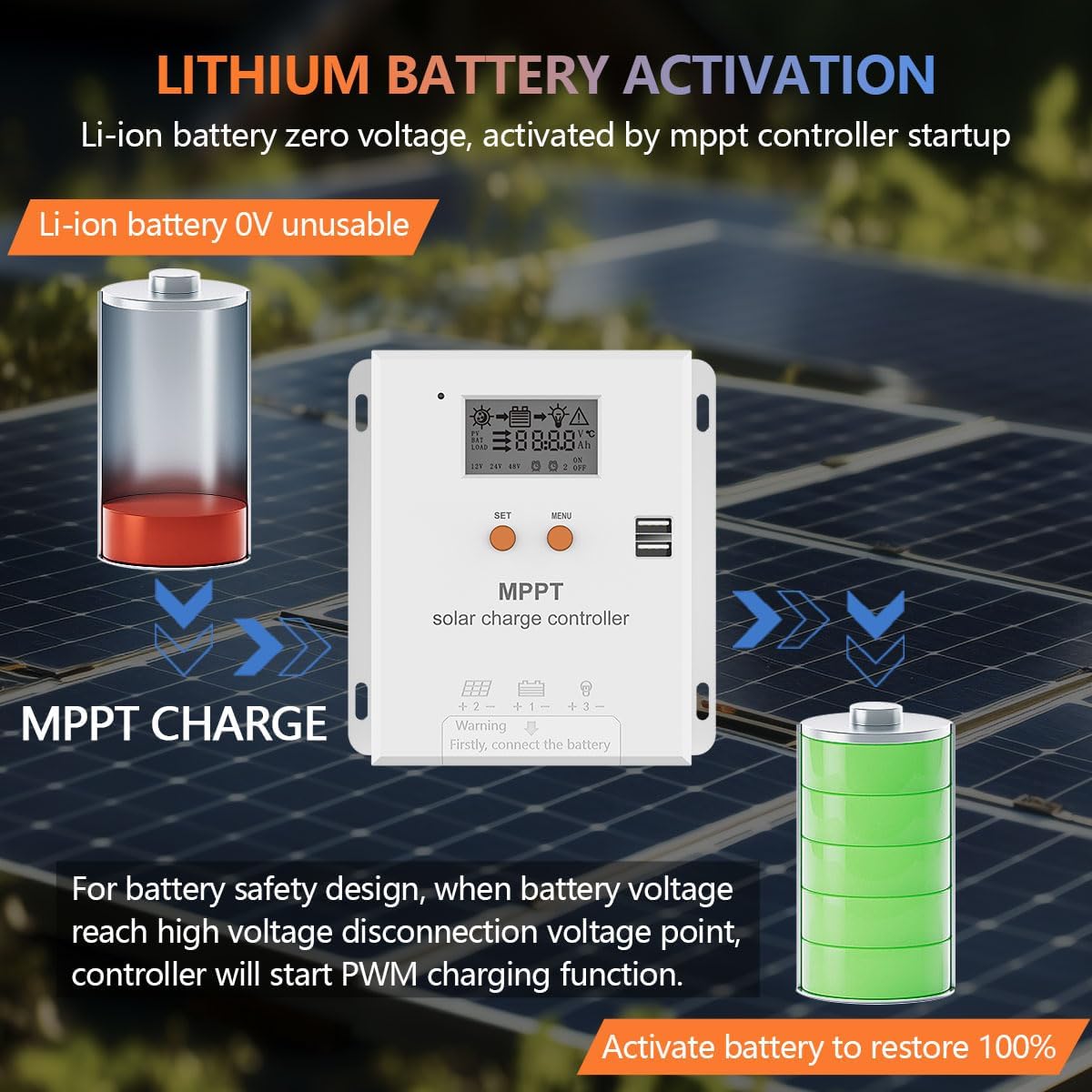
Image: Port Introduction. This diagram illustrates the various ports and buttons on the Y&H MPPT Solar Charge Controller, including the LCD display, set button, menu button, USB outputs, battery terminals, photovoltaic array terminals, and optional temperature sensor interface.
- Tela LCD
- Botão de configuração
- Botão de menu
- USB Output (x2)
- Terminal de bateria
- Photovoltaic Array Terminals
- Temperature Sensor Interface (Optional)
4. Configuração e instalação
Ambiente de instalação:
The controller should be installed in a well-ventilated place. Avoid direct sunlight and high temperatures. Do not install in locations where water can enter the controller.

Image: Dimensions & Cables. This image provides the physical dimensions of the controller and general guidelines for cable connections, emphasizing proper ventilation and avoiding water exposure.
Etapas de fiação:
Follow these steps carefully for proper wiring. Incorrect wiring can damage the controller or other components.

Image: How to Wire. This diagram illustrates the correct sequence for connecting the battery, solar panel, and load to the charge controller.
- Abra a tampa: Unscrew and remove the terminal cover to access the wiring ports.
- Conecte a bateria: First, connect the battery to the controller's battery terminals (marked with a battery symbol). Ensure correct polarity (+ to + and - to -).
- Conecte o painel solar: Next, connect the solar panel to the controller's PV input terminals (marked with a solar panel symbol). Ensure correct polarity.
- Conecte a carga (opcional): Finally, connect your DC load to the controller's load terminals (marked with a light bulb symbol). Ensure correct polarity.
The controller will automatically detect 12V or 24V systems. Ensure your battery bank voltage corresponde ao vol do sistematage.

Image: 12V/24V System Wiring. This image demonstrates typical wiring setups for both 12V and 24V battery systems with solar panels and a load.
5. Instruções de operação
Interface de exibição LCD:
The large LCD display provides real-time information about your system. Press the "MENU" button to view parameters and cycle through different screens. Press the "SET" button to enter settings mode and adjust parameters.
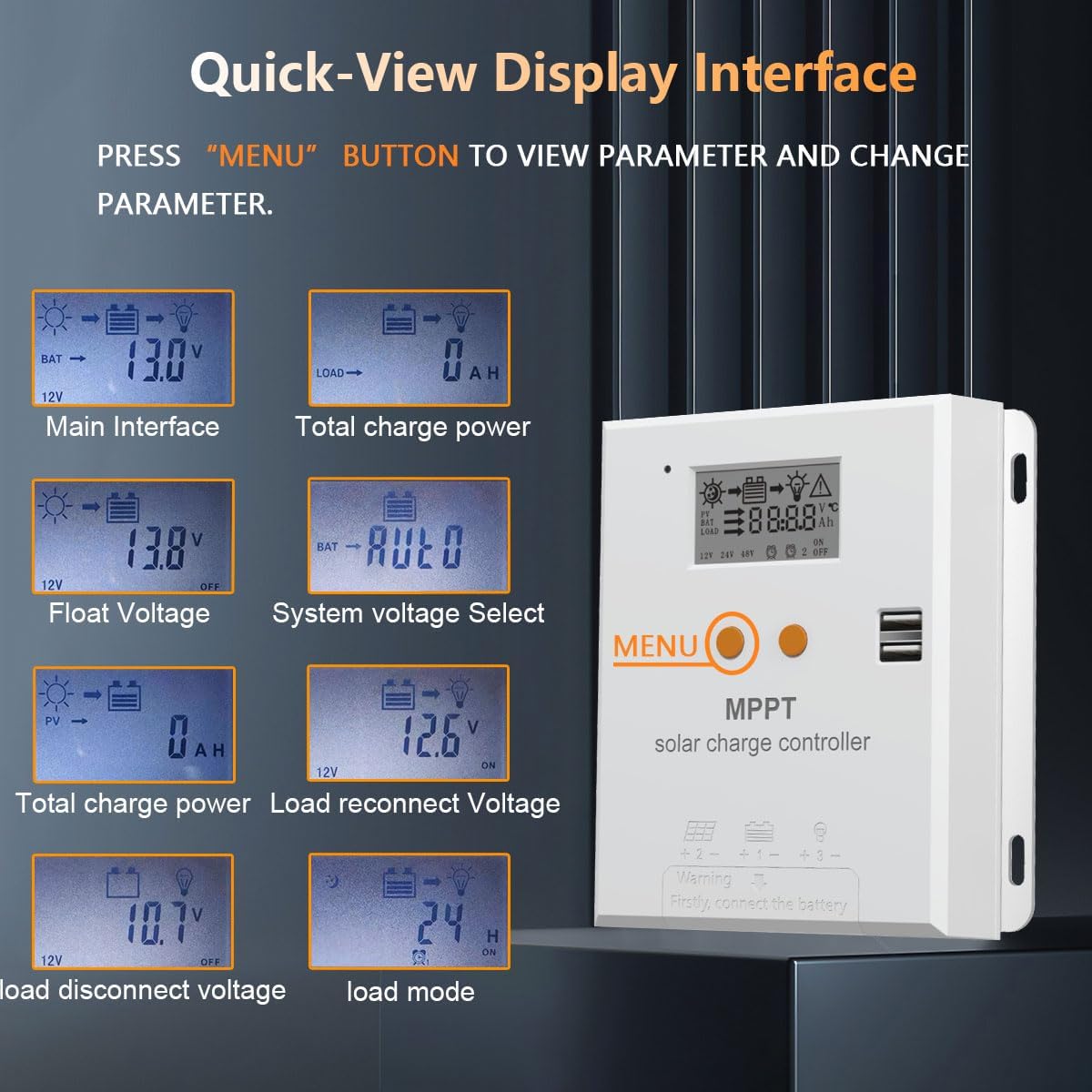
Image: Quick-View Interface de exibição. Esta imagem mostra examples of the information displayed on the LCD, such as main interface, total charge power, float voltage, sistema voltage select, load reconnect voltage, and load disconnect voltage.
Load Working Modes:
The controller offers several load working modes to suit different applications:
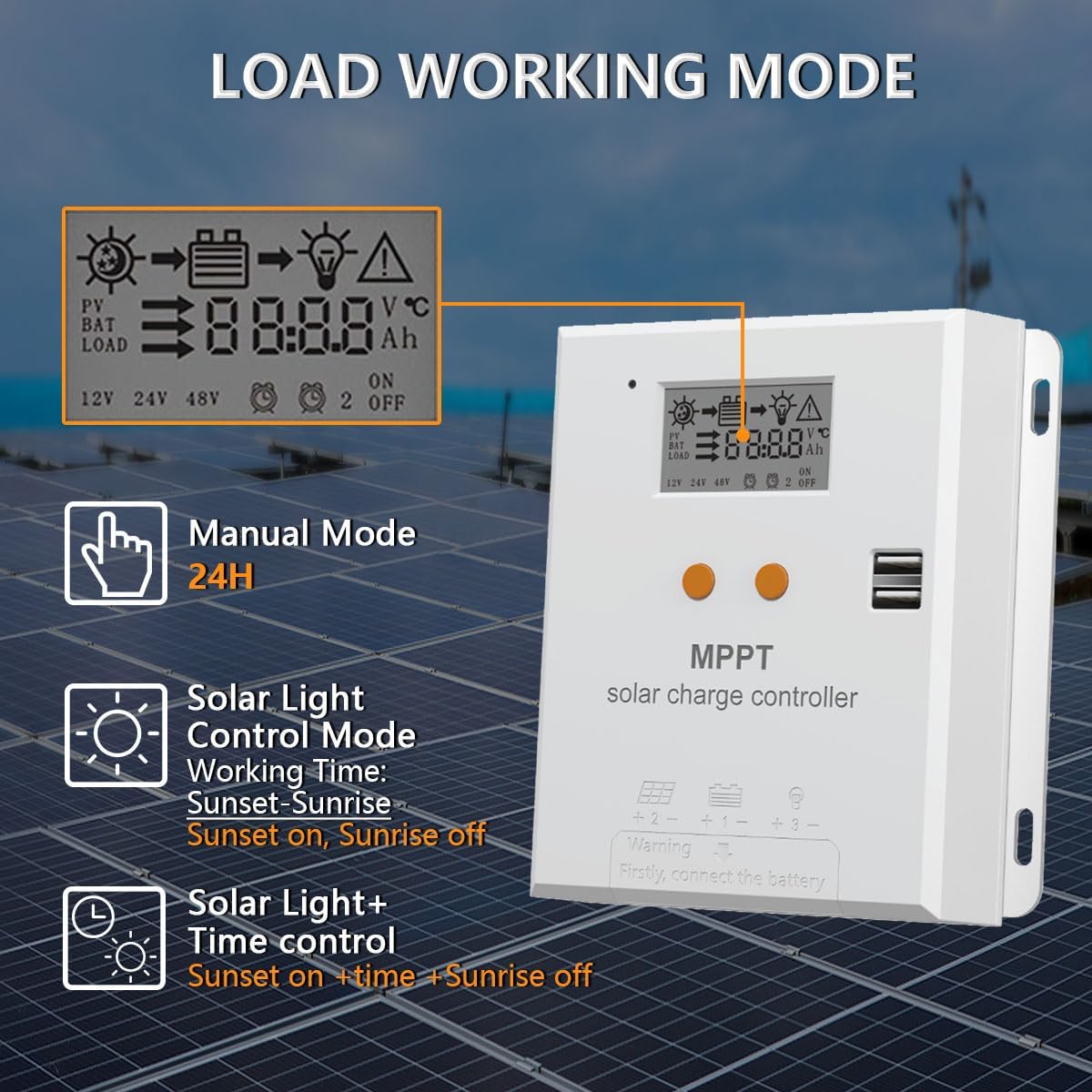
Image: Load Working Mode. This image details the Manual Mode (24H), Solar Light Control Mode (Sunset-Sunrise), and Solar Light + Time Control modes.
- Modo manual (24 horas): A saída de carga permanece ligada continuamente por 24 horas.
- Solar Light Control Mode: The load turns on at sunset and off at sunrise.
- Solar Light + Time Control Mode: The load turns on at sunset and stays on for a set number of hours, then turns off.
- Charge-Only Mode: The controller focuses solely on charging the battery, with no load output.
Ativação da bateria de lítio:
For lithium batteries with zero voltage, the MPPT controller can activate them upon startup. For battery safety, when the battery voltage atinge um alto volumetage disconnection point, the controller will initiate a PWM charging function to activate the battery and restore it to 100%.

Image: Lithium Battery Activation. This image illustrates how the MPPT controller can activate a zero-voltage lithium-ion battery and restore it to full charge.
6. Manutenção
- Inspecione regularmente todas as conexões de fiação para verificar se estão bem apertadas e se há corrosão.
- Mantenha o controlador limpo e livre de poeira e detritos. Use um pano seco para a limpeza.
- Certifique-se de que as aberturas de ventilação não estejam bloqueadas para evitar superaquecimento.
- Verifique periodicamente os terminais da bateria quanto à corrosão e limpe-os, se necessário.
- Monitore o visor LCD para verificar se há códigos de erro ou leituras incomuns.
7. Solução De Problemas
| Problema | Possível causa | Solução |
|---|---|---|
| Sem monitor/Controlador não liga | Bateria desconectada ou com baixa voltagemtage; polaridade inversa. | Verifique as conexões da bateria e voltage. Ensure correct polarity. Charge battery if too low. |
| Bateria não carrega | Solar panel not connected; low solar input; incorrect battery type setting; faulty wiring. | Check solar panel connections and ensure sufficient sunlight. Verify battery type setting. Inspect all wiring. |
| Carregar não está funcionando | Load disconnected; battery low voltage protection; load mode setting incorrect; overcurrent protection. | Verifique as conexões de carga. Certifique-se da voltagem da bateria.tage está acima do volume baixotage disconnect point. Adjust load mode. Reduce load or check for short circuit. |
| Sobrecarga da bateria | Incorrect battery type setting; faulty controller. | Verify the battery type setting matches your battery. If the issue persists, contact support. |
| Aviso de alta temperatura | Ventilação deficiente; temperatura ambiente excessiva; carga pesada. | Ensure adequate airflow around the controller. Relocate to a cooler area if possible. Reduce load. |
8. Especificações
| Parâmetro | Valor |
|---|---|
| Número do modelo | NC-20A-JP |
| Corrente de carga nominal | 20A |
| Vol do Sistematage | Auto de 12V / 24V |
| Vol. Máx. De Entrada PVtage | <75VDC |
| Bateria Voltage Alcance | 8V-32V |
| Max Charge Power (12V) | 240 W |
| Max Charge Power (24V) | 480 W |
| Tipo de exibição | LCD |
| Tipos de bateria compatíveis | AGM, Gel, Flooded, Lithium (LiFePO4, Ternary Lithium) |
| Recursos de proteção | Sobrevoltage, Overcurrent, Short Circuit, Overheat |
| UPC | 704334203396 |
9. Garantia e Suporte
Y&H products are designed for reliability and performance. For warranty information, technical support, or service inquiries, please refer to the contact information provided with your purchase or visit the official Y&H website. Please have your model number (NC-20A-JP) and purchase details ready when contacting support.