Introdução
Thank you for choosing the SDRD SD-216 Karaoke Machine. This portable system is designed to provide high-quality audio and an engaging karaoke experience for various occasions. It features dual wireless microphones, powerful sound output, dynamic LED lighting, and multiple connectivity options. Please read this manual carefully to ensure proper use and maintenance of your device.
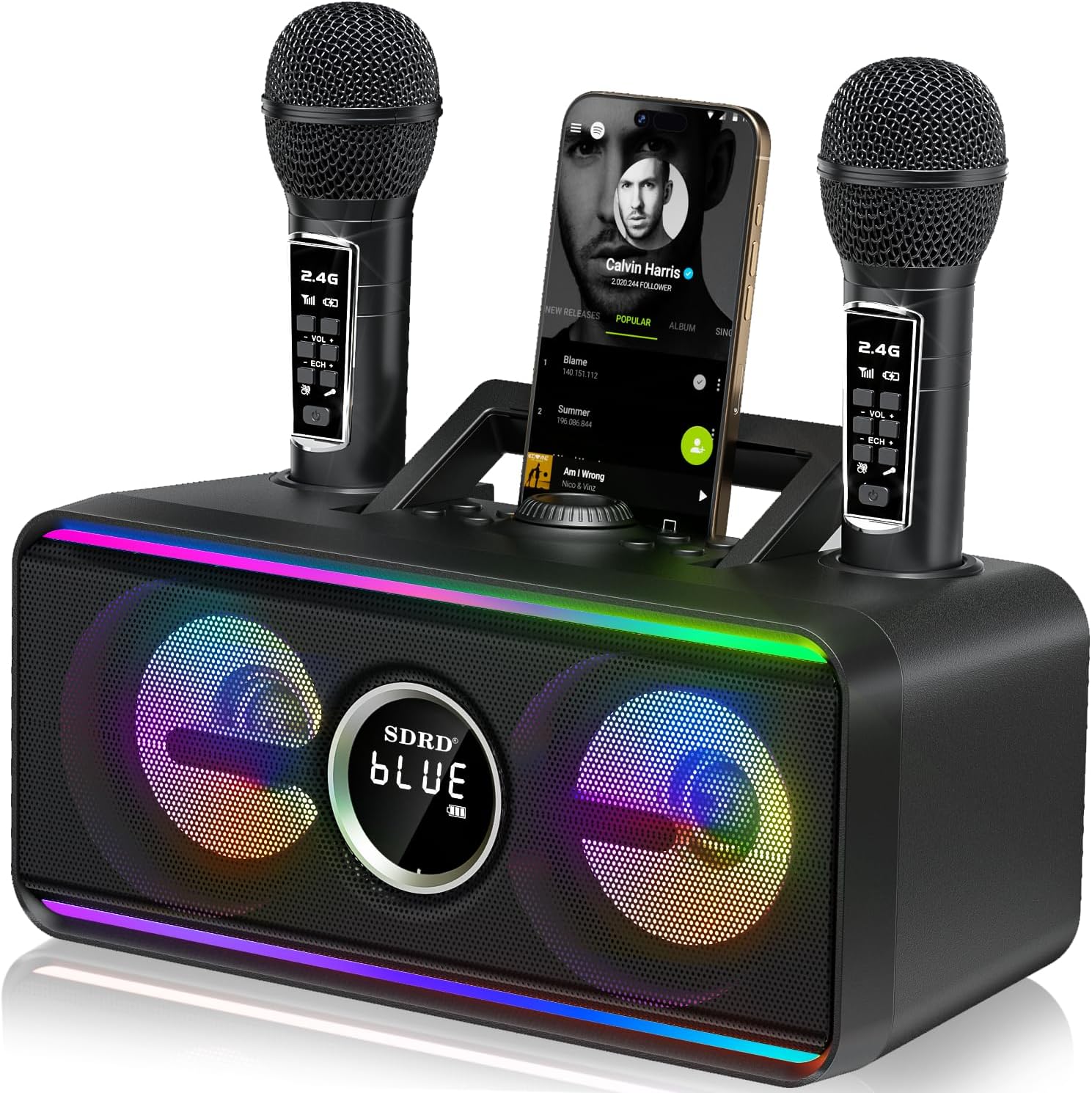
Imagem: A máquina de karaokê SDRD SD-216, em destaque.asing its compact design, dual microphone docks, and vibrant LED lights.
O que está na caixa
Por favor, verifique se todos os itens estão presentes na embalagem:
- 1 x máquina de karaokê
- 2 x microfones sem fio
- 1 x cabo de carregamento (USB-C)
- 1 x Mics Cable (AUX)
- 1 x Manual do Usuário

Image: A visual representation of the package contents, including the main unit, two wireless microphones, and accompanying cables.
Guia de configuração
Carregamento inicial
Before first use, fully charge the karaoke machine and both wireless microphones. The main unit has a 4000mAh battery, providing 6-8 hours of continuous use after a 3-hour charge. Microphones can be charged by docking them in the main unit or via their individual USB-C ports.

Image: The integrated design allows for convenient storage and charging of the microphones directly within the main unit.
Emparelhamento de microfone
The wireless microphones are pre-paired with the main unit. Simply power on both the machine and the microphones, and they should connect automatically. Ensure microphones are within 5-10 meters (16-32 feet) of the main unit for optimal performance.
Instruções de operação
Conectando a fontes de áudio
- Bluetooth 5.3: Turn on the karaoke machine and enable Bluetooth on your smartphone, tablet, or TV. Select "SD-216" from the list of available devices. A stable connection can be maintained up to 100 feet (30 meters).
- Reprodução USB: Insira um pen drive contendo arquivos de áudio MP3. files into the USB port. The machine will automatically detect and play the music.
- Entrada AUX: Use the provided AUX cable to connect external audio devices (e.g., MP3 players, computers) to the AUX port.

Image: The Bluetooth 5.3 connectivity allows for stable wireless connection to various devices over a significant range.
Funções do painel de controle
A unidade principal possui uma interface de comando integrada para facilitar o controle:
- Ligar/desligar: Localizado na parte traseira da unidade.
- Controle de volume: Rotate the central knob to adjust the master volume.
- Anterior Próximo: Buttons to skip tracks.
- Pausa/Reprodução: Button to control music playback.
- Seleção de modo: Cycle through USB, Bluetooth, and AUX input modes.
- Luz LED: Button to change LED lighting modes.
- Scene/Voice: Buttons for special sound effects or vocal adjustments.

Imagem: Uma imagem detalhada view of the control panel, highlighting the various buttons and ports for intuitive operation.
Uso do microfone
Cada microfone sem fio possui seus próprios controles:
- Botão de energia: Ligue/desligue o microfone.
- Controle de volume: Adjust individual microphone volume.
- Echo/Reverb: Adjust the echo effect for vocals.
- Efeitos sonoros: Buttons for applause, laughter, and cheers.
Efeitos de iluminação LED
The SD-216 features dynamic LED lights with multiple modes to enhance your party atmosphere. Press the "LED Light" button on the main unit to cycle through different effects, including music rhythm, static colors, or turning the lights off.

Image: The karaoke machine's dual LED zones provide customizable lighting effects to match any mood or occasion.
Manutenção
- Limpeza: Use a soft, dry cloth to clean the exterior of the machine and microphones. Do not use abrasive cleaners or solvents.
- Cuidados com a bateria: To prolong battery life, avoid fully discharging the unit frequently. Charge the device regularly, even if not in use for extended periods. Store in a cool, dry place.
- Armazenar: When not in use, store the microphones in their designated docks on the main unit to prevent loss and ensure they are charged for next use.
Solução de problemas
| Problema | Possível causa | Solução |
|---|---|---|
| Nenhum som sai do alto-falante. | Volume muito baixo; modo de entrada incorreto; dispositivo não conectado. | Increase volume; select correct input mode (BT/USB/AUX); ensure device is properly paired/connected. |
| Microphone not connecting or cutting out. | Microphone battery low; out of range; interference. | Charge microphone; ensure microphone is within 5-10 meters of the unit; reduce obstacles between mic and unit. |
| Audio skipping or pausing during duets. | Temporary signal interference or processing delay. | Ensure microphones are fully charged. Maintain optimal distance from the unit. |
| As luzes LED não funcionam ou estão travadas. | Incorrect mode selected; malfunction. | Press the LED Light button to cycle through modes. If issue persists, contact support. |
| Echo effect not noticeable. | Echo level set too low. | Adjust the echo control on the microphone. |
Especificações
| Recurso | Detalhe |
|---|---|
| Número do modelo | SD-216 |
| Tecnologia de Conectividade | AUX, Bluetooth 5.3, USB |
| Potência de saída do alto-falante | 20W (High-fidelity) |
| Capacidade da bateria (unidade principal) | 4000mAh |
| Tempo de jogo | 6-8 horas |
| Tempo de carregamento | Aproximadamente 3 horas |
| Tipo de microfone | 2.4GHz sem fio |
| Dimensões do produto | 11.42 x 4.72 x 5.51 polegadas |
| Peso do item | 4.31 libras (1.96 kg) |
| Fonte de energia | Alimentado por bateria |
Informações de garantia
The SDRD SD-216 Karaoke Machine comes with a standard manufacturer's warranty. Please refer to the warranty card included in your package or contact SDRD customer support for detailed information regarding warranty coverage and terms.
Apoiar
For further assistance, technical support, or inquiries about your SDRD SD-216 Karaoke Machine, please contact SDRD customer service through the contact information provided on the product packaging or the official SDRD website. Você também pode visitar o SDRD Store on Amazon para recursos adicionais.