
Introdução
Thank you for choosing the Philips Solar Security Light. This manual provides essential information for the safe and efficient operation of your solar-powered, wall-mounted flood light with PIR motion sensor. Please read these instructions carefully before installation and use, and retain them for future reference.
Informações de segurança
- Ensure the mounting surface is stable and can support the weight of the light fixture.
- Não tente desmontar ou modificar o produto. Isso pode anular a garantia e representar riscos à segurança.
- Mantenha o painel solar limpo para garantir um desempenho de carregamento ideal.
- Avoid looking directly into the light source when it is active, as it may cause eye strain.
- Ao final de sua vida útil, descarte o produto e seus componentes de forma responsável, de acordo com as normas locais.
Conteúdo da embalagem
Verifique se todos os componentes estão presentes antes da instalação:
- Philips Solar Security Light (1 unit)
- Controle remoto (1 unidade)
- Suporte de montagem (1 unidade)
- Parafusos (2 unidades)
- Wall Plugs (2 units)
Produto acimaview
The Philips Solar Security Light is an outdoor, solar-powered flood light designed for enhanced security and illumination. It features a PIR motion sensor, high-brightness LEDs, and multiple lighting modes.

Imagem: Acimaview of the Philips Solar Security Light, highlighting its durable design with a solar panel, three LED light heads, and an integrated motion sensor.
Principais características:
- Alto Brilho: 800 lumens with 6500K cool daylight color temperature.
- PIR Motion Sensor: Detects motion up to 49.2 feet with a 180-degree detection angle.
- 3 modos de iluminação: Customizable illumination settings for various needs.
- Alimentado por energia solar: Equipped with an upgraded polycrystalline solar panel and a 2000 mAh high-capacity battery for efficient charging and extended use.
- À prova de intempéries: IP65 rated for resistance against heavy rain, humidity, and extreme temperatures.
- Controle remoto: Allows convenient adjustment of light modes without manual interaction.
Configuração e instalação
The Philips Solar Security Light is designed for easy wall-mounted installation with no wiring required. It comes pre-assembled.
Etapas de instalação:
- Escolha um local: Select an outdoor location that receives direct sunlight for most of the day to ensure optimal charging of the solar panel. The light should be mounted on a wall.
- Marque os pontos de perfuração: Hold the mounting bracket against the desired wall location and mark the positions for the two screws.
- Furos de perfuração: Drill two holes at the marked points. Insert the wall plugs into the drilled holes.
- Fixe o suporte de montagem: Fixe o suporte de montagem na parede utilizando os parafusos fornecidos.
- Monte a Luz: Slide the solar security light onto the mounting bracket until it clicks securely into place.
- Ajuste os faróis e o sensor: Adjust the three light heads and the PIR motion sensor to cover the desired area. The motion sensor has an adjustable angle of 180 degrees.
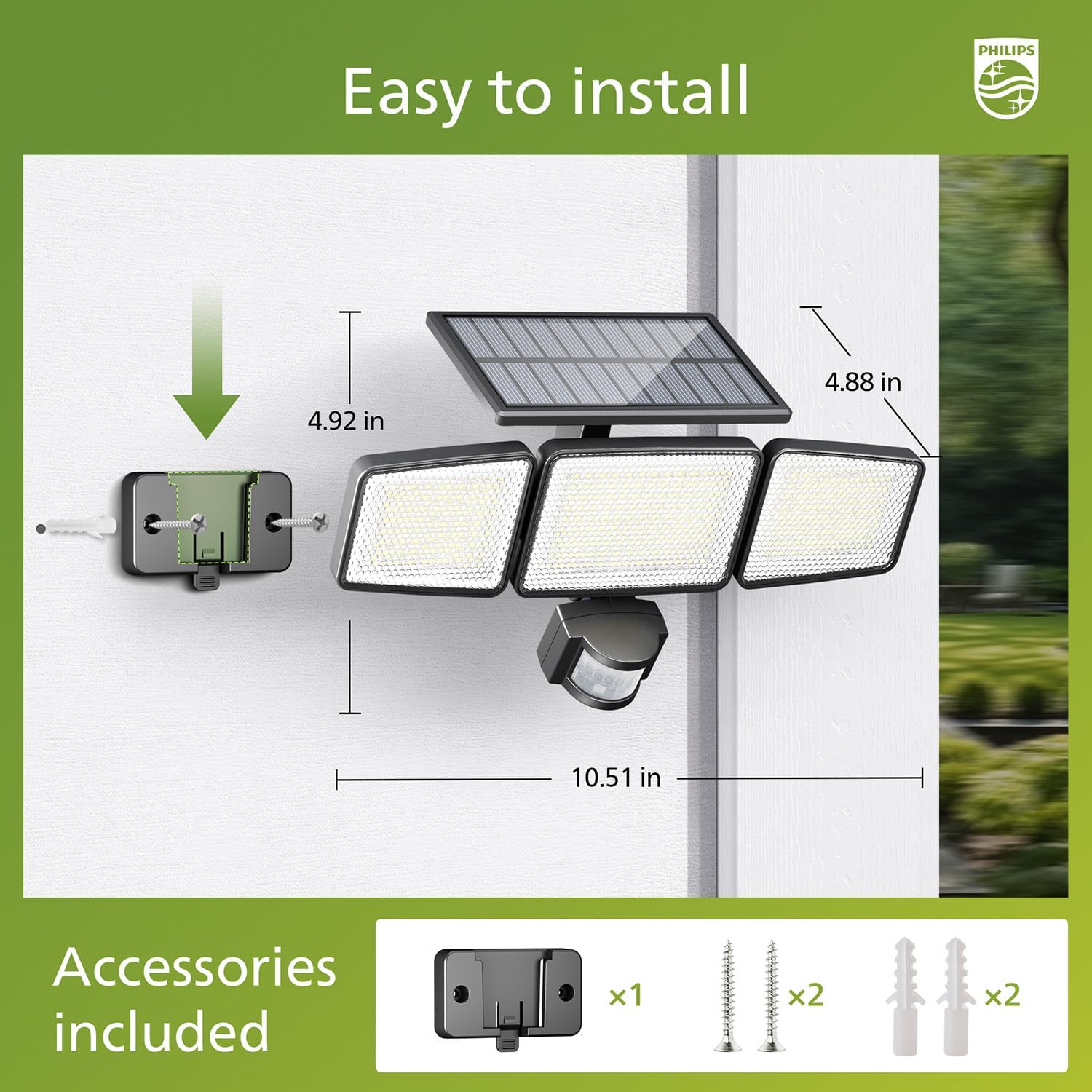
Image: Visual guide for installing the Philips Solar Security Light, including dimensions and the accessories provided for wall mounting.
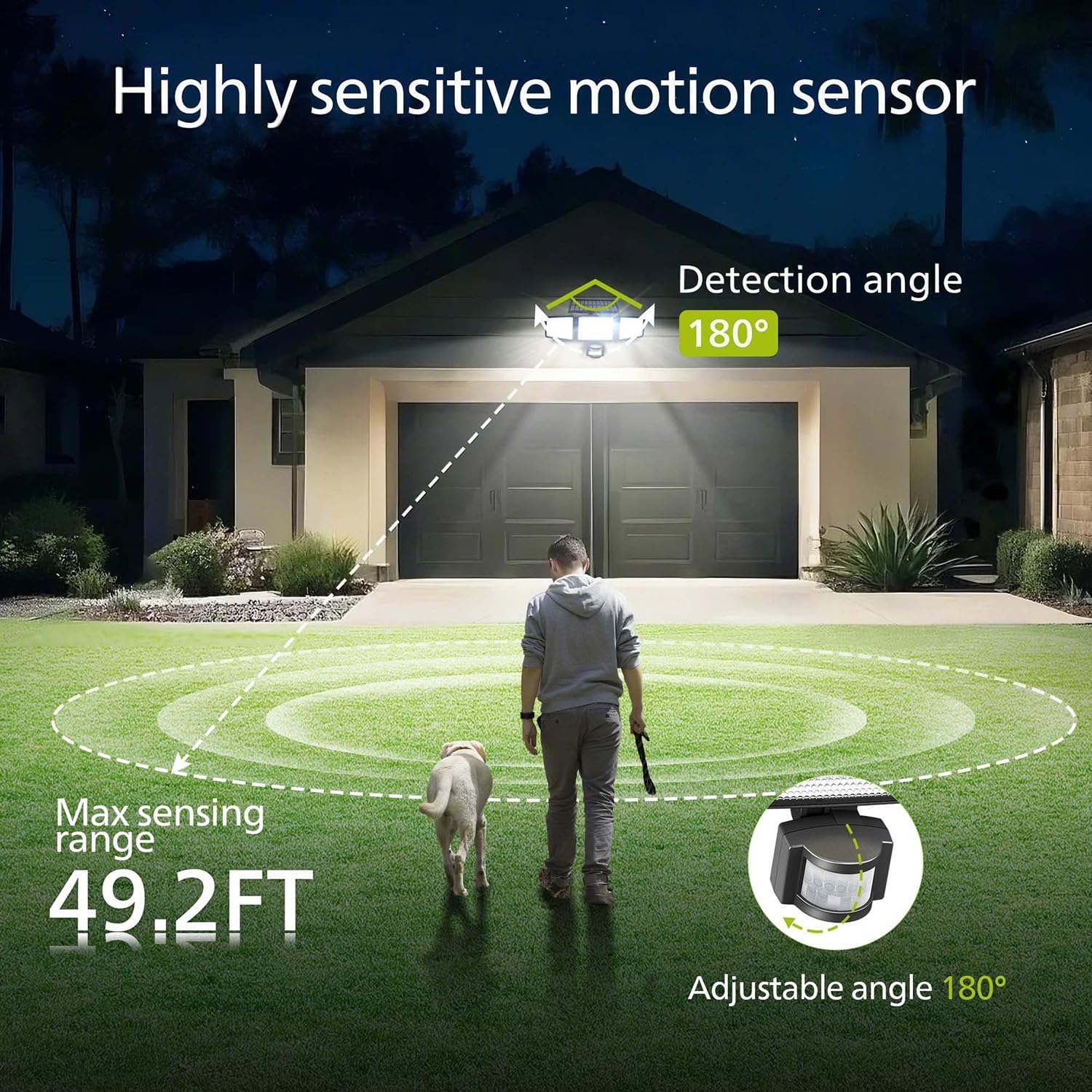
Image: Illustration of the motion sensor's coverage, showing a 180-degree detection angle and a maximum sensing range of 49.2 feet.
Instruções de operação
The Philips Solar Security Light features three distinct lighting modes, controllable via the included remote control.
Modos de iluminação:
- Modo Sensor: The light remains off until motion is detected. Upon detection, it illuminates at 100% brightness (800 lumens) for approximately 25 seconds, then turns off.
- Modo de escurecimento: The light stays on continuously at a low brightness of 10% (80 lumens) throughout the night.
- Modo Dim + Sensor: The light stays on continuously at a very low brightness of 2-3% (16-24 lumens). When motion is detected, it brightens to 100% (800 lumens) for approximately 25 seconds, then returns to the dim state.

Image: Detailed explanation of the three operational modes, showing how the light behaves in Sensor, Dim, and Dim + Sensor modes based on motion detection and ambient light.
Use the remote control to switch between these modes as needed. Ensure the remote control has a clear line of sight to the light fixture for proper function.
Manutenção
Regular maintenance ensures optimal performance and longevity of your Philips Solar Security Light.
- Limpeza do painel solar: Limpe periodicamente o painel solar com um pano macio e seco.amp Use um pano para remover poeira, sujeira ou detritos. Um painel solar limpo garante a máxima absorção da luz solar e a eficiência de carregamento.
- Limpeza do aparelho: Clean the light fixture with a soft, dry cloth. Avoid using abrasive cleaners or solvents that could damage the finish or electronic components.
- Bateria: The integrated high-capacity 2000 mAh battery is designed for long-term use. No user maintenance or replacement is required for the battery.
- Resistência às intempéries: The IP65 rating ensures the light is protected against dust and water jets. However, avoid submerging the unit in water.

Image: Focus on the high-quality solar panel, illustrating its role in providing power for 8-10 hours of operation and its 1800mAh high-capacity battery.
Solução de problemas
If you encounter issues with your Philips Solar Security Light, refer to the following common problems and solutions:
- A luz não acende à noite:
- Ensure the solar panel is receiving adequate direct sunlight during the day.
- Check if the light is in the correct operating mode (e.g., not in 'off' state if the remote has an off button).
- Verify that the remote control battery is functional.
- Light is dim or only stays on for a short period:
- The solar panel may not be fully charged. Ensure it is clean and exposed to direct sunlight for at least 6-8 hours.
- Ambient temperature can affect battery performance; extreme cold may reduce operating time.
- Motion sensor is not detecting movement:
- Certifique-se de que a lente do sensor esteja limpa e desobstruída.
- Verify the light is in a motion-activated mode (Sensor Mode or Dim + Sensor Mode).
- Adjust the angle of the motion sensor to cover the desired detection area.
If problems persist, please contact Philips customer support for further assistance.
Especificações
| Recurso | Especificação |
|---|---|
| Marca | FILIPES |
| Modelo | 929004621403 |
| Cor | Preto |
| Material | Alumínio |
| Formulário de Luminária | Holofote |
| Uso interno/externo | Ar livre |
| Fonte de energia | Alimentado por energia solar |
| Método de controle | Remoto |
| Fonte de luz | LIDERADO |
| Número de fontes de luz | 4 |
| Volumetage | 3.7 volts CC |
| Cor clara | Branco frio (6500K) |
| Brilho | 800 lúmens (máx.) |
| Nível de resistência à água | IP65 à prova d'água |
| Tipo de montagem | Montagem na parede |
| Capacidade da bateria | 2000 mAh |
| Ângulo de detecção | 180 graus |
| Alcance de detecção | Até 49.2 pés |

Image: A comparison table highlighting key specifications of the Philips solar security light, such as brightness, lighting modes, battery capacity, and waterproof rating.
Garantia e Suporte
Para informações sobre garantia e suporte ao cliente, consulte o site oficial da Philips. webou entre em contato com o departamento de atendimento ao cliente. Guarde o comprovante de compra como prova de aquisição.
Para obter mais ajuda, visite: www.philips.com/support


