
1. Introdução
Thank you for choosing the Codnida Cell 2T 4G LTE Solar Security Camera. This device provides reliable outdoor surveillance with its 4G LTE connectivity, solar power capabilities, and advanced features like 2K color night vision and intelligent motion detection. This manual will guide you through the setup, operation, and maintenance of your camera to ensure optimal performance.

Imagem 1.1: Terminadoview of the Codnida Cell 2T 4G LTE Solar Security Camera.
2. O que está na caixa
Verifique se todos os componentes estão presentes antes de prosseguir com a instalação.
- 1 x Codnida Cell 2T Camera
- 1 x Painel Solar
- 1 x SIM Card (with free trial data)
- 1 x Screw Kit for mounting
- 1 x Manual do Usuário (este documento)
- 1 x cabo de carregamento USB

Image 2.1: All included components in the Codnida Cell 2T package.
3. Recursos do Produto
- Conectividade 4G LTE: Operates independently without Wi-Fi, ideal for remote locations. Includes a trial SIM card.
- Solar Powered & Long-Life Battery: Equipped with a high-efficiency solar panel and a built-in 10400mAh battery for continuous operation.
- 2K HD Resolution & Color Night Vision: Captures clear 2K video with three night vision modes (color, black & white, smart).
- 355° Pan/Tilt Rotation: Offers wide area coverage with remote control via the app.
- Intelligent PIR Motion Detection: Detects human movement and sends instant notifications. Customizable detection zones and sensitivity.
- Áudio bidirecional: Microfone e alto-falante integrados para comunicação em tempo real.
- Alarme de som e luz: Deters intruders with an audible alarm and flashing LED lights upon detection.
- IP65 à prova de intempéries: Designed for outdoor use, resistant to rain, humidity, and dust.
- Armazenamento flexível: Supports cloud storage and local Micro SD card storage up to 256GB.
4. Guia de configuração
4.1. Carregamento inicial
Before first use, fully charge the camera's internal battery using the provided USB cable and a 5V/2A power adapter (not included). The charging indicator light will turn solid blue when fully charged.
4.2. Instalação do cartão SIM e do cartão Micro SD
- Locate the SIM card and Micro SD card slot on the camera, usually protected by a rubber cover.
- Abra a tampa com cuidado.
- Insert the provided 4G SIM card into the SIM card slot with the gold contacts facing down and the notched corner aligned correctly. Push until it clicks into place.
- If using a Micro SD card for local storage (up to 256GB, not included), insert it into the Micro SD card slot with the gold contacts facing down.
- Ensure both cards are securely seated. Close the rubber cover firmly to maintain IP65 weather resistance.

Image 4.2: Illustration of SIM card insertion into the camera.
4.3. Conexão do Painel Solar
Connect the solar panel cable to the designated charging port on the camera. Ensure the connection is secure and the rubber seal is properly seated to prevent water ingress. Position the solar panel in an area that receives maximum direct sunlight throughout the day for optimal charging.
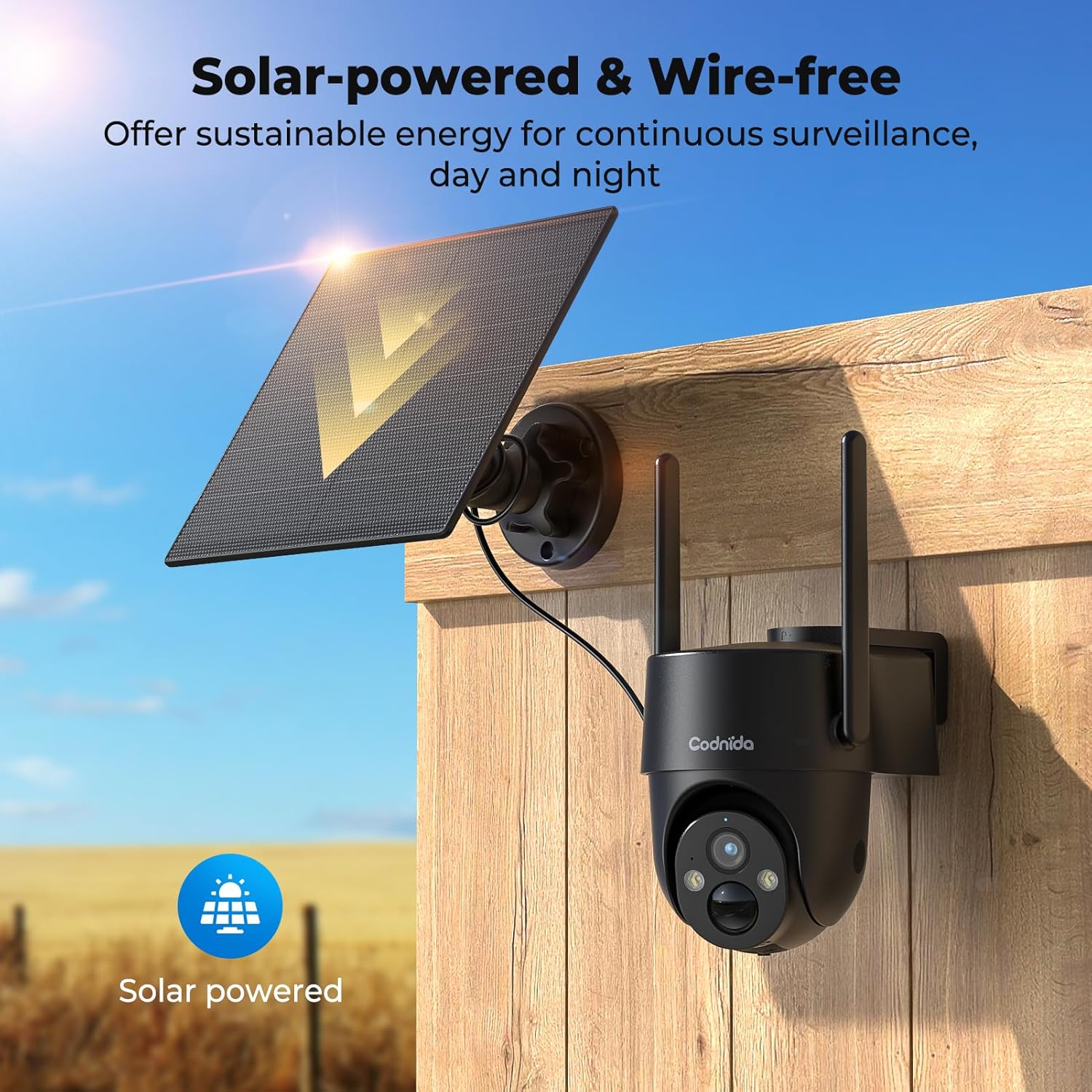
Image 4.3: The camera and solar panel installed, demonstrating wire-free operation.
4.4. Montando a Câmera
- Choose a suitable outdoor location that provides the desired surveillance view and allows the solar panel to receive ampa luz do sol.
- Use the provided screw kit to securely mount the camera bracket to a wall or pole.
- Attach the camera to the mounted bracket. Adjust the angle for optimal coverage.
- Ensure the camera is within a good 4G signal range.
4.5. Instalação e pareamento do aplicativo
- Baixe o CloudEdge Baixe o aplicativo da loja de aplicativos do seu smartphone (iOS ou Android).
- Crie uma nova conta ou faça login se já tiver uma.
- Turn on the camera by pressing the power button. The indicator light will flash.
- In the CloudEdge app, tap the "+" icon to add a new device.
- Select the appropriate camera model or scan the QR code on the camera if available.
- Follow the on-screen instructions to complete the pairing process. Ensure your phone's Bluetooth and location services are enabled during pairing.
5. Instruções de operação
5.1. Viver View
Abra o aplicativo CloudEdge e selecione sua câmera na lista de dispositivos para acessar a transmissão de vídeo ao vivo. Você pode view foo em tempo realtage from your camera anytime, anywhere with 4G connectivity.
5.2. Controle de Pan/Tilt
Do show view interface in the CloudEdge app, use the directional controls to remotely pan (horizontal) and tilt (vertical) the camera lens. The camera supports 355° PTZ rotation for comprehensive coverage.

Image 5.2: The camera's 360° pan/tilt capability for wide area surveillance.
5.3. Configurações de Detecção de Movimento
The camera features PIR human motion detection. In the app settings, you can:
- Enable/Disable motion detection.
- Adjust sensitivity levels (low, medium, high).
- Set detection zones to focus on specific areas and reduce false alarms.
- Schedule detection times.
When motion is detected, the camera will record a clip and send a notification to your smartphone.

Image 5.3: The camera's PIR human motion detection accurately identifies people.
5.4. Modos de visão noturna
The camera offers three night vision modes, configurable in the app:
- Visão noturna colorida: Utilizes built-in spotlights to provide full-color images in low light.
- Black & White Night Vision: Uses infrared (IR) LEDs for clear black and white images in complete darkness.
- Visão noturna inteligente: Automatically switches between black & white and color night vision when motion is detected.

Image 5.4: Demonstrating the camera's 2K color night vision capability.
5.5. Áudio bidirecional
Toque no ícone do microfone na transmissão ao vivo. view to speak through the camera's speaker. This allows for communication with visitors or to deter unwanted individuals.
5.6. Sound and Light Alarm
When motion is detected at night, the camera can automatically activate a loud siren and flash its LED spotlights to warn off intruders. This feature can be configured in the app's alarm settings.

Image 5.6: The camera's sound and light alarm system deterring an intruder.
5.7. Gerenciamento de armazenamento
Recorded videos can be stored in two ways:
- Armazenamento em nuvem: Subscribe to a CloudEdge cloud plan for secure online storage.
- Cartão Micro SD: If an SD card is installed, recordings will be saved locally. You can view and manage these recordings through the app.
6. Manutenção
- Limpeza: Limpe periodicamente a lente da câmera e o painel solar com um pano macio e seco.amp cloth to ensure clear images and efficient solar charging. Do not use harsh chemicals.
- Cuidados com a bateria: While solar-powered, ensure the camera receives adequate sunlight. If the battery level drops significantly, consider temporarily charging it via USB. Avoid prolonged exposure to extreme temperatures.
- Atualizações de firmware: Check the CloudEdge app regularly for firmware updates. Keeping the firmware updated ensures optimal performance and access to new features.
- Dados do cartão SIM: Monitor your SIM card data usage to ensure continuous connectivity, especially after the trial period.
7. Solução De Problemas
| Problema | Solução |
|---|---|
| A câmera não está conectando à rede 4G. |
|
| A bateria não está carregando através do painel solar. |
|
| A detecção de movimento não está funcionando ou há muitos alarmes falsos. |
|
| Cannot access live view. |
|
8. Especificações
| Recurso | Detalhe |
|---|---|
| Modelo | Cell 2T |
| Conectividade | 4G LTE (Celular) |
| Fonte de energia | Alimentado por energia solar, bateria recarregável de 10400mAh |
| Resolução de vídeo | 2K (1440p) |
| Resolução Estática Efetiva | 3 MP |
| Visão noturna | Color Night Vision, Black & White IR Night Vision, Smart Mode (up to 10 meters) |
| Ângulo de inclinação / inclinação | Panorâmica de 355°, inclinação de 90° |
| Detecção de movimento | PIR Human Motion Detection |
| Áudio | Áudio bidirecional (microfone e alto-falante integrados) |
| Alarme | Alarme de Som e Luz |
| Resistência às intempéries | IP65 |
| Armazenar | Armazenamento em nuvem, cartão Micro SD (até 256 GB) |
| Método de controle | Aplicativo CloudEdge |
| Dimensões (C x L x A) | 6 x 6 x 6 cm |
| Peso | 1.31 kg |
| Material | Plástico |
| Volumetage | 5 Volts |
| O quetage | 4.5 Watts |
9. Garantia e Suporte
Codnida products typically come with a standard manufacturer's warranty. Please refer to the warranty card included in your package or visit the official Codnida website para obter termos e condições detalhados da garantia.
For technical support, troubleshooting assistance, or any product-related inquiries, please contact Codnida customer service through the contact information provided on the official website or within the CloudEdge app. When contacting support, please have your product model (Cell 2T) and purchase details ready.