
1. Introdução
This manual provides detailed instructions for the setup, operation, maintenance, and troubleshooting of your Yeabomy Smart Bluetooth Glasses E13C. Please read this manual thoroughly before using the product to ensure proper function and longevity.

A pair of black smart Bluetooth sunglasses, viewvisto de um ângulo, mostrandoasing the integrated technology in the temples.
2. Produto acabadoview
2.1 Conteúdo da embalagem
Verifique se todos os itens estão presentes na embalagem:
- Smart Bluetooth Glasses (E13C)
- Cabo de carregamento magnético
- Pano de limpeza
- Eyeglasses Storage Bag
- Estojo para óculos
- Manual do usuário (este documento)
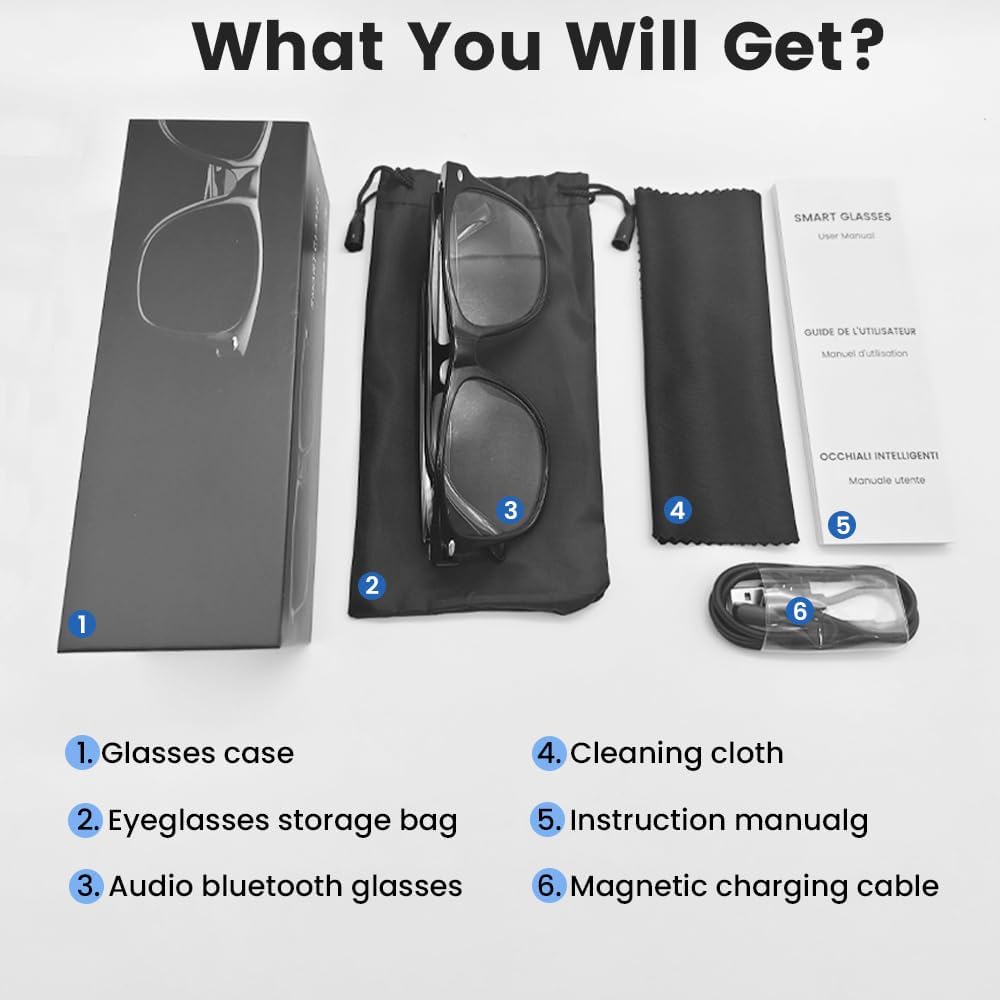
An image displaying the package contents: a glasses case, an eyeglasses storage bag, the audio Bluetooth glasses, a cleaning cloth, an instruction manual, and a magnetic charging cable.
2.2 Principais Características
- Controle de voz inteligente: Operate functions using voice commands.
- Lentes polarizadas: Effective blue light filtering and 100% UV protection. Lenses are replaceable with prescription lenses.
- Ampla compatibilidade: Connects with various devices including smartphones (Android, iOS) and computers via Bluetooth 5.4.
- Emparelhamento em uma etapa: Automatic reconnection to the last paired device.
- À prova d'água (IPX5): Resistant to sweat and rain.
- Design leve: Weighs approximately 27g for comfortable extended wear.
- Dual Magnetic Charging: Efficient and secure charging.
- Controles de toque intuitivos: For media playback, calls, and voice assistant activation.
3. Configuração
3.1 Carregando os Óculos
Before first use, fully charge the smart glasses. Use the provided magnetic charging cable.
- Connect the magnetic charging cable to the charging contacts on the temple of the glasses.
- Connect the USB end of the cable to a standard USB power adapter (not included) or a computer's USB port.
- The indicator light will show yellow during charging.
- Charging is complete when the indicator light turns green. A full charge takes approximately 1.5 hours.
The glasses provide approximately 4-6 hours of media playback and over 300 hours of standby time on a full charge.

An illustration showing the magnetic charging cable connecting to the glasses' temple, with indicators for charging (yellow light) and fully charged (green light). Battery capacity, charging time, playback time, and calling time are also displayed.
3.2 Emparelhamento Bluetooth
To connect your smart glasses to a device:
- Ensure the glasses are charged and powered on.
- Ative o Bluetooth em seu smartphone ou outro dispositivo.
- Procurar available Bluetooth devices. The glasses will appear as "E13".
- Select "E13" to pair. Once paired, the glasses will automatically reconnect to this device when powered on and within range (up to 33 feet).

A person wearing the smart glasses while running, with a smartphone screen showing Bluetooth settings and the glasses (E13) connected. The image highlights the 33ft Bluetooth 5.4 transmission range and voice control functionality.
4. Instruções de operação
4.1 Ligar/Desligar
- Ligar: Long touch the control area for 5 seconds.
- Desligar: Long touch the control area for 5 seconds.
4.2 Controles de toque
The smart glasses feature intuitive touch controls located on the temples:
- Reproduzir/Pausar Música: Once-Tap
- Próxima faixa: Toque duas vezes
- Faixa anterior: Toque duas vezes
- Atender chamada: Once-Tap
- Desligue a chamada: Once-Tap
- Ative o Voice Assistant: Long Touch for 2 seconds
- Fotografia remota: Double click to control your smartphone's camera.

A diagram illustrating the touch control gestures on the smart glasses for various functions: pick up calls, turn on music, open navigation, take photos, previous/next track, play/pause, voice assistant, answer/hang up calls, and power on/off.
4.3 Controle de voz
After activating the voice assistant (Long Touch for 2 seconds), you can use voice commands for various functions, such as:
- Making calls (e.g., "Call [Contact Name]")
- Playing music (e.g., "Play [Song Title]")
- Enviando mensagens
- Opening navigation
5. Manutenção
- Limpeza: Use o pano de limpeza fornecido para limpar delicadamente as lentes e a armação. Evite produtos químicos agressivos ou materiais abrasivos.
- Resistência à água: The glasses are IPX5 water-resistant, meaning they can withstand sweat and light rain. Do not submerge them in water or expose them to strong jets of water.
- Armazenar: When not in use, store the glasses in the provided eyeglasses storage bag or glasses case to protect them from scratches and dust.
- Temperatura: Avoid exposing the glasses to extreme temperatures (hot or cold) as this can affect battery life and electronic components.

A pair of smart glasses resting on a surface, emphasizing their lightweight design (27g) and comfort for extended wear. A magnified inset shows the dual magnetic charging contacts.
6. Solução De Problemas
- Não é possível ligar: Ensure the glasses are fully charged. Connect to the magnetic charging cable and check the indicator light.
- Não foi possível emparelhar com o dispositivo:
- Certifique-se de que o Bluetooth esteja habilitado no seu dispositivo.
- Make sure the glasses are within the 33-foot Bluetooth range.
- Turn the glasses off and on again, then try pairing.
- Esqueça o dispositivo nas configurações de Bluetooth do seu telefone e tente emparelhar novamente.
- Sem som/Volume baixo:
- Check the volume settings on both the glasses (if applicable via touch control) and your connected device.
- Certifique-se de que os óculos estejam devidamente conectados via Bluetooth.
- Confirm that the audio output on your device is set to the smart glasses.
- Os controles de toque não respondem: Ensure the glasses are powered on and connected. Try restarting the glasses.
7. Especificações
| Modelo | E13C |
| Marca | Yeabomy |
| Tecnologia de Conectividade | Bluetooth 5.4 |
| Compatibilidade do sistema operacional | Android, iOS Devices |
| Características especiais | Music Player, Phone Call, Voice Control, UV Protection, Polarized Lenses, Remote Photography |
| Capacidade da bateria | 1 Amp Hours (80mAh per temple) |
| Tempo de carregamento | Aproximadamente 1.5 horas |
| Continuous Playback Time (Music) | Aproximadamente 5 horas |
| Continuous Calling Time | Aproximadamente 4 horas |
| Tempo de espera | Mais de 300 horas |
| Peso do item | 0.07 libras (aproximadamente 27g) |
| Resistência à água | IPX5 |
| Dimensões da embalagem | 6.65 x 2.4 x 2.24 polegadas |
| Tamanho da tela | 1.96 Inches (Visible screen diagonal) |
| Capacidade de armazenamento de memória | 128 MB |
| GPS | Sem GPS |

An image detailing the physical dimensions of the smart glasses, including lens width, frame width, and temple length. It also shows various face shapes (oval, triangle, round, square, diamond) indicating suitability.
8. Garantia e Suporte
For warranty information or technical support, please refer to the contact details provided with your purchase documentation or visit the official Yeabomy webGuarde seu comprovante de compra para eventuais solicitações de garantia.