
1. Introdução
Welcome to the Hot Pepper K82A Smartphone User Manual. This guide provides essential information to help you set up, operate, maintain, and troubleshoot your new device. The Hot Pepper K82A is an advanced Android smartphone featuring a 6.67-inch AMOLED display, a powerful Octa-Core processor, 256GB of storage, 8GB of RAM, and a long-lasting 5000mAh battery. It also boasts a versatile triple camera system with a 50MP main sensor and a 24MP selfie camera.
2. O que está na caixa
Upon unboxing your Hot Pepper K82A, please ensure all the following items are present:
- Hot Pepper KR10 Smartphone
- Adaptador USB
- Cabo de carregamento USB-C
- Manual do usuário
- Ferramenta Ejetora SIM

Image: Contents of the Hot Pepper K82A retail box.
3. Dispositivo acabadoview
Familiarize yourself with the physical components and ports of your Hot Pepper K82A smartphone.

Image: Hot Pepper K82A device overview, showing camera modules, side-mounted fingerprint sensor, and bottom ports.
- Câmera principal: High-resolution rear camera.
- Câmera grande angular: Para fotografias de paisagens mais amplas.
- Câmera de profundidade: Enhances portrait mode effects.
- Desbloqueio facial por IA: Front-facing camera for secure facial recognition.
- Sensor de impressão digital: Side-mounted for quick and secure unlocking.
- Microfone embutido: Para chamadas e gravação de voz.
- Type-C 2.0 Charger Port: Para carregamento e transferência de dados.
4. Configuração
4.1. Inserindo o(s) cartão(ões) SIM
- Localize a bandeja do cartão SIM na lateral do seu telefone.
- Insira a ferramenta de ejeção do SIM no pequeno orifício ao lado da bandeja e empurre suavemente até que a bandeja se solte.
- Place your Nano-SIM card(s) and/or microSD card (if applicable) into the tray with the gold contacts facing down. Ensure they are correctly seated.
- Empurre cuidadosamente a bandeja de volta para o telefone até que ela se encaixe no lugar.
4.2. Ligar / desligar
- Para ligar: Press and hold the Power button (usually on the right side) until the Hot Pepper logo appears.
- Para desligar: Mantenha pressionado o botão Liga/Desliga até que as opções de energia apareçam na tela e, em seguida, toque em "Desligar".
- Reiniciar: Press and hold the Power button, then tap "Restart".
4.3. Configuração inicial
The first time you power on your phone, you will be guided through an initial setup process:
- Selecione seu idioma preferido.
- Conecte-se a uma rede Wi-Fi.
- Review e aceitar os termos e condições.
- Faça login com sua conta do Google ou crie uma nova.
- Configure o bloqueio de tela (PIN, padrão, senha, impressão digital ou desbloqueio facial).
- Restaurar dados de um dispositivo anterior (opcional).
5. Operando seu smartphone
5.1. Navegação Básica
- Tocar: Para selecionar um item ou abrir um aplicativo.
- Deslize: Para percorrer telas ou listas.
- Pitada: Para ampliar ou reduzir o zoom nas fotos e web páginas.
- Pressão longa: Para acessar menus contextuais ou mover ícones.
5.2. Fazer chamadas e enviar mensagens
- Abra o Telefone app to dial numbers or access contacts.
- Abra o Mensagens Aplicativo para enviar e receber SMS/MMS.
5.3. Conectando-se a redes
- Wi-fi: Vá para Configurações > Rede e internet > Wi-Fi Para se conectar às redes disponíveis.
- Bluetooth: Vá para Configurações > Dispositivos conectados > Bluetooth para emparelhar com outros dispositivos Bluetooth.
- Dados móveis: Certifique-se de que seu cartão SIM esteja ativo e que os dados móveis estejam habilitados. Configurações > Rede e internet > Rede móvel.
6. Uso da câmera
Capture every moment with the Hot Pepper K82A's versatile AI Triple Camera system.
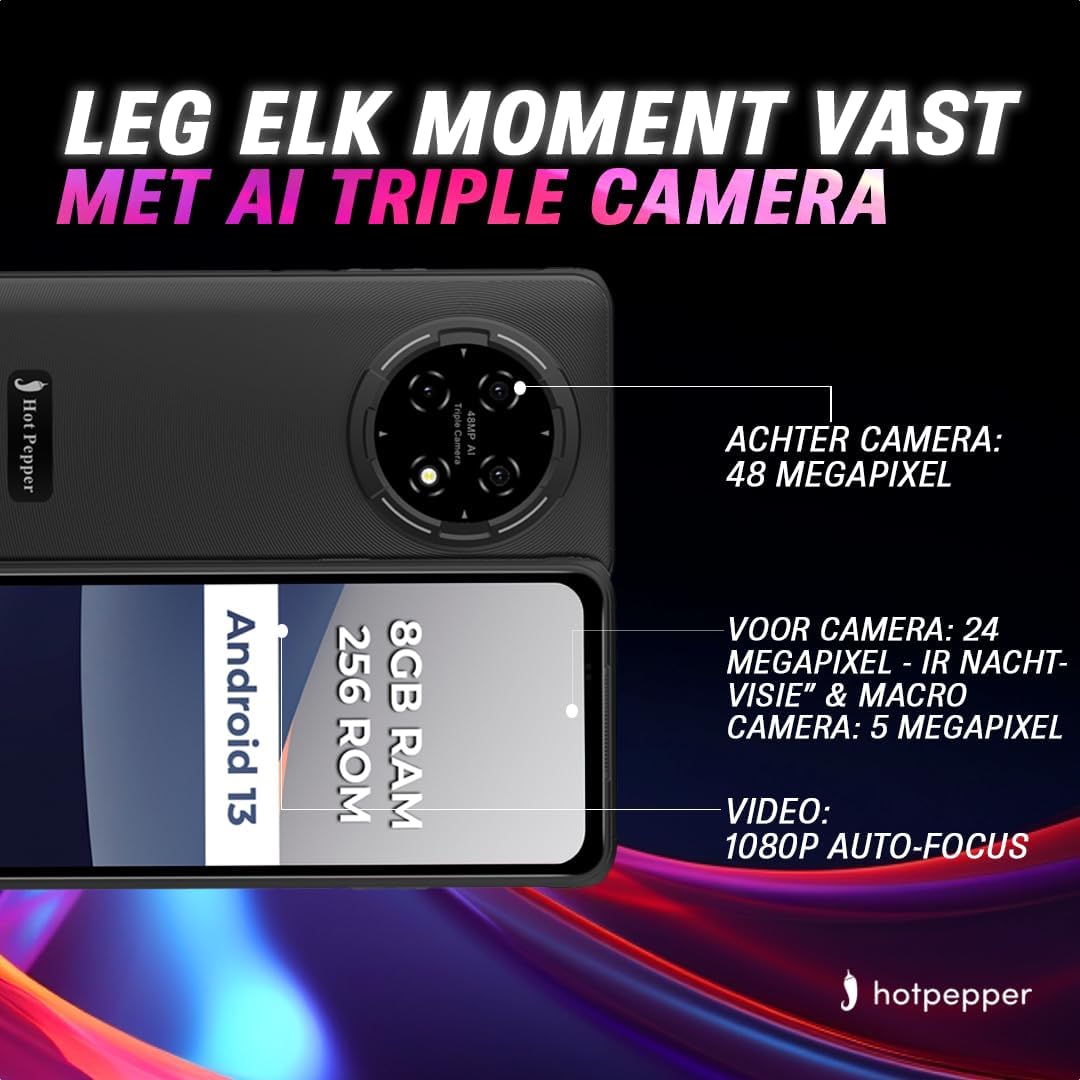
Image: Hot Pepper K82A camera specifications.
- Câmera traseira: 48 Megapixels for high-resolution photos.
- Câmera frontal: 24 Megapixels, featuring IR Night Vision and Macro capabilities for detailed selfies and close-up shots.
- Câmera Macro: 5 Megapixels for extreme close-up photography.
- Gravação de vídeo: Supports 1080p video with auto-focus.
Para usar a câmera, abra o Câmera app. You can switch between photo and video modes, adjust settings, and select different lenses (e.g., wide-angle, macro) as available.
7. Gerenciamento de bateria
The Hot Pepper K82A is equipped with a 5000mAh battery designed for extended use. To optimize battery life and ensure proper charging:

Image: Hot Pepper K82A battery life and charging details.
- Carregamento: Use the provided 18W fast charger and USB-C cable for optimal charging speed.
- Uso esperado: Up to 24 hours call time, 14 hours web usage, 8 hours video playback, 7 hours gaming, and 660 hours standby time.
- Dicas para economizar bateria: Reduce screen brightness, disable unused features like Bluetooth or GPS, close background apps, and enable battery saver mode in settings.
8. Características externas
The Hot Pepper K82A is built to withstand various outdoor conditions, making it an ideal companion for your adventures.

Image: Hot Pepper K82A outdoor durability features.
- Design robusto: Engineered for durability, suitable for various environments.
- Sinal GPS: GPS integrado para navegação e serviços de localização.
- IP68 Water and Dust Resistance: Protects against immersion in water and ingress of dust.
- Resistência à queda: Projetado para resistir a quedas de até 1.5 metros.
9. Especificações
Detailed technical specifications for the Hot Pepper K82A smartphone:
| Recurso | Especificação |
|---|---|
| Marca | Pimenta |
| Nome do modelo | Hot Pepper K82A |
| Número do modelo | KR10 |
| Sistema operacional | Androide 13.0 |
| Tamanho da tela | 6.78 polegadas |
| Resolução | 1080 x 2400 |
| Tamanho da RAM | 8 GB |
| Capacidade de armazenamento | 256 GB |
| Modelo de CPU | MediaTek Helio (Octa-Core) |
| Resolução da câmera traseira | 48 megapixels (efetivos) |
| Resolução da câmera frontal | 24 megapixels |
| Composição da Bateria | Íon de lítio (5000 mAh) |
| Conectividade | USB, conector de 3.5 mm |
| Tecnologia Celular | 5G |
| Características especiais | Robust Body, Dual SIM, Expandable Memory, Water Resistant (IP68) |
| Cor | Azul |
10. Manutenção
To ensure the longevity and optimal performance of your Hot Pepper K82A smartphone, follow these maintenance guidelines:
- Limpeza: Use um pano macio e sem fiapos para limpar a tela e a carcaça. Evite materiais abrasivos ou produtos químicos agressivos.
- Atualizações de software: Verifique e instale regularmente as atualizações do sistema para garantir que seu dispositivo tenha os recursos, patches de segurança e melhorias de desempenho mais recentes. Acesse Configurações > Sistema > Atualização do sistema.
- Gerenciamento de armazenamento: Limpe periodicamente o desnecessário files, desinstalar aplicativos não utilizados e transferir arquivos de mídia grandes. files to cloud storage or a computer to free up internal storage.
- Cuidados com a bateria: Avoid extreme temperatures. Do not leave the phone fully charged or fully discharged for extended periods.
11. Solução De Problemas
Aqui estão soluções para alguns problemas comuns que você pode encontrar:
11.1. O dispositivo não liga
- Ensure the battery is charged. Connect the phone to the charger for at least 15-30 minutes.
- Pressione e mantenha pressionado o botão Liga/Desliga por 10 a 15 segundos para forçar a reinicialização.
11.2. Tela não responde
- Force a reinicialização do dispositivo (veja acima).
- If the issue persists, consider a factory reset (data will be lost, back up first).
11.3. Network Issues (No Signal/Wi-Fi)
- Ative e desative o Modo Avião.
- Reinicie o telefone.
- Verifique a inserção do cartão SIM.
- Para resolver o problema com o Wi-Fi, reinicie o roteador.
11.4. Bateria descarregando rapidamente
- Verifique o consumo da bateria em Configurações> Bateria Identificar aplicativos que consomem muita energia.
- Reduce screen brightness and disable unnecessary features.
- Feche os aplicativos em segundo plano.
11.5. Restauração de fábrica (último recurso)
Se o seu dispositivo apresentar problemas persistentes de software, pode ser necessário restaurá-lo às configurações de fábrica. Aviso: Este procedimento apagará todos os dados do seu telefone. Faça backup dos seus dados importantes antes de prosseguir.
- Vá para Configurações > Sistema > Opções de redefinição.
- Tocar Apagar todos os dados (redefinição de fábrica).
- Confirme sua decisão e digite seu PIN/senha, se solicitado.
12. Garantia e Suporte
Your Hot Pepper K82A smartphone comes with a standard manufacturer's warranty. Please refer to the warranty card included in your product packaging for specific terms and conditions, including coverage duration and limitations.
For technical support, warranty claims, or further assistance, please visit the official Hot Pepper webou entre em contato com o serviço de atendimento ao cliente através das informações de contato fornecidas na documentação do produto.