
1. Introdução
Welcome to the ZORNHER ZH870 Wireless Mechanical Gaming Keyboard user manual. This document provides detailed instructions for setting up, operating, and maintaining your new keyboard. The ZH870 is designed for both gaming and productivity, featuring a compact 80% layout, triple connectivity options, customizable RGB lighting, and hot-swappable switches.

Figure 1: ZORNHER ZH870 Wireless Mechanical Gaming Keyboard.
2. Conteúdo da embalagem
Verifique se todos os itens estão presentes na embalagem:
- 1x teclado totalmente montado
- 1x extrator Keycap
- 1 x capa de poeira
- 3x Replace Switches
- 1 receptor de 2.4 GHz
- 1x USB-C Cable (1.8m nylon)
- 1x Manual de Instruções

Figure 2: Package contents for the ZH870 keyboard.
3. Produto acabadoview
The ZORNHER ZH870 is an 80% layout mechanical keyboard designed for optimal performance and user experience. Key features include:
- Dipped PBT Keycaps: High-purity PBT keycaps with clear, side-printed legends for durability and vibrant RGB diffusion.
- Layout em 80%: Compact design retaining essential keys (F-row, arrows, navigation cluster) for efficiency.
- Creamy Linear Switches: Factory-lubed switches with gasket mount for soft keystrokes and audible feedback.
- 22 RGB Modes: Vivid RGB lighting with south-facing and side LEDs, offering 22 preset effects.
- Troca a quente: Compatible with 3-pin and 5-pin mechanical switches without soldering.
- Triple Connection: Seamless switching between 2.4GHz wireless, Bluetooth 5.0, and USB-C wired modes, supporting up to 5 devices.
- Bateria de 4000mAh: Bateria de alta capacidade para uso prolongado sem fio.
- Design ergonômico: OEM-profile keycaps and stable build for comfort and control.
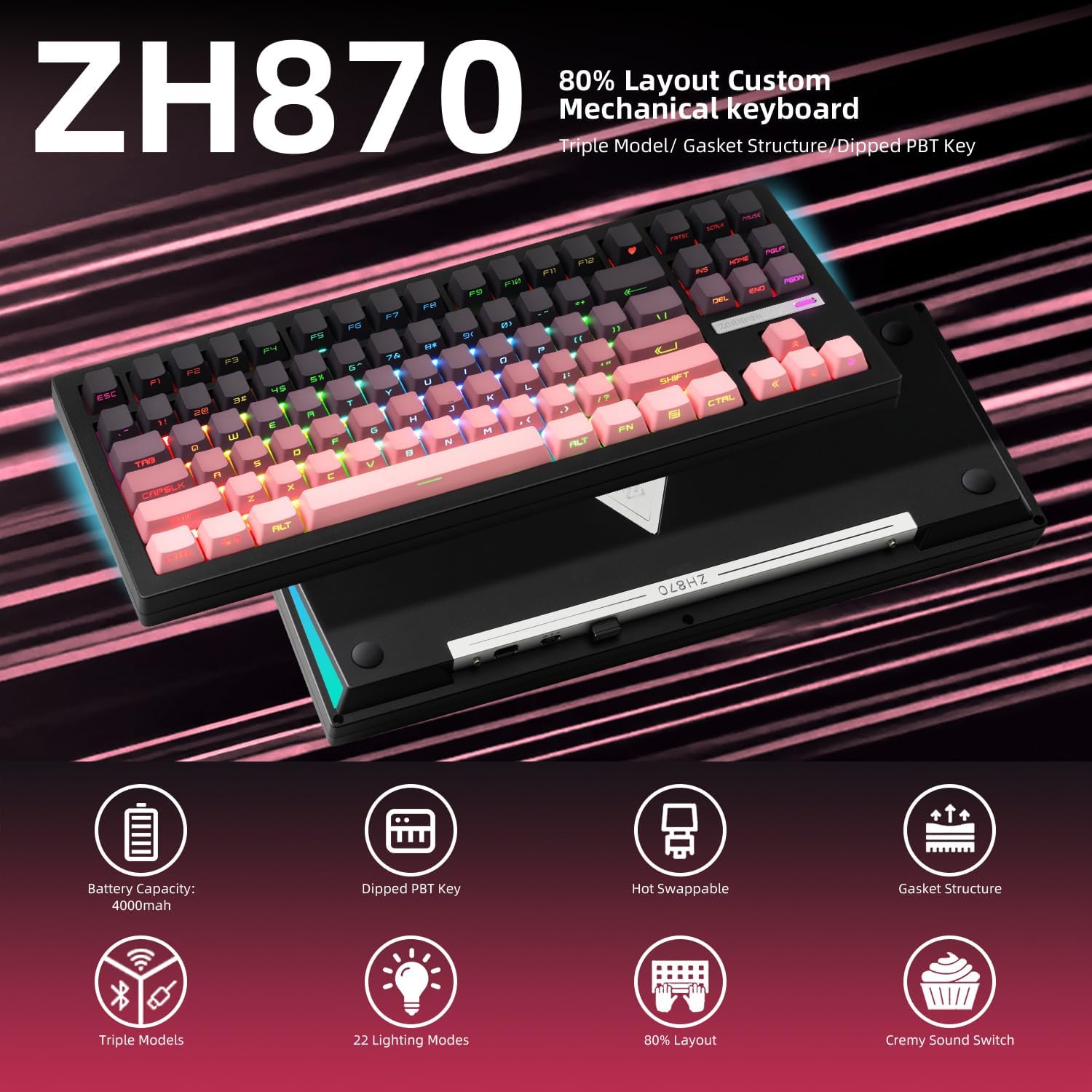
Figure 3: Key features of the ZORNHER ZH870 keyboard.
4. Configuração
4.1. Modos de conectividade
The ZH870 supports three connection methods: 2.4GHz wireless, Bluetooth 5.0, and USB-C wired. You can switch between these modes using the dedicated switch on the back of the keyboard.
- Sem fio de 2.4 GHz: Insert the 2.4GHz receiver into a USB port on your device. Select 2.4GHz mode on the keyboard.
- Bluetooth 5.0: Select Bluetooth mode on the keyboard. Pair with your device via Bluetooth settings. The keyboard can connect to up to 5 devices.
- USB-C com fio: Connect the provided USB-C cable from the keyboard to your device. Select wired mode on the keyboard.

Figure 4: Triple connection options for the ZH870.
4.2. Carregamento
The keyboard is powered by a 4000mAh battery. Connect the USB-C cable to the keyboard and a power source (e.g., computer USB port, wall adapter) to charge. The battery status can be monitored via the keyboard's display or software.
4.3. Pés Ajustáveis
The keyboard features adjustable feet on the underside, allowing you to set the typing angle for ergonomic comfort. There are multiple height settings available.
5. Instruções de operação
5.1. Modos de iluminação RGB
The ZH870 offers 22 preset RGB lighting effects, including side-glow and south-facing LEDs for clean and immersive illumination. Use the function keys (Fn) in combination with other keys to cycle through effects, adjust brightness, and change colors.
- Fn + MENU: Change backlight effect.
- Fn + SHIFT_R: Alterar a cor da luz de fundo.
- Fn+F13: Switch side backlight effect.
- Fn + BACKSPACE: Toggle lights off/on.
- Fn + Seta para cima: Aumente o brilho da luz de fundo.
- Fn + Seta para baixo: Diminua o brilho da luz de fundo.
- Fn + Seta para a Esquerda: Diminua a velocidade da luz de fundo.
- Fn + Seta para a Direita: Aumentar a velocidade da luz de fundo.
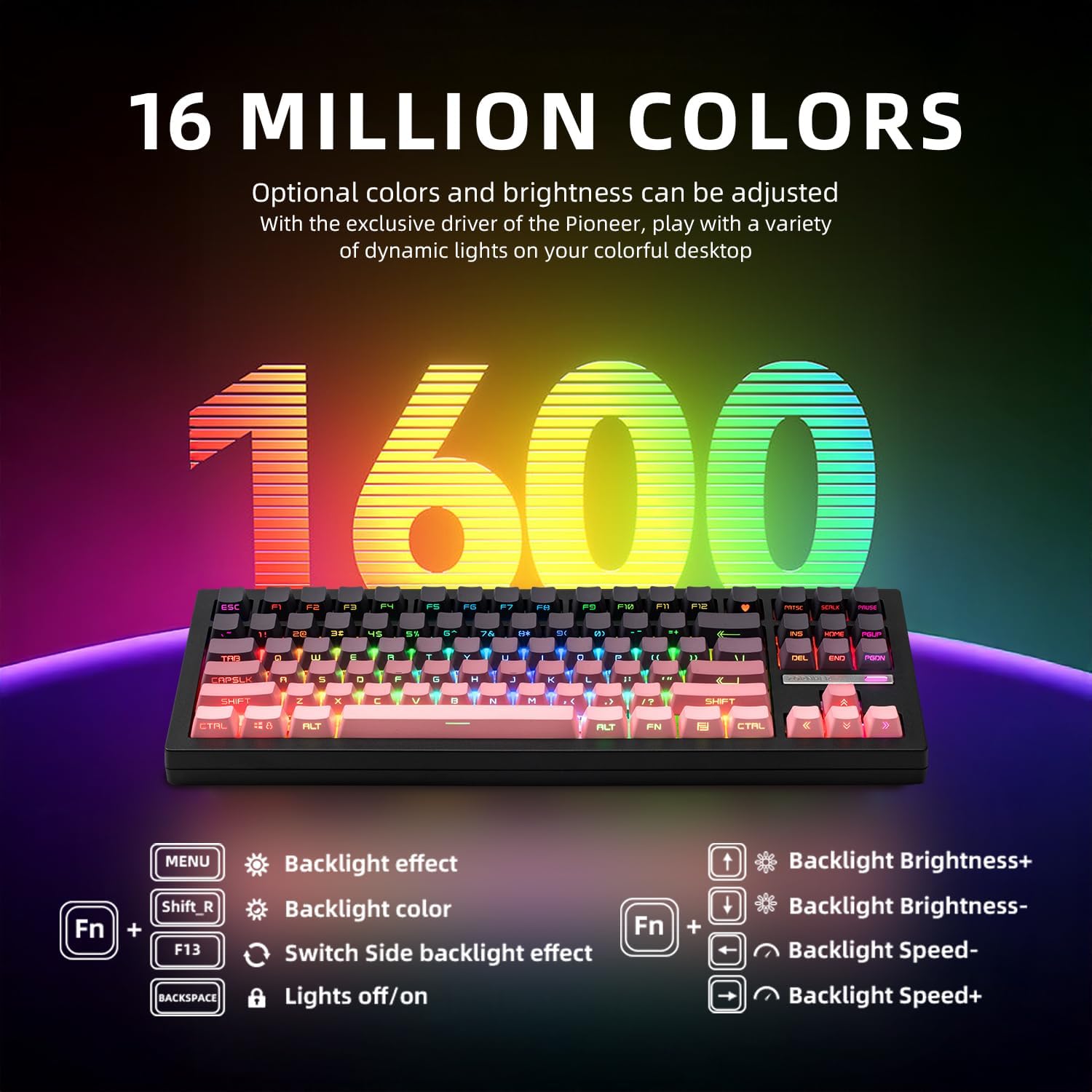
Figure 5: RGB lighting control functions.
5.2. Personalização
The keyboard is fully customizable:
- Interruptores intercambiáveis a quente: The PCB supports both 3-pin and 5-pin mechanical switches, allowing for easy switch replacement without soldering.
- Suporte ao motorista: Utilize the dedicated driver software to remap keys, set macros, and personalize lighting modes to suit your preferences.

Figura 6: Funcionalidade de troca a quente.

Figure 7: Software interface for advanced customization.
5.3. Conexão de múltiplos dispositivos
The ZH870 can connect to up to 5 devices simultaneously via its triple connection modes, allowing for seamless switching between your computer, tablet, and other compatible devices.
6. Manutenção
To ensure the longevity and optimal performance of your ZORNHER ZH870 keyboard, regular maintenance is recommended:
- Limpeza: Use the provided dust cover when not in use. For general cleaning, gently wipe the keycaps and keyboard surface with a soft, lint-free cloth. Use the included brush to remove dust and debris from between the keycaps.
- Remoção de teclas e interruptores: Use the keycap puller and switch puller (if applicable) to carefully remove keycaps and switches for deeper cleaning or replacement.
7. Solução De Problemas
If you encounter issues with your ZORNHER ZH870 keyboard, please refer to the following common solutions:
- Problemas de conectividade: Ensure the keyboard is in the correct mode (2.4GHz, Bluetooth, or Wired) for your device. For wireless connections, check battery level and ensure the receiver is properly inserted or Bluetooth is paired. Try restarting the keyboard and your device.
- Teclas não respondem: Check if the keyboard is properly connected. If using wireless, ensure it's charged. If specific keys are not working, consider replacing the switch using the hot-swappable feature.
- Problemas com iluminação RGB: Verify that the lighting is not turned off (Fn + BACKSPACE). Adjust brightness and effects using the function key combinations. Ensure the driver software is up-to-date for advanced customization.
- Bateria não carregando: Ensure the USB-C cable is securely connected to both the keyboard and a working power source. Try a different USB-C cable or port.
For further assistance, please contact ZORNHER customer support.
8. Especificações
| Recurso | Detalhe |
|---|---|
| Dimensões do produto | 16.65 x 7.99 x 2.75 polegadas |
| Peso do item | 3.85 libras |
| Fabricante | ZORNHER |
| Baterias | CR5 batteries required (included) |
| Dispositivos compatíveis | Gaming Console, Laptop, PC, Smart TV, Tablet |
| Tecnologia de Conectividade | Bluetooth, USB-C, Wi-Fi (2.4 GHz) |
| Descrição do teclado | Mecânico |
| Usos recomendados | Everyday Use, Gaming, Personal |
| Características especiais | 3 Mode, Backlit, Hot-Swappable, Rechargeable |
| Retroiluminação do Teclado | RGB |
9. Garantia e Suporte
The ZORNHER ZH870 Wireless Mechanical Gaming Keyboard comes with a Garantia de 2 ano for worry-free ownership. For any product-related inquiries, technical support, or warranty claims, please contact ZORNHER customer service through the official channels provided at the time of purchase.
10. Vídeos de Produtos
ZORNHER Mechanical Keyboard Overview
Este vídeo fornece uma breve visão geral.view of the Zornher mechanical keyboard, highlighting its design and features.
ZORNHER ZH870 Mechanical Keyboard Features
Um breve vídeo mostraasing the ZORNHER ZH870 mechanical keyboard, focusing on its key attributes and aesthetic.