
Apexel TM6
APEXEL 2-in-1 HD Fixed Focus Telephoto & Macro Lens Kit User Manual
Modelo: TM6
Introdução
This manual provides comprehensive instructions for the APEXEL 2-in-1 HD Fixed Focus 6X Telephoto Lens & 150mm Macro Lens Kit, Model TM6. This professional phone lens kit is designed to enhance your smartphone photography by offering both long-distance telephoto capabilities and intricate close-up macro shooting. Please read this manual thoroughly before use to ensure proper operation and care of your new lens kit.

Figure 1: The APEXEL 2-in-1 HD Fixed Focus Telephoto & Macro Lens Kit.

Figure 2: The TM6 TeleMacro Lens, designed for versatile photography from wide landscapes to intricate details.
Conteúdo da embalagem
Verifique se todos os itens listados abaixo estão incluídos em seu pacote:
- 1 x Telephoto Lens
- 1 x 150mm Macro Lens
- 1 x 37mm Threaded Phone Clip
- 1 x 37mm Threaded Eyecup
- 1 x 25-37mm Adapter Ring
- 1 x Organizer Pouch
- 1 x Pano de limpeza
- 3 x EVA Spacers
- 1 x Manual do Usuário (este documento)

Figure 3: All components included in the APEXEL 2-in-1 lens kit package.
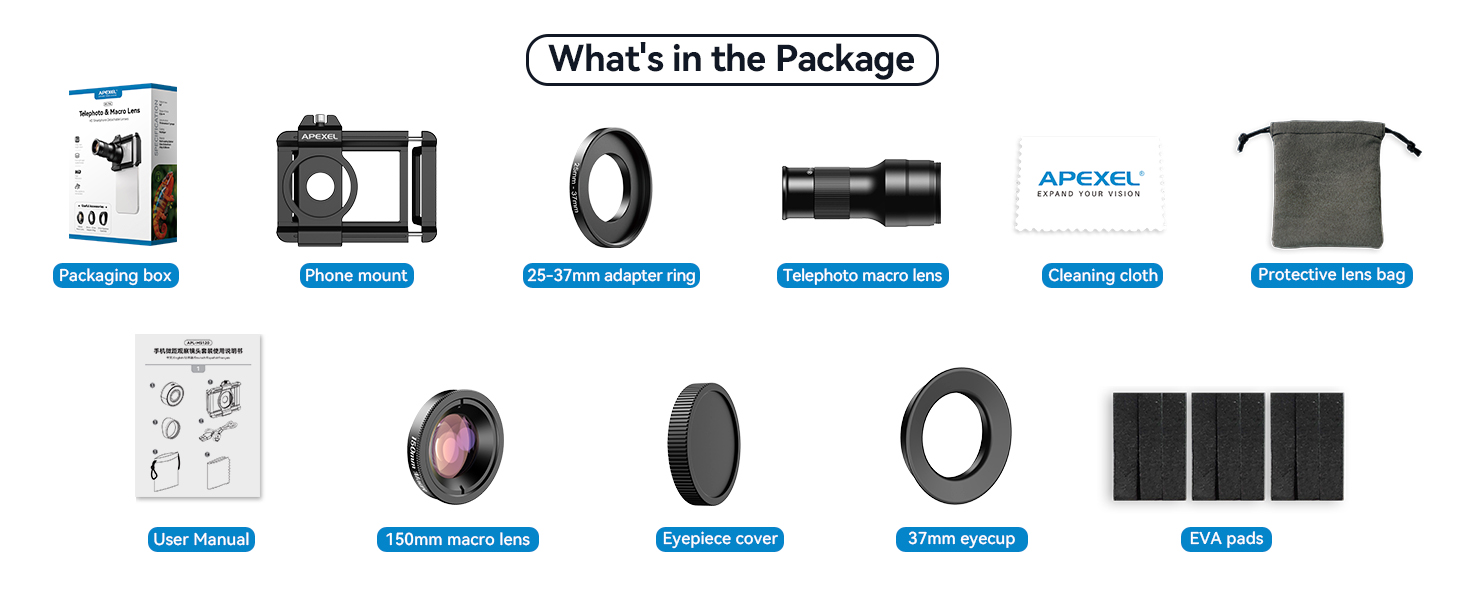
Figure 4: Visual representation of the package contents, including the packaging box, phone mount, adapter ring, telephoto macro lens, cleaning cloth, protective lens bag, user manual, 150mm macro lens, eyepiece cover, 37mm eyecup, and EVA pads.
Video 1: Unboxing and initial look at the TM6 Telephoto Macro Lens kit.
Configuração e instalação
Compatibilidade
The APEXEL lens kit is designed for most smartphones with a width between 70-100 mm (2.8-3.9 inches). Please note that it is não compatível with iPhone Mini, SE series, or Samsung Galaxy S25, S24, S23, S22 series. If your phone has a built-in macro function, it is recommended to disable it before using this lens kit for optimal performance.

Figure 5: The universal clip is compatible with most smartphones within the specified width range.

Figure 6: Detailed compatibility information, including phone width and specific models that are not supported. EVA pads are included to keep the protruding phone lens level with the phone clip.
Etapas de instalação rápida
Follow these steps to properly install the lens kit on your smartphone:
- Puxar: Separe os músculos esticadosamp of the phone clip and carefully insert your smartphone.
- Empurrar: Loosen the top screw on the phone clip and push the slider to align the central aperture with your phone's main camera lens.
- Torção: Tighten the top fixed screw to secure the phone clip in the correct focus hole position.
- Parafuso: Screw the telephoto lens (or macro lens, if using separately) into the threaded interface of the phone clip to complete the installation.

Figure 7: Step-by-step guide for attaching the lens to your smartphone.

Figure 8: Visual instructions for quick installation, specifically highlighting the macro lens working distance.
EVA Gasket Installation
If your phone's camera lens protrudes significantly, use the provided EVA spacers to ensure the phone lens is level with the phone clip. This helps in achieving a stable and aligned connection.
Video 2: Demonstration of EVA gasket installation for proper lens alignment.
Instruções de operação
Telephoto Lens Usage (6X Fixed Focus)
The 6X telephoto lens allows you to capture distant subjects with enhanced clarity. The optimal focusing distance for the telephoto lens is 30cm to infinity. Simply attach the telephoto lens to the phone clip and use your phone's camera application. You can adjust the focus by rotating the focus ring on the lens.

Figura 9: Example of telephoto lens capability, showing a distant bird captured clearly.

Figure 10: Dual functionality of the lens kit, highlighting the 6X telephoto and 150mm macro capabilities.

Figure 11: Various applications for the telephoto lens, including wildlife observation and event viewindo.
Vídeo 3: Acabouview of the 6X telephoto lens and 150mm macro lens functionalities.
Macro Lens Usage (150mm)
The 150mm macro lens is designed for capturing intricate details of small subjects. This lens needs to be installed separately from the telephoto lens. The optimal macro distance is between 15cm and 40cm from the subject. Rotate the focus ring on the macro lens to achieve sharp focus.

Figura 12: Example of macro lens capability, showing detailed capture of a flower.

Figure 13: Various applications for the macro lens, including close-up photography of small objects.
Video 4: Demonstration of 150mm macro lens shooting.
Dual Modes: Phone Photography & Handheld Observation
The TM6 lens supports two primary usage modes:
- Phone Photography: Install the lens on your mobile phone using the provided clip to enhance your phone's photography capabilities for both distant and close-up shots.
- Naked Eye Observation: After installing the included eyecup, the telephoto lens can be used as a mini monocular for direct observation of distant objects without a phone.

Figure 14: The lens can be used for handheld observation or attached to a phone for photography.
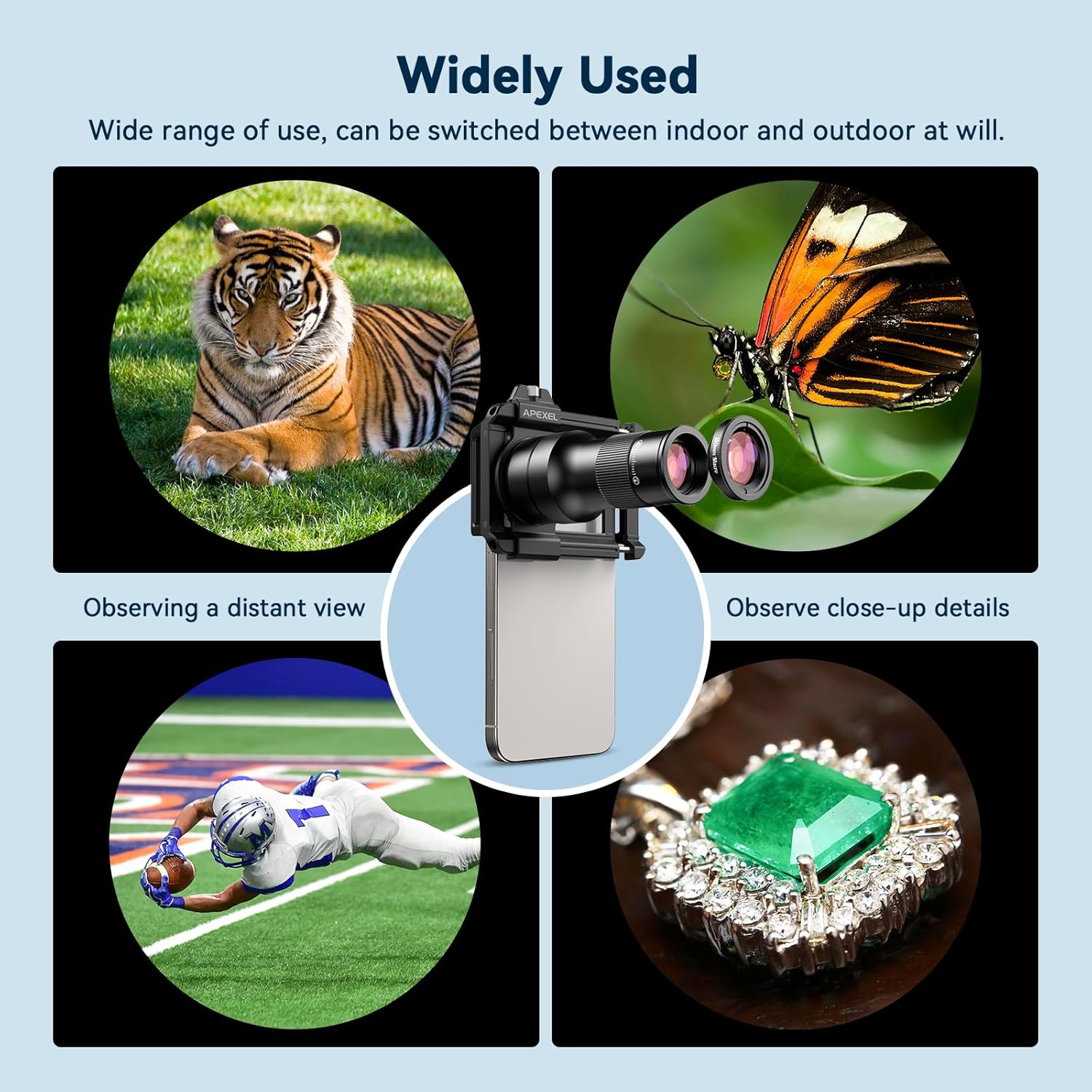
Figure 15: The lens kit offers versatile use for both distant and close-up observations.
Video 5: Demonstration of switching between telephoto and macro modes for different shooting scenarios.
Addressing Dark Corners / Black Circles
It is normal to encounter small dark corners or black circles on the screen when using the lens. To reduce this effect, you can appropriately enlarge your phone screen within the camera application. If your phone has a separate telephoto lens, be mindful that excessive magnification may cause it to automatically switch to the phone's telephoto lens, potentially resulting in a black screen.

Figure 16: Adjusting phone screen magnification can help minimize dark corners.
Maintaining Macro Control (iOS & Galaxy)
For optimal macro photography, it may be necessary to adjust your phone's macro settings:
- Para iOS (iPhone 13 e versões mais recentes):
- Vá para Configurações.
- Navegar para Câmera.
- Ligar Controle de macro.
- Disable the macro function of your phone within the camera app to use the external macro lens effectively.
- For Samsung Galaxy S22, S23 Ultra:
- Open the camera app and tap the close-up focus enhancement icon. When illuminated yellow, it is activated.
- Tap again to turn off the focus enhancement for the external macro lens.

Figure 17: Steps to manage macro settings on iOS and Galaxy phones for optimal external lens use.
Manutenção
To ensure the longevity and optimal performance of your APEXEL lens kit, follow these maintenance guidelines:
- Limpeza de lentes: Use the provided cleaning cloth or a soft, lint-free microfiber cloth specifically designed for optical lenses. Gently wipe the lens surfaces to remove dust, smudges, or fingerprints. Avoid using abrasive materials or harsh chemicals.
- Armazenar: When not in use, store the lenses and phone clip in the provided organizer pouch to protect them from dust, scratches, and impacts. Keep them in a cool, dry place away from direct sunlight and extreme temperatures.
- Manuseio: Always handle the lenses by their barrels and avoid touching the optical surfaces directly.
Solução de problemas
| Problema | Possível causa | Solução |
|---|---|---|
| Small dark corners or black circles on screen | Normal due to lens design; phone's telephoto lens interference. | Enlarge the phone screen appropriately within the camera app. If your phone has a separate telephoto lens, avoid excessive magnification that might trigger it. |
| Phone clip does not match or fit | Incompatibility with phone model or incorrect adjustment. | Ensure your phone width is within 70-100mm. Refer to the compatibility section. If issues persist, contact customer support for replacement accessories. |
| Unclear product installation | Improper alignment or attachment. | Review the "Quick Installation Steps" carefully. Ensure the lens is securely screwed into the phone clip and aligned with the main camera. |
| Pressed keys or buttons on phone | Phone clip obstructing side buttons. | Adjust the phone's position within the clip to avoid pressing any buttons. The clip is designed to be adjustable. |
If you encounter any problems not listed here or require further assistance, please contact APEXEL customer support.
Especificações
Key technical specifications for the APEXEL 2-in-1 HD Fixed Focus Telephoto & Macro Lens Kit:
- Marca: Apexel
- Modelo: TM6
- Lens Design: 6X (Telephoto)
- Min Focal Length: 15 Millimetres (Macro)
- Max Focal Length: 1000 Millimetres (Telephoto)
- Tipo de foco: Foco manual
- Revestimento da lente: Totalmente Multirrevestido (FMC)
- Optical Glass: 7 groups of 10 imported optical glass elements
- Tipo de prisma: Schmidt roof prism
- Additional Technologies: Edge ink coating, APO achromatic lens technology
- Transmittance: Maior que 99.5%
- Refletividade: Menos de 0.3%
- Dimensões do produto (C x L x A): 6 x 3 x 3 centímetros
- Dimensões da embalagem (C x L x A): 31.6 x 23.5 x 6.1 centímetros
- Peso da embalagem: 0.26 quilos
- Compatibilidade: Smartphones with width 70-100 mm (2.8-3.9 inches)

Figure 18: Details on the advanced optical design and coating for superior image quality.

Figure 19: The lens is compatible with 37mm filters (not included) and features a lightweight, portable design.
Garantia e Suporte
APEXEL offers a 1-year return service for this product. For any issues, questions, or to request replacement accessories (e.g., if the clip does not match your phone), please contact APEXEL customer support. They aim to reply within 24 hours.
For further information and support, visit the official APEXEL store: Loja APEXEL na Amazon.