
ANYCUBIC Anycubic Kobra S1
Anycubic Kobra S1 3D Printer User Manual
Model: Anycubic Kobra S1 | Brand: ANYCUBIC
1. Introdução
This user manual provides comprehensive instructions for the assembly, operation, and maintenance of your Anycubic Kobra S1 3D Printer. Designed for both beginners and experienced users, the Kobra S1 offers high-speed, high-precision 3D printing with advanced features for an optimal printing experience. Please read this manual thoroughly before using the printer to ensure safe and efficient operation.

Figure 1.1: Anycubic Kobra S1 3D Printer. This image shows the fully enclosed 3D printer with a printed lion model inside, highlighting its sleek design and printing capabilities.
2. Informações de segurança
- Utilize sempre a impressora em uma área bem ventilada.
- Mantenha as mãos longe das peças móveis durante a operação.
- Não toque no bico de impressão ou na mesa aquecida durante ou imediatamente após a impressão, pois eles podem atingir altas temperaturas.
- Certifique-se de que a impressora esteja colocada em uma superfície estável e nivelada.
- Utilize apenas filamentos e adaptadores de energia recomendados.
- Mantenha crianças e animais de estimação afastados da impressora durante o funcionamento.
- In case of emergency, immediately disconnect the power supply.
3. O que está na caixa
Your Anycubic Kobra S1 package includes the following components:
- Anycubic Kobra S1 3D Printer
- Cabo de energia
- Porta-carretel de filamento
- Tool Kit (including various Allen wrenches, pliers, scraper)
- Cabo USB
- Teste de filamento
- Manual do usuário (este documento)
- SD Card with preloaded test files
4. Configuração
4.1 Montagem Inicial
The Anycubic Kobra S1 is designed for quick and easy assembly. Follow the included quick start guide or refer to the official assembly video for detailed instructions. Ensure all components are securely fastened before proceeding.
4.2 Automatic Bed Leveling (LeviQ3.0)
The printer features LeviQ3.0 technology for effortless automatic bed leveling and Z-axis compensation. This ensures a perfect first layer without manual adjustments. Simply initiate the auto-leveling process from the touchscreen interface.
4.3 Atualização de firmware
For full functionality and optimal performance, it is recommended to update to firmware v2.4.8.3 or later. Firmware updates can unlock additional features and improve printer stability. Instructions for updating firmware are available on the official Anycubic website.

Figure 4.1: Important notes regarding compatibility, firmware updates, and nozzle clogging. This image highlights key considerations for optimal printer performance and user experience.
5. Instruções de operação
5.1 High-Speed and High-Precision Printing
The Anycubic Kobra S1 boasts a travel speed of up to 600mm/s and 20000mm/s² acceleration. Its CoreXY construction and dual motor drive minimize vibrations, ensuring smoother and more precise prints even at high speeds.

Figure 5.1: Illustration of the Anycubic Kobra S1's high printing speed capabilities, showing a Benchy print time of 15 minutes compared to others at 1 hour 26 minutes.
5.2 Compatibilidade de filamentos
The full metal hotend can reach 320°C, and the heated bed maintains 120°C, allowing compatibility with a wide range of filaments including PLA, TPU, ASA, ABS, and PETG. Multiple nozzle sizes (0.2, 0.4, 0.6, 0.8mm) are supported for various printing applications.
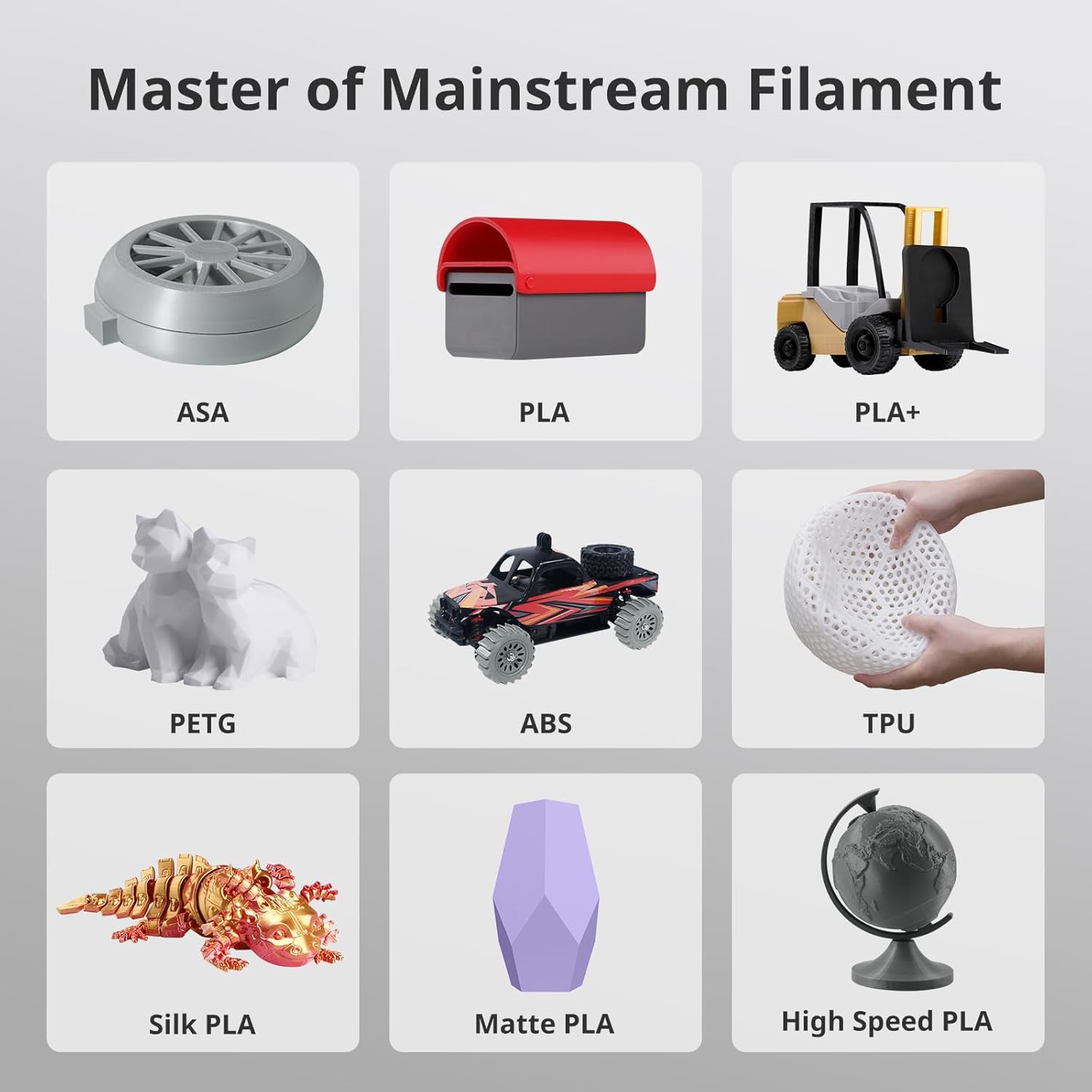
Figure 5.2: Visual representation of the Anycubic Kobra S1's compatibility with various mainstream filaments such as ASA, PLA, PLA+, PETG, ABS, TPU, Silk PLA, Matte PLA, and High Speed PLA.
5.3 Impressão Multicolorida
For multi-color printing, the Anycubic Kobra S1 requires the Anycubic ACE Pro. Note that the ACE Pro for Kobra 3 is not directly compatible with the Kobra S1; an upgrade kit is necessary. This setup allows for vibrant, multi-color prints.

Figura 5.3: Um example of stunning multi-color printing, demonstrating the capabilities when the Anycubic Kobra S1 is equipped with the Anycubic ACE Pro.
5.4 One-Click Printing & Makeronline
Leverage Anycubic's self-operated model library, Makeronline, which offers a vast collection of high-quality, free model resources from over 3000 designers worldwide. This feature simplifies the printing process with one-click printing functionality.
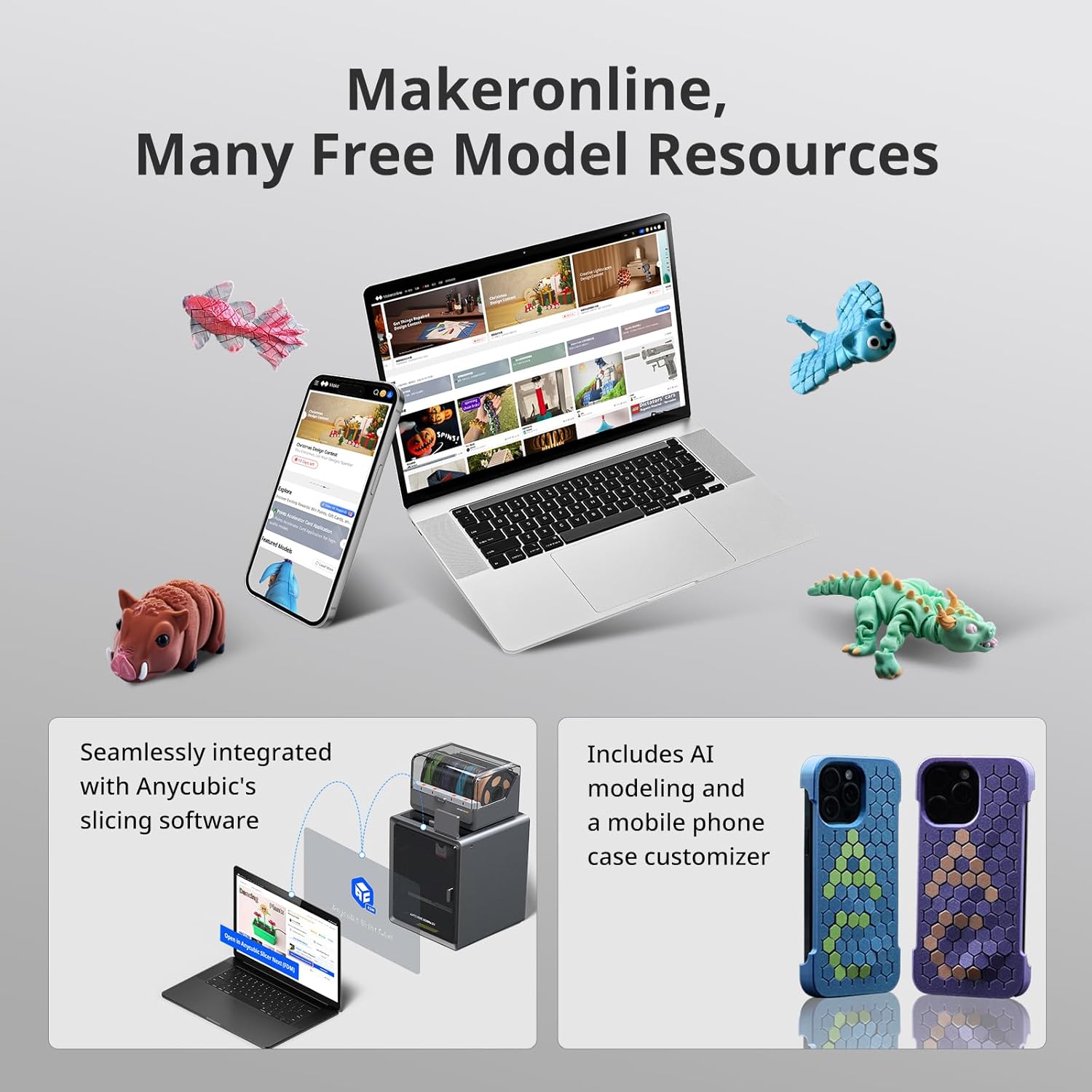
Figure 5.4: The Makeronline platform, showcasing its integration with Anycubic's slicing software and offering a wide range of free 3D models for printing.
5.5 Intelligent Printing Features
- Detecção de "espaguete" por IA: Instantly detects and alerts you to anomalies such as "spaghetti" failures, ensuring smooth operation. (Requires camera for functionality).
- Belt Tension Monitoring: Continuously checks belt status to prevent disruptions and ensure precision.
- Recuperação de perda de energia: Automatically resumes printing after power loss or interruptions, enhancing efficiency and reliability.

Figura 5.5: Overview of intelligent printing features including AI Spaghetti Detection, Belt Tension Monitoring, and Power Loss Recovery, designed to enhance print reliability and user convenience.
5.6 Monitoramento e controle remoto
Monitor and control your Anycubic Kobra S1 remotely using the Anycubic App. This allows you to check print progress, adjust settings, and manage your printer from anywhere.
Video 5.1: Anycubic Kobra S1 Combo 3D Printer Remote Monitoring. This video demonstrates the remote monitoring capabilities of the printer, allowing users to oversee their prints from a distance.
Video 5.2: Anycubic Kobra S1 3D Printer OverviewEste vídeo fornece uma visão geral.view of the Anycubic Kobra S1 3D printer, showcasinsuas características e design.
6. Manutenção
6.1 Manutenção do Hotend
The Anycubic Kobra S1 features a tool-free hotend disassembly for easy maintenance and replacement. Ensure the hotend is properly installed after any maintenance to prevent issues.

Figura 6.1: Detalhado view of the Anycubic Kobra S1's hotend, highlighting its tool-free disassembly, anti-clogging design, 320°C metal hotend, and various nozzle options.
6.2 Secagem de filamentos
Proper filament drying is crucial for print quality. If using the Anycubic ACE Pro, it supports drying while printing, helping to maintain filament quality and prevent issues like stringing or poor adhesion.
Video 6.1: Anycubic Kobra S1 Combo, Drying While Printing. This video illustrates the filament drying feature of the Anycubic ACE Pro, which can be used in conjunction with the Kobra S1.
7. Solução De Problemas
7.1 Nozzle Clogging
Nozzle clogs are a common 3D printing issue with multiple possible causes, including incorrect temperature settings or filament type. Refer to the Anycubic WIKI troubleshooting guide for solutions. If the problem persists, contact customer support.
7.2 Problemas de compatibilidade
The Anycubic ACE Pro for Kobra 3 is not compatible with the Anycubic Kobra S1 directly. An upgrade accessory kit is required to enable multi-color printing with the Kobra S1 if you already own an ACE Pro for Kobra 3. Always review compatibility details before purchase.
8. Especificações
| Recurso | Detalhe |
|---|---|
| Marca | ANYCUBIC |
| Modelo | Anycubic Kobra S1 |
| Dimensões do produto | 22 x 19 x 18 polegadas (55.88 x 48.26 x 45.72 cm) |
| Peso do item | 2.2 libras (1 kg) |
| Max Velocidade de Impressão | 600 mm/seg |
| Velocidade máxima de aceleração | 20000 mm/s² |
| Temperatura do Hotend | Até 320°C |
| Temperatura da cama aquecida | Até 120°C |
| Diâmetro do bico | Standard 0.4mm (Supports 0.2, 0.6, 0.8mm expansion) |
| Filamento Suportado | PLA, TPU, ASA, ABS, PETG |
| Volume de construção | 250 x 250 x 250 mm |
| Nivelamento automático | LeviQ3.0 Full-Auto |
| Nível de ruído | ≤44dB |
9. Garantia e suporte
Anycubic prioritizes customer satisfaction. If you encounter any questions or issues with your Kobra S1 3D Printer, please do not hesitate to contact our dedicated customer support team for assistance. For warranty information, please refer to the documentation provided with your purchase or visit the official Anycubic website.
You can visit the official ANYCUBIC Store for more information and support: Loja Oficial da ANYCUBIC
Documentos relacionados - Anycubic Kobra S1
 |
Guia do usuário do fatiador Anycubic Um guia do usuário abrangente para o software Anycubic Slicer, detalhando os requisitos do sistema, instalação, configuração, fatiamento e recursos de controle remoto para impressoras 3D Anycubic. |
 |
Manual do Usuário do Anycubic Kobra S1 Combo: Configuração, Operação e Guia Técnico Seu guia essencial para a impressora 3D Anycubic Kobra S1 Combo. Aprenda sobre instalação, software, impressão, manutenção e especificações técnicas para um desempenho ideal. |
 |
Anycubic Kobra S1 Max Combo User Manual - Setup, Installation, and Operation Guide Comprehensive user manual for the Anycubic Kobra S1 Max Combo 3D printer, covering setup, installation, operation, maintenance, and troubleshooting. |
 |
Manual do usuário do Anycubic Kobra 3 Combo Manual do usuário para a impressora 3D Anycubic Kobra 3 Combo, abrangendo o produtoview, instalação da máquina, guia de inicialização, encadernação da impressora, impressão, outras funções, manutenção e pontos de atenção importantes. |
 |
Impressora 3D Anycubic ACE Pro: Guia de Instalação da Máquina Instruções passo a passo para desbloquear e instalar a impressora 3D Anycubic ACE Pro, incluindo detalhes sobre como remover parafusos e acessar a unidade. |
 |
Guia de atualização de firmware da Anycubic Kobra 2 Max Guia completo para atualização do firmware da impressora 3D Anycubic Kobra 2 Max, abrangendo conexão Wi-Fi, instalação do firmware, calibração do dispositivo e etapas de solução de problemas. |
Ask a question about this manual
Ask about setup, troubleshooting, compatibility, parts, safety, or missing instructions. Manuals+ will review the question and use this page’s manual context to help answer it.