
T-Wolf GG-G530
Manual do Usuário do Mouse Gamer Competitivo T-Wolf RoboCop GG-G530
Model: GG-G530
Introdução
This manual provides essential information for the setup, operation, and maintenance of your T-Wolf RoboCop Competitive Gaming Mouse GG-G530. Please read this manual thoroughly before using the product to ensure optimal performance and longevity.
Conteúdo da embalagem
- 1 x T-Wolf RoboCop Competitive Gaming Mouse GG-G530
- 1 x Manual do Usuário (este documento)
Características do produto
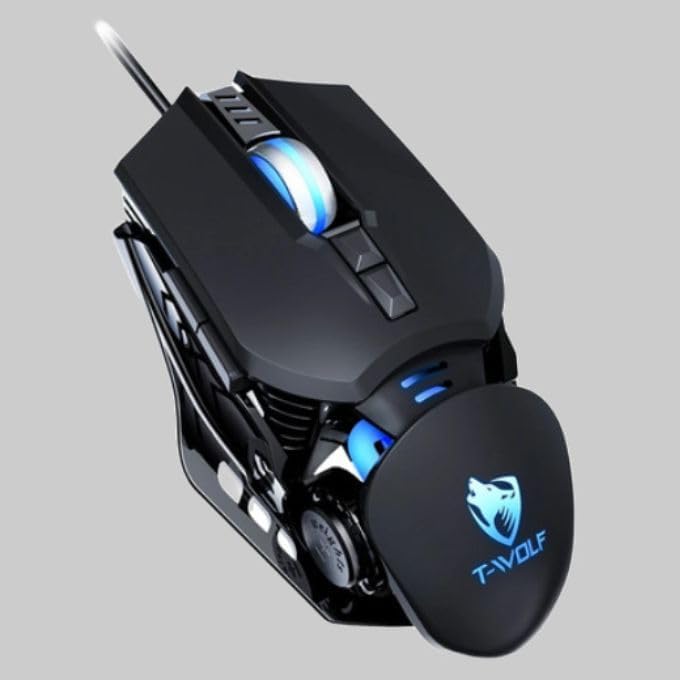
The T-Wolf RoboCop Competitive Gaming Mouse GG-G530 is designed for precision and comfort, suitable for both gaming and office use. Key features include:
- Optical Engine Design: Ensures stable operation and high sensitivity.
- Mechanical Armored Modeling: Distinctive and robust design.
- Symmetrical DIY Counterweight: Allows for adaptable weight adjustment.
- 7 botões: Includes left click, right click, scroll wheel, DPI switcher, and additional programmable buttons.
- Conectividade Inteligente: Plug-and-play functionality with automatic driver installation.
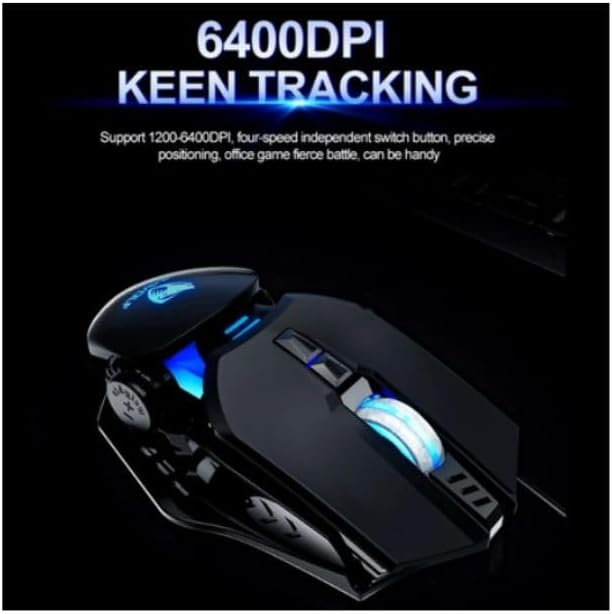
- DPI ajustável: Four levels of sensitivity (1200/2400/3200/6400 DPI) for precise control.
- Design ergonômico: Provides comfortable use for extended periods without fatigue.
- Four-Color Light Effect: Dynamic lighting for visual appeal.
- Conexão com fio: Reliable USB interface with a 150cm cable.
- Compatibilidade do sistema: Supports Windows and Mac operating systems.
Configurar
- Conecte o mouse: Insert the USB connector of the T-Wolf RoboCop Gaming Mouse into an available USB port on your computer.
- Instalação automática de drivers: The operating system will automatically detect the mouse and install the necessary drivers. This process typically takes a few moments. No manual driver installation is required.
- Pronto para uso: Após a instalação dos drivers, o mouse está pronto para uso imediato.
Instruções de operação
The T-Wolf RoboCop Gaming Mouse features 7 buttons for various functions. Familiarize yourself with their basic operations:
- Botão esquerdo do mouse: Primary selection and interaction.
- Botão direito do mouse: Accesses contextual menus and secondary functions.
- Rodinha do mouse: Percorre os documentos e web páginas. Também pode funcionar como um botão de clique do meio.
- DPI Switcher Button: Ajusta a sensibilidade do mouse (DPI).
- Botões Adicionais: The remaining buttons can be assigned specific functions through your operating system's mouse settings or compatible third-party software (note: no macro programming is natively supported by the mouse hardware).

Ajuste de DPI
The mouse features an adjustable DPI (Dots Per Inch) setting, allowing you to change the cursor sensitivity on the fly. This is particularly useful for different tasks, such as precise aiming in games or fast navigation in general use.
- Localize o DPI Switcher Button, typically positioned behind the scroll wheel.
- Press the DPI Switcher Button to cycle through the available DPI settings: 1200 DPI, 2400 DPI, 3200 DPI, and 6400 DPI.
- Each press will change the sensitivity, allowing you to find the setting that best suits your current activity.
Manutenção
To ensure the longevity and optimal performance of your T-Wolf RoboCop Gaming Mouse, follow these simple maintenance guidelines:
- Limpeza: Use um pano macio e seco para limpar a superfície do mouse. Para sujeira mais resistente, umedeça levemente o mouse.ampLimpe o pano com água ou uma solução de limpeza suave. Evite produtos químicos agressivos ou materiais abrasivos.
- Sensor óptico: Periodically clean the optical sensor on the underside of the mouse with a cotton swab to prevent dust buildup, which can affect tracking performance.
- Cuidados com os cabos: Evite dobrar ou puxar o cabo USB bruscamente para evitar danos internos.
- Armazenar: Quando não estiver em uso, guarde o mouse em um local limpo e seco, longe de temperaturas extremas.
Solução de problemas
If you encounter issues with your T-Wolf RoboCop Gaming Mouse, refer to the following common solutions:
- O mouse não responde:
- Certifique-se de que o cabo USB esteja conectado firmemente a uma porta USB funcional do seu computador.
- Tente conectar o mouse em uma porta USB diferente.
- Reinicie o seu computador.
- Cursor Movement is Erratic or Jumpy:
- Limpe o sensor óptico na parte inferior do mouse.
- Ensure you are using the mouse on a clean, non-reflective, and uniform surface. Mouse pads are recommended.
- DPI Adjustment Not Working:
- Ensure you are pressing the correct DPI switcher button.
- The mouse cycles through fixed DPI settings; there is no visual indicator on the mouse itself for the current DPI level, only the change in cursor speed.
- Botões não funcionam:
- Check your operating system's mouse settings to ensure buttons are enabled and configured correctly.
- Test the mouse on another computer to rule out a software or system issue.
Especificações
| Modelo | GG-G530 |
| Material | ABS + Electroplating |
| Sistema de Rastreamento | Óptico |
| Conexão | Com fio |
| Comprimento do cabo | 150 centímetros |
| Tipo de interface | USB |
| Configurações de DPI | 1200 / 2400 / 3200 / 6400 (Ajustável) |
| Número de botões | 7 |
| Vida útil | Approximately three years |
| Método de trabalho | Fotoelétrico |
| Efeito de luz | Four-color cycling |
| Tamanho do item | 130 x 80 x 35 mm |
| Peso do item | 160 g |
| Sistemas Suportados | Windows, Mac |
Garantia e Suporte
Your T-Wolf RoboCop Competitive Gaming Mouse GG-G530 comes with a Garantia do fabricante de 6 meses a partir da data da compra.
This warranty covers defects in materials and workmanship under normal use. It does not cover damage caused by accident, misuse, abuse, unauthorized modification, or external causes such as liquid damage.
For warranty claims or technical support, please contact your retailer or the point of purchase. Please retain your proof of purchase for warranty validation.
