
nubia V60 (Model Number: 123439101056)
Manual do Usuário do Smartphone ZTE nubia V60
Model: V60 (123439101056) | Brand: nubia
1. Introdução
Welcome to the user manual for your new ZTE nubia V60 smartphone. This guide provides essential information to help you set up, operate, maintain, and troubleshoot your device. Please read this manual thoroughly to ensure optimal performance and longevity of your smartphone.
The nubia V60 features a 6.72-inch FHD+ display, a powerful 50MP AI rear camera, a 32MP front camera, 8GB RAM (expandable with 12GB Dynamic RAM), 256GB ROM, a 5000mAh battery with 22.5W fast charging, NFC, fingerprint recognition, and DTS sound effects.
2. Configuração inicial
2.1. Desembalando e Conteúdo da Embalagem
Antes de começar, verifique se todos os itens estão presentes na embalagem:
- ZTE nubia V60 Smartphone
- Adaptador de energia
- Cabo USB
- Ferramenta para ejeção do SIM (pode variar conforme a região)
- Guia de Início Rápido (este documento serve como um guia completo)
2.2. Inserindo o cartão SIM e o cartão microSD
- Localize a bandeja do cartão SIM na lateral do seu dispositivo.
- Insira a ferramenta ejetora do SIM no pequeno orifício ao lado da bandeja e pressione firmemente até que a bandeja saia.
- Place your Nano-SIM card(s) and/or microSD card (if applicable) into the tray with the gold contacts facing down, ensuring they are correctly aligned.
- Empurre a bandeja cuidadosamente de volta para o compartimento até ouvir um clique.

Imagem: Lado view of the nubia V60, illustrating the location of the SIM card tray and physical buttons.
2.3. Carregando a bateria
Before first use, fully charge your device. Connect the USB cable to the power adapter and then to the phone's charging port. Plug the power adapter into a wall outlet. The device supports 22.5W fast charging.
2.4. Ligando e configuração inicial
- Press and hold the Power button (located on the right side) until the screen lights up.
- Follow the on-screen instructions to select your language, connect to Wi-Fi, set up your Google account, and configure security features like fingerprint recognition.
3. Operando seu dispositivo
3.1. Navegação Básica
The nubia V60 operates on Android 13.0. Use touch gestures such as tap, swipe, pinch-to-zoom, and long-press to navigate the interface. The power button and volume buttons are located on the right side of the device.

Imagem: Frente view of the nubia V60, showcasing its 6.72-inch FHD+ display.
3.2. Recursos da câmera
Your device is equipped with a 50MP AI Rear Camera and a 32MP Front Camera.
- Iniciando a câmera: Toque no ícone da câmera na tela inicial ou na tela de bloqueio.
- Tirar fotos/vídeos: Tap the shutter button to capture an image or switch to video mode to record.
- Aprimoramentos de IA: The AI features automatically optimize settings for various scenes and subjects.
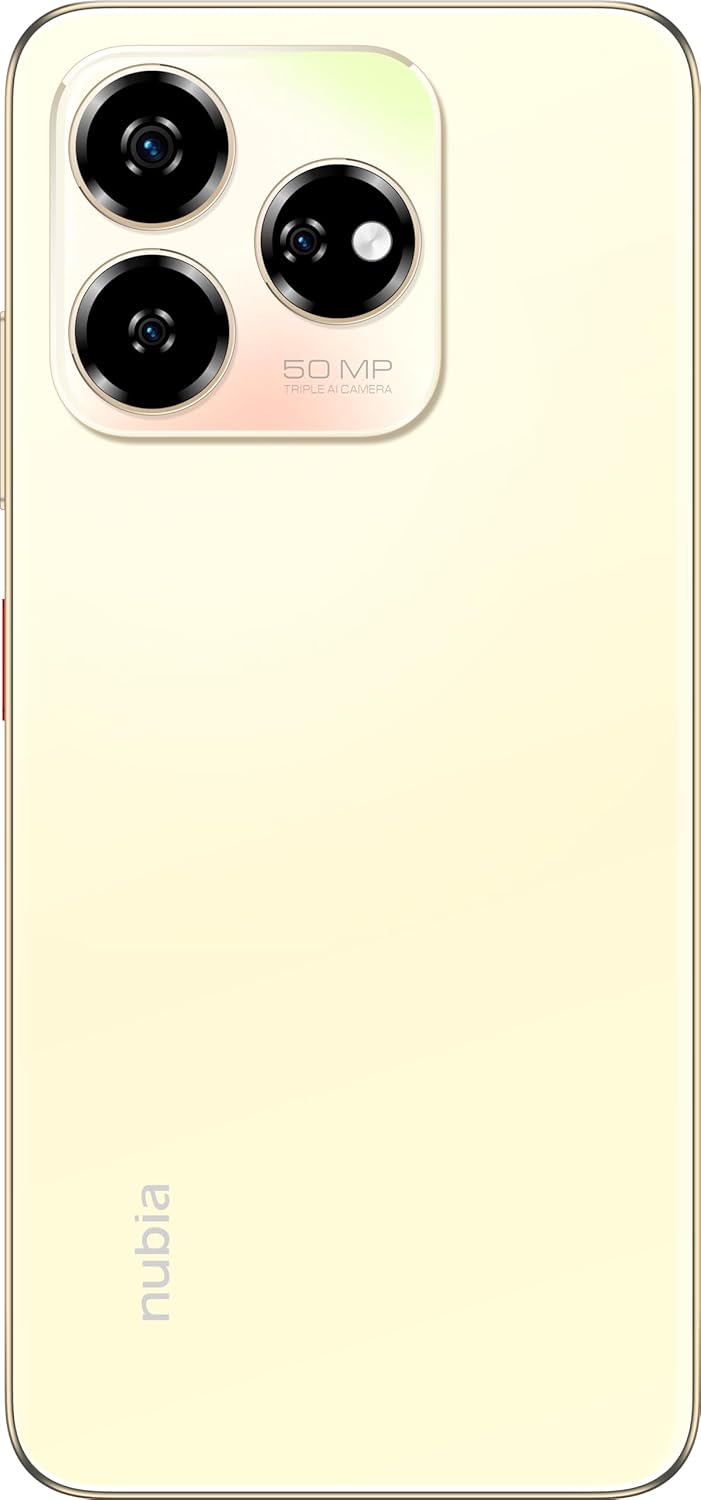
Imagem: Traseira view of the nubia V60, highlighting the 50MP triple AI camera module.
3.3. Reconhecimento de impressão digital
The device features a side-mounted fingerprint sensor for secure and quick unlocking. To set up:
- Vá para Configurações> Segurança> Impressão digital.
- Follow the on-screen prompts to register your fingerprint(s).
3.4. Funcionalidade NFC
NFC (Near Field Communication) allows for quick data exchange and contactless payments. To use NFC:
- Certifique-se de que o NFC esteja ativado em Configurações > Dispositivos conectados > Preferências de conexão > NFC.
- Tap your phone to another NFC-enabled device or payment terminal to initiate a connection or transaction.
3.5. DTS Sound Effect
Experience enhanced audio quality with DTS sound effects. This feature can be configured in your device's sound settings to optimize audio for various media types.
3.6. Live Island
The Live Island feature provides dynamic notifications and quick access to certain functions around the front camera cutout. Explore its functionalities through your device's display settings or by interacting with notifications.
4. Manutenção e Cuidados
4.1. Limpando seu dispositivo
Use um pano macio e sem fiapos para limpar a tela e a carcaça do seu telefone. Evite usar produtos químicos agressivos ou materiais abrasivos que possam danificar o acabamento ou o revestimento da tela.
4.2. Atualizações de software
Verifique e instale regularmente atualizações de software para garantir que seu dispositivo tenha os recursos, patches de segurança e melhorias de desempenho mais recentes. Acesse Configurações > Sistema > Atualização do sistema.
4.3. Cuidados com a bateria
- Evite temperaturas extremas, pois elas podem reduzir a vida útil da bateria.
- Utilize apenas acessórios de carregamento originais ou certificados.
- Para uma saúde ideal da bateria, evite descarregá-la completamente com frequência ou mantê-la em 100% por longos períodos.
4.4. Gerenciamento de armazenamento
Reavaliar periodicamenteview your device's storage (256GB ROM) and clear unnecessary files, apps, or media to maintain optimal performance. You can check storage usage in Configurações > Armazenamento.
5. Solução De Problemas
This section addresses common issues you might encounter with your nubia V60.
5.1. O dispositivo não liga
- Certifique-se de que a bateria esteja carregada. Conecte o carregador e aguarde alguns minutos antes de tentar ligar o aparelho.
- Pressione e mantenha pressionado o botão Liga/Desliga por pelo menos 10 a 15 segundos para forçar a reinicialização.
5.2. Problemas de carregamento
- Verify that the charging cable and adapter are securely connected and undamaged.
- Try using a different power outlet or charging accessory.
- Limpe a porta de carregamento cuidadosamente com uma escova macia e seca para remover quaisquer resíduos.
5.3. Problemas de conectividade de rede
- Verifique se o seu cartão SIM está inserido corretamente e ativado.
- Ative e desative o Modo Avião.
- Reinicie seu dispositivo.
- Vá para Configurações > Rede e internet > Rede móvel e certifique-se de que o tipo de rede desejado esteja selecionado.
5.4. Aplicativos travando ou congelando
- Feche e reabra o aplicativo.
- Limpe o cache e os dados do aplicativo em Configurações > Aplicativos > [Nome do aplicativo] > Armazenamento e cache.
- Certifique-se de que o aplicativo esteja atualizado para a versão mais recente.
- Reinicie seu dispositivo.
5.5. Restauração de fábrica (último recurso)
Aviso: A restauração de fábrica apagará todos os dados do seu telefone. Faça backup dos seus dados importantes antes de prosseguir.
Para restaurar as configurações de fábrica, acesse Configurações > Sistema > Opções de redefinição > Apagar todos os dados (redefinição de fábrica) e siga as instruções.
6. Especificações técnicas
| Recurso | Especificação |
|---|---|
| Nome do modelo | V60 |
| Número do modelo do item | 123439101056 |
| Marca | Núbia |
| Sistema operacional | Androide 13.0 |
| Tamanho da tela | 6.72 polegadas |
| Tamanho da memória RAM instalada | 8 GB (Additional 12GB Dynamic RAM) |
| Capacidade de armazenamento de memória | 256 GB |
| Velocidade da CPU | 1.8 GHz |
| Câmera Traseira | Câmera AI de 50 MP |
| Câmera Frontal | 32MP |
| Classificação de potência da bateria | 5000 mAh |
| Carregamento rápido | 22.5 W |
| Tecnologias de comunicação sem fio | NFC |
| Tecnologias de conectividade | NFC |
| Tecnologia Celular | 4G |
| GPS | GLONASS |
| Conector de áudio | Sem entrada para fones de ouvido |
| Fator de forma | Bar |
| Cor | Sunlit Gold |
| Peso do item | 510 g |
| Dimensões da embalagem | 18 x 8.6 x 5.6 cm |
| O que está na caixa | Adaptador de energia, cabo USB |
7. Informações de garantia
Your ZTE nubia V60 smartphone comes with a standard manufacturer's warranty, covering defects in materials and workmanship under normal use. The duration and terms of this warranty may vary by region. Please refer to the warranty card included in your product packaging for specific details.
Additionally, extended warranty and accidental damage protection plans may be available for purchase. For example, options such as a 1-Year Extended Warranty Plan, 2-Years Extended Warranty Plan, and 1-Year Accidental Damage Protection Plan might be offered by authorized retailers.
Guarde o comprovante de compra para eventuais solicitações de garantia.
8. Suporte ao cliente
For further assistance, technical support, or service inquiries regarding your ZTE nubia V60, please contact nubia customer service through their official website ou as informações de contato fornecidas na documentação do produto.
You can often find FAQs, troubleshooting guides, and software downloads on the official nubia support website. When contacting support, please have your device model number (V60) and item model number (123439101056) ready.
Ask a question about this manual
Ask about setup, troubleshooting, compatibility, parts, safety, or missing instructions. Manuals+ will review the question and use this page’s manual context to help answer it.