
1. Introdução
The POCREATION Bluetooth USB Adapter Dongle is a versatile wireless device designed to provide Bluetooth connectivity for audio devices on your PC or gaming console. It functions as both a receiver and a transmitter, allowing you to connect various audio peripherals wirelessly with a range of up to 33 feet (10 meters).
This manual will guide you through the setup, operation, and maintenance of your new adapter, ensuring optimal performance and user experience.
2. Conteúdo da embalagem
Por favor, verifique se todos os itens estão presentes em sua embalagem:
- 1 x POCREATION Bluetooth USB Adapter Dongle
- 1 x 3.5mm Audio Plug
- 1 x Manual de Instruções (este documento)

Image 2.1: The POCREATION Bluetooth USB Adapter Dongle and its accompanying 3.5mm audio plug.
3. Instruções de configuração
Follow these steps to set up your POCREATION Bluetooth USB Adapter Dongle:
- Connect the USB Adapter: Insert the USB adapter into an available USB port on your PC or gaming console (e.g., for PS5 controller). Ensure it is firmly seated.
- Connect the 3.5mm Audio Plug (for Microphone Use): If you intend to use a microphone, connect the 3.5mm audio plug to the corresponding audio jack on your device. For gaming consoles, this typically connects to the controller's audio port.
- Reconhecimento do sistema: The adapter's Bluetooth stack operates independently of the host computer. Once plugged in, the host system should recognize the USB sound device.
- Emparelhamento inicial: The adapter is designed for easy pairing. Refer to your audio device's instructions for initiating pairing mode. The adapter will automatically attempt to connect to available Bluetooth audio devices.
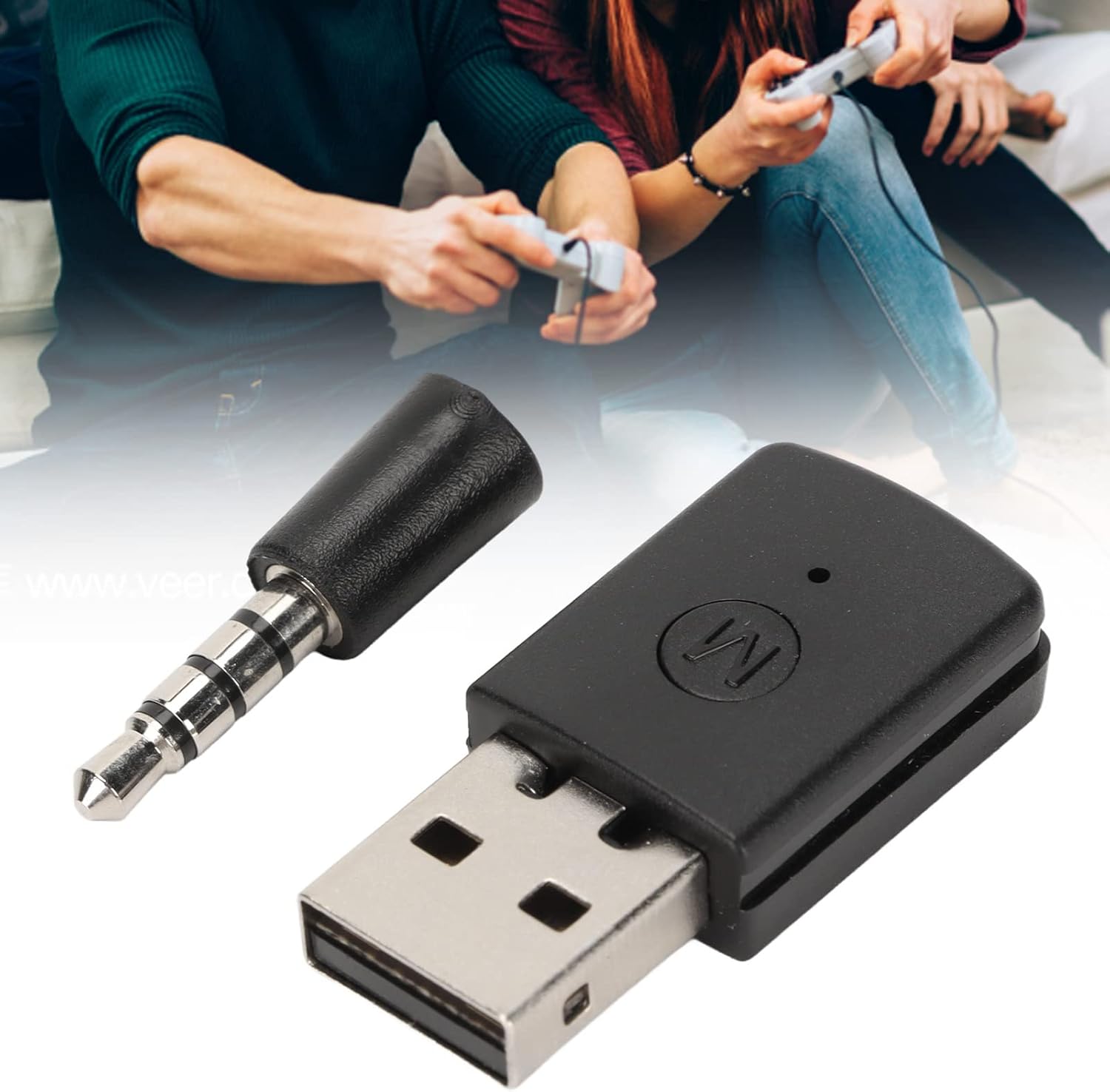
Image 3.1: The adapter connected to a gaming setup, illustrating its use for wireless audio.
4. Instruções de operação
The POCREATION Bluetooth USB Adapter Dongle can function as both a receiver and a transmitter:
- Modo receptor: When connected to a device that outputs sound (e.g., a PC), the adapter can receive audio signals from a Bluetooth-enabled headset or speaker. Ensure your audio device is in pairing mode and within the 33-foot range.
- Modo do transmissor: When connected to a host that supports USB sound, the dongle transmits the host's audio signal to a paired Bluetooth terminal device (e.g., headphones).
- Funcionalidade do microfone: If the 3.5mm plug is connected, you can use a compatible microphone for voice chat. For optimal performance, you can fix the microphone to a cable clip on your clothing to reduce noise.
5. Manutenção
To ensure the longevity and proper functioning of your adapter, follow these simple maintenance guidelines:
- Mantenha o adaptador seco e longe da umidade.
- Evite expor o adaptador a temperaturas extremas.
- Clean the adapter gently with a soft, dry cloth. Do not use liquid cleaners or abrasive materials.
- Guarde o adaptador em local seguro quando não estiver em uso para evitar danos físicos.
6. Solução De Problemas
If you encounter issues with your POCREATION Bluetooth USB Adapter Dongle, please refer to the following common solutions:
- No Sound/Cannot Connect:
- Ensure the USB adapter is securely plugged into a functional USB port.
- Verify that your audio device (headset, speaker) is powered on, charged, and in pairing mode.
- Confirm that the host device (PC, console) supports USB audio output.
- For gaming consoles, ensure the adapter is connected to the controller, as it may not function if connected directly to another machine.
- Check the audio output settings on your PC or console to ensure the USB audio device is selected.
- Microfone não funciona:
- Ensure the 3.5mm audio plug is fully inserted into the adapter and your microphone.
- Check the microphone input settings on your PC or console.
- Test the microphone with another device to rule out a microphone issue.
- Alcance limitado:
- Ensure there are no significant obstructions (walls, large metal objects) between the adapter and your audio device.
- Move closer to the adapter to confirm if the range improves.
- Avoid sources of strong electromagnetic interference.
7. Especificações
| Número do modelo | POCREATIONxysg3o7ad0 |
| Marca | POCREATION |
| Material | abdômen |
| Versão Bluetooth | 5.4 |
| Distância de transmissão | 33 pés (10 metros) |
| Dispositivos compatíveis | Gaming Consoles (e.g., PS5), PC |
| Usos específicos | Microphone, Audio Transmission/Reception |
| Tipo de conector | USB, Auxiliar (3.5 mm) |
| Peso do item | 0.882 onças |
| Dimensões da embalagem | 4.33 x 2.76 x 0.79 polegadas |
8. Garantia e Suporte
For warranty information and technical support, please refer to the documentation provided with your purchase or visit the official POCREATION website. Contact details for customer service are typically available on the product packaging or manufacturer's website.