
1. Introdução
The ULANZI U60 RGB Video Light is a versatile and portable LED lighting solution designed for photography and videography. Featuring 60 high color rendering LED beads, it offers 360° full-color adjustment, dimmable brightness from 0-100%, and color temperature control from 2500K to 9000K. Its compact design, built-in 2500mAh rechargeable battery, and multiple mounting options make it ideal for various creative lighting scenarios, including portraits, weddings, and vlogging.
2. Informações de segurança
- Não desmonte nem modifique o dispositivo. Modificações não autorizadas podem causar danos ou ferimentos.
- Mantenha o dispositivo longe de água, umidade e ambientes com alta umidade relativa do ar.
- Use only the provided or a certified Type-C charging cable.
- Avoid direct eye exposure to the light, especially at high brightness settings.
- Não exponha o dispositivo a temperaturas extremas ou à luz solar direta por períodos prolongados.
- Mantenha fora do alcance de crianças.
3. Produto acabadoview
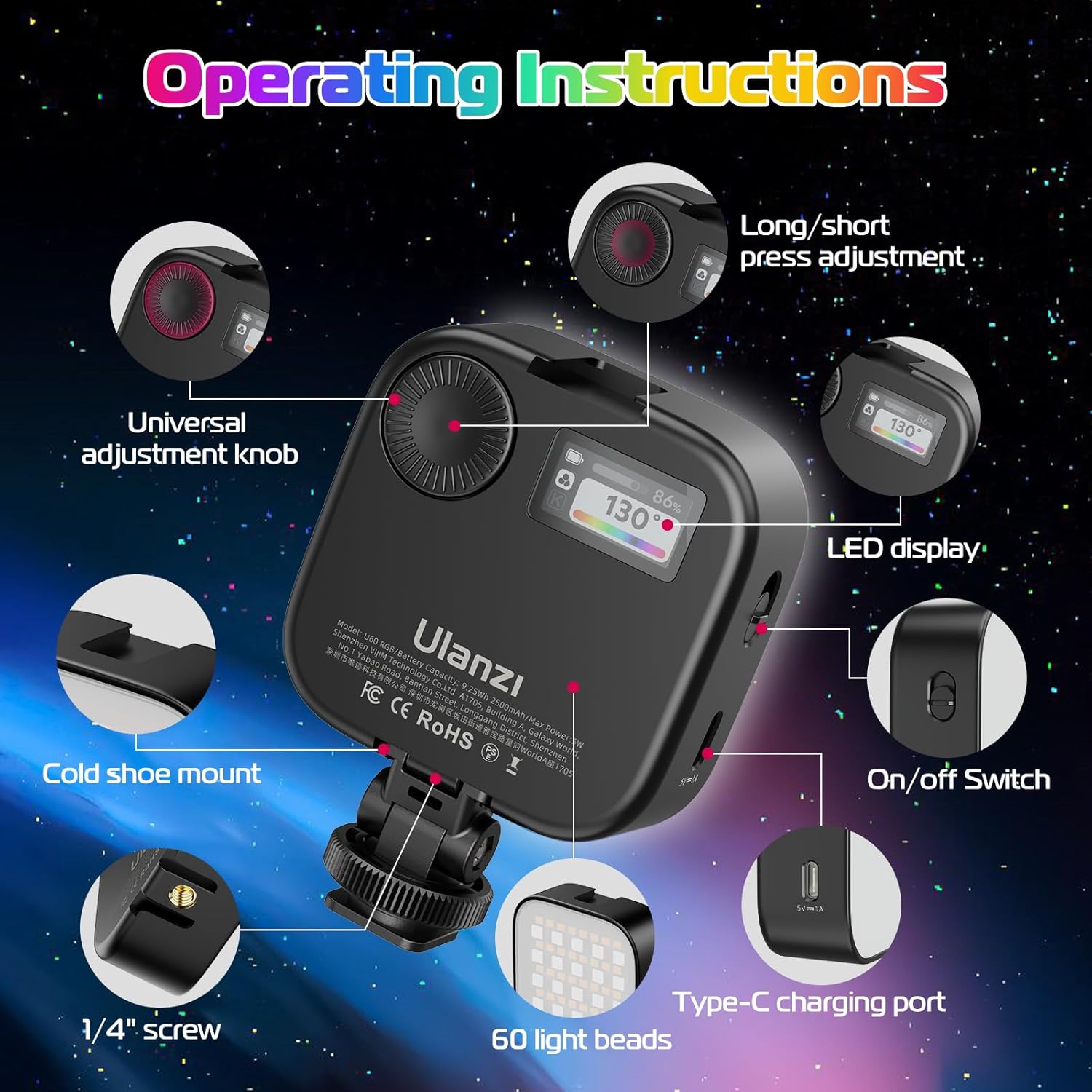
Figure 3.1: Key components of the ULANZI U60 RGB Video Light, including the universal adjustment knob, LED display, and charging port.
Componentes e controles:
- Universal Adjustment Knob: Used for navigating menus and adjusting parameters.
- Long/Short Press Adjustment: Controls different functions based on press duration.
- Telão LED: Shows current settings such as brightness, color temperature, and battery level.
- Interruptor liga/desliga: Liga ou desliga o dispositivo.
- Tipo-C Porta de Carregamento: Para carregar a bateria interna.
- 60 Light Beads: High-quality LED beads providing illumination.
- Montagem de sapata fria: For attaching the light to cameras or other accessories.
- Orifício para parafuso de 1/4": Standard mounting point for tripods and light stands.
4. Configuração
Carregamento inicial:
Before first use, fully charge the ULANZI U60 RGB Video Light. Connect the provided Type-C USB cable to the charging port on the device and plug the other end into a suitable USB power source (e.g., wall adapter, computer USB port). The LED display will indicate charging status.
Acessórios de fixação:

Figure 4.1: The ULANZI U60 RGB Video Light can be used with a quick release clip, cold shoe adapter, or mounted using its 1/4 inch screw.
- Clipe de liberação rápida: Attach the light to the quick release clip for use with smartphones, tablets, or laptops. Ensure the clip is securely fastened.
- Adaptador para sapata fria: Slide the cold shoe adapter into the cold shoe mount on your camera or DSLR.
- Parafuso de 1/4": For tripod or light stand mounting, screw the light onto any standard 1/4-inch screw thread.
5. Instruções de operação

Figure 5.1: Visual representation of the ULANZI U60's adjustable brightness, color temperature, and full RGB color spectrum.
Ligar/desligar:
Press and hold the On/Off Switch located on the side of the device to power it on or off.
Ajustando o brilho:
Rotate the Universal Adjustment Knob to increase or decrease the brightness from 0% to 100%. The current brightness level will be displayed on the LED screen.
Ajuste da temperatura da cor (modo CCT):
In CCT mode, rotate the Universal Adjustment Knob to change the color temperature from 2500K (warm) to 9000K (cold). This allows you to match ambient light or create specific moods.
Adjusting HUE (RGB Mode):
In RGB mode, rotate the Universal Adjustment Knob to adjust the hue from 0° to 359°, providing access to the full spectrum of colors.
Modos de comutação:
Short press the Universal Adjustment Knob to cycle through different modes (e.g., CCT, HSI, Scene Effects).
6. Carregamento

Figure 6.1: The ULANZI U60 features a built-in 2500mAh battery and Type-C charging, offering extended use.
- Capacidade da bateria: The ULANZI U60 RGB Video Light is equipped with a built-in 2500mAh rechargeable lithium battery.
- Tempo de carregamento: Uma carga completa normalmente leva cerca de 4 horas.
- Duração da bateria: At maximum brightness, the light can operate for up to 90 minutes. At minimum brightness, it can last up to 10 hours.
- Porta de carregamento: The device uses a Type-C charging port.
- Use durante o carregamento: The light can be used while it is charging, ensuring continuous operation without interruption.
7. Opções de montagem

Figure 7.1: The ULANZI U60 offers flexible mounting solutions for diverse shooting environments.
- Clipe de liberação rápida: The included quick release clip allows you to attach the light to various devices such as iPhones, Android cellphones, iPads, tablets, and laptops. The maximum clip width is 0.78 inches (2cm), providing a stable and secure attachment.
- 1/4-inch Screw: The light is equipped with a standard 1/4-inch screw hole, making it compatible with cameras, tripods, microphone mounts, and light stands.
- Adaptador para sapata fria: Utilize the quick release cold shoe adapter to mount the light directly onto DSLR cameras or camcorders.
- Magnetic Attraction Design: The back of the U60 features a magnetic design, allowing it to be adsorbed onto most metal surfaces. This provides convenient and versatile placement options for setting up your scene easily.
8. Scene Lighting Effects

Figure 8.1: The ULANZI U60 offers 18 pre-programmed scene lighting effects for creative applications.
The ULANZI U60 RGB Video Light includes 18 built-in scene lighting effects to enhance your creative projects. These effects can simulate various real-world lighting scenarios:
- Carro de polícia
- TV
- green flash
- Vela
- HSI lento
- Ambulância
- Blue Flash
- Estroboscópio
- HSI rápido
- Carro de Bombeiros
- Emergência
- Raio
- Fogos de artifício
- Flash vermelho
- Lâmpada de falha
- pulsante
- Festa
- Paparazzi
To activate and cycle through these effects, refer to the operating instructions on your device's LED display.
9. Manutenção
- Limpeza: Use um pano macio e seco para limpar a superfície da lâmpada. Não use produtos de limpeza abrasivos ou solventes.
- Armazenar: Guarde o dispositivo em local fresco e seco, longe da luz solar direta e de temperaturas extremas quando não estiver em uso.
- Cuidados com a bateria: To prolong battery life, avoid completely depleting the battery frequently. Charge the device regularly, even if not in active use.
10. Solução De Problemas
- A luz não acende:
- Ensure the battery is charged. Connect the light to a power source using the Type-C cable.
- Press and hold the On/Off switch for a few seconds. - Light Flickering or Unstable Output:
- Check the battery level; a low battery can cause flickering.
- Ensure the charging cable is securely connected if operating while charging.
- If the issue persists, try resetting the device by turning it off and on again. - Controles não respondem:
- Power off the device and then power it back on to reset the controls.
- Ensure no debris is obstructing the adjustment knob or buttons. - Light Not Holding Charge:
- The battery may be at the end of its lifespan. Contact ULANZI customer support for assistance.
11. Especificações
| Recurso | Especificação |
|---|---|
| Número do modelo | U60 |
| Dimensões do produto | 2.7 x 2.68 x 0.98 polegadas |
| Peso do item | 8.1 onças |
| Capacidade da bateria | Bateria de lítio recarregável 2500mAh |
| Duração da bateria (brilho máximo) | Até 90 minutos |
| Duração da bateria (brilho mínimo) | Até 10 horas |
| Faixa de temperatura de cor | 2500K - 9000K |
| Ajuste de brilho | Regulável de 0% a 100% |
| Ajuste de MATIZ | 0° - 359° Full Color |
| IRC (Índice de Reprodução de Cor) | 95+ |
| Ângulo de Iluminação | 120° |
| Brilho Máximo | 400 LUX a 0.5 m |
| Porta de carregamento | USB Tipo C |
| Fabricante | ULANZI |
12. Lista de embalagem

Figure 12.1: All items included in the ULANZI U60 RGB Video Light package.
The following items are included in your ULANZI U60 RGB Video Light package:
- 1 x ULANZI U60 RGB Video Light
- 1 x Quick Release Clip
- 1 x Adaptador de Sapata Fria
- 1 x cabo de carregamento tipo C
- 1 x Manual do Usuário
- 1 x caixa de embalagem
13. Garantia e Suporte
For warranty information, technical support, or any inquiries regarding your ULANZI U60 RGB Video Light, please visit the official ULANZI website or contact their customer service directly. You can also find more information and support resources at the ULANZI Store on Amazon: