
Introdução
This manual provides detailed instructions for the EKSA H1 Plus Bluetooth Trucker Headset. Please read thoroughly to ensure proper setup, operation, and maintenance of your device. This headset is designed for clear communication in various environments, featuring advanced noise-cancelling technology and versatile connectivity options.
Conteúdo da embalagem
- H1 Plus Headset
- Estojo protetor
- Replacement Ear Pad (Mesh breathable)
- Cabo de carregamento tipo C
- USB Dongle (PC Adapter)
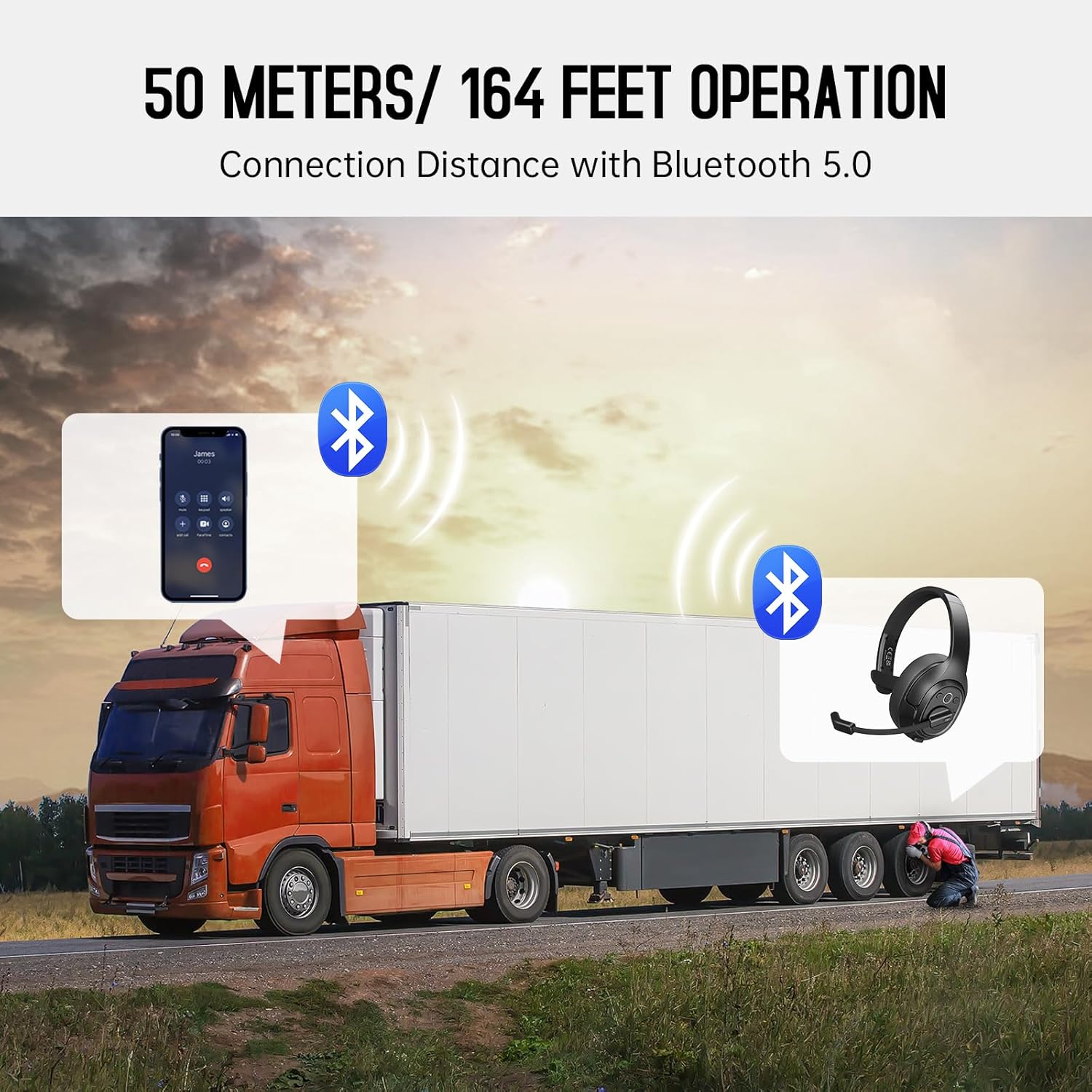
Image: The EKSA H1 Plus headset, USB dongle, and charging cable as typically found in the product packaging.
Configurar
1. Carregando o fone de ouvido
Before first use, fully charge the headset. Connect the provided Type-C charging cable to the headset's charging port and the other end to a USB power source. The charging indicator will show the charging status. A full charge takes approximately 1.5 hours.

Image: Visual representation of the headset's battery life and charging duration.
2. Ligar / desligar
Press and hold the Multi-Function Button (MFB) for 3 seconds to power on or off the headset. A voice prompt will indicate the status.
3. Bluetooth Pairing (for Mobile Devices)
- Verifique se o fone de ouvido está desligado.
- Press and hold the MFB for 5-7 seconds until the LED indicator flashes blue and red alternately, indicating pairing mode.
- On your mobile device, enable Bluetooth and search for "EKSA-H1PLUS".
- Select "EKSA-H1PLUS" to connect. The LED will turn solid blue once connected.
4. Connecting with USB Dongle (for PC/Mac without Bluetooth)
- Conecte o dongle USB a uma porta USB disponível no seu computador.
- Ligue o fone de ouvido. Ele tentará se conectar automaticamente ao dongle.
- The LED on the dongle and headset will turn solid blue when connected.
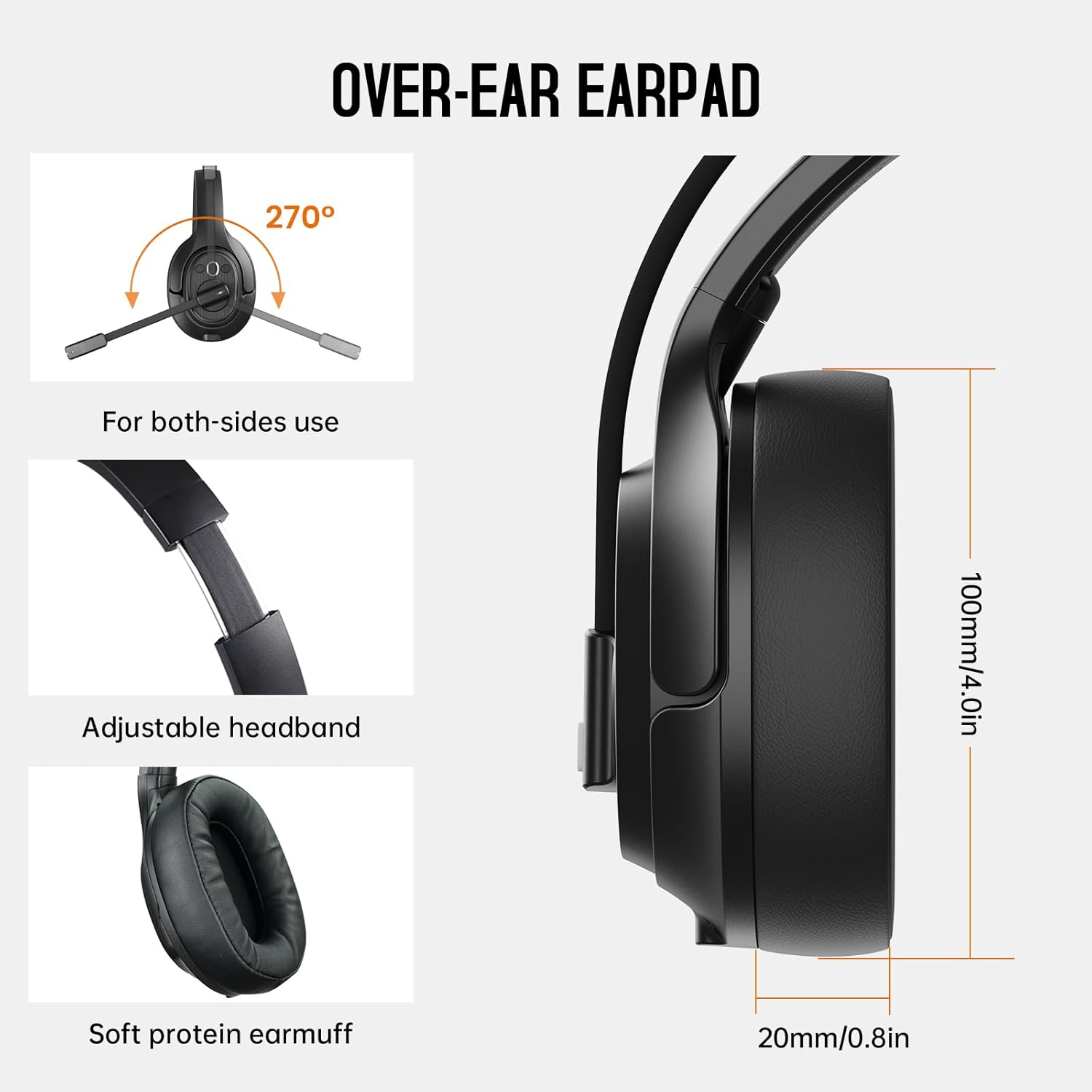
Image: The headset demonstrating simultaneous connection to a phone via Bluetooth and a laptop via USB dongle.
Instruções de operação
1. Controlesview
The headset features intuitive controls located on the earcup:
- Botão multifuncional (MFB): Ligar/desligar, reproduzir/pausar música, atender/encerrar chamadas.
- Aumentar volume (+): Aumentar o volume.
- Volume baixo (-): Diminuir volume.
- Botão Mudo: Ative/desative o som do microfone durante as chamadas.
- AI Assistant Button: Ative o assistente de voz do seu dispositivo.

Imagem: Close-up view of the headset's control buttons and ports.
2. Fazendo e recebendo chamadas
- Atender/encerrar chamada: Pressione rapidamente o MFB.
- Rejeitar chamada: Pressione e segure o MFB por 2 segundos.
- Rediscar último número: Pressione duas vezes o MFB.
- Silenciar/ativar microfone: Short press the dedicated mute button on the microphone arm.
3. Microphone and Wearing Adjustments
The headset is designed for comfort and versatility:
- Faixa de cabeça ajustável: Ajuste a faixa de cabeça estendendo-a ou retraindo-a para que fique confortável.
- Microfone giratório: The microphone arm can rotate 270 degrees, allowing it to be worn on either the left or right ear. Position the microphone close to your mouth for optimal voice pickup.
- Fones de ouvido confortáveis: The over-ear design with soft ear pads ensures comfort during extended use.

Image: Features illustrating the ergonomic design of the headset, including adjustable headband and rotatable microphone.
4. Environmental Noise Cancelling (ENC) Microphone
The AI-Powered ENC microphone filters out up to 99.8% of ambient noise, ensuring your voice is transmitted clearly even in noisy environments like call centers, construction sites, or trucks.

Image: A visual explanation of the ENC microphone's function, demonstrating noise reduction.
5. Conexão de múltiplos dispositivos
The headset supports simultaneous connection to two different devices, such as a smartphone and a computer, allowing seamless switching between calls and other audio sources.

Image: Illustration of the headset's ability to connect to two devices concurrently.
6. Extended Wireless Range
Utilizing Bluetooth 5.0 technology, the headset offers a stable wireless connection up to 30 meters (99 feet). In unobstructed environments, the range can extend up to 50 meters (164 feet).

Image: Visualizing the headset's long-range wireless capabilities in an outdoor setting.
Manutenção
- Limpeza: Use um pano macio e seco para limpar o fone de ouvido. Evite usar produtos químicos agressivos ou materiais abrasivos.
- Substituição das almofadas auriculares: The headset comes with a replacement mesh breathable ear pad. To replace, gently twist and pull off the existing ear pad, then align and press the new ear pad into place.
- Armazenar: Store the headset in its protective case when not in use to prevent damage.

Image: Demonstrating the detachable ear pads and the two types included for different comfort levels.
Solução de problemas
| Problema | Solução |
|---|---|
| O fone de ouvido não liga. | Ensure the headset is fully charged. Press and hold the MFB for 3 seconds. |
| Não foi possível emparelhar via Bluetooth. | Ensure the headset is in pairing mode (flashing blue/red LED). Turn off and on Bluetooth on your device. Move closer to the device. |
| Sem som ou com qualidade de áudio ruim. | Check volume levels on both the headset and connected device. Ensure the headset is selected as the audio output device. Re-pair the headset. |
| O microfone não está funcionando. | Ensure the microphone is not muted. Check microphone settings on your connected device. Adjust microphone position. |
| USB dongle not connecting. | Ensure the dongle is fully inserted. Try a different USB port. Restart your computer. |
Especificações
| Recurso | Detalhe |
|---|---|
| Nome do modelo | EKSA-H1PLUS |
| Tecnologia de Conectividade | Sem fio (Bluetooth 5.0) |
| Versão Bluetooth | 5.0 |
| Alcance Bluetooth | 30 Meters (99 feet), up to 50 Meters (164 feet) unobstructed |
| Microfone | AI-Powered Environmental Noise Cancelling (ENC) |
| Duração da bateria (tempo de conversação) | Até 30 horas |
| Duração da bateria (tempo de reprodução de música) | Até 57 horas |
| Tempo de carregamento | Aproximadamente 1.5 horas |
| Formato do fone de ouvido | Sobre a orelha |
| Tipo de controle | Volume Control, Mute, AI Assistant |
| Peso | 1.01 libras (aproximadamente 458g) |
Vídeos oficiais do produto
EKSA H1 Plus Wireless Bluetooth Headset Overview
Vídeo: Um oficial sobreview of the EKSA H1 Plus Wireless Bluetooth Headset, highlighting its key features and design.
EKSA H1Plus Bluetooth Trucker Headset Features
Video: A detailed look at the features and benefits of the EKSA H1Plus Bluetooth Trucker Headset.
Garantia e Suporte
EKSA products are designed for durability and performance. For warranty information and customer support, please refer to the official EKSA website or contact their customer service directly. Optional protection plans are available for extended coverage.
Para obter mais ajuda, visite: www.eksa.net


