
1. Introdução
This manual provides essential information for the safe and efficient operation, maintenance, and troubleshooting of your smartGyro K2 PRO Black electric scooter. Please read this manual thoroughly before using the scooter to ensure proper handling and to maximize its lifespan.
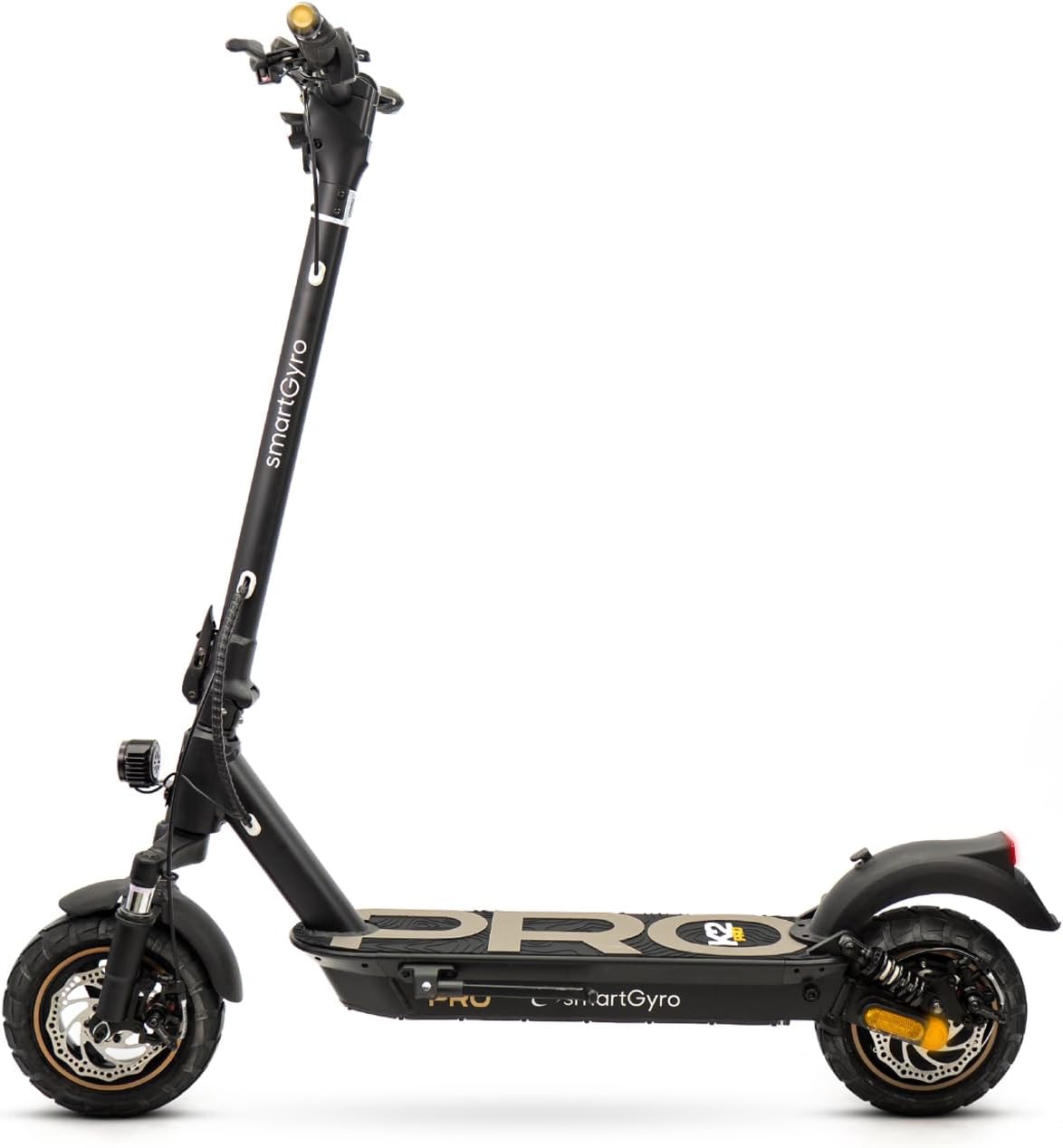
Figure 1: smartGyro K2 PRO Black Electric Scooter
2. Instruções de segurança
Your smartGyro K2 PRO Black is a powerful electric scooter. Always prioritize safety during operation. Adhere to local regulations and wear appropriate safety gear, including a helmet and protective pads.
- Use sempre capacete e outros equipamentos de proteção (joelheiras, cotoveleiras).
- Certifique-se de que a scooter esteja totalmente carregada e que todos os componentes estejam seguros antes de cada uso.
- Familiarize yourself with local traffic laws and regulations for electric scooters.
- Evite andar de bicicleta em condições climáticas adversas (chuva forte, neve, gelo).
- Não exceda a capacidade máxima de carga de 110 kg.
- Mantenha uma velocidade segura e uma distância segura de outros veículos e pedestres.
3. Configuração e Preparação Inicial
3.1 Desdobrando a Scooter
The smartGyro K2 PRO Black features a 2.0 generation folding system for easy transport and storage. To unfold:
- Coloque a scooter em uma superfície plana.
- Release the folding mechanism latch located on the stem.
- Carefully raise the handlebar stem until it locks securely into place. Ensure the locking mechanism is fully engaged.

Figure 2: Scooter dimensions and folding mechanism
3.2 Carregando a bateria
Before first use, fully charge the scooter's battery. The lithium battery has a capacity of 15,000 mAh, providing an autonomy of approximately 60 km.
- Localize a porta de carregamento da scooter.
- Connect the charger to the charging port, then plug it into a power outlet.
- The indicator light on the charger will show the charging status.
- Depois de totalmente carregado, desconecte o carregador.
The battery incorporates OSP technology with a triple security system and BMS for enhanced safety and longevity.
4. Operando a Scooter
4.1 Ligar/Desligar e Visor
The smartGyro K2 PRO Black features a multifunction front display providing essential ride information.

Figure 3: Multifunction Display
- Ligar: Press and hold the power button on the display.
- Desligar: Mantenha pressionado o botão liga/desliga até que a tela desligue.
- The display shows partial and total mileage, current gear, and speed.
4.2 Modos de Condução
Select from 4 driving modes directly from the display: Walk, Eco, Comfort, and Sport. Choose the mode that best suits your riding environment and desired performance.
4.3 Sistema de freios
The scooter is equipped with a triple braking system for optimal safety and control:
- Freio a disco dianteiro
- Freio a disco traseiro
- Regenerative braking: Converts braking energy into electricity to recharge the battery, extending autonomy.

Figura 4: Sistema de Frenagem Tripla
4.4 Sistema de Iluminação
For enhanced visibility and safety, the scooter includes a comprehensive lighting system:
- Double high-luminosity front light.
- Luz de freio traseira.
- Position lights.
- Turn signals integrated into the handlebars.
4.5 SmartGyro App Connectivity
Connect your scooter to the smartGyro mobile application for additional features:
- Remote locking/unlocking of the scooter.
- Access to ride information (distance, battery status).
- Customization of settings.

Figure 5: SmartGyro App Interface
5. Principais características
5.1 Powerful Motor
The smartGyro K2 PRO Black is equipped with a 48V Brushless motor, offering a nominal power of 900W and a maximum power of 1000W. This motor provides strong performance, capable of ascending inclines with a high degree of gradient.
5.2 Advanced Suspension System
Experience a smooth ride with the scooter's front and rear long-travel suspensions. These are designed to absorb shocks and vibrations, making it ideal for both urban environments and off-road terrains.

Figure 6: Dual Suspension System
5.3 Durable Wheels
The scooter features 10-inch Tubeless pneumatic wheels. These robust and stable wheels are designed for various terrains, providing excellent traction on both smooth and uneven surfaces.
5.4 DGT Certification
The smartGyro K2 PRO Black holds a VMP (Personal Mobility Vehicle) certificate, ensuring compliance with current legislation for safe mobility.
6. Manutenção
Regular maintenance is crucial for the longevity and performance of your electric scooter.
- Pressão dos pneus: Regularly check and maintain the recommended tire pressure for optimal performance and safety.
- Inspeção dos freios: Periodically inspect the disc brakes for wear and tear. Adjust or replace brake pads as needed.
- Limpeza: Limpe a scooter com anúncioamp tecido. Evite usar jatos de água de alta pressão diretamente sobre componentes eletrônicos.
- Cuidados com a bateria: Store the scooter in a cool, dry place. If storing for extended periods, ensure the battery is charged to about 50-70% and recharge it every few months.
- Mecanismo de dobramento: Keep the folding mechanism clean and lubricated to ensure smooth operation.
7. Solução De Problemas
If you encounter any issues with your smartGyro K2 PRO Black, refer to the following common troubleshooting tips:
| Problema | Possível causa | Solução |
|---|---|---|
| A scooter não liga. | Bateria fraca; conexões soltas | Carregue a bateria; verifique todas as conexões dos cabos. |
| Reduced range/autonomy | Under-inflated tires; heavy load; riding uphill frequently | Check tire pressure; reduce load; use Eco mode. |
| Os freios parecem fracos. | Pastilhas de freio gastas; cabo de freio solto | Inspecione e substitua as pastilhas de freio; ajuste a tensão do cabo de freio. |
| Ruídos incomuns | Loose components; debris in wheels/brakes | Tighten all screws; clean wheels and brake area. |
For issues not listed here or if solutions do not resolve the problem, please contact smartGyro customer support or an authorized service center.
8. Especificações técnicas
| Recurso | Especificação |
|---|---|
| Marca | SMARTGYRO |
| Número do modelo | K2 PRO Black |
| Potência do motor (nominal) | 900 W |
| Motor Power (Maximum) | 1000 W, 48 V |
| Capacidade da bateria | Bateria de lítio de 15,000 mAh |
| Autonomia máxima | Aproximadamente. 60 km |
| Sistema de freio | Front Disc, Rear Disc, Regenerative |
| Rodas | 10-inch Tubeless Pneumatic |
| Suspensão | Front and Rear Long-Travel |
| Mostrar | Multifunction Digital Display |
| Luzes | Double Front, Rear Brake, Position, Handlebar Turn Signals |
| Mecanismo de dobramento | 2.0 Generation Secure Folding System |
| Conectividade | SmartGyro Mobile App (Remote Lock, Info) |
| Certificação | DGT VMP Certified |
| Dimensões (desdobradas) | 126 x 62.5 x 125 cm |
| Peso | 20 kg |
| Capacidade Máxima de Carga | 110 kg |
| Material da estrutura | Liga de aço |
9. Vídeos de Produtos
Vídeo 1: Acabouview of smartGyro K2 PRO Black features, including power, autonomy, and suspension.
Video 2: Demonstration of the smartGyro K2 PRO Black's design, braking system, and DGT certification.
10. Garantia e Suporte
smartGyro offers comprehensive support for its products. Your smartGyro K2 PRO Black comes with a circulation certificate redeemable online. For any service needs, smartGyro provides an extensive network of authorized workshops throughout Spain, ensuring quick and direct after-sales service.
Please refer to the official smartGyro webConsulte o site ou a documentação de compra para obter os termos e condições específicos da garantia.