
Introdução
This manual provides detailed instructions for the safe and effective use of your MiLESEEY D5 70M-BT Laser Distance Meter. This device is designed for precise distance measurements up to 70 meters, featuring an electronic angle sensor, various measurement modes, and smartphone application connectivity for enhanced functionality.
Informações de segurança
Leia e compreenda todas as instruções de segurança antes de operar o dispositivo. O não cumprimento dessas instruções pode resultar em exposição à radiação laser, choque elétrico, incêndio ou ferimentos graves.
- Laser Class II Product: This device emits Class II laser radiation. Do not stare into the laser beam. Avoid direct eye exposure.
- Tipo de laser: 635nm <1mW.
- Não tente modificar ou desmontar o dispositivo. Os reparos devem ser realizados somente por pessoal de serviço autorizado.
- Mantenha o dispositivo fora do alcance de crianças.
- Do not operate the device in explosive atmospheres or near flammable liquids and gases.
- Use only specified batteries (2 x 1.5V AAA alkaline batteries).
Conteúdo da embalagem
Verifique se todos os itens estão presentes na embalagem:
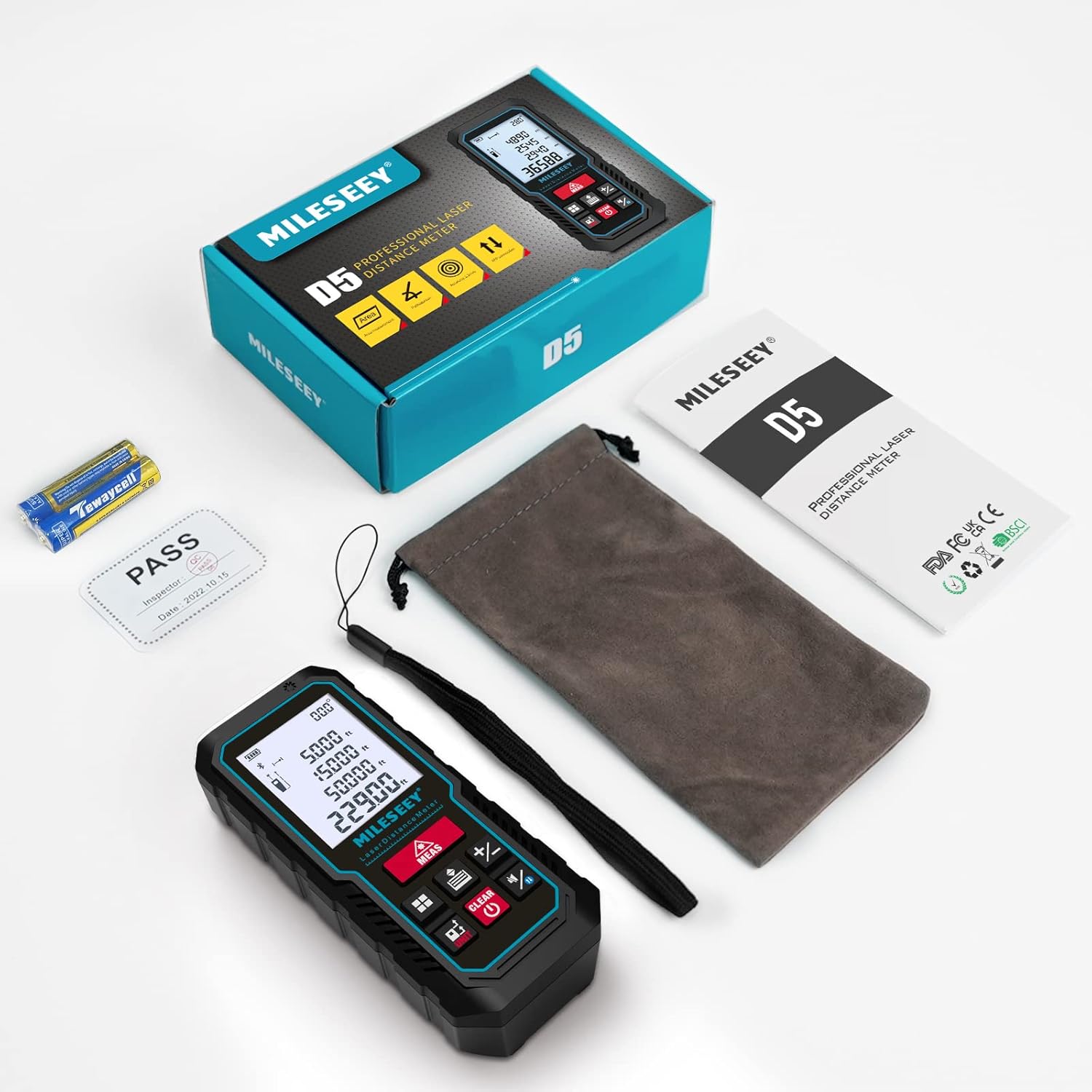
- 1 x MiLESEEY D5 Laser Distance Meter
- 2 pilhas AAA de 1.5 V
- 1 x Manual do Usuário
- 1 x Bolsa portátil
- 1 x Alça de Mão

Produto acimaview
The MiLESEEY D5 70M-BT features a robust design with an easy-to-read LCD display and intuitive controls, offering high accuracy for various measurement tasks.
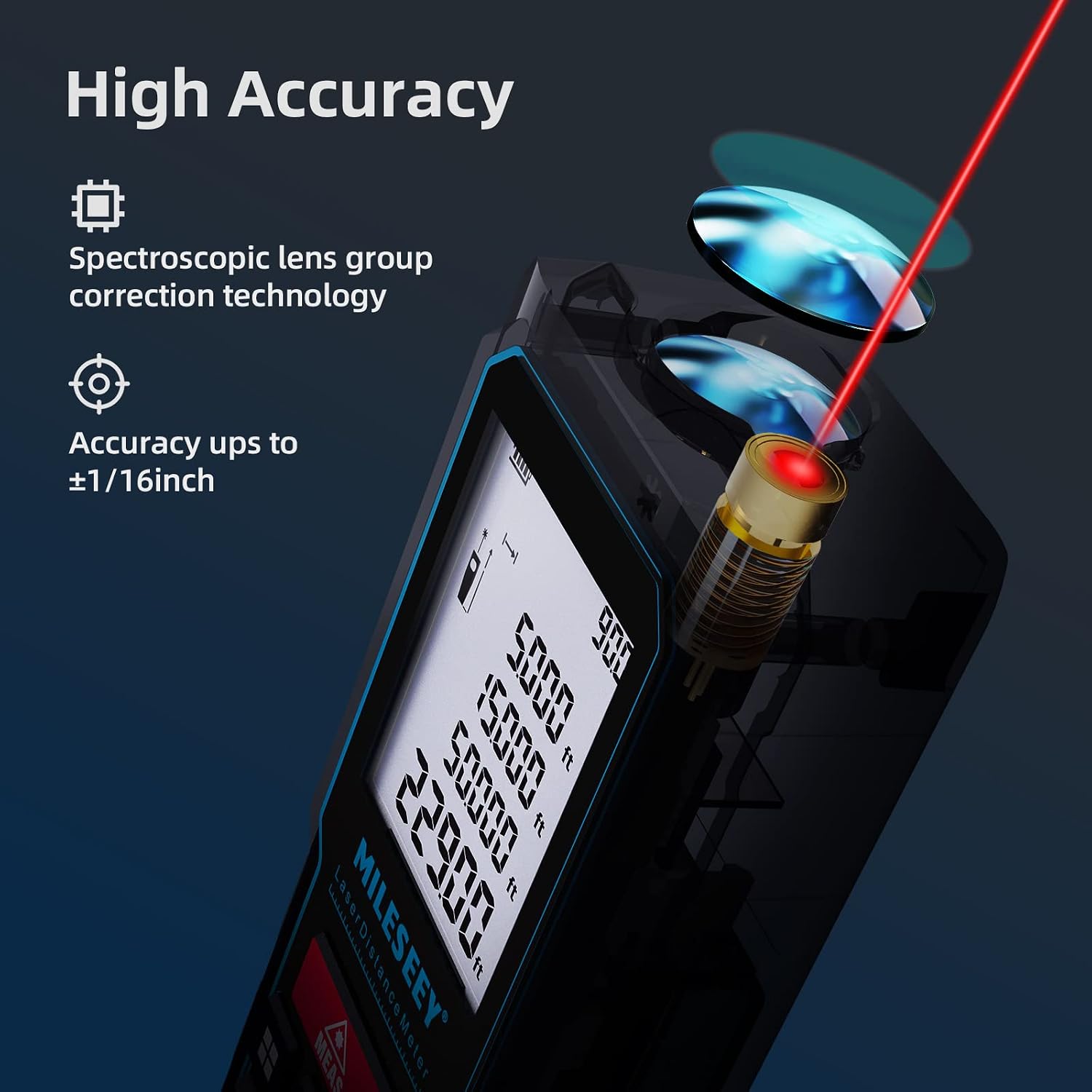
Os principais componentes incluem:
- Emissor/Receptor de Laser: Located at the top for accurate measurements.
- Tela LCD: 2-inch screen with backlight for clear visibility of measurements and settings.
- Measurement Button (MEAS): Initiates measurements.
- Botões de função: For selecting measurement modes (distance, area, volume, Pythagorean, etc.).
- Botão da unidade (UNIT): Altera as unidades de medida (m/pé/pol/pé+pol).
- Botão de ponto de referência: Switches between front and rear reference points for measurement.
- Clear/Off Button (CLEAR/OFF): Clears current measurement or powers off the device.
Configurar
Instalação da bateria
The device requires two 1.5V AAA alkaline batteries. Ensure correct polarity when inserting the batteries.
- Abra a tampa do compartimento da bateria na parte traseira do dispositivo.
- Insert two AAA batteries, matching the positive (+) and negative (-) terminals as indicated.
- Feche bem a tampa do compartimento da bateria.
Ligar/Desligar
- Para ligar, pressione o botão MEDIDAS botão.
- Para desligar, pressione e segure o LIMPAR button for a few seconds, or the device will automatically shut off after 180 seconds of inactivity to conserve energy.
Instruções de operação
Medição básica de distância
For a single distance measurement:
- Aponte o laser para o alvo.
- Pressione o MEDIDAS button once. The measurement will be displayed on the screen within 0.5 seconds.

Alterando Unidades e Ponto de Referência
The device supports multiple units and reference points.
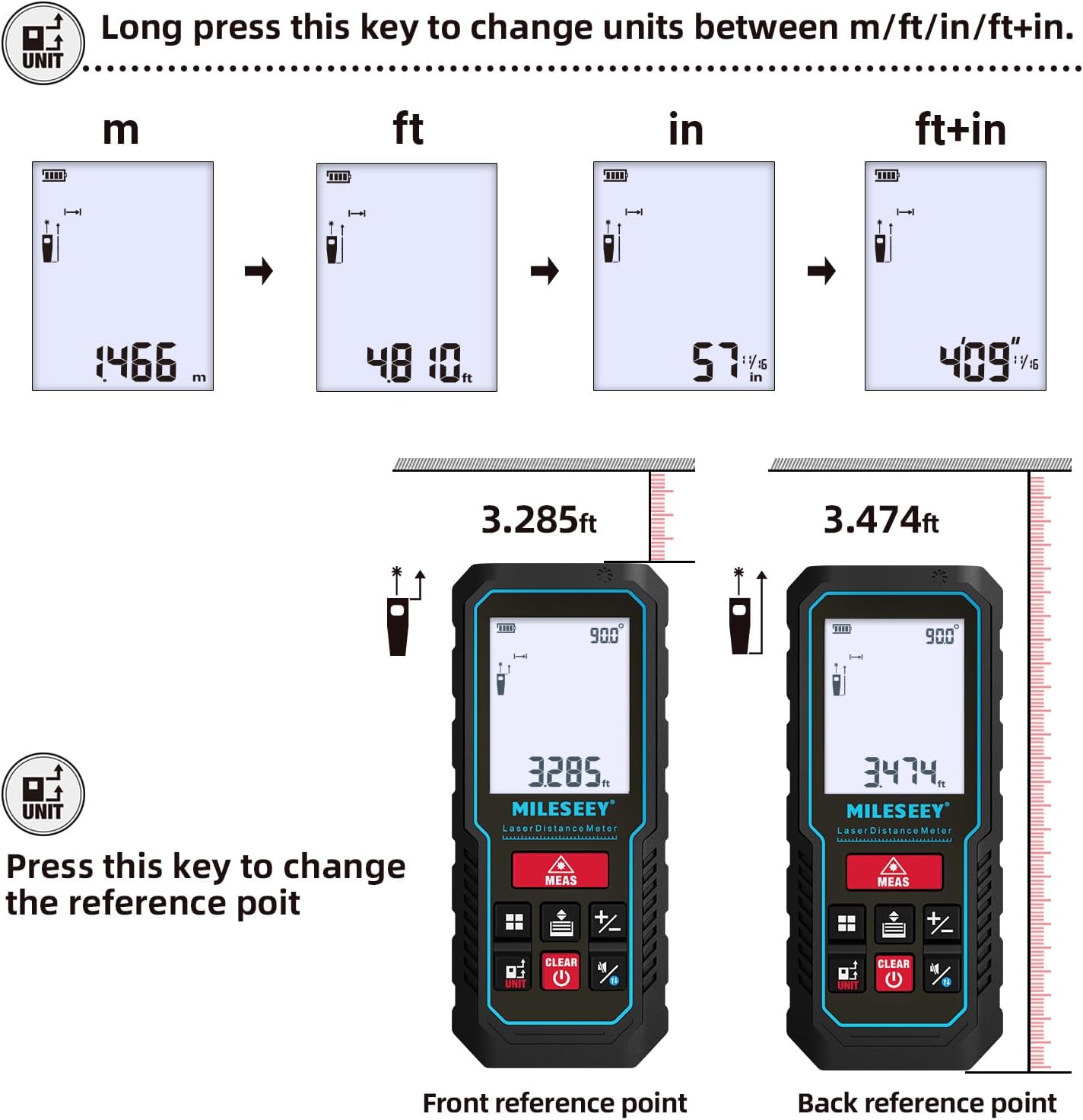
- Conversão de unidades: Pressione e segure o UNIDADE button to cycle through units: meters (m), feet (ft), inches (in), and feet + inches (ft+in).
- Ponto de referência: Pressione o UNIDADE button briefly to switch the measurement reference point between the front edge and the rear edge of the device.
Modos de Medição
The MiLESEEY D5 offers various measurement functions:
- Medição Contínua: For tracking distances as you move the device.
- Medição de área: Calculates the area of a surface (length x width).
- Medição de Volume: Calculates the volume of a space (length x width x height).
- Pythagorean Method (2-point and 3-point): Indirect measurement for heights or distances where direct measurement is not possible.
- Adição/Subtração: Add or subtract measurements.
- Nivelamento automático: Automatically calculates horizontal distance.
- Altura automática: Automatically calculates vertical height.


Smartphone App Connectivity (Smart Life App)
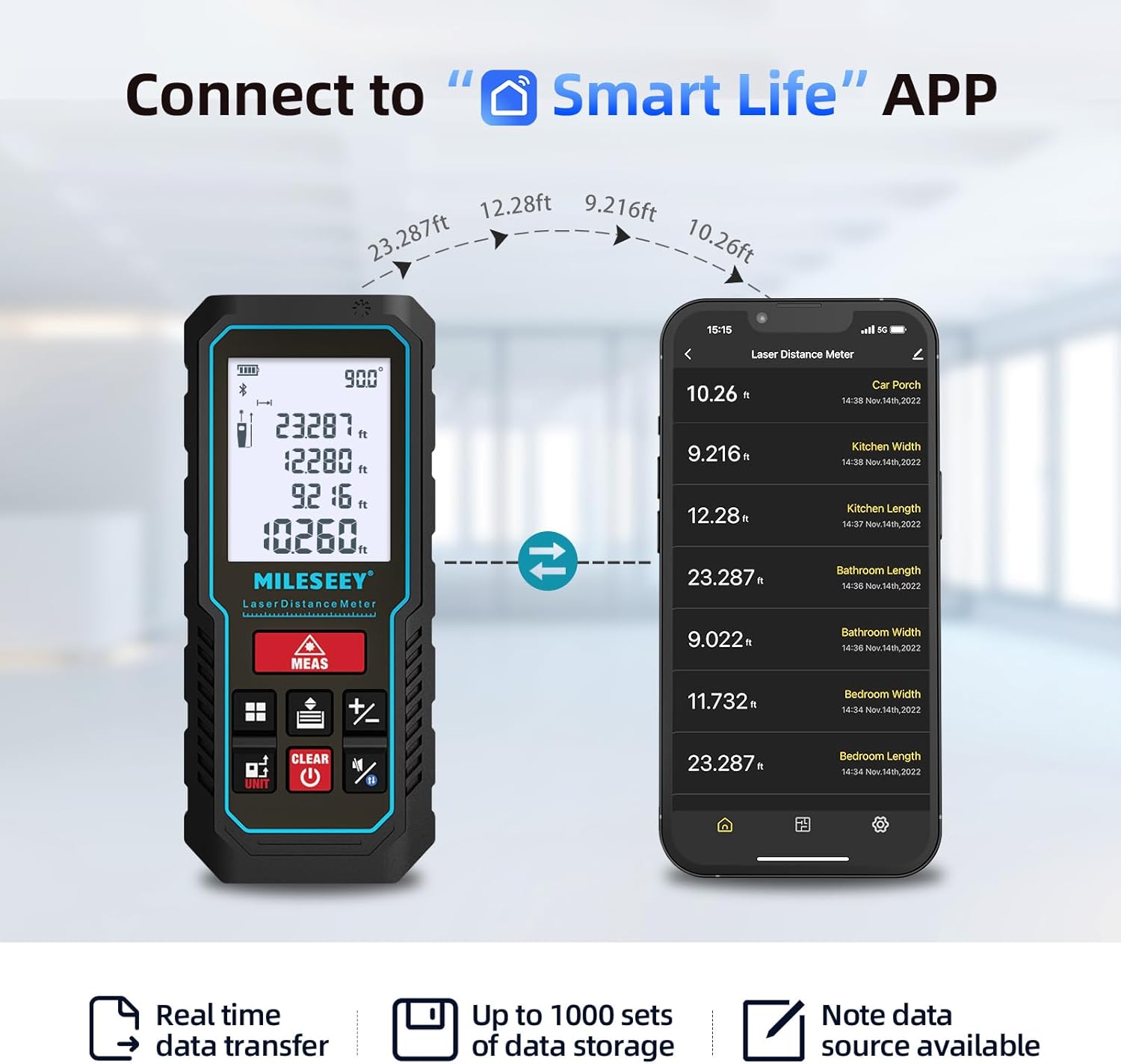
The MiLESEEY D5 70M-BT can connect wirelessly to your smartphone via the free "SMART LIFE" app, allowing for real-time data transfer, storage, and advanced functions.
- Download the "SMART LIFE" app from your device's app store (available on Google Play and Apple App Store).
- Enable Bluetooth on your smartphone and open the "SMART LIFE" app.
- Follow the in-app instructions to pair your MiLESEEY D5 device.
- Once connected, you can document measurements, create floor plans by drawing on photos or grids, and store up to 1000 sets of data.


Data Records and Mute Mode
- The device stores up to 30 data records, which can be recalled for review and calculation.
- A mute mode is available for quiet operation in sensitive environments.

Manutenção
A manutenção adequada garante a longevidade e a precisão do seu dispositivo.
- Limpeza: Limpe o dispositivo com um pano macio, damp pano. Não use produtos de limpeza abrasivos ou solventes.
- Armazenar: Store the device in its portable pouch in a cool, dry place when not in use. Remove batteries if storing for extended periods.
- Proteção: The device has an IP54 rating, making it splash-resistant and dust-proof. Avoid submerging it in water. It also features 1-meter drop resistance.

Solução de problemas
If you encounter issues with your MiLESEEY D5, refer to the following common problems and solutions:
| Problema | Possível causa | Solução |
|---|---|---|
| O dispositivo não liga | Baterias fracas ou descarregadas; instalação incorreta da bateria. | Replace batteries with new 1.5V AAA alkaline batteries. Ensure correct polarity. |
| Medidas imprecisas | Obstruction in laser path; unstable measuring surface; extreme temperature changes; dirty lens. | Ensure a clear path for the laser. Measure on a stable surface. Allow device to acclimate to ambient temperature. Clean the lens with a soft cloth. |
| Cannot connect to Smart Life App | Bluetooth is off; app not installed; device not in pairing mode. | Ensure Bluetooth is enabled on your phone. Download and install the "SMART LIFE" app. Follow app instructions for pairing. |
| Mensagem de "Erro" no visor | Measurement out of range; strong light interference; target surface not reflective enough. | Ensure target is within 0.16m - 70m range. Avoid measuring in direct sunlight or strong light. Use a reflective target plate if necessary. |
Especificações
| Recurso | Detalhe |
|---|---|
| Marca | Mileseey |
| Número do modelo | D5 (70M-BT) |
| Faixa de medição | 0.16 m - 70 m |
| Precisão | ±2 mm |
| Aula de Laser | Classe II |
| Tipo de laser | 635nm <1mW |
| Mostrar | LCD de 2 polegadas com retroiluminação |
| Electronic Angle Sensor | Yes, ±0.3° accuracy |
| Funções de Medição | Distance, Continuous, Area, Volume, Pythagorean (2/3-point), Addition/Subtraction, Auto Level, Auto Height |
| Unidades | m / pés / pol / pés + pol |
| Registros de dados | 30 (on device), up to 1000 (via app) |
| Conectividade | Bluetooth (Smart Life App) |
| Fonte de energia | 2 x 1.5V AAA Alkaline Batteries |
| Desligamento automático | 180 segundos de inatividade |
| Classificação IP | IP54 (Splash-resistant, Dust-proof) |
| Resistência à queda | 1 metro |
| Material | Acrilonitrila Butadieno Estireno (ABS) |
| Dimensões (C x L x A) | 15.2L x 10.1L x 4.8H cm |
| Peso do item | 220 gramas |
Garantia e Suporte
MiLESEEY provides comprehensive support for its products.
- Garantia: The device comes with a 12-month warranty.
- Garantia de devolução de dinheiro: É oferecida uma garantia de reembolso de 90 dias.
- Suporte estendido: 2 years of assistance after registration and lifetime technical support from MILESEEY.
- For technical assistance or warranty claims, please contact MILESEEY customer service through their official channels or the retailer where the product was purchased.