1. Introdução
This manual provides essential information for the installation, operation, and maintenance of your Redragon RGPS-650W 80+ Gold 650 Watt ATX Fully Modular Power Supply. Please read this manual thoroughly before installation and retain it for future reference. This power supply unit (PSU) is designed to deliver stable and efficient power to your personal computer system.
2. Recursos do Produto
- Certificação 80 Plus Gold: Ensures high energy efficiency, reduced heat generation, and lower operating noise.
- Capacitores 100% japoneses: Built for enhanced reliability, durability, and stable power delivery.
- Ventilador no modo RPM zero: The cooling fan operates only when the internal temperature reaches 60°C, providing silent operation under low loads.
- Tamanho compacto de 160 mm: Designed for broad chassis compatibility and improved cable management space.
- Iluminação RGB: Features up to 9 RGB modes with 26 selected colors to customize your PC's aesthetic.
- Circuitos avançados: Utilizes LLC resonant + DC-DC structure for stable CPU and GPU power, supporting dual CPU P8 (4+4) for server motherboards.
- Proteções abrangentes: Inclui mais de 1 volumetage Protection (OVP), Over Current Protection (OCP), Over Power Protection (OPP), Over Temperature Protection (OTP), Under VoltagProteção UVP e proteção contra curto-circuito (SCP).
- Fully Modular Flat Black Cables: Reduces cable clutter and improves airflow within the PC case, optimizing overall efficiency and thermal performance.
3. Conteúdo da embalagem
Verifique se todos os componentes estão presentes na embalagem:
- Fonte de alimentação Redragon RGPS-650W
- Cabo de alimentação CA
- Conjunto de cabos modulares:
- 2x SATA (3 in 1) cables for Hard Disk Drives
- 1x IDE/Molex (3 in 1) cable for Cooling Fans
- 2x PCIe 8-Pin (6+2) cables for Graphics Processing Units (GPU)
- 1x ATX 12V 8-Pin (4+4) cable for Central Processing Unit (CPU)
- 1x ATX 24-Pin (20+4) cable for Mainboard
- Parafusos de montagem
- Manual do usuário (este documento)

Figura 3.1: Cabos modulares incluídos
4. Informações de segurança
- Sempre desconecte o cabo de alimentação CA da tomada antes de instalar ou remover a fonte de alimentação ou qualquer outro componente.
- Não abra a fonte de alimentação. Alto volumetages are present inside, even when disconnected from power. There are no user-serviceable parts inside. Opening the casinO uso do g anulará a garantia.
- Ensure the power supply is installed in a well-ventilated area, away from heat sources, direct sunlight, and liquids.
- Use only the modular cables provided with this power supply. Using incompatible cables may cause damage to the PSU or connected components.
- Connect the power supply to a grounded power outlet.
- If the power supply is not functioning correctly, contact Redragon customer support immediately. Do not attempt to repair it yourself.
5. Guia de instalação
Follow these steps to install your Redragon RGPS-650W power supply:
- Prepare seu sistema:
- Desligue o computador e desconecte o cabo de alimentação da tomada.
- Open your computer case. Refer to your case's manual for specific instructions.
- Remova a fonte de alimentação antiga (se aplicável):
- Disconnect all power cables from your motherboard, graphics card, and other components.
- Unscrew the old power supply from the case and carefully remove it.
- Instalar nova fonte de alimentação:
- Place the Redragon RGPS-650W into the power supply mounting area of your case. Ensure the fan is facing the correct direction for optimal airflow (usually facing down if there's a bottom vent, or up if the case has a top vent and the PSU is top-mounted).
- Fixe a fonte de alimentação à caixa utilizando os parafusos de montagem fornecidos.
- Conecte cabos modulares:
Due to the fully modular design, connect only the cables required for your system. This reduces clutter and improves airflow.
- Connect the 24-Pin ATX cable to your motherboard.
- Connect the 8-Pin (4+4) ATX 12V cable to your motherboard's CPU power connector.
- Connect the 8-Pin (6+2) PCIe cables to your graphics card(s). Use separate cables for each GPU power input if your card requires multiple.
- Connect SATA cables to your SSDs, HDDs, and optical drives.
- Connect IDE/Molex cables to any other peripherals that require them (e.g., case fans, fan controllers).

Figure 5.1: Fully Modular Cabling Ports
- Gerenciamento de cabos:
- Route cables neatly behind the motherboard tray or in designated cable management areas of your case to improve airflow and aesthetics.
- Verificações finais:
- Verifique novamente todas as conexões para garantir que estejam seguras.
- Feche a caixa do computador.
- Connect the AC power cord to the power supply and then to a grounded wall outlet.
6. Instruções de operação
Your Redragon RGPS-650W power supply is designed for straightforward operation.
- Ligar: After installation, flip the power switch on the back of the PSU to the 'ON' position. Then, power on your computer as usual.
- Modo de ventilador com RPM zero: The PSU features a Zero RPM fan mode. The fan will remain off under low to moderate loads to ensure silent operation. It will automatically activate when the internal temperature reaches approximately 60°C to maintain optimal cooling.
- Controle de iluminação RGB: The integrated RGB fan offers multiple lighting modes. A dedicated button on the PSU allows you to cycle through 9 RGB modes and 26 selected colors to match your system's aesthetic.

Figure 6.1: Redragon RGPS-650W with RGB Fan
7. Manutenção
A manutenção adequada garante a longevidade e o desempenho ideal da sua fonte de alimentação.
- Limpeza de pó: Periodically clean the exterior of the power supply and its fan grille to prevent dust buildup, which can impede airflow and lead to overheating. Use compressed air or a soft brush. Always disconnect the power supply from the wall outlet before cleaning.
- Inspeção do ventilador: Occasionally check the fan for any obstructions or unusual noises. If the fan is not spinning when it should (under load) or makes excessive noise, contact support.
- Integridade do cabo: Ensure all modular cables remain securely connected and are not pinched or damaged.
8. Solução De Problemas
Se você encontrar problemas com sua fonte de alimentação, consulte os problemas e soluções comuns a seguir:
| Problema | Possível causa | Solução |
|---|---|---|
| O sistema não liga. |
|
|
| O sistema liga, mas desliga imediatamente. |
|
|
| PSU fan is not spinning. |
|
|
| RGB lighting is not working or incorrect. |
|
|
9. Especificações
| Recurso | Detalhe |
|---|---|
| Nome do modelo | RGPS-650W |
| Número do modelo do item | Fonte de alimentação013 |
| Marca | Dragão Vermelho |
| Potência de saídatage | 650 Watts |
| Certificação de Eficiência | Mais de 80 ouro |
| Fator de forma | ATX |
| Projeto de Fonte de Alimentação | Totalmente Modular |
| Método de resfriamento | Air (Zero RPM Mode) |
| Capacitores | 100% Japanese Capacitors (105°C Rated, 400V/680UF) |
| Proteções | OVP, OCP, OPP, OTP, UVP, SCP |
| Dimensões do produto (C x L x A) | 11.81 x 7.87 x 4.72 inches (160mm Compact Size) |
| Peso do item | 5.3 libras |
| Dispositivos compatíveis | Computador pessoal |
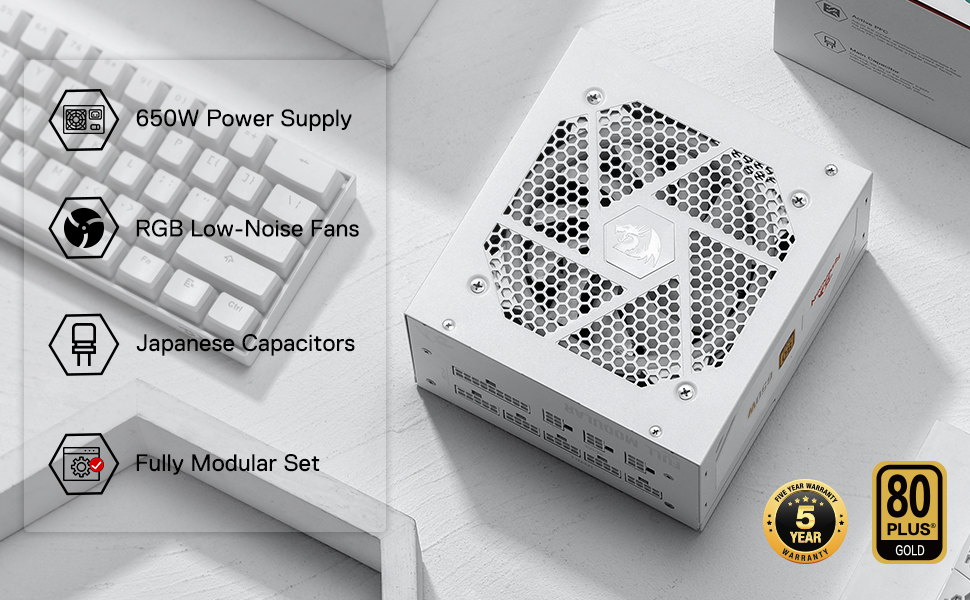
Figura 9.1: Curva de Eficiência do 80 Plus Gold

Figure 9.2: Compact 160mm Size
10. Garantia e Suporte
The Redragon RGPS-650W Power Supply comes with a Garantia de 5 anos, ensuring reliability and peace of mind. This warranty covers defects in materials and workmanship under normal use.
For technical support, warranty claims, or any inquiries regarding your product, please visit the official Redragon webVisite o site ou entre em contato com o departamento de atendimento ao cliente. Guarde o comprovante de compra para validação da garantia.

Figure 10.1: 5-Year Warranty