
1. Introdução
Thank you for choosing the AIYIMA A05 TPA3221 Power Amplifier. This compact 2.0 channel stereo amplifier is designed to deliver high-fidelity audio to passive speakers, featuring both Bluetooth and RCA input options. This manual provides detailed instructions for setup, operation, and maintenance to ensure optimal performance and longevity of your device.
2. Instruções de segurança
- Fonte de energia: Use only the specified power adapter (DC 12-32V) to prevent damage. Ensure the power outlet voltage é compatível.
- Ventilação: Coloque o amplifier in a well-ventilated area. Do not block ventilation openings. Avoid placing it on soft surfaces that may obstruct airflow.
- Umidade: Keep the device away from water, humidity, and liquids. Do not operate with wet hands.
- Aquecer: Avoid direct sunlight, heat sources, or extreme temperatures.
- Limpeza: Desligue a energia antes de limpar. Use um pano macio e seco. Não use produtos de limpeza líquidos ou em aerossol.
- Manutenção: Não tente reparar ou desmontar a unidade por conta própria. Encaminhe todos os serviços de manutenção a pessoal qualificado.
- Crianças: Mantenha fora do alcance de crianças.
3. Conteúdo da embalagem
Por favor, verifique se a embalagem contém os seguintes itens:
- AIYIMA A05 Bluetooth 5.0 Ampmais vivo x 1
- Antena Bluetooth x 1
- Manual do usuário x 1
- Cartão de garantia x 1
- Adaptador de alimentação DC 32V x 1

Imagem 3.1: Contents of the AIYIMA A05 amppacote de amplificador, incluindo o amplifier unit, Bluetooth antenna, user manual, warranty card, and power adapter.
4. Produto acabadoview
4.1 Controles do painel frontal
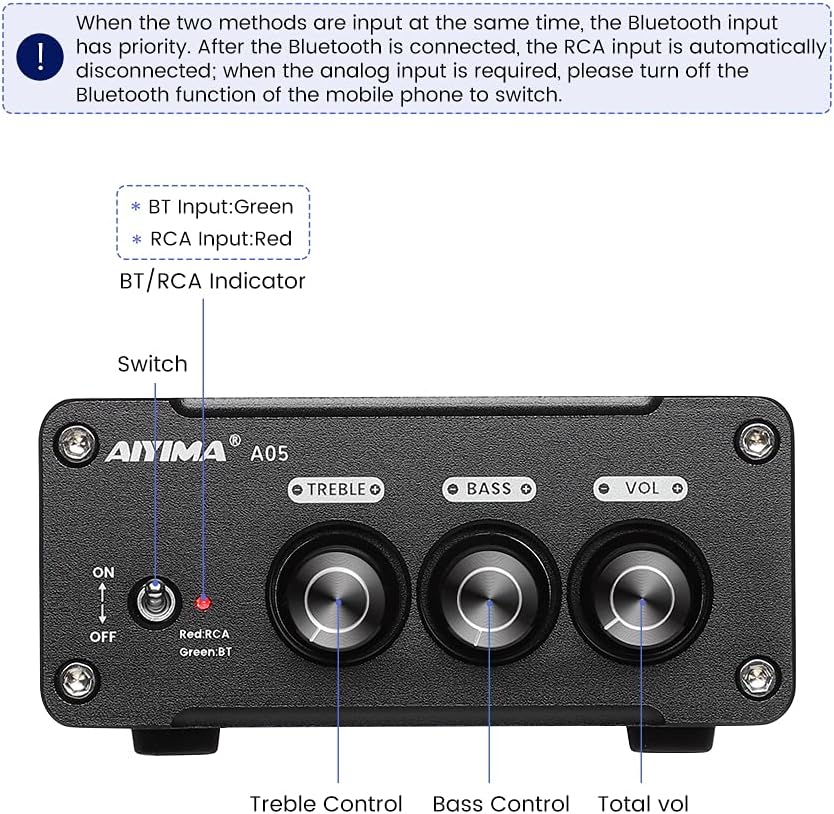
Imagem 4.1: Front panel of the AIYIMA A05 amplifier, showing the power switch, input indicator, treble, bass, and volume controls.
- Interruptor de energia (LIGADO/DESLIGADO): Alterna o amppoder do lificador.
- BT/RCA Indicator: Displays the active input source. Green indicates Bluetooth (BT) input, Red indicates RCA input.
- Controle de agudos: Ajusta a saída de áudio de alta frequência.
- Controle de graves: Ajusta a saída de áudio de baixa frequência.
- Controle de volume: Adjusts the overall audio output level.

Imagem 4.2: Fechar-se view of the power switch and the BT/RCA input indicator on the front panel.

Imagem 4.3: Fechar-se view of the Treble, Bass, and Volume control knobs.
4.2 Conexões do Painel Traseiro

Imagem 4.4: Rear panel of the AIYIMA A05 amplifier, showing the Bluetooth antenna port, RCA audio input, speaker outputs, and DC power input.
- ANT (Bluetooth Antenna Port): Connect the included Bluetooth antenna here for wireless audio reception.
- AUDIO IN (RCA Input): Connect audio sources (e.g., CD player, TV, DAC) using RCA cables.
- SPEAKER (Audio Output): Connect passive speakers using speaker wires. Ensure correct polarity (+ to + and - to -).
- DC 24-32V (Power Input): Connect the provided DC power adapter.
5. Instruções de configuração
Siga estes passos para configurar seu AIYIMA A05 ampmais vital:
- Conectar antena Bluetooth: Screw the included Bluetooth antenna into the ANT port on the rear panel.
- Conectar alto-falantes: Connect your passive speakers to the SPEAKER output terminals on the rear panel. Ensure the positive (+) terminal of the amplifier connects to the positive (+) terminal of the speaker, and the negative (-) terminal connects to the negative (-).
- Connect Audio Source (RCA): If using a wired audio source, connect it to the AUDIO IN (RCA) ports on the rear panel using appropriate RCA cables.
- Conecte a energia: Connect the DC power adapter to the DC 24-32V input port on the rear panel, then plug the adapter into a wall outlet.
- Ligar: Flip the power switch on the front panel to the "ON" position. The input indicator will light up.

Imagem 5.1: Rear panel of the amplifier with Bluetooth antenna, RCA cables, speaker wires, and power adapter connected.
6. Instruções de operação
6.1 Ligar/Desligar
Para ligar o amplifier, flip the front panel switch to the "ON" position. To power off, flip the switch to the "OFF" position.
6.2 Conexão Bluetooth
- Garantir o amplifier is powered on and the BT/RCA indicator is green, indicating Bluetooth mode. If it's red, ensure no RCA cable is connected or disconnect it.
- No seu dispositivo móvel (telefone, tablet, etc.), ative o Bluetooth e procure por dispositivos disponíveis.
- Select "AIYIMA A05" from the list of devices to pair.
- Once paired, the indicator light will remain green, and you can play audio from your device through the ampmais vivo.
6.3 RCA Input Usage
- Connect your audio source to the RCA input ports on the rear panel.
- Garantir o amplifier is powered on. The BT/RCA indicator should be red, indicating RCA input mode.
- If the indicator is green (Bluetooth mode), ensure Bluetooth is disconnected on any paired device, or turn off Bluetooth on your mobile device to switch to RCA input.
6.4 Ajustando o áudio
- Volume: Rotate the "VOL" knob clockwise to increase volume and counter-clockwise to decrease.
- Agudos: Rotate the "TREBLE" knob to adjust high-frequency sounds to your preference.
- Baixo: Rotate the "BASS" knob to adjust low-frequency sounds to your preference.
7. Manutenção
- Limpeza: Disconnect the power adapter before cleaning. Use a soft, dry, lint-free cloth to wipe the surface of the amplifier. Do not use harsh chemicals or abrasive materials.
- Armazenar: If not in use for an extended period, store the ampColoque o amplificador em local fresco e seco, longe da luz solar direta e de temperaturas extremas.
- Conexões: Verifique periodicamente todas as conexões de cabos para garantir que estejam seguras e livres de corrosão.
8. Solução De Problemas
If you encounter issues with your AIYIMA A05 ampAmplificador, consulte os seguintes problemas comuns e suas soluções:
| Problema | Possível causa | Solução |
|---|---|---|
| Nenhuma saída de som |
|
|
| Distorted or buzzing sound |
|
|
| Bluetooth não conecta |
|
|
| Loud noise/ticking on startup |
|
|
If the problem persists after trying these solutions, please contact AIYIMA customer support for further assistance.
9. Especificações

Imagem 9.1: Dimensions of the AIYIMA A05 amplifier: 107mm (4.2in) width, 87mm (3.4in) depth, 36mm (1.4in) height.
| Recurso | Especificação |
|---|---|
| Modelo | A05 |
| Potência de saída | 105 Watts (at 4 Ω) |
| Número de canais | 2.0 (Estéreo) |
| Versão Bluetooth | QCC3034 APTX Bluetooth 5.0 |
| Chipset | TPA3221 |
| Volume Mínimo de Fornecimentotage | 12 Volts (CC) |
| Vol. Máximo de Suprimentotage | 32 Volts (CC) |
| Peso do item | 500 gramas |
| Dimensões (aprox.) | 107mm (W) x 87mm (D) x 36mm (H) |
10. Garantia e Suporte
O AIYIMA A05 amplifier comes with a warranty. Please refer to the included Warranty Card for specific terms and conditions. For technical support, troubleshooting assistance, or warranty claims, please contact AIYIMA customer service through the retailer where the product was purchased or visit the official AIYIMA website.
Recursos on-line: For additional information and support, you may visit the AIYIMA store page: AIYIMA Official Store