Introdução
Obrigado pela compra.asing the SDRD SD-306 Portable Karaoke Machine. This device combines a powerful Bluetooth speaker with two wireless microphones, offering a versatile solution for karaoke, music playback, and public speaking. Please read this manual carefully before use to ensure proper operation and to maximize your enjoyment of the product.
Informações de segurança
- Não exponha o dispositivo à água ou umidade excessiva.
- Evite temperaturas extremas e luz solar direta.
- Não desmonte nem tente reparar o dispositivo por conta própria. Encaminhe todos os serviços de manutenção a pessoal qualificado.
- Mantenha fora do alcance de crianças.
- Utilize apenas o cabo de carregamento e o adaptador fornecidos.
Conteúdo da embalagem
- SDRD SD-306 Karaoke Speaker Unit
- 2 x microfones sem fio
- Cabo de carregamento USB
- Manual do usuário
Produto acimaview

Image: The SDRD SD-306 main speaker unit with two wireless microphones docked on top.

Imagem: Topo view of the karaoke machine, highlighting the slot for a smartphone or tablet and the microphone controls.
Main Unit Controls (Top Panel)
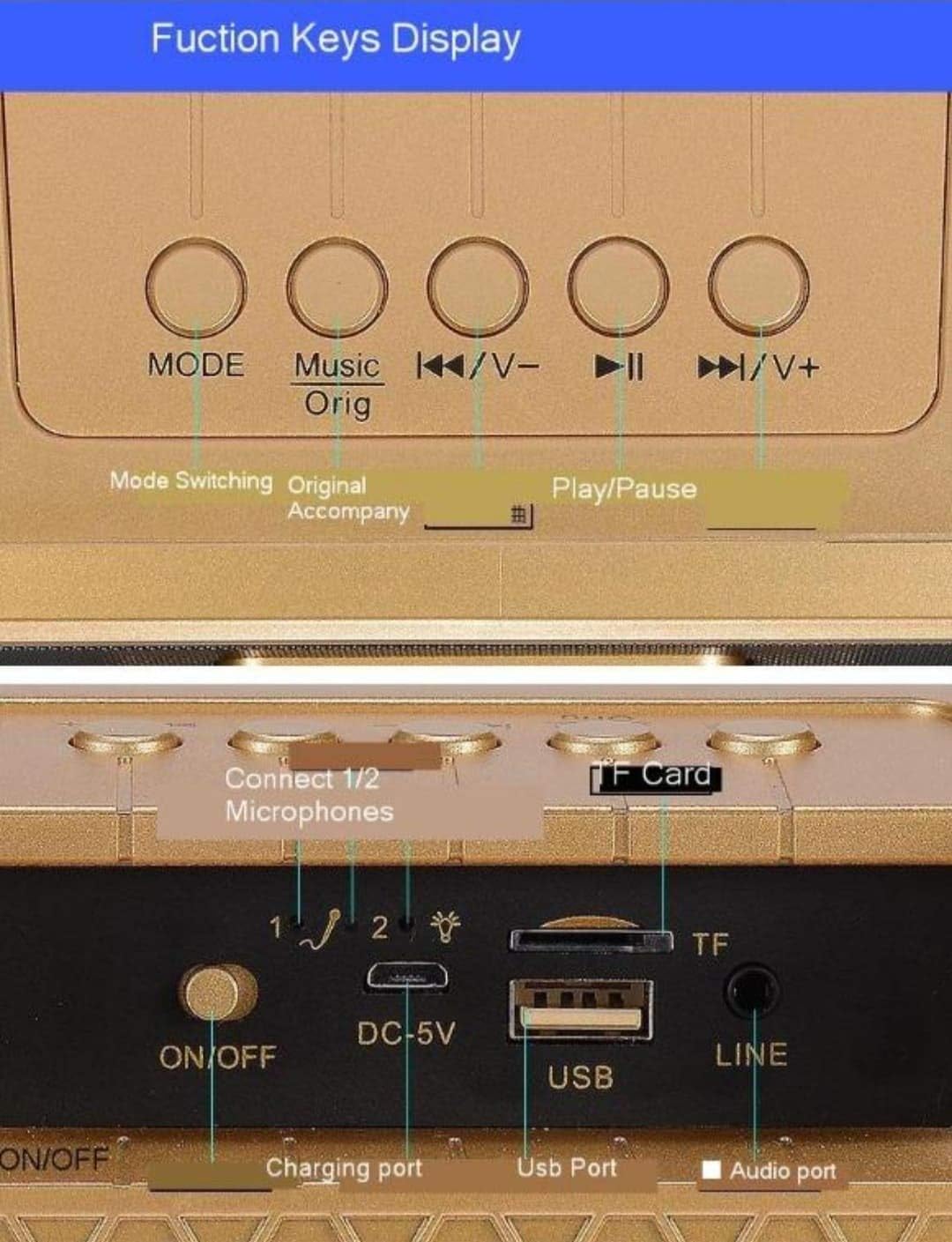
Imagem: Detalhada view of the main unit's top panel buttons, including Mode, Music Original, Previous/Volume Down, Play/Pause, and Next/Volume Up.
- MODO: Short press to switch between input modes (Bluetooth, USB, TF Card, AUX, FM Radio).
- Music Orig: Short press to cancel the original vocal track of a song (karaoke mode).
- ◀◀/V-: Pressione rapidamente para a faixa anterior; pressione e segure para diminuir o volume.
- ►►/V+: Pressione rapidamente para a próxima faixa; pressione e segure para aumentar o volume.
- ►██: Botão Reproduzir/Pausar.
- Modo EQ: Short press to cycle through six different EQ effects.
Main Unit Ports (Rear Panel)

Imagem: Detalhada view of the main unit's rear panel, showing the ON/OFF switch, DC-5V charging port, USB port, TF Card slot, and LINE (AUX) input.
- LIGADO/DESLIGADO: Power switch for the main unit.
- DC-5V: Charging port for the main unit.
- USB: USB port for playing music from a USB flash drive.
- Cartão TF: Slot for playing music from a TF (Micro SD) card.
- LINE (AUX): 3.5mm audio input for connecting external audio devices.
- Connect 1/2 Microphones: Indicators for microphone connection status.
Controles de microfone
- Reverberation Intensity Regulation: Ajusta o efeito de eco.
- Human Voice Volume Regulation: Controls the microphone's vocal volume.
- Ligar/desligar: Liga ou desliga o microfone.
- Funny: Activates voice changing effects.
- Vaias: Activates a cheering sound effect.
- Aplausos: Activates an applause sound effect.
- Risada: Activates a laughter sound effect.
Configurar
1. Carregando o dispositivo
Before first use, fully charge the main unit and both microphones. Connect the USB charging cable to the DC-5V port on the main unit and to a standard 5V USB power adapter (not included). The microphones also have charging ports; use their respective cables if separate. An indicator light will show charging status and turn off when fully charged.
2. Ligando
Flip the ON/OFF switch on the rear of the main unit to the 'ON' position. The unit will power on and indicate its current mode.
For each microphone, slide its power switch to the 'ON' position. The microphones will automatically attempt to pair with the main unit.
3. Microphone Pairing
The wireless microphones are designed to automatically pair with the main unit upon power-on. If pairing fails, ensure both the main unit and microphones are charged and within range. Power cycle both devices if necessary.
Instruções de operação
1. Conexão Bluetooth

Image: Diagram illustrating the wireless Bluetooth connection process between a smartphone and the karaoke machine, showing a 10-meter transmission distance.
- Ensure the main unit is powered on and in Bluetooth mode (press MODE button until 'Bluetooth' is announced or indicated).
- No seu smartphone ou tablet, ative o Bluetooth e procure os dispositivos disponíveis.
- Select "SDRD SD-306" from the list of devices.
- Uma vez conectado, você pode reproduzir músicas do seu dispositivo através da máquina de karaokê.
2. Playing Music from Other Sources
- USB/Cartão TF: Insert a USB flash drive or TF card into the respective port. The unit will automatically switch to the corresponding mode and begin playing music. Use the ◀◀/V- and ►►/V+ buttons to navigate tracks.
- Entrada AUX: Connect an external audio device (e.g., MP3 player, computer) to the LINE (AUX) port using a 3.5mm audio cable. Press the MODE button until AUX mode is selected.
- Rádio FM: Press the MODE button to switch to FM Radio mode. The unit will automatically scan and tune into available radio stations.
3. Função Karaokê
- Original Sound Cancellation: While playing a song, short press the "Music Orig" button on the main unit to reduce or cancel the original vocal track, allowing you to sing along. Press again to restore the original vocal.
- EQ Effects: Short press the "EQ Mode" button on the main unit to cycle through various sound equalization effects, enhancing your listening or singing experience.
- Volume do microfone: Use the "Human Voice Volume Regulation" control on the microphone to adjust your vocal volume.
- Echo/Reverb: Adjust the "Reverberation Intensity Regulation" control on the microphone to add or reduce echo effect to your voice.
- Efeitos especiais: Use the "Funny", "Boos", "Applause", and "Laughter" buttons on the microphone to add sound effects during your performance.
Manutenção
- Limpe o dispositivo com um pano macio e seco. Não utilize produtos de limpeza abrasivos ou solventes.
- Guarde o dispositivo em local fresco e seco quando não estiver em uso.
- Evite deixar cair a unidade ou os microfones, pois isso pode causar danos internos.
Solução de problemas
| Problema | Possível causa | Solução |
|---|---|---|
| Sem energia | Bateria descarregada; Interruptor de alimentação desligado | Charge the unit/microphones; Turn on the power switch. |
| Sem som do alto-falante | Volume muito baixo; Modo incorreto; Dispositivo não conectado | Increase volume; Select correct input mode (Bluetooth, USB, AUX); Ensure device is paired/connected. |
| Microfone não funciona | Microphone off; Battery drained; Not paired | Turn on microphone; Charge microphone; Power cycle microphone and main unit to re-pair. |
| Conexão Bluetooth instável | Too far from device; Interference | Move closer to the speaker (within 10m); Avoid obstacles or other wireless devices. |
| Sound cutting off (especially high notes) | Microphone signal interference; Low battery | Ensure microphones are fully charged; Reduce distance between microphones and speaker; Check for other wireless interference. |
Especificações
| Recurso | Detalhe |
|---|---|
| Marca | SDRD |
| Modelo | SD-306 |
| Dimensões do produto | 10 x 10 x 10 cm |
| Peso do item | 450 g |
| Tecnologia de Conectividade | Bluetooth, USB, AUX, Micro SD (TF Card) |
| Cor | Preto |
| Dispositivos compatíveis | Rádio, Smartphone |
| Microphones Included | 2 microfones sem fio |
Garantia e Suporte
This product comes with a standard manufacturer's warranty. For specific warranty terms and conditions, please refer to the documentation provided with your purchase or contact your retailer. For technical support or service inquiries, please contact the SDRD customer service department through the contact information provided on the product packaging or the official SDRD website.