
Mediashop M23407
Vibro Shaper - Manual do Usuário da Plataforma Vibratória para Fitness
Modelo: M23407 | Marca: Mediashop
1. Introdução
Thank you for choosing the Vibro Shaper Fitness Vibration Platform. This manual provides essential information for the safe and effective use of your new fitness equipment. The Vibro Shaper is designed to help you achieve your fitness goals, whether it's improving physical condition, losing weight, or toning your body. With just 10 minutes of training per day, you can perform a full-body workout comfortably at home.

Image 1.1: The Vibro Shaper Fitness Vibration Platform and its remote control.
2. Informações importantes de segurança
Please read all safety warnings and instructions carefully before using the Vibro Shaper. Failure to follow these instructions may result in injury.
- Consult your doctor before starting any new exercise program, especially if you have pre-existing medical conditions, are pregnant, or have recently undergone surgery.
- O peso máximo recomendado para o usuário deste aparelho é de 100 kg.
- Use the Vibro Shaper on a stable, flat surface. Ensure there is enough clear space around the device.
- Mantenha crianças e animais de estimação afastados do aparelho durante o funcionamento.
- Do not use the device if it is damaged or malfunctioning. Contact customer support immediately.
- Não insira nenhum objeto nas aberturas do dispositivo.
- Desligue o aparelho da tomada quando não estiver em uso ou antes de limpá-lo.
- Este aparelho é somente para uso doméstico. Não use ao ar livre.
- The remote control requires batteries (not included). Ensure correct polarity when inserting.
3. Conteúdo da embalagem
Carefully unpack your Vibro Shaper and check that all items are present and undamaged.
- 1 x Vibro Shaper Classic Vibration Platform
- 2 x Power Stretch Bands (Resistance Bands)
- 1 x Nutrition Plan (Diet Plan)
- 1 x Controle Remoto (pilhas não incluídas)
- 1 x Manual do Usuário (este documento)
4. Configuração
- Colocação: Place the Vibro Shaper on a firm, level surface. Ensure there is sufficient space around the device for safe movement during exercises.
- Conexão de energia: Conecte o cabo de alimentação a uma tomada elétrica padrão.
- Baterias de controle remoto: Open the battery compartment on the back of the remote control and insert the required batteries (e.g., 2x AAA, check remote for specific type). Ensure correct polarity.
- Ligar: Locate the main power switch on the side or back of the Vibro Shaper and switch it to the "ON" position. The display on the platform should light up.
5. Instruções de operação
The Vibro Shaper offers various settings to customize your workout.
5.1. Painel de controle e controle remoto
The device can be controlled via the integrated control panel on the platform or the included remote control. The remote control allows for convenient adjustment during your workout.
- Botão de energia: Liga/desliga o dispositivo.
- Botão Iniciar / Parar: Starts or pauses the vibration.
- Botões +/- de velocidade: Adjusts the vibration speed (99 levels available).
- Program Buttons (P1, P2, P3): Selects one of the three automatic training programs. Each program has varying speeds and vibration patterns.
- Botão de tempo: Adjusts the workout duration (default is 10 minutes).
5.2. Iniciando um treino
- Certifique-se de que o dispositivo está ligado.
- Step onto the platform or position yourself for your desired exercise.
- Press the "Start" button on the control panel or remote control.
- Select a program (P1, P2, P3) or manually adjust the speed using the Speed +/- buttons.
- The default workout duration is 10 minutes. The device will automatically stop after the set time.
6. Guia de Exercícios
The Vibro Shaper is versatile and can be used for various exercises targeting different muscle groups. Remember to maintain proper form and listen to your body. A detailed exercise plan with 20 relevant exercises is included in your package.
6.1. Basic Standing Position

Image 6.1: Standing position on the Vibro Shaper.
Stand with your feet shoulder-width apart on the platform. Keep your knees slightly bent and your core engaged. This position is ideal for general full-body vibration and improving circulation. Adjust foot placement to vary intensity: wider stance for higher intensity, narrower for lower.
6.2. Push-Up Position
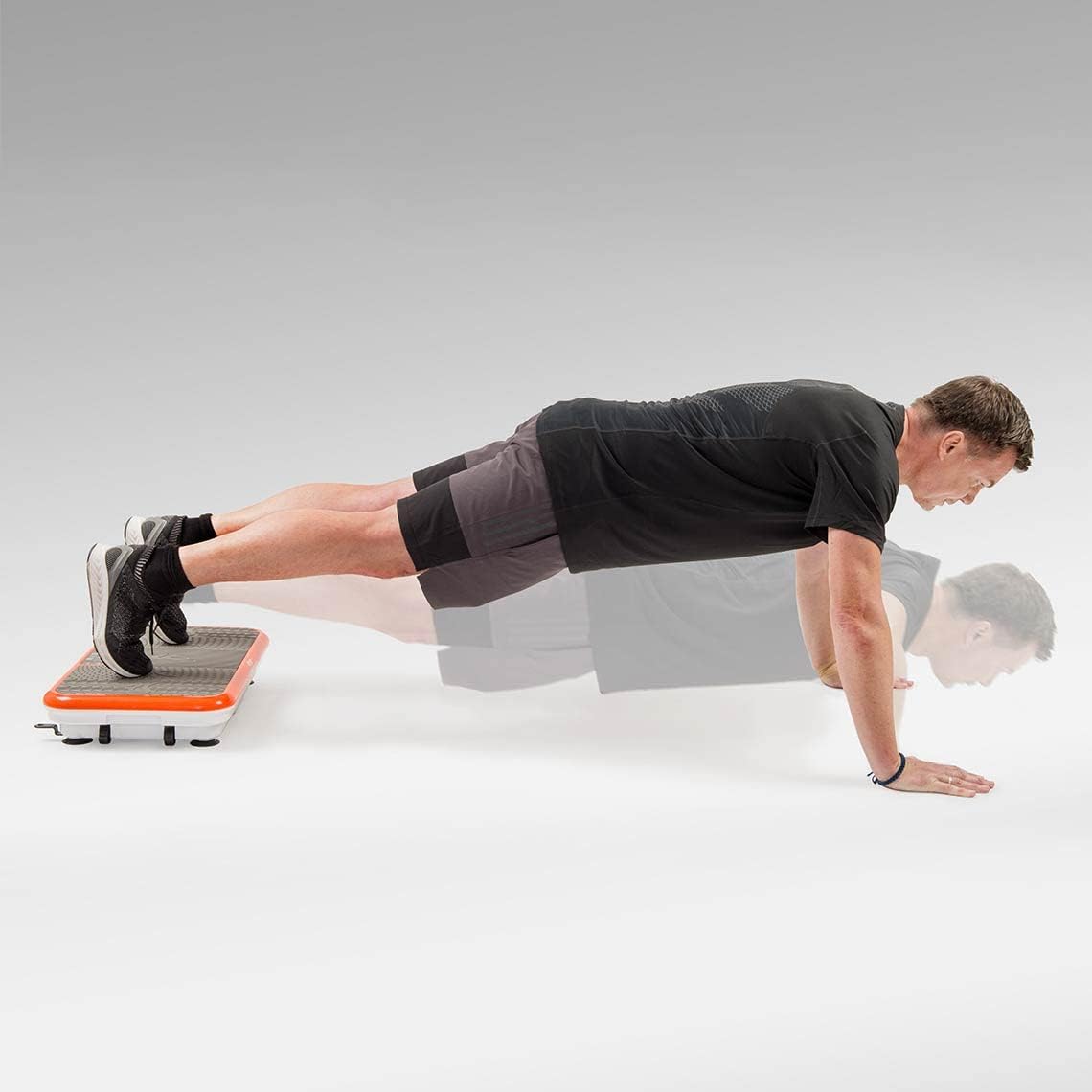
Image 6.2: Push-up exercise using the Vibro Shaper.
Place your hands on the platform, slightly wider than shoulder-width apart, and extend your legs behind you into a plank position. Perform push-ups as usual. The vibration adds an extra challenge, engaging more stabilizing muscles in your chest, shoulders, and triceps.

Imagem 6.3: Outro example of a push-up exercise.
Alternatively, you can place your feet on the platform and hands on the floor for an elevated push-up, increasing the challenge to your upper body.
6.3. Resistance Band Exercises

Image 6.4: Using resistance bands with the Vibro Shaper.
Attach the Power Stretch Bands to the designated hooks on the Vibro Shaper. Stand on the platform and perform various upper body exercises such as bicep curls, tricep extensions, or shoulder raises. The vibration enhances muscle activation during these movements.
6.4. Core and Lower Body Exercises
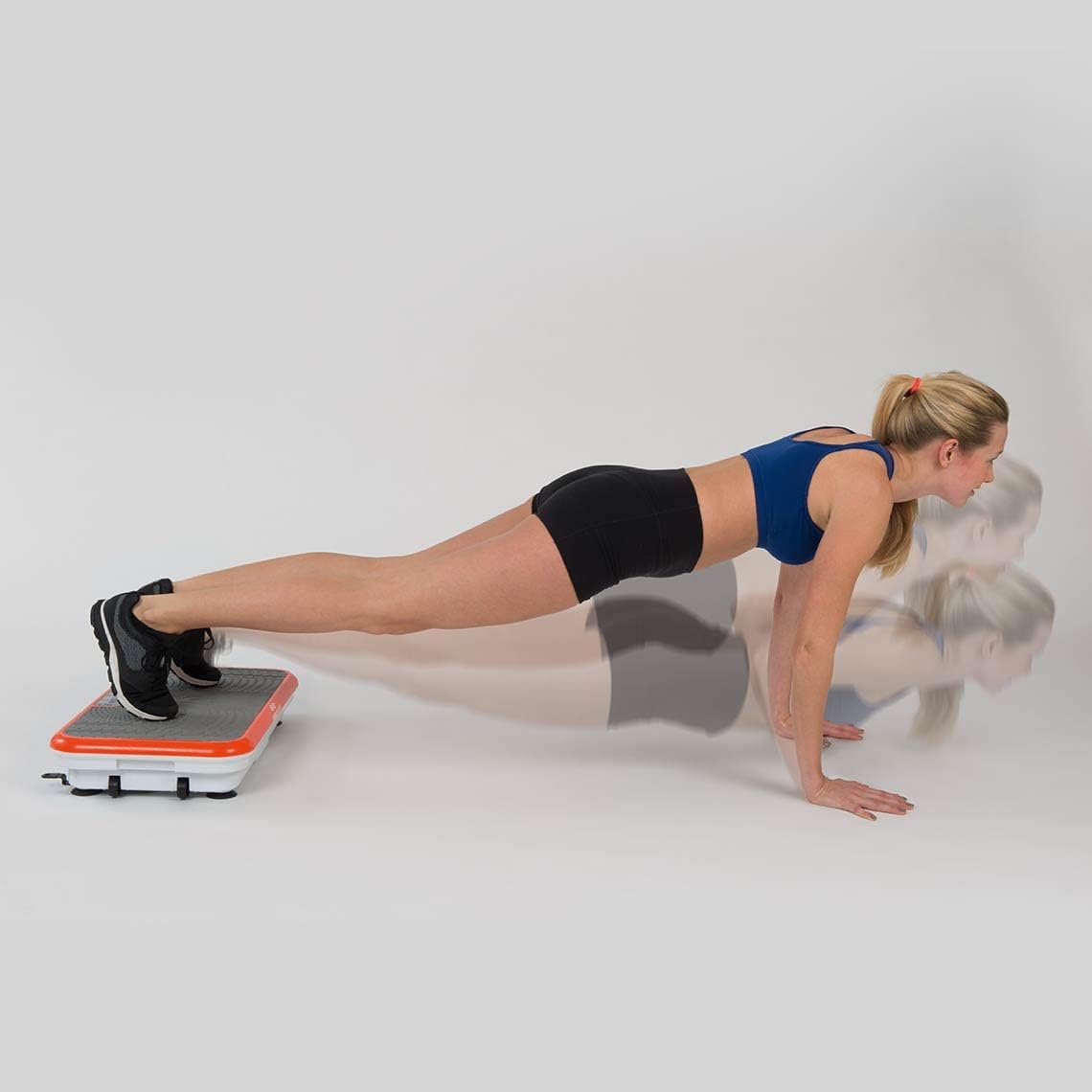
Image 6.5: Plank exercise with feet on the platform.
Assume a plank position with your feet on the Vibro Shaper. This variation intensifies core engagement due to the instability and vibration.

Image 6.6: Glute bridge exercise with feet on the platform.
Lie on your back with your feet on the platform, knees bent. Lift your hips off the ground, squeezing your glutes. The vibration adds intensity to this lower body and core exercise.

Image 6.7: Crunches with feet on the platform.
Lie on your back with your feet on the platform, knees bent. Place your hands behind your head and perform crunches, lifting your upper body towards your knees. The vibration helps to engage your abdominal muscles more effectively.
7. Manutenção
Regular cleaning and proper care will ensure the longevity of your Vibro Shaper.
- Limpeza: Unplug the device before cleaning. Wipe the surface with a soft, damp pano. Não use produtos de limpeza abrasivos ou solventes.
- Armazenar: Store the Vibro Shaper in a cool, dry place away from direct sunlight and moisture.
- Inspeção: Periodically check the power cord and all components for any signs of wear or damage.
8. Solução De Problemas
| Problema | Possível causa | Solução |
|---|---|---|
| O dispositivo não liga. | Not plugged in; Main power switch off; Power outlet malfunction. | Ensure power cord is securely plugged in. Turn main power switch ON. Try a different power outlet. |
| O controle remoto não funciona. | Batteries are dead or incorrectly inserted; Remote control out of range. | Replace batteries, ensuring correct polarity. Point remote directly at the device's sensor. Ensure you are within effective range. |
| A vibração é fraca ou inconsistente. | Incorrect speed setting; Device overloaded. | Increase the speed setting. Ensure user weight does not exceed 100 kg. |
| Ruído incomum durante a operação. | Loose component; Device on uneven surface. | Ensure device is on a flat, stable surface. If noise persists, discontinue use and contact customer support. |
If you encounter problems not listed here or if solutions do not resolve the issue, please contact Mediashop customer support.
9. Especificações técnicas
- Modelo: M23407
- Marca: Mediashop
- Dimensões: 62.5 x 38.5 x 12 cm (24.6 x 15.2 x 4.7 polegadas)
- Peso: 12.84 kg (28.3 libras)
- Material: Plástico
- Maximum Recommended User Weight: 100 quilos (220 lbs)
- Tipo de controle: Controle remoto
- Tecnologia de vibração: Oscillation (up to 50 muscle contractions/second)
- Níveis de velocidade: 99
- Programas de treinamento: 3 programas automáticos
10. Garantia e Suporte
Your Vibro Shaper is covered by the standard manufacturer's warranty. Please refer to the warranty card included in your package for specific terms and conditions.
For technical support, spare parts, or warranty claims, please contact Mediashop customer service.
Mediashop Customer Service: Please visit the official Mediashop website or refer to your purchase documentation for contact details specific to your region.