
Introdução
Thank you for choosing the WEKOME D6 Desktop Mini Bluetooth Speaker. This compact and portable speaker delivers clear sound quality and offers versatile connectivity options. This manual provides detailed instructions on how to set up, operate, and maintain your speaker to ensure optimal performance.
Produto acimaview

Figura 1: Frente view of the WEKOME D6 Mini Bluetooth Speaker, highlighting its compact cylindrical design and control panel.
The WEKOME D6 is a palm-sized desktop speaker designed for portability and ease of use. It features Bluetooth connectivity for wireless audio streaming and a TF card slot for direct music playback. Its robust design ensures clear audio output for various compatible devices.
Principais características:
- Conectividade Bluetooth: Seamless wireless pairing with smartphones, tablets, and laptops.
- Design compacto: Palm-sized for easy portability.
- Qualidade de som nítida: Delivers crisp and clear audio.
- Bateria de longa duração: 500 mAh battery provides approximately 4-5 hours of playback.
- Alcance estendido: Bluetooth transmission distance of up to 10 meters (33 feet).
- Suporte para cartão TF: Maximum support for 32GB TF (MicroSD) cards for direct music playback.
- Potência de saída: Speaker maximum output power of 10 Watts.
Conteúdo da embalagem
Por favor, verifique se a embalagem contém os seguintes itens:
- WEKOME D6 Desktop Mini Bluetooth Speaker
- Cabo de carregamento USB
- Manual do usuário (este documento)
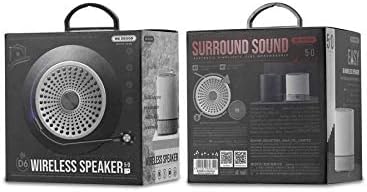
Figura 2: Retail packaging of the WEKOME D6 Mini Bluetooth Speaker, illustrating the product's branding and key information on the box.
Configurar
1. Carregando o alto-falante:
- Conecte a extremidade menor do cabo de carregamento USB à porta de carregamento da caixa de som.
- Conecte a outra extremidade do cabo USB a um adaptador de alimentação USB (não incluído) ou à porta USB de um computador.
- The charging indicator light will illuminate during charging and turn off once fully charged. A full charge typically takes 2-3 hours.
2. Ligar/Desligar:
- Para ligar: Pressione e segure o Botão de energia Aguarde alguns segundos até ouvir um sinal sonoro ou ver uma luz indicadora acender.
- Para desligar: Pressione e segure o Botão de energia Novamente, por alguns segundos.
3. Emparelhamento Bluetooth:
- Ensure the speaker is powered on and in Bluetooth pairing mode (it will usually enter this mode automatically upon first power-on or if no device is connected). The indicator light will typically flash rapidly.
- No seu dispositivo (smartphone, tablet, laptop), ative o Bluetooth e procure por dispositivos disponíveis.
- Select "WEKOME D6" from the list of found devices.
- Once paired, the speaker will provide an audible confirmation, and the indicator light will stop flashing and remain solid.
- The speaker will automatically reconnect to the last paired device when powered on, if the device's Bluetooth is enabled and within range.
4. TF Card Insertion:
- Locate the TF card slot on the speaker.
- Gently insert a TF (MicroSD) card (up to 32GB) with pre-loaded music files into the slot until it clicks into place.
- The speaker will automatically switch to TF card playback mode if a card is detected.
Operando o alto-falante
Botões de controle:
Refer to Figure 1 for the location of the control buttons.
- Botão de energia: Pressione e segure para ligar/desligar.
- Botão Aumentar Volume / Próxima Faixa (+):
- Pressione rapidamente: Aumenta o volume.
- Pressione e segure: Pule para a próxima faixa.
- Botão Reproduzir/Pausar (||): Pressione rapidamente para reproduzir ou pausar a música.
- Botão Diminuir Volume / Faixa Anterior (-):
- Pressione rapidamente: Diminui o volume.
- Pressione e segure: Ir para a faixa anterior.
- Mode Button (Dot between + and Play/Pause): Short press to switch between Bluetooth mode and TF card mode (if a TF card is inserted).
Manutenção
- Limpeza: Use um pano macio e seco para limpar a superfície do alto-falante. Não use produtos de limpeza abrasivos, álcool ou outros solventes químicos, pois podem danificar o acabamento.
- Armazenar: Guarde a caixa de som em local fresco e seco, longe da luz solar direta e de temperaturas extremas.
- Cuidados com a bateria: Para prolongar a vida útil da bateria, evite descarregar completamente a caixa de som com frequência. Carregue-a regularmente, mesmo que não a utilize por longos períodos.
- Resistência à água: This speaker is not water-resistant. Avoid exposure to liquids.
Solução de problemas
| Problema | Possível causa | Solução |
|---|---|---|
| A caixa de som não liga. | Bateria fraca. | Carregue totalmente a caixa de som. |
| Nenhum som. | Volume too low; Speaker not paired; Incorrect mode. | Increase volume; Ensure speaker is paired; Switch to correct mode (Bluetooth/TF card). |
| Não é possível emparelhar com o dispositivo Bluetooth. | O alto-falante não está em modo de emparelhamento; Bluetooth do dispositivo desligado; Muito longe do alto-falante. | Ensure speaker is in pairing mode; Turn on device Bluetooth; Move device closer to speaker (within 10M). |
| Music stops playing from TF card. | TF card not inserted correctly; Corrupted files; Unsupported format. | Reinsert TF card; Check TF card for errors; Ensure music fileOs arquivos estão em um formato compatível (por exemplo, MP3). |
Especificações
| Marca | BEM-VINDO |
| Nome do modelo | D6 |
| Tecnologia de Conectividade | Bluetooth |
| Tipo de alto-falante | Desktop Mini Speaker |
| Potência máxima de saída do alto-falante | 10 Watts |
| Capacidade da bateria | 500 mAh (approx. 4-5 hours playback) |
| Distância de transmissão | 10 metros (33 pés) |
| Suporte para cartão TF | Até 32 GB |
| Dispositivos compatíveis | Laptop, Smartphone, Tablet |
| Tipo de montagem | Mesa |
| Dimensões da embalagem | 12.4 x 11.4 x 7.6 cm |
| Peso | 210 g |
Garantia e Suporte
For warranty information and technical support, please refer to the warranty card included with your product or contact WEKOME customer service through their official website or authorized retailers. Keep your purchase receipt as proof of purchase for warranty claims.