1. Introdução
Welcome to the user manual for your Everest SMW-242 Blue 4D Wireless Mouse. This guide provides comprehensive instructions for setting up, operating, and maintaining your device to ensure optimal performance and longevity. Please read this manual carefully before using the mouse.
2. Conteúdo da embalagem
Verifique se todos os itens listados abaixo estão incluídos no seu pacote:
- Everest SMW-242 Wireless Mouse (Blue)
- Receptor USB Nano
- AA Battery (may be included depending on region/package)
- Manual do usuário (este documento)
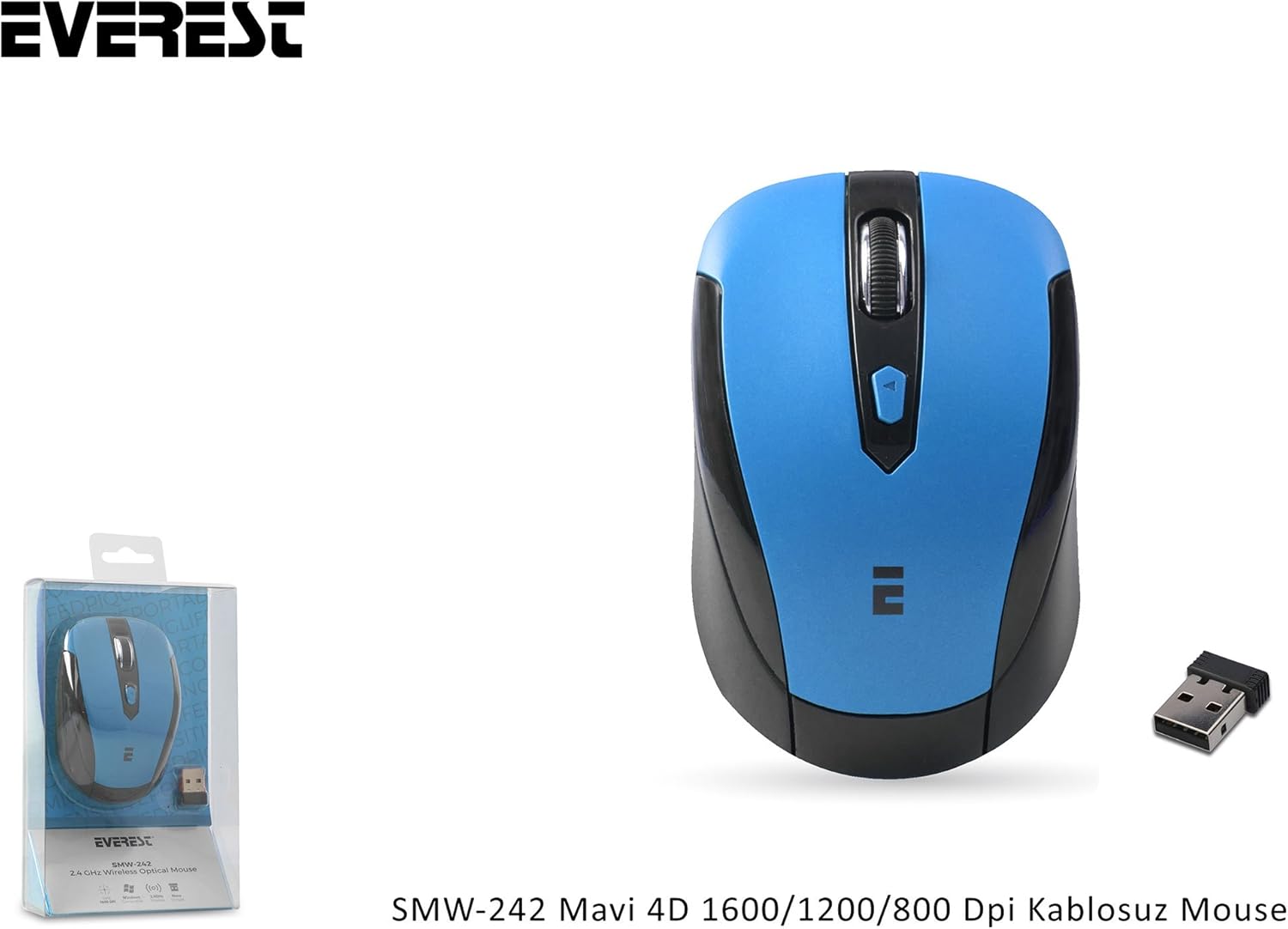
Figure 2.1: Everest SMW-242 Wireless Mouse and USB Nano Receiver, as typically found in the product packaging.
3. Produto acabadoview
Familiarize yourself with the various components of your Everest SMW-242 Wireless Mouse:

Figura 3.1: parte superior view of the mouse, showing the left and right click buttons, scroll wheel, and DPI adjustment button. The USB receiver is shown separately.

Figura 3.2: Angulado view highlighting the ergonomic design and button placement, including the scroll wheel and the DPI button located below it.
- Botão esquerdo do mouse: Função primária padrão do rato.
- Botão direito do mouse: Função secundária padrão do rato.
- Rodinha do mouse: Para rolagem vertical e função de clique do meio.
- Botão de ajuste de DPI: Cycles through DPI settings (800/1200/1600 DPI).
- Sensor óptico: Located on the bottom, for tracking movement.
- Compartimento da bateria: Located on the bottom, for inserting the AA battery.
- Armazenamento do receptor USB Nano: Located inside the battery compartment for convenient storage.
4. Guia de configuração
Follow these steps to set up your Everest SMW-242 Wireless Mouse:
- Insira a bateria:
Locate the battery compartment on the underside of the mouse. Open the cover and insert one AA battery, ensuring the polarity (+/-) matches the diagram inside the compartment. Close the cover securely.

Figura 4.1: parte inferior view of the mouse showing the open battery compartment and the correct orientation for inserting an AA battery.
- Conecte o Nano Receptor USB:
Remove the USB Nano Receiver from its storage slot (often found within the battery compartment or a dedicated slot). Plug the receiver into an available USB port on your computer.
- Ligar:
Some models may have an On/Off switch on the bottom of the mouse. If present, slide it to the "On" position. The mouse should automatically connect to the receiver.
- Instalação do driver (Plug & Play):
Your computer's operating system (Windows, macOS, Linux) should automatically detect and install the necessary drivers. No manual driver installation is typically required. You should be able to use the mouse within a few seconds.
5. Instruções de operação
The Everest SMW-242 Wireless Mouse offers intuitive operation for everyday computing tasks.
Funções básicas:
- Clique esquerdo: Utilizado para selecionar itens e abrir files e ativando links.
- Clique com o botão direito: Opens context menus for various options.
- Rodinha do mouse: Role para cima ou para baixo para percorrer os documentos e web pages. Press the scroll wheel for middle-click functionality (e.g., opening links in new tabs).
Ajuste de DPI:
The mouse features adjustable DPI (Dots Per Inch) settings, allowing you to change the cursor speed and sensitivity. This mouse supports 800, 1200, and 1600 DPI.
- To change the DPI, press the Botão de ajuste de DPI located just below the scroll wheel.
- Each press will cycle through the available DPI settings (e.g., 800 DPI → 1200 DPI → 1600 DPI → 800 DPI).
- Choose the DPI setting that best suits your preference for precision and speed.
6. Manutenção
Proper maintenance will help extend the life of your Everest SMW-242 Wireless Mouse.
- Limpeza: Use um pano macio e seco para limpar a superfície do mouse. Para sujeira mais resistente, umedeça levemente o mouse.ampLimpe o pano com água ou uma solução de limpeza suave. Evite usar produtos químicos agressivos ou materiais abrasivos.
- Substituição da bateria: When the mouse performance degrades or it stops responding, it's likely time to replace the AA battery. Follow the steps in the "Setup Guide" to replace the battery.
- Armazenar: When not in use for extended periods, it is recommended to turn off the mouse (if it has a switch) and store the USB Nano Receiver inside the mouse's dedicated storage slot to prevent loss.
- Ambiente: Avoid exposing the mouse to extreme temperatures, direct sunlight, or excessive moisture.
7. Solução De Problemas
If you encounter issues with your Everest SMW-242 Wireless Mouse, refer to the following common problems and solutions:
| Problema | Possível causa | Solução |
|---|---|---|
| O mouse não responde. | Low battery; USB receiver not connected; Mouse not powered on; Connection interference. | Replace the battery. Ensure the USB receiver is securely plugged into a working USB port. If applicable, turn on the mouse. Try plugging the receiver into a different USB port or moving closer to the receiver. |
| Cursor erratic or jumps. | Dirty optical sensor; Uneven surface; Low battery. | Clean the optical sensor on the bottom of the mouse. Use the mouse on a clean, flat, opaque surface or a mouse pad. Replace the battery. |
| DPI setting not changing. | Mau funcionamento do botão DPI; Conflito de software. | Ensure you are pressing the correct DPI button. Restart your computer. If the issue persists, contact customer support. |
| Problemas de conexão sem fio. | Distância do receptor; Interferência de outros dispositivos sem fio. | Reduce the distance between the mouse and the USB receiver. Move other wireless devices (e.g., Wi-Fi routers, cordless phones) away from the receiver. |
8. Especificações
Key technical specifications for the Everest SMW-242 Wireless Mouse:
- Marca: Everest
- Modelo: SMW-242
- Cor: Azul
- Conectividade: Wireless (2.4 GHz USB Nano Receiver)
- Configurações de DPI: 800 / 1200 / 1600 DPI (Ajustável)
- Tecnologia de detecção de movimento: Óptico
- Botões: 4D (Left, Right, Scroll Wheel, DPI)
- Fonte de energia: 1 x pilha AA
- Origem: China
- Compatibilidade: USB port required. Compatible with most operating systems (e.g., Windows, macOS, Linux).
9. Garantia e Suporte
For warranty information or technical support, please refer to the warranty card included with your product or visit the official Everest website. If you require further assistance, please contact Everest customer service through their official channels.
Note: Specific warranty terms and conditions may vary by region and retailer. Please retain your proof of purchase for warranty claims.