
Panasonic DMC-FZ1000
Manual do Usuário da Câmera Digital Panasonic Lumix DMC-FZ1000
Modelo: DMC-FZ1000
1. Introdução
The Panasonic Lumix DMC-FZ1000 is a high-performance bridge digital camera designed for both advanced photography and 4K video recording. It features a large 20.1 MP 1-inch high-sensitivity MOS sensor and a Venus Engine image processor, enabling stunning image quality and high-speed performance. The camera is equipped with a versatile 16x Leica DC Vario-Elmarit zoom lens, providing a 35mm equivalent focal range of 25-400mm with an aperture of f/2.8-4.0. Its advanced HYBRID O.I.S.+ (Optical Image Stabilizer) minimizes camera shake across five axes, ensuring sharp images and stable video even in challenging conditions. The DMC-FZ1000 offers both a high-resolution electronic viewfinder and a free-angle LCD monitor for flexible shooting perspectives.
2. Introdução
2.1. Inserindo a bateria
The camera uses a Lithium Ion battery. Ensure the battery is fully charged before first use. To insert the battery:
- Abra a tampa do compartimento da bateria, localizada na parte inferior da câmera.
- Insert the battery with the contacts facing the correct direction, as indicated by the diagram inside the compartment.
- Feche bem a tampa do compartimento da bateria até ouvir um clique.
2.2. Inserindo um cartão de memória
The camera supports SD, SDHC, and SDXC memory cards. For 4K video recording, a UHS Speed Class 3 (U3) or higher card is recommended.
- Abra a tampa do compartimento do cartão de memória, geralmente localizada perto do compartimento da bateria.
- Insert the memory card into the slot with the label facing the front of the camera until it clicks.
- Feche bem a tampa do compartimento do cartão de memória.
2.3. Colocação da tampa da lente
The camera comes with a lens cap to protect the lens when not in use.
- Align the lens cap with the front of the lens.
- Gently push the lens cap onto the lens until it is securely in place.

Figura 2.3.1: Frente view of the Panasonic Lumix DMC-FZ1000 with the lens cap attached.
2.4. Inicialização e configurações básicas
After inserting the battery and memory card, turn on the camera using the power switch. The first time you power on, you may be prompted to set the date, time, and language. Follow the on-screen instructions.
3. Camera Controls and Functions
3.1. Topo View Controles
The top of the camera features essential controls for shooting modes and basic operations.

Figura 3.1.1: parte superior view of the Panasonic Lumix DMC-FZ1000.
- Seletor de modo: Selects shooting modes (e.g., Program AE, Aperture Priority, Shutter Priority, Manual, Scene, Creative Control, Movie).
- Botão do obturador: Pressione até a metade para focar, pressione totalmente para tirar uma foto.
- Alavanca de zoom: Surrounds the shutter button, used to control the optical zoom.
- Interruptor de alimentação: Liga ou desliga a câmera.
- Sapato quente: For attaching external flash units or other accessories.
3.2. Traseira View Controles
The rear of the camera provides access to the LCD monitor and various function buttons.
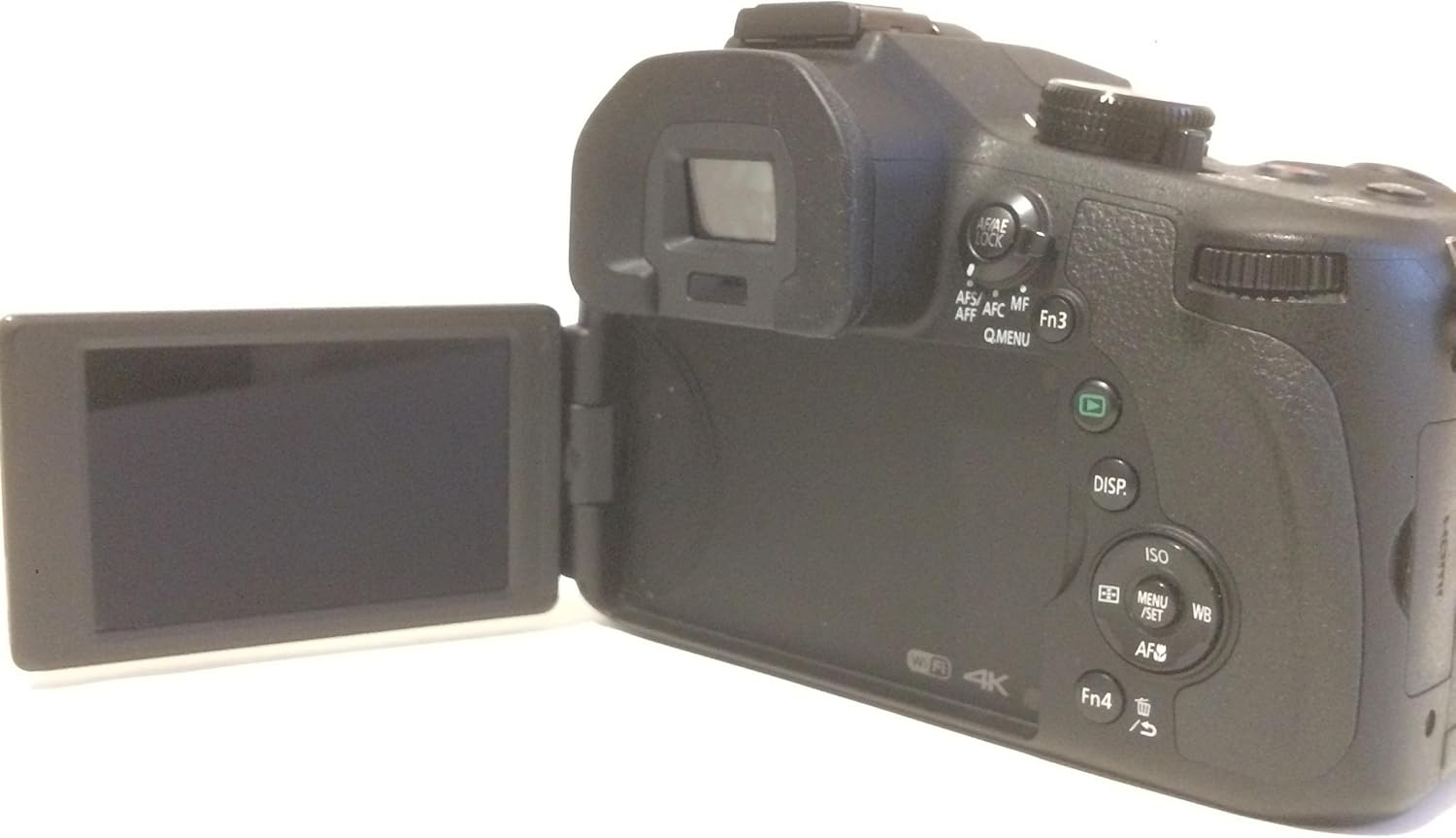
Figura 3.2.1: Traseira view of the Panasonic Lumix DMC-FZ1000 with the articulated LCD screen.
- Monitor LCD: A 3.0-inch, 921k-dot free-angle LCD for composing shots, reviewing images, and navigating menus. It can be articulated for various shooting angles.
- Eletrônico Viewlocalizador (EVF): A 0.39-inch, 2,359k-dot OLED live viewfinder for precise composition, especially in bright conditions.
- DISP. Button: Changes the information displayed on the LCD/EVF.
- ISO Button: Ajusta a sensibilidade ISO.
- WB Button: Adjusts the White Balance settings.
- AF/AE LOCK Button: Locks autofocus and autoexposure.
- Q.MENU Button: Accesses the Quick Menu for frequently used settings.
3.3. Lens Controls
The lens features switches for focus and zoom control.
- Zoom Switch: Allows for smooth, precise zoom adjustments.
- Focus Switch: Toggles between Autofocus (AF) and Manual Focus (MF).
3.4. Modos de filmagem
The DMC-FZ1000 offers various shooting modes to suit different photographic needs:
- Automotivo Inteligente (iA): A câmera seleciona automaticamente as configurações ideais.
- Programa AE (P): A câmera define a abertura e a velocidade do obturador, o usuário controla as demais configurações.
- Prioridade de abertura AE (A): O usuário define a abertura, a câmera define a velocidade do obturador.
- Prioridade de Obturador AE (S): O usuário define a velocidade do obturador, a câmera define a abertura.
- Exposição manual (M): O usuário controla tanto a abertura quanto a velocidade do obturador.
- Modos de cena: Pre-set modes for specific scenes (e.g., Portrait, Landscape, Sports).
- Controle criativo: Applies various artistic filters to images.
3.5. Foco
The camera utilizes Contrast Detection Auto Focus (AF) technology. It supports Automatic AF (AF-A) and Manual Focus (MF).
- Auto-foco: A câmera foca automaticamente no objeto.
- Foco manual: Allows the user to manually adjust the focus using the lens ring.
3.6. Estabilização de imagem
The DMC-FZ1000 features Optical Image Stabilization (O.I.S.) to reduce blur caused by camera shake, particularly useful when shooting handheld or in low light.
3.7. Gravação de vídeo
The camera can record 4K UHD (2160p) videos in MP4 format. To start recording, press the dedicated movie record button.
3.8. Conectividade
The camera supports Wi-Fi for wireless image transfer and remote control. It also has USB and HDMI ports for wired connections to computers or external displays.
4. Cuidados e Manutenção
Os cuidados adequados garantem a longevidade e o desempenho ideal da sua câmera.
- Limpeza do corpo da câmera: Use um pano macio e seco para limpar o corpo da câmera. Para sujeira mais persistente, umedeça levemente o pano.ampUmedeça o pano com água. Evite usar solventes orgânicos.
- Limpeza da lente: Use a lens brush or a blower to remove dust. For smudges, use a specialized lens cleaning solution and a microfiber cloth. Never touch the lens surface with your fingers.
- Cuidados com a bateria: Store batteries in a cool, dry place. Avoid extreme temperatures. Do not fully discharge batteries for extended periods.
- Armazenar: When not in use for extended periods, store the camera in a dry, well-ventilated area, preferably with a desiccant to prevent mold and mildew. Remove the battery before storage.
5. Solução De Problemas
This section addresses common issues you might encounter with your Panasonic Lumix DMC-FZ1000.
| Problema | Possível causa | Solução |
|---|---|---|
| A câmera não liga. | A bateria está descarregada ou inserida incorretamente. | Carregue a bateria completamente e certifique-se de que esteja inserida corretamente. |
| As imagens estão desfocadas. | Tremor da câmera, foco incorreto ou pouca luz. | Hold the camera steady, use O.I.S., ensure proper focus, or increase ISO/use flash in low light. |
| Erro no cartão de memória. | O cartão está cheio, corrompido ou incompatível. | Exclua desnecessários fileSe você estiver com problemas, formate o cartão (isso apagará todos os dados) ou tente usar outro cartão compatível. |
| Não é possível gravar vídeo em 4K. | Memory card speed is insufficient. | Use a memory card with UHS Speed Class 3 (U3) or higher. |
6. Especificações
Key technical specifications for the Panasonic Lumix DMC-FZ1000.
| Recurso | Especificação |
|---|---|
| Nome do modelo | Lumix DMC-FZ1000 |
| Resolução do sensor fotográfico | 20.1 MP |
| Tamanho do sensor de foto | 1 polegadas |
| Zoom óptico | 16x |
| Distância focal máxima | 400 milímetros (equivalente a 35 mm) |
| Distância focal mínima | 25 milímetros (equivalente a 35 mm) |
| Abertura Máxima | f/2.8 |
| Resolução de vídeo | 4KUHD 2160p |
| Estabilização de Imagem | Óptico |
| Tamanho da tela | 3 polegadas |
| Tipo de exibição | LCD (Articulado) |
| Viewlocalizador | Eletrônico |
| Conectividade | Wi-Fi, USB, HDMI |
| Peso do item | 780 gramas |
7. Garantia e Suporte
For information regarding product warranty, service, and technical support, please refer to the official Panasonic webou entre em contato diretamente com o serviço de atendimento ao cliente da Panasonic. Guarde seu comprovante de compra para eventuais solicitações de garantia.
Ask a question about this manual
Ask about setup, troubleshooting, compatibility, parts, safety, or missing instructions. Manuals+ will review the question and use this page’s manual context to help answer it.