
1. پهview
The Philips TAZ2200 is a versatile portable sound machine designed for enjoying various audio formats. It features a top-loading CD player, a front-loading cassette player, FM radio, Bluetooth 6.0 connectivity, USB playback, and a 3.5mm audio input. Equipped with dynamic bass boost and 6W stereo speakers, it delivers rich sound. The unit can be powered by AC mains or batteries and includes a carrying handle for portability.
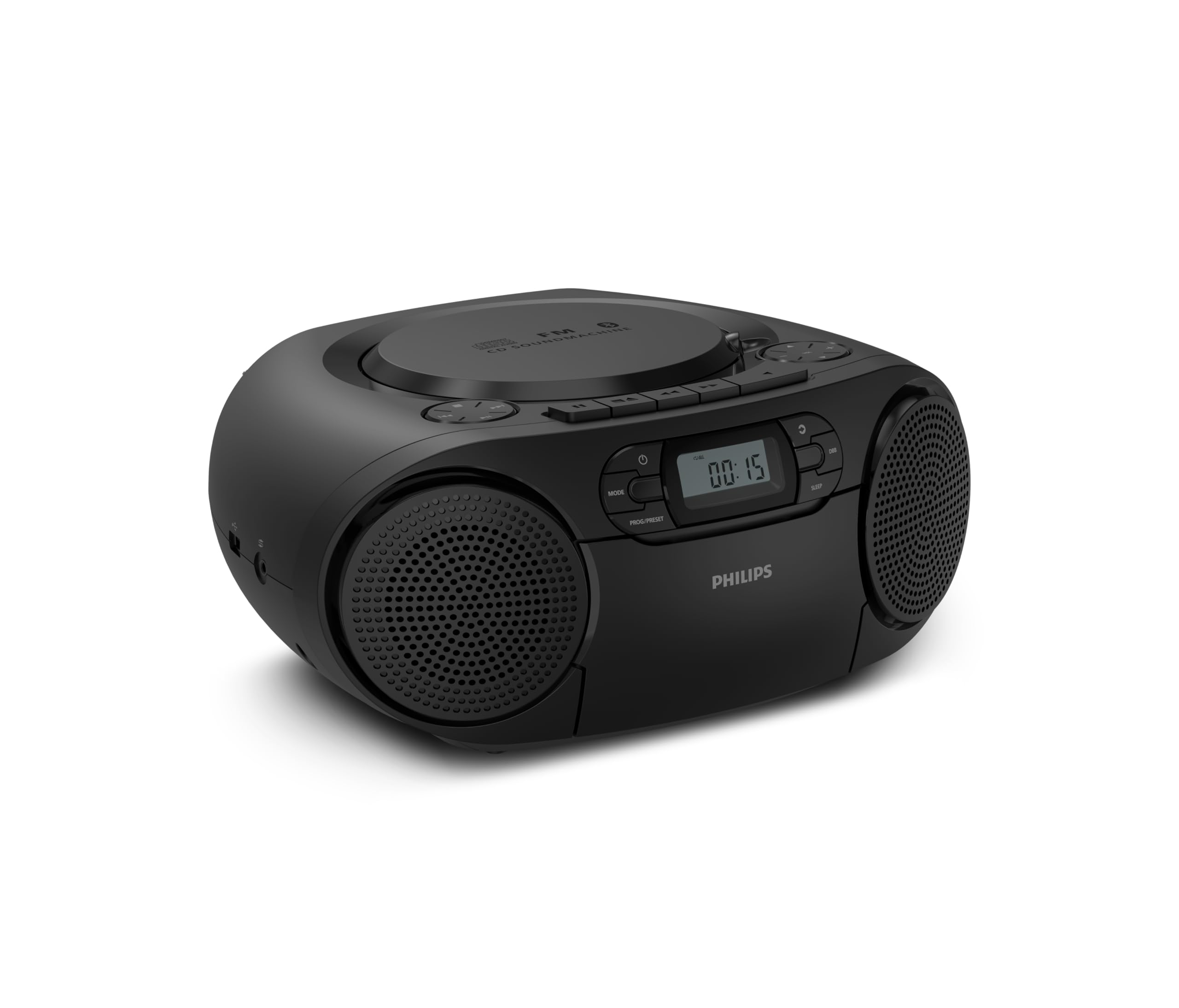
مخکی view of the Philips TAZ2200 CD Soundmachine, showing the main display and control buttons.
2. د خوندیتوب معلومات
Please read these safety instructions carefully before using your device and keep them for future reference. Incorrect use may result in hazards.
- د بریښنا سرچینه: یوازې ټاکل شوی بریښنا اډاپټر یا بیټرۍ وکاروئ. ډاډ ترلاسه کړئ چې حجمtagد واحد اړتیاوې پوره کوي.
- اوبه او رطوبت: واحد د باران، رطوبت، څاڅکو یا څاڅکو سره مه مخ کوئ. په واحد کې د مایعاتو ډک شوي شیان مه کېږدئ، لکه ګلدانونه.
- وینټیلیشن: د کافي هوا ورکولو ډاډ ترلاسه کړئ. د هوا ورکولو هیڅ لاره مه بندوئ. د کافي هوا ورکولو لپاره د واحد شاوخوا لږترلږه فاصله وساتئ.
- تودوخه: واحد د تودوخې سرچینو ته نږدې مه کېږدئ لکه ریډیټرونه، د تودوخې راجسترونه، بخارۍ، یا نور وسایل (په شمول د ampلایفیر) چې تودوخه تولیدوي.
- بیټرۍ: Follow correct polarity when inserting batteries. Do not mix old and new batteries, or different types of batteries. Remove batteries if the unit is not used for a long period.
- پاکول: د پاکولو دمخه د بریښنا له ساکټ څخه واحد خلاص کړئ. نرم، وچ ټوکر وکاروئ. د مایع پاکوونکو یا ایروسول پاکوونکو څخه کار مه اخلئ.
- خدمت کول: د دې محصول پخپله خدمت کولو هڅه مه کوئ. ټول خدمتونه وړ خدماتي پرسونل ته راجع کړئ.
۲. په بکس کې څه دي؟
د خلاصولو پر مهال، مهرباني وکړئ ډاډ ترلاسه کړئ چې لاندې لیست شوي ټول توکي شتون لري:
- Philips TAZ2200 CD Soundmachine
- د بریښنا کیبل
- د چټک پیل لارښود
- د تضمین کتابچه
- د خوندیتوب پاڼه
4. کنټرولونه او اتصالات
د مخکني پینل کنټرولونه
The front panel features the main display, power button, mode selection, program/preset buttons, and dynamic bass boost (DBB) control. Playback controls for CD and USB are also located here.

تفصیلي مخ view showing the display, power, mode, program/preset, and DBB buttons.
Side and Rear Connections
The side of the unit provides a USB port for digital audio playback and a 3.5mm audio input jack for connecting external devices.

اړخ view illustrating the USB port and Audio Input jack.
The top of the unit houses the CD compartment and additional playback controls, while the rear features the AC power input and the FM antenna.

پورته view showing the CD compartment and associated controls.

شاته view displaying the AC power input and the telescopic FM antenna.
5. ترتیب کول
5.1 د بریښنا رسول
د AC بریښنا
- ډاډ ترلاسه کړئ چې واحد بند دی.
- Connect the supplied power cable to the AC IN socket on the rear of the sound machine.
- Plug the other end of the power cable into a wall power outlet.
د بیټرۍ ځواک
For portable use, the unit can operate on 6 x C-type batteries (not included).
- د واحد په پورتنۍ برخه کې د بیټرۍ کمپارټ پوښ خلاص کړئ.
- Insert 6 C-type batteries, ensuring correct polarity (+/-) as indicated inside the compartment.
- د بیټرۍ کمپارټ پوښ په خوندي ډول وتړئ.
۵.۲ د انتن تنظیم کول
For optimal FM radio reception, fully extend the telescopic antenna located at the rear of the unit. Adjust its position and angle to achieve the clearest signal.
6. عملیاتي لارښوونې
6.1 عمومي عملیات
- پاور آن/بند: فشار ورکړئ پاور د واحد د فعالولو یا بندولو لپاره ت buttonۍ.
- د حجم کنټرول: د کارولو VOL+ or والیوم - ت theۍ د حجم کچه تنظیمولو لپاره.
- متحرک باس بوسټ (DBB): فشار ورکړئ DBB button to activate or deactivate the dynamic bass boost feature for enhanced bass sound.
- د موډل انتخاب: فشار ورکړئ موډ button repeatedly to switch between CD, Cassette, FM Radio, Bluetooth, USB, and Audio Input modes.
6.2 CD پلے بیک
- د سي ډي کمپارټمنټ پوښ د واحد په سر کې خلاص کړئ.
- یوه سي ډي (سي ډي، سي ډي-آر، یا سي ډي-آر ډبلیو) د لیبل اړخ د سپینډل په سر کې ځای په ځای کړئ.
- د سي ډي کمپارټ پوښ وتړئ.
- فشار ورکړئ موډ د CD حالت غوره کولو لپاره ت buttonۍ.
- فشار ورکړئ پلی/پاز د بيا غږولو پيلولو لپاره ت buttonۍ.
- د کارولو SKIP تonsۍ (|< or >> |) د ټریکونو پریښودو لپاره.
- فشار ورکړئ او ونیسئ |< or >> | to search within a track.
- فشار ورکړئ ودروئ د بيا غږولو د بندولو لپاره ت buttonۍ.
6.3 کیسیټ پلی بیک
- Open the cassette compartment door on the front of the unit.
- د کیسیټ ټیپ دننه کړئ چې خلاص څنډه یې پورته خوا ته وي.
- د کیسټ خونې دروازه وتړئ.
- فشار ورکړئ موډ د کیسټ حالت غوره کولو لپاره تڼۍ.
- فشار ورکړئ لوبه وکړئ د بيا غږولو پيلولو لپاره ت buttonۍ.
- د کارولو ګړندی مخکی or REWIND buttons to quickly advance or rewind the tape.
- فشار ورکړئ ودروئ د بيا غږولو د بندولو لپاره ت buttonۍ.
6.4 ایف ایم راډیو
- فشار ورکړئ موډ د FM راډیو حالت غوره کولو لپاره تڼۍ.
- اتومات سکین: فشار ورکړئ او ونیسئ PROG/PRESET د شته ایف ایم سټیشنونو د اتوماتیک سکین کولو او ذخیره کولو لپاره تڼۍ.
- لاسي لارښود: فشار ورکړئ TUNING تonsۍ (|< or >> |) په لاسي ډول د مطلوب فریکونسۍ سره سمون ورکول.
- د پریزیټ خوندي کول: After tuning to a station, press PROG/PRESET once, then use |< or >> | د مخکینۍ شمېرې د غوره کولو لپاره، او فشار ورکړئ PROG/PRESET بیا د تایید لپاره.
- د وړاندې کولو یادول: په FM حالت کې ، فشار ورکړئ PROG/PRESET repeatedly to cycle through saved preset stations.
6.5 بلوتوث پلې بیک
- فشار ورکړئ موډ button to select Bluetooth mode. The display will show 'BT' and flash, indicating it's in pairing mode.
- په خپل بلوتوث فعال شوي وسیله (سمارټ فون، ټابلیټ) کې، بلوتوث فعال کړئ او د شته وسایلو لټون وکړئ.
- Select "Philips TAZ2200" from the list of devices.
- Once paired, the unit will emit a confirmation sound, and 'BT' will stop flashing.
- Start playing audio on your connected device. The sound will be streamed to the sound machine.
۱۴ USB پلے بیک
- Insert a USB flash drive into the USB port on the side of the unit.
- فشار ورکړئ موډ د USB حالت غوره کولو لپاره تڼۍ.
- دا واحد به په اتوماتيک ډول مطابقت لرونکی آډیو کشف او غږول پیل کړي files (MP3, WAV, WMA).
- د پلې بیک کنټرولونه وکاروئ (پلی/پاز, SKIP, ودروئ) as you would for CD playback.
6.7 Audio Input (AUX)
- Connect one end of a 3.5mm audio cable (not included) to the AUDIO IN jack on the side of the sound machine.
- Connect the other end of the audio cable to the headphone jack or audio output of your external device (e.g., MP3 player, turntable).
- فشار ورکړئ موډ button to select Audio Input mode.
- Start playing audio on your external device. The sound will be played through the sound machine.
7. ساتنه
- د واحد پاکول: Wipe the exterior of the unit with a soft, slightly damp ټوکر د کثافاتو پاکوونکي یا محلول مه کاروئ.
- د سي ډي پلیر پاملرنه: Keep the CD compartment clean. If the lens is dirty, use a specialized CD lens cleaner. Avoid touching the lens.
- د کیسټ پلیر پاملرنه: په دوره یي ډول د ټیپ سرونه پاک کړئ او رولرونه د پنبې په سویب سره په نرمۍ سره وخورئ.ampد isopropyl الکول سره ختم شوی.
- د بیټرۍ بدلول: If using batteries, replace all 6 C-type batteries when the unit's performance diminishes or if the unit will not be used for an extended period.
- ذخیره کول: کله چې په کارولو کې نه وي، نو دا واحد په پاک او وچ ځای کې د مستقیم لمر وړانګو او سختې تودوخې څخه لرې وساتئ.
8. ستونزه حل کول
If you encounter any issues with your Philips TAZ2200, please refer to the table below for common problems and solutions.
| ستونزه | احتمالي لامل | د حل لاره |
|---|---|---|
| هیڅ ځواک نشته | د برېښنا کیبل نه دی وصل شوی؛ بیټرۍ خالي شوې یا په غلط ډول داخل شوې دي. | Check AC power connection; Replace batteries or ensure correct polarity. |
| غږ نشته | غږ ډېر ټیټ دی؛ غلط حالت غوره شوی دی؛ هیډفونونه وصل دي. | Increase volume; Select the correct source mode (CD, FM, BT, etc.); Disconnect headphones. |
| سي ډي نه غږېږي | CD inserted incorrectly; CD is dirty or scratched; CD format not supported. | Insert CD with label side up; Clean or replace CD; Ensure CD is CD-R/RW compatible. |
| کیسیټ نه غږېږي | Cassette inserted incorrectly; Tape is damaged. | Insert cassette correctly; Try a different cassette. |
| د FM ضعیف استقبال | انتن په سمه توګه نه غځول شوی یا موقعیت نه لري؛ کمزوری سیګنال. | د ټیلسکوپیک انتن په بشپړه توګه پراخ او تنظیم کړئ؛ هڅه وکړئ چې واحد بل ځای ته ولیږدوئ. |
| بلوتوث نه نښلي | Unit not in pairing mode; Bluetooth device too far; Device already paired with another unit. | Ensure unit is in Bluetooth mode and flashing; Move device closer; Disconnect from other devices. |
| د USB پلې بیک ستونزې | USB ډرایو په سمه توګه نه دی داخل شوی؛ نا مناسب file بڼه؛ USB ډرایو فاسد شوی دی. | د USB ډرایو بیا دننه کول؛ ډاډ ترلاسه کړئ files are MP3, WAV, or WMA; Try a different USB drive. |
9. مشخصات
| فیچر | مشخصات |
|---|---|
| برانډ | فیلیپس |
| د ماډل شمیره | TAZ2200/10 |
| د ارتباط ټیکنالوژي | Bluetooth 6.0, USB, Audio Input (3.5mm) |
| د سپیکر ډول | Stereo (2 speakers) |
| د تولید بریښنا | 6 واټ (اعظمي) |
| د رسنیو ملاتړ | CD, CD-R, CD-RW, Cassette, USB (MP3, WAV, WMA) |
| د راډیو تونر | Digital FM with 20 presets |
| د بریښنا سرچینه | AC (wired), 6 x C-type batteries (not included) |
| ابعاد (LxWxH) | 24.5 x 28.5 x 12.5 سانتي متره |
| وزن | 1.35 کیلوګرامه |
| رنګ | سره زر |
10. تضمین او ملاتړ
10.1 د محصول تضمین
This Philips TAZ2200 CD Soundmachine comes with a 2 کلن تضمین د پیرود نیټې څخه. مهرباني وکړئ د تضمین ادعاوو لپاره د پیرود ثبوت وساتئ. تضمین د عادي استعمال شرایطو لاندې د تولید نیمګړتیاوې او نیمګړتیاوې پوښي.
10.2 د پیرودونکي ملاتړ
For technical assistance, troubleshooting beyond this manual, or warranty service, please refer to the contact information provided in the warranty booklet included with your product. You can also visit the official Philips support website for your region for further assistance and FAQs.