
1. پیژندنه
This manual provides essential information for setting up, operating, and maintaining your HP OmniDesk Slim Desktop PC, Model S03-0006. This desktop PC is designed for daily tasks, offering an Intel Core i3-14100 processor, ample memory, and various connectivity options for productivity and entertainment.
2. د بسته محتويات
ډاډ ترلاسه کړئ چې ټول توکي په کڅوړه کې شتون لري:
- HP S03-000 OmniDesk Slim Desktop PC
- د بریښنا رسول
- USB Black Wired Keyboard (if included with specific bundle)
- USB Wired Mouse (if included with specific bundle)
یادونه: اضافي لوازمات په جلا توګه پلورل کیدی شي.
3. محصول ختم شوview
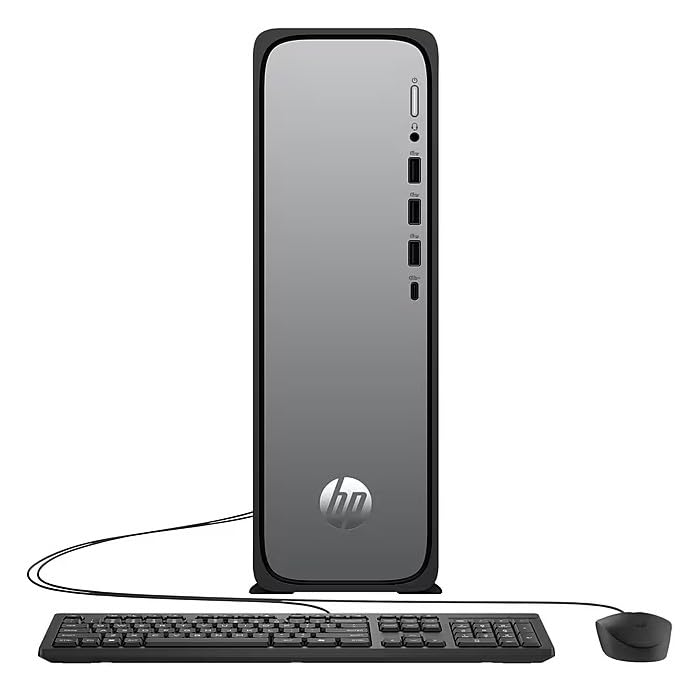
The HP OmniDesk Slim Desktop PC features a compact design with essential components for efficient computing.

شکل 3.1: HP OmniDesk Slim Desktop PC showcasing دا سلم پرو دیfile, Intel Core i3-14100 processor, 8GB DDR5 RAM, 256GB SSD, Intel UHD Graphics 710, Wi-Fi 6, Bluetooth 5.4, Windows 11, and dual display support.
۴. بندرونه او نښلونکي
Familiarize yourself with the various ports on your desktop PC for connecting peripherals and displays.
شکل 3.2: Front and rear port layout of the HP OmniDesk Slim Desktop PC. Front ports include a headphone/microphone combo jack, USB Type-A 5Gbps ports, and a USB Type-C 10Gbps port. Additional ports (typically rear) include 4 USB 2.0 Type-A, 1 RJ-45 (Ethernet), 1 HDMI Out, and 1 DisplayPort 1.4.
- مخکینۍ بندرونه:
- هیډفون / مایکروفون کومبو
- USB Type-A 5Gbps signaling rate (3 ports)
- USB Type-C 10Gbps signaling rate (1 port)
- شاته بندرونه:
- USB 2.0 Type-A (4 ports)
- RJ-45 (ایترنیټ)
- HDMI 1.4b (1 port)
- DisplayPort 1.4a (1 port)
4. د تنظیم کولو لارښود
Follow these steps to set up your HP OmniDesk Slim Desktop PC:
- مانیټر وصل کړئ: Connect your monitor to the PC using an HDMI or DisplayPort cable. Ensure the cable is securely plugged into both the PC and the monitor.
- پرفیریلز وصل کړئ: Plug in your USB keyboard and mouse into the available USB ports on the PC.
- بریښنا وصل کړئ: Connect the power supply cable to the PC's power input, then plug the other end into a wall outlet or surge protector.
- پاور آن: Press the power button on the front of the PC. The system will boot up, and you will see the Windows 11 setup screen.
- د وینډوز لومړنی تنظیم: د وینډوز 11 تنظیم بشپړولو لپاره په سکرین کې لارښوونې تعقیب کړئ، پشمول د ژبې، سیمې، شبکې اتصال، او د کارونکي حساب جوړول.
5. عملیاتي لارښوونې
5.1. بنسټیز عملیات
- پاور آن/بند: Press the power button to turn on the PC. To shut down, click the Start button, then Power > Shut down.
- بیا پیل کول: د سټارټ تڼۍ کلیک وکړئ، بیا پاور> بیا پیل کړئ.
- د خوب حالت: د سټارټ تڼۍ کلیک وکړئ، بیا پاور > سلیپ کلیک وکړئ.
5.2. د شبکې سره نښلول
Your PC supports both wired (Ethernet) and wireless (Wi-Fi) network connections.
- د تار نښلول: Connect an Ethernet cable from your router or modem to the RJ-45 port on the back of the PC.
- Wireless Connection (Wi-Fi 6):
- په ټاسک بار کې د وای فای آیکون کلیک وکړئ.
- له لیست څخه خپل مطلوب وای فای شبکه غوره کړئ.
- که غوښتنه وشي نو د شبکې امنیتي کیلي (پاسورډ) دننه کړئ، بیا کلیک وکړئ نښلول.
5.3. Dual Display Support
To extend your desktop to a second monitor:
- Connect the second monitor to an available video output port (HDMI or DisplayPort) on your PC.
- په ډیسټاپ کې ښۍ کلیک وکړئ او غوره کړئ د ښودلو ترتیبات.
- Under "Multiple displays," select how you want the displays to behave (e.g., Extend these displays, Duplicate these displays).
6. ساتنه
- د سافټویر تازه معلومات: د سیسټم ثبات او امنیت ډاډمن کولو لپاره په منظم ډول د وینډوز تازه معلومات وګورئ او نصب کړئ. لاړ شئ ترتیبات> د وینډوز تازه معلومات.
- د موټر چلوونکي تازه معلومات: Keep your device drivers updated. HP Support Assistant (MyHP) can help manage these updates.
- پاکول: Use a soft, dry cloth to clean the exterior of the PC. Avoid liquid cleaners directly on components. Ensure ventilation openings are clear of dust.
- بیک اپ ډاټا: په منظمه توګه مهم بیک اپ fileد معلوماتو د ضایع کیدو مخنیوي لپاره بهرني ډرایو یا کلاوډ ذخیره ته واستوئ.
7. ستونزه حل کول
| ستونزه | احتمالي حل |
|---|---|
| کمپیوټر نه چالانېږي. |
|
| په مانیټر کې هیڅ ښودنه نشته. |
|
| د انټرنیټ پیوستون نشته. |
|
| Peripherals (keyboard/mouse) not working. |
|
8. مشخصات
| د ماډل نوم | HP OmniDesk Desktop HP S03-000 PC |
| د ماډل شمیره | OmniDesk Slim S03-0006 |
| پروسیسر | Intel Core i3-14100 (3.5 GHz, 6 MB Cache) |
| ګرافیک | د انټل UHD ګرافیک 710 (مدغم) |
| RAM | 8 GB DDR5 (4800 MT/s), Max 64 GB |
| ذخیره کول | ۴۸۰ جي بي ايس ايس ډي (سالډ سټېټ ډرایو) |
| عملیاتي سیسټم | د وینډوز 11 کور |
| ارتباط | Realtek Wi-Fi 6 (2x2), Bluetooth 5.4, Gigabit Ethernet (RJ-45) |
| بندرونه |
|
| ابعاد (H x W x D) | 11.61 x 3.94 x 11.97 انچه |
| وزن | 8.38 پونډه |
| تصدیقونه | ENERGY STAR certified, EPEAT Gold with Climate+ |
9. تضمین او ملاتړ
9.1. د تضمین معلومات
This HP OmniDesk Slim Desktop PC comes with a د 90 ورځو محدود تضمین. مهرباني وکړئ د ځانګړو شرایطو او مقرراتو لپاره ستاسو د محصول سره شامل شوي تضمین اسنادو ته مراجعه وکړئ.
9.2. تخنیکي ملاتړ
د تخنیکي مرستې، د ډرایور ډاونلوډونو، یا نورو معلوماتو لپاره، مهرباني وکړئ د HP رسمي ملاتړ ته مراجعه وکړئ. website. You can also utilize the pre-installed MyHP application for device customization, optimization, and access to helpful messages and settings.
Always provide your product model number (S03-0006) and serial number when contacting support.