
1. پیژندنه
This manual provides detailed instructions for the VENTION 15-in-1 USB-C Docking Station. It covers product features, setup procedures, operational guidelines, and troubleshooting tips to ensure optimal performance and user experience. Please read this manual thoroughly before using the device.
2. محصول ختم شوview
The VENTION 15-in-1 USB-C Docking Station is designed to expand the connectivity of your laptop, transforming a single USB-C port into multiple ports for various peripherals, external displays, and network connections. It features a robust aluminum alloy shell for optimal heat dissipation and a 360° rotatable, detachable base for flexible placement.
۲.۲. د پورټ ترتیب
The docking station offers a comprehensive array of ports to meet diverse connectivity needs:
- 2 x 4K@60Hz HDMI Ports
- 1 x 4K@60Hz DisplayPort (DP)
- 1 x 10Gbps USB-C Port (Data)
- 2 x 10Gbps USB-A Ports (USB 3.2 Gen 2)
- 1 x USB 3.0 Port (5Gbps)
- 2 x USB 2.0 Ports (480Mbps)
- 1 x 100W Power Delivery (PD) Port (Input)
- 1 x PC Host Port (USB-C connection to laptop)
- 1 x 3.5mm Audio Port (Microphone/Audio Jack)
- ۱ x د ایس ډي کارت لوستونکی
- 1 x د TF کارت لوستونکی
- 1 x RJ45 Gigabit Ethernet Port

2.2. د ډیزاین ځانګړتیاوې
- Optimal Heat Dissipation: Constructed with an aluminum alloy shell to efficiently dissipate heat, ensuring stable performance during extended use.
- د ښویېدو ضد پیډونه: Equipped with anti-slip pads for stability on various surfaces.
- Detachable and Rotatable U-shaped Stand: The docking station features a versatile stand that allows for 360° rotation for optimal viewing angles and can be detached for minimalist use or portability.

3. د تنظیم کولو لارښود
Follow these steps to set up your VENTION 15-in-1 USB-C Docking Station:
- Verify Laptop Compatibility: Ensure your laptop's USB-C port supports DisplayPort Alternate Mode (Alt Mode) for video output and Power Delivery for charging. Laptops with Thunderbolt 3/4 ports are also compatible.
- د بریښنا سره وصل شئ (اختیاري مګر سپارښتنه شوې): For optimal performance and laptop charging, connect a 100W Power Delivery (PD) charger (not included) to the PD input port on the docking station.
- لپ ټاپ سره وصل شئ: Use the included USB-C 4.0 cable to connect the docking station's "PC HOST" port to your laptop's USB-C or Thunderbolt port.
- بهرنۍ نندارې سره وصل کړئ: Connect your monitors to the HDMI and/or DisplayPort (DP) outputs on the docking station using appropriate cables (not included). Refer to Section 4.1 for display configuration details.
- پرفیریلز وصل کړئ: Plug in your USB devices (keyboard, mouse, external drives), Ethernet cable, audio devices, and SD/TF cards as needed.


4. عملیاتي لارښوونې
4.1. Display Configuration (Dual/Triple Monitors)
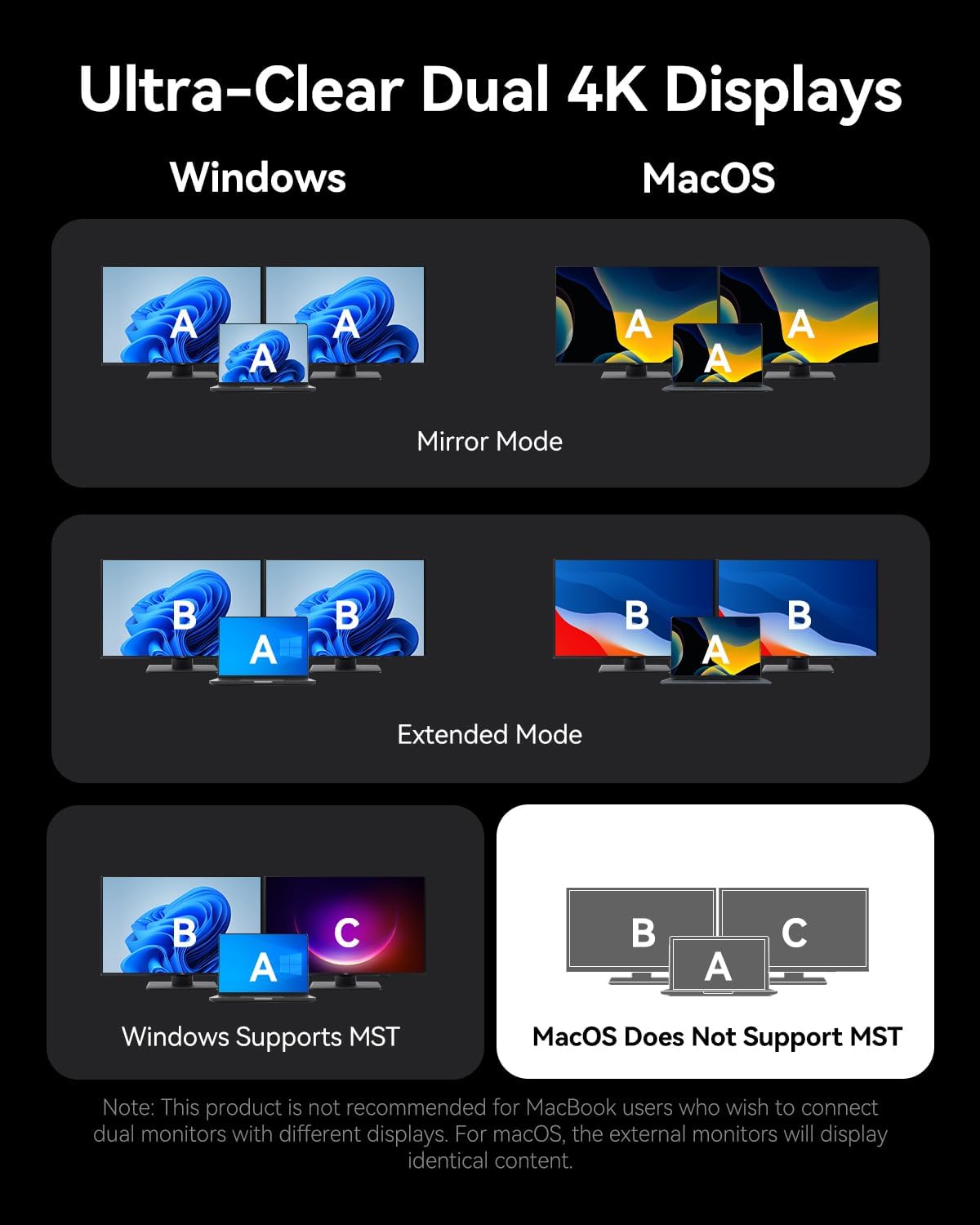
The docking station supports connecting up to three external monitors via its two HDMI ports and one DisplayPort. The display behavior varies depending on your operating system:
د وینډوز سیسټمونو لپاره:
- دوه ګونی مانیټرونه: Supports up to 4K@30Hz.
- Triple Monitors: Supports up to 1080P@60Hz.
- Windows systems support Multi-Stream Transport (MST) mode, allowing for extended displays where each monitor shows different content (A-B-C or A-B-B).
د macOS سیسټمونو لپاره:
- Single, Dual, or Triple Monitors: Supports up to 4K@60Hz for each display.
- macOS systems only support Single-Stream Transport (SST) mode. This means all external monitors will mirror the content of your laptop's display (A-A-A) or mirror each other while extending from the laptop (A-B-B). Extended displays with different content on each external monitor are not supported.
Note: For screen mirroring or extending, please use your own HDMI/DP cables. The included USB-C cable is for charging and data transfer, not video output.

4.2. د معلوماتو لیږد
د ډاکینګ سټیشن د لوړ سرعت معلوماتو لیږد وړتیاوې چمتو کوي:
- USB 3.2 Gen 2 Ports (USB-A & USB-C): Offers speeds up to 10Gbps for rapid file transfers with compatible devices.
- د USB 3.0 پورټ: Provides speeds up to 5Gbps.
- د USB 2.0 بندرونه: Suitable for connecting peripherals like keyboards and mice with speeds up to 480Mbps.
- د SD/TF کارت سلاټونه: Supports simultaneous reading and writing of SD and TF cards, ideal for photographers and content creators.

۵.۴. د بریښنا رسولو (PD) چارج کول
The dedicated 100W PD input port allows you to charge your laptop while using the docking station. Connect a compatible 100W USB-C power adapter to this port. The docking station will pass through up to 85W to your laptop, reserving power for its own operation.
4.4. ګیګابایټ ایترنیټ
Connect an Ethernet cable to the RJ45 port for a stable and high-speed wired network connection, supporting speeds of 10Mbps, 100Mbps, and 1000Mbps (1 Gigabit).
۵.۵. د غږ اتصال
The 3.5mm audio port supports both microphone input and audio output, allowing you to connect headphones, speakers, or a headset for communication and multimedia.
5. مطابقت
The VENTION 15-in-1 USB-C Docking Station is compatible with a wide range of devices that feature a full-featured USB-C port or Thunderbolt 3/4 port. This includes, but is not limited to:
- د ماک بوک پرو (2016-2021)
- د مک بوک هوا (2018-2021)
- ماک بوک (2015-2021)
- ډیل ایکس پی ایس ۱۳/۱۵
- HP Laptops
- Lenovo Laptops
- Surface Book 2 / Surface Go
- iPad Pro / iPad Air (with USB-C)
- Other laptops with full-featured USB-C or Thunderbolt 3/4 ports.
Important: Ensure your laptop's USB-C port supports DisplayPort Alternate Mode for video output and Power Delivery for charging functionality.

6. ستونزه حل کول
که تاسو د خپل ډاکینګ سټیشن سره ستونزې سره مخ شئ، مهرباني وکړئ لاندې عام حلونو ته مراجعه وکړئ:
- د ښودلو محصول نشته:
- ډاډ ترلاسه کړئ چې ستاسو د لیپ ټاپ USB-C پورټ د DisplayPort بدیل حالت ملاتړ کوي.
- Check all video cables (HDMI/DP) are securely connected and functional.
- Verify your monitor input source is correctly selected.
- د ستونزې د حل لپاره په یو وخت کې یو مانیټر وصل کولو هڅه وکړئ.
- خپل لیپ ټاپ بیا پیل کړئ او د ډاکینګ سټیشن بیا وصل کړئ.
- لیپ ټاپ چارج نه کوي:
- Ensure a compatible 100W PD power adapter is connected to the docking station's PD input port.
- ډاډ ترلاسه کړئ چې ستاسو د لیپ ټاپ USB-C پورټ د بریښنا رسولو ملاتړ کوي.
- Check the USB-C cable connecting the docking station to your laptop is securely plugged in.
- د USB وسایل نه پیژندل شوي:
- ډاډ ترلاسه کړئ چې د ډاکینګ سټیشن ستاسو لپ ټاپ سره په سمه توګه وصل دی.
- هڅه وکړئ چې USB وسیله د ډاکینګ سټیشن کې بل پورټ سره وصل کړئ.
- Connect the USB device directly to your laptop to confirm it is functional.
- د ایترنیټ اتصال ستونزې:
- د ایترنیټ کیبل اتصال د ډاکینګ سټیشن او خپل روټر/موډیم دواړو سره وګورئ.
- په خپل لپ ټاپ کې د شبکې ترتیبات تایید کړئ.
- که امکان ولري، د ایترنیټ کیبل د بل وسیلې سره ازموینه وکړئ.
If problems persist, please contact VENTION customer support for further assistance.
7. مشخصات
| فیچر | مشخصات |
|---|---|
| ماډل | B0FX459ZTN |
| بندرونه | 2x HDMI (4K@60Hz), 1x DP (4K@60Hz), 1x USB-C (10Gbps), 2x USB-A (10Gbps), 1x USB 3.0 (5Gbps), 2x USB 2.0 (480Mbps), 1x PD (100W), 1x PC Host, 1x 3.5mm Audio, 1x SD, 1x TF, 1x RJ45 Gigabit Ethernet |
| د بریښنا رسول | 100W Input, up to 85W Output to Laptop |
| د ډیټا لیږد سرعت | USB 3.2 Gen 2: 10Gbps, USB 3.0: 5Gbps, USB 2.0: 480Mbps |
| د ایترنیټ سرعت | 10/100/1000Mbps |
| مواد | د المونیم مصر |
| ابعاد | 7.91 x 6.81 x 2.44 انچه |
| وزن | ۲.۴۵ پونډه |
| رنګ | تور |
8. ساتنه
To ensure the longevity and optimal performance of your VENTION 15-in-1 USB-C Docking Station, follow these maintenance guidelines:
- پاکول: Use a soft, dry, lint-free cloth to clean the exterior of the docking station. Avoid using liquid cleaners, aerosols, or solvents.
- ذخیره کول: د ډاکینګ سټیشن په یخ او وچ ځای کې د مستقیم لمر وړانګو او سختې تودوخې څخه لرې وساتئ.
- سمبالول: Avoid dropping or subjecting the device to strong impacts. Do not attempt to disassemble the docking station, as this will void the warranty.
- د کیبل مدیریت: Organize cables to prevent tangling and strain on the ports.
9. تضمین او ملاتړ
The VENTION 15-in-1 USB-C Docking Station comes with a د 12 میاشتو تضمین د پیرود نیټې څخه. دا تضمین د عادي استعمال لاندې د تولید نیمګړتیاوې او نیمګړتیاوې پوښي.
په بسته کې شامل دي:
- 1 x USB-C Docking Station (15-in-1)
- 1 x 360-Degree Rotatable Base
- ۱ x USB-C ۲.۰ کیبل
- 1 x د کارونکي لارښود

For any questions, technical support, or warranty claims, please contact VENTION customer service. Refer to the contact information provided on the product packaging or the official VENTION webسایټ
۳.۳. د محصول رسمي ویډیو
Watch the official product video for a visual guide on the VENTION 15-in-1 USB-C Docking Station's features and usage: