
پیژندنه
This manual provides essential information for setting up, operating, maintaining, and troubleshooting your Apple iPhone 17. This device is a renewed, unlocked US Version with 256GB storage and eSIM capability. Please read these instructions carefully to ensure optimal performance and longevity of your device.
وسیله ختمه شوهview
The Apple iPhone 17 features a sleek design and powerful capabilities. Below are images highlighting key aspects of the device.
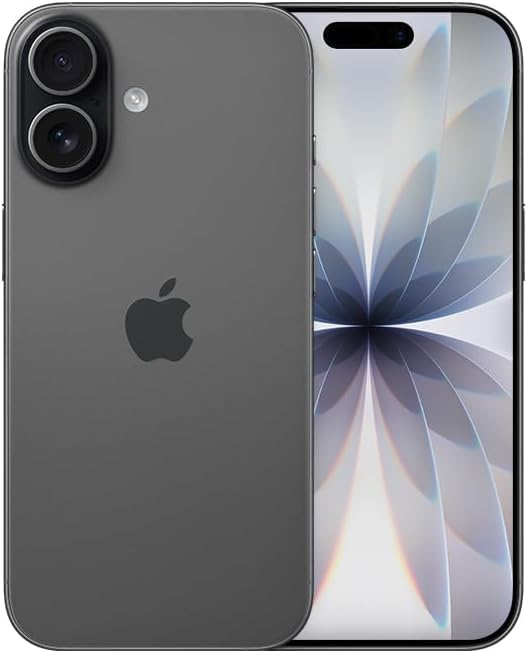
انځور: مخکینۍ برخه view of the Apple iPhone 17 in Black. This image displays the device's screen and overall form factor.

Image: Close-up of the dual camera system on the rear of the Apple iPhone 17. This highlights the camera lenses and flash module.

انځور: سایډ پروfile of the Apple iPhone 17, showing the power button and volume controls. This view emphasizes the device's slim design.
چمتو کول
Follow these steps to set up your renewed Apple iPhone 17:
- د کیریر مطابقت: This phone is unlocked and compatible with GSM and CDMA networks (e.g., AT&T, T-Mobile, Sprint, Verizon, US Cellular, Cricket, Metro, Tracfone, Mint Mobile). Before proceeding, verify compatibility with your chosen carrier.
- د eSIM فعالول: The iPhone 17 uses an eSIM. Your carrier will provide instructions for activating the eSIM. Often, this involves scanning a QR code. Important: Do not discard any QR stickers provided with your device, as they may be essential for eSIM activation.
- پاور آن: Press and hold the power button on the side of the device until the Apple logo appears.
- ابتدايي ترتیب: Follow the on-screen prompts to select your language, region, connect to a Wi-Fi network, and transfer data from a previous device if applicable.
- لوازم: The device includes a generic (Mfi certified) charger and charging cable. Headphones and a physical SIM card are not included.
Operating Your iPhone 17
Your iPhone 17 runs on iOS 18, offering a user-friendly interface and a wide range of features.
بنسټیز نیویګیشن
- کور سکرین: Swipe up from the bottom of the screen to return to the Home Screen.
- د اپلیکیشن بدلونکی: Swipe up from the bottom and pause in the middle of the screen to view اطلاقات خلاص کړئ.
- د کنټرول مرکز: د چټکو ترتیباتو ته د لاسرسي لپاره د پورتنۍ ښیې کونج څخه ښکته سوائپ کړئ.
- خبرتیاوې: Swipe down from the top-center to view خبرتیاوې
د کیمرې ځانګړتیاوې
The iPhone 17 is equipped with a powerful camera system:
- شاته کیمره: 48 MP sensor with LED flash and 10x digital zoom for high-quality photos and videos.
- مخکینۍ کیمره: Single front-facing camera for selfies and video calls.
- ویډیو نیول: Supports 1080p and 4k video recording.
ښودنه او ارتباط
- ښکاره کول: 6.3-inch OLED display with 2622 x 1206 resolution and a 120Hz refresh rate, providing vibrant visuals and smooth scrolling.
- ارتباط: Supports 5G cellular technology, Bluetooth, NFC, USB Type C, and Wi-Fi for seamless communication and data transfer.
Security and Additional Features
- بایومیټریک امنیت: Face Recognition for secure unlocking and authentication.
- اضافي ځانګړتیاوې: Includes Always On Display, Built-In GPS, Dual SIM capability (via eSIM), and Wireless Charging.
ګټور ویډیوګانې
Video: A comparison between the iPhone 17 and another phone model, highlighting design and features. This video is provided by Ersbit.
ویډیو: یو صادقانه بیاکتنهview of the Apple iPhone 17, discussing its performance and user experience. This video is provided by Dimitri.
ویډیو: تفصيلي بیاکتنهview of the Apple iPhone 17, covering various aspects of the device. This video is provided by Bonfashion.
ویډیو: یوه لنډه کلیپ خپرونهasing the Lavender color variant of the iPhone 17. This video is provided by Veronika.
Video: Demonstrating the Apple iPhone 17 in daily use scenarios. This video is provided by Ericka Garcia Garcia.
Video: A design comparison between the iPhone 17 Pro and the standard iPhone 17. This video is provided by Ersbit.
ویډیو: یو اوورview of the iPhone Air and iPhone 17's overall design. This video is provided by Ersbit.
ساتنه
Proper maintenance ensures the longevity and performance of your iPhone 17.
- د بیټرۍ روغتیا: Your renewed iPhone 17 is guaranteed to have a minimum battery capacity of 80%. To preserve battery life, avoid extreme temperatures and excessive charging cycles.
- پاکول: د سکرین او بهرنۍ برخې پاکولو لپاره له نرم، لینټ څخه پاک ټوکر څخه کار واخلئ. د کثافاتو موادو یا سخت کیمیاوي موادو څخه ډډه وکړئ.
- د سافټویر تازه معلومات: Regularly update your iOS to the latest version to benefit from security patches, new features, and performance improvements.
- د ذخیرې مدیریت: په دوره توګه بیاview او غیر ضروري حذف کړئ files, apps, and media to optimize storage and performance.
د ستونزو حل کول
If you encounter issues with your iPhone 17, consider the following common solutions:
- د شبکې د اتصال مسلې: If you experience problems with calls, texts, or data, first ensure your eSIM is properly activated with your carrier. Some carriers may have specific requirements or known compatibility issues. Contact your carrier's support for assistance.
- وسیله ځواب نه ورکوي: Perform a force restart. The exact steps may vary slightly by iOS version, but typically involve pressing and quickly releasing the Volume Up button, then the Volume Down button, then pressing and holding the Side button until the Apple logo appears.
- د بیټرۍ ختمول: Check battery usage in Settings to identify apps consuming significant power. Adjust settings like screen brightness, background app refresh, and location services to optimize battery life.
- د اپلیکیشن مسلې: If an app is not functioning correctly, try closing and reopening it. If the issue persists, delete and reinstall the app, or check for app updates in the App Store.
- د سافټویر ستونزې: Ensure your device is running the latest iOS version. If problems persist, consider backing up your data and performing a factory reset.
مشخصات
Detailed technical specifications for the Apple iPhone 17 (256GB, Unlocked, Renewed):
| فیچر | مشخصات |
|---|---|
| برانډ | اپل |
| د ماډل نوم | iPhone 17 |
| عملیاتي سیسټم | iOS 18 |
| د حافظې د ذخیره کولو ظرفیت | 256 جي بي |
| د RAM حافظې نصب شوې اندازه | 8 جي بي |
| د CPU ماډل | A- لړۍ |
| د CPU سرعت | 3.7 GHz |
| د سکرین اندازه | ۷۸۷ انچه |
| د ښودلو ډول | OLED |
| قرارداد | 2622 x 1206 پکسلز |
| د تازه کولو نرخ | 120 Hz |
| Display Pixel Density | 460 Pixels Per Inch (PPI) |
| بېسیم چمتو کوونکی | خلاص شوی |
| سیلولر ټیکنالوژي | 5G |
| د ارتباط ټیکنالوژي | بلوتوث، NFC، USB، وای فای |
| د سیم کارت سلاټ شمېر | E Sim |
| د نښلونکي ډول | د USB ډول C |
| Rear Facing Camera Photo Sensor Resolution | 48 MP |
| Number of Rear Facing Cameras | 1 |
| Number of Front Cameras | 1 |
| د کیمرې فلش | LED |
| ډیجیټل زوم | 10.0 |
| د ویډیو نیول حل | 1080p, 4k |
| د بیټرۍ ظرفیت | 3600 ملیونهamp ساعتونه |
| د بیټرۍ توضیحات | لیتیم آیون |
| Biometric Security Feature | د مخ پیژندنه |
| اضافي ځانګړتیاوې | Always On Display, Built-In GPS, Dual SIM, Factory Unlocked, Wireless Charging |
| د اوبو د مقاومت کچه | د اوبو مقاومت نلري |
| د توکي وزن | 14.88 اونس |
| د توکي ابعاد | 6 x 4 x 2 انچه |
| د ماډل کال | 2025 |
| UPC | 756613503987 |
تضمین او ملاتړ
Your renewed Apple iPhone 17 is covered by a 90-Day Amazon Renewed Guarantee. This warranty ensures that your device is in excellent working condition and provides options for replacement or refund if issues arise within the warranty period.
د نورو مرستو لپاره، مهرباني وکړئ لاندې ته مراجعه وکړئ:
- د ایمیزون نوی ملاتړ: Visit the Amazon Renewed Store for information regarding your purchase and warranty claims.
- د ایپل ملاتړ: For general iOS and device functionality questions, visit the official Apple Support webسایټ
- د بار وړونکي ملاتړ: Contact your mobile carrier for any network-related issues, eSIM activation, or service plan inquiries.