
1. پهview
The GetPairr Vista 11-inch Portable Display Audio Android Navigation System is designed to enhance your in-car entertainment and navigation experience. Featuring a built-in Android system, it supports wireless connectivity for popular smartphone integration platforms and offers versatile audio output options.
کلیدي ځانګړتیاوې:
- Integrated Android System: Equipped with a 4-core CPU, 2GB RAM, and 32GB ROM, allowing direct access to streaming applications like YouTube, Netflix, and Spotify via Wi-Fi tethering.
- بېسیم کارپلی/انډرایډ آټو: Seamlessly connect your smartphone via Bluetooth for wireless access to navigation, music, messaging, and calls, eliminating cable clutter.
- Smart Split Screen (PIP Function): The 11-inch wide display supports a 5:5 split-screen ratio, enabling simultaneous viewing of navigation and other Android applications.
- Dual Bluetooth Connectivity: Allows simultaneous connection to your smartphone for input and your car's audio system for wireless output to car speakers.
- د لوړ ریزولوشن ښودنه: An 11-inch screen with 1920x720 resolution provides clear visuals for maps, videos, and applications, improving visibility and operational ease while driving.

2. ترتیب کول
2.1 د بسته محتويات
ډاډ ترلاسه کړئ چې ټول توکي په کڅوړه کې شتون لري:
- Portable Display Audio Main Unit
- ولاړ
- AUX کیبل
- Cigarette Lighter Plug Adapter
- د کارونکي لارښود (دا لاسوند)

2.2 نصب کول
- د واحد نصبول: Attach the provided stand to the main unit. Secure the stand to your dashboard using the 3M tape. Ensure the unit is placed in a location that does not obstruct your view یا د موټر چلولو سره مداخله وکړي.
- د بریښنا پیوستون: Connect the cigarette lighter plug adapter to the main unit's 5V power cable. Insert the cigarette lighter plug into your vehicle's accessory socket. The unit supports both 12V and 24V vehicle systems.
- ابتدايي بریښنا فعاله: Once connected, the unit will power on automatically when the vehicle's ignition is turned on.


3. عملیاتي لارښوونې
3.1 Android System and App Usage
The GetPairr Vista unit runs on an Android operating system, allowing you to install and use various applications.
- د وای فای اتصال: To access online services and download apps, connect the unit to a Wi-Fi network. This can be done via your smartphone's tethering function or an in-car Wi-Fi hotspot.
- د اپلیکیشن نصبول: Use the pre-installed app store or other compatible methods to download and install applications like YouTube, Netflix, Spotify, etc.
- نیویگیشن: Utilize navigation apps directly on the unit or through connected CarPlay/Android Auto.

۶.۲ بې سیم کارپلی / انډرایډ آټو اتصال
Connect your smartphone wirelessly to access CarPlay or Android Auto features.
- جوړه کول: On your smartphone, enable Bluetooth and search for the GetPairr Vista unit. Pair the devices.
- اتوماتیک پیوستون: Once paired, CarPlay or Android Auto will automatically connect when the unit powers on.
- فعالیت: Access your phone's navigation, music, messages, and make calls directly from the unit's display.
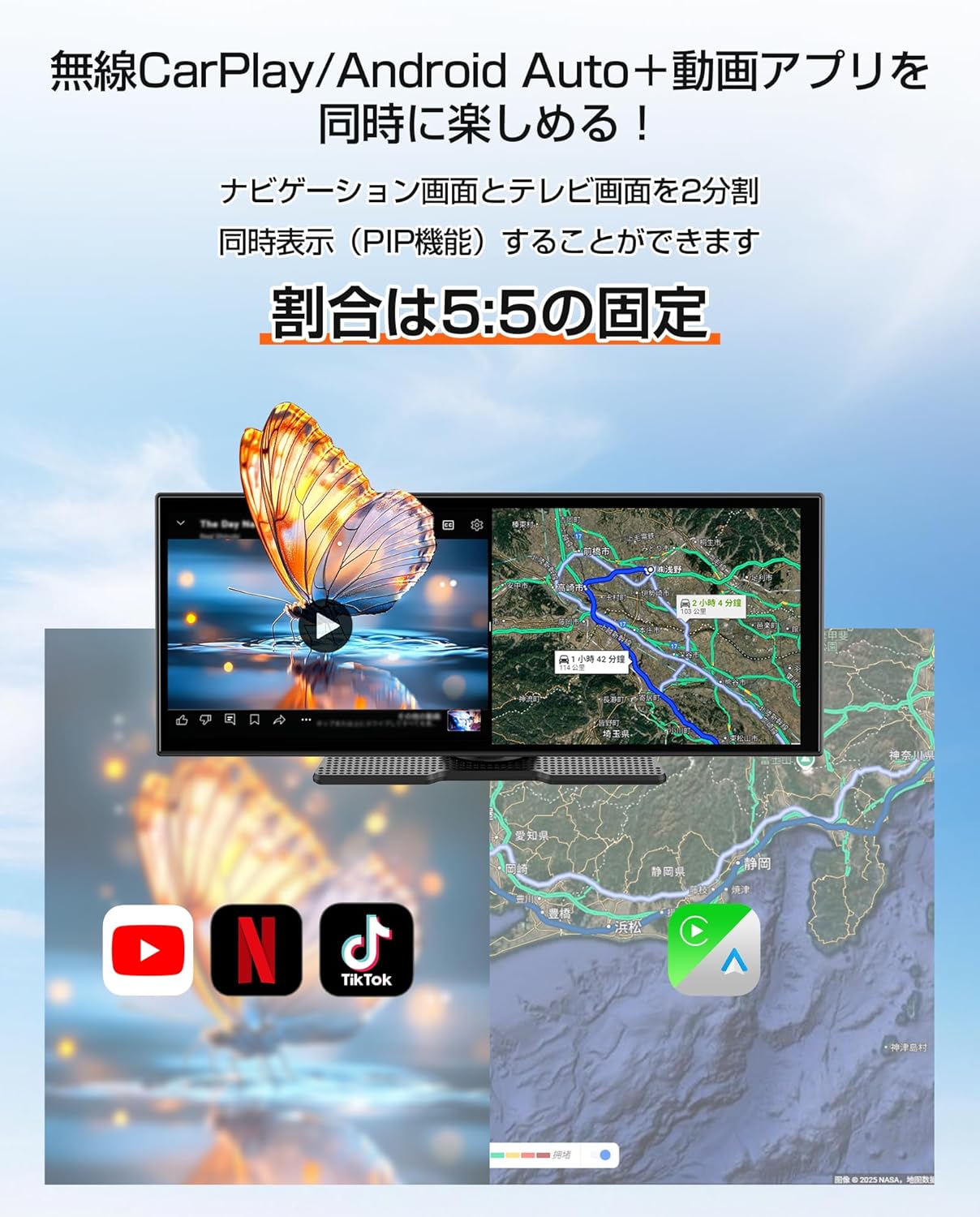
3.3 Split Screen Function (PIP)
The 11-inch display supports a 5:5 split-screen mode, allowing two applications to run side-by-side.
- فعالول: Refer to the on-screen interface for activating split-screen mode.
- کارول: د مثال لپارهample, display navigation on one half (via CarPlay/Android Auto) and a video streaming app (via the built-in Android system) on the other.

۲.۷ د آډیو آوټ پټ اختیارونه
The unit offers multiple ways to output audio to your car's speakers.
- دوه ګونی بلوتوث: The unit can receive audio from your smartphone via Bluetooth and transmit it to your car's audio system (if it supports Bluetooth audio input).
- اوکس کیبل: Connect the provided AUX cable from the unit to your car's AUX input for a wired audio connection.
- د FM لیږدونکی: The unit can transmit audio via an FM frequency, which you can tune into on your car's radio.
- جوړ شوی سپیکر: The unit has a small built-in speaker for basic audio output. For optimal sound quality, connecting to your car's audio system is recommended.

4. ساتنه
4.1 پاکول
To maintain the display's clarity and unit's appearance:
- په نرمۍ سره سکرین د نرم، لینټ نه پاک ټوکر سره پاک کړئ. د سختو داغونو لپاره، لږ څهampټوکر د اوبو یا سکرین خوندي کلینر سره ومینځئ.
- Avoid using abrasive cleaners, solvents, or aerosol sprays directly on the unit.
- بندرونه له دوړو او کثافاتو څخه پاک وساتئ.
4.2 ذخیره کول
کله چې د اوږدې مودې لپاره نه کارول کیږي:
- واحد د بریښنا سرچینې څخه جلا کړئ.
- دا واحد په یخ او وچ ځای کې وساتئ، د مستقیم لمر وړانګو او سختې تودوخې څخه لرې.
5. ستونزه حل کول
If you encounter issues with your GetPairr Vista unit, refer to the following common solutions:
- ځواک نشته: Ensure the cigarette lighter adapter is securely plugged into both the unit and the vehicle's accessory socket. Check if the vehicle's accessory socket is receiving power.
- غږ نشته: Verify the audio output method selected (Bluetooth, AUX, FM). Ensure your car's audio system is set to the correct input source. Adjust volume on both the unit and your car's audio system.
- کارپلی/انډرایډ آټو نه وصل کیږي: Ensure Bluetooth is enabled on your smartphone and the unit. Try unpairing and re-pairing the devices. Check for any software updates for your smartphone or the unit.
- Slow Performance/App Freezing: Close unused applications. Ensure a stable Wi-Fi connection for online activities. Restart the unit if necessary.
- سکرین بې ځوابه: Perform a soft reset by holding the power button (if available) or disconnecting and reconnecting power.
که ستونزې دوام ومومي، مهرباني وکړئ د پیرودونکو ملاتړ سره اړیکه ونیسئ.
6. مشخصات
| فیچر | تفصیل |
|---|---|
| د سکرین اندازه | 11 انچه |
| د ښودلو ډول | LCD |
| قرارداد | 1920x720 |
| عملیاتي سیسټم | Android, Wireless Apple CarPlay, Wireless Android Auto |
| CPU | 4-کور |
| RAM | 2GB |
| ROM | 32GB |
| ارتباط | بلوتوث، USB، وای فای |
| د آډیو وتلې حالت | سټیریو |
| د نصب کولو ډول | 3M ټیپ |
| د محصول ابعاد | 26 cm (L) x 2.7 cm (W) x 10.5 cm (H) |
| وزن | 1 کیلو ګرامه |
| د بریښنا انډول | DC 12V/24V (via cigarette lighter adapter) |
| شاملې برخې | AUX Cable, Cigarette Plug Adapter, Portable Display Audio Main Unit, User Manual |
7. تضمین او ملاتړ
7.1 د تضمین معلومات
The GetPairr Vista unit comes with a د جوړونکي دوه کلن تضمین from the date of purchase. In the event of any defects or malfunctions, the manufacturer offers exchange or refund services.
7.2 د پیرودونکي ملاتړ
For inquiries or support, please contact us via the official LINE account: @getpairr.