
محصول پای ته ورسیدview
The HP OmniDesk Desktop PC M02-0127c is a high-performance computer designed for everyday computing and productivity. It features an AMD Ryzen 7 8700G processor, 32GB DDR5 memory, and a 1TB NVMe SSD, along with integrated AMD Radeon 780M Graphics. This manual provides essential information for setting up, operating, maintaining, and troubleshooting your device.

مخامخ ښي خوا ته view of the HP OmniDesk Desktop PC, showcasing its minimalist black design with a wood-inspired front panel.
1. د تنظیم کولو لارښود
۲.۱ د بکس خلاصول او لومړنی ځای پرځای کول
Carefully remove all components from the packaging. Ensure the desktop tower, wireless keyboard, and wireless mouse are present. Place the desktop on a stable, flat surface with adequate ventilation.
1.2 د پردیو سره نښلول
Connect your monitor, keyboard, mouse, and power cable to the appropriate ports on the desktop.
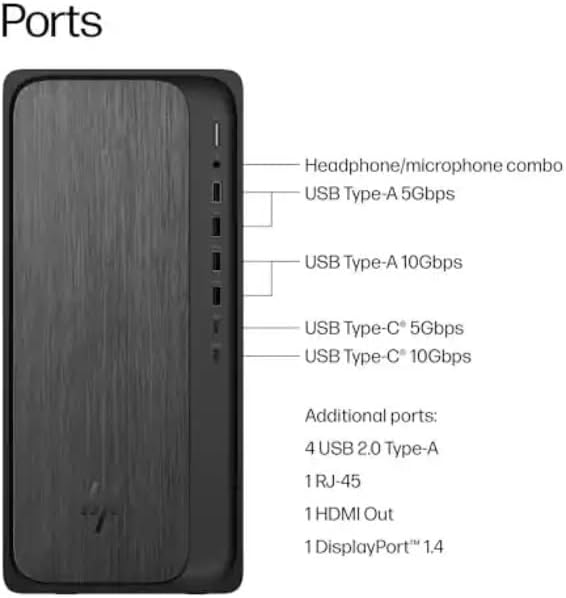
Diagram illustrating the various ports on the front and rear of the HP OmniDesk Desktop PC, including USB Type-A, USB Type-C, HDMI Out, RJ-45, and headphone/microphone combo.
- د بریښنا پیوستون: Connect the power cable to the power input on the rear of the desktop and then to a wall outlet.
- د څارنې اړیکه: Use an HDMI cable to connect your monitor to the HDMI Out port on the rear of the desktop. The system also supports DisplayPort 1.4.
- کیبورډ او موږک: The included HP black wireless keyboard and mouse combo connect wirelessly. Insert the USB receiver into an available USB port on the desktop. Ensure batteries are installed in the keyboard and mouse.
۲.۳ لومړی بوټ او د وینډوز ۱۱ تنظیم کول
Press the power button on the front of the desktop. The system will boot into the Windows 11 Home setup process. Follow the on-screen instructions to configure your operating system, including language, region, network connection, and user account.
2. عملیاتي لارښوونې
۳.۱ د بریښنا فعال/بند او د خوب حالتونه
- پاور آن: د ډیسټاپ په مخ کې د بریښنا تڼۍ فشار ورکړئ.
- بندول: د سټارټ تڼۍ کلیک وکړئ، بیا پاور، او "بند کړئ" غوره کړئ.
- بیا پیل کول: د سټارټ تڼۍ کلیک وکړئ، بیا پاور، او "بیا پیل کړئ" غوره کړئ.
- خوب: Click the Start button, then Power, and select "Sleep". The system will enter a low-power state, allowing for quick resume.
۴.۲ شبکو سره نښلول
- وای فای: Click the network icon in the taskbar, select your Wi-Fi network, enter the password, and click "Connect". The system supports Wi-Fi 6 (802.11ax).
- ایترنیټ: Connect an Ethernet cable from your router or modem to the RJ-45 port on the rear of the desktop for a wired network connection.
2.3 Using Bluetooth Devices
د بلوتوث وسیلو سره د نښلولو لپاره، لاړ شئ ترتیبات > بلوتوث او وسایل. Ensure Bluetooth is turned on, then click "Add device" and follow the pairing instructions for your device. The system supports Bluetooth 5.4.
2.4 Utilizing the Copilot Key
The included keyboard features a dedicated Copilot key. Press this key to instantly access your AI Assistant for enhanced productivity and quick task management within Windows 11.
3. ساتنه
۴.۱ ستاسو د ډیسټاپ پاکول
Regularly clean the exterior of your desktop with a soft, dry, lint-free cloth. For dust accumulation in vents, use compressed air. Ensure the system is powered off and unplugged before cleaning.
3.2 د سافټویر تازه معلومات
Keep your Windows operating system and drivers updated to ensure optimal performance and security. Go to ترتیبات> د وینډوز تازه معلومات د شته تازه معلوماتو د کتلو او نصبولو لپاره.
3.3 د ذخیرې مدیریت
The 1TB NVMe SSD provides fast storage. Regularly manage your files and uninstall unused applications to maintain free space and system performance.
3.4 د چاپیریال په اړه نظرونه
The HP OmniDesk PC is designed with recycled materials and is EPEAT Gold Climate+ Registered and ENERGY STAR certified. Ensure proper disposal of electronic waste according to local regulations.
4. ستونزه حل کول
۱ برېښنا نشته
نښې: The desktop does not power on when the power button is pressed.
حل لاره:
- Verify the power cable is securely connected to both the desktop and a working wall outlet.
- د دیوال ساکټ د بل وسیلې سره ازموینه وکړئ ترڅو ډاډ ترلاسه کړئ چې دا بریښنا لري.
- Ensure the power supply unit (PSU) switch (if present) is in the ON position.
4.2 نه ښکاره کول
نښې: The desktop powers on, but nothing appears on the monitor.
حل لاره:
- Check that the monitor is powered on and the video cable (HDMI) is securely connected to both the desktop and the monitor.
- ډاډ ترلاسه کړئ چې ستاسو په مانیټر کې د ننوتلو سمه سرچینه غوره شوې ده.
- که امکان ولري، د بل مانیټر یا ویډیو کیبل سره ازموینه وکړئ.
4.3 System Not Booting (Advanced)
نښې: The system powers on but fails to load the operating system, or displays error messages.
حل لاره:
- Attempt to access the BIOS/UEFI settings (usually by pressing F10 or Delete during startup) to check boot order or run diagnostics.
- If installing a new operating system like Linux, ensure any existing drive encryption is disabled and consider updating the BIOS first, as noted by some users.
- If the issue persists, contact HP Support.
۵.۳ د اتصال مسلې
نښې: Unable to connect to Wi-Fi, Bluetooth, or wired network.
حل لاره:
- وای فای/بلوتوث: Ensure wireless adapters are enabled in Windows settings. Restart your router/modem.
- ایترنیټ: Check cable connections. Verify router/modem status.
- که اړتیا وي، د شبکې چلوونکي تازه کړئ.
5. تخنیکي مشخصات
| فیچر | تفصیل |
|---|---|
| د ماډل نوم | OmniDesk |
| د ماډل شمیره | M02-0127c |
| پروسیسر | AMD Ryzen 7 8700G (4.2GHz base, up to 5.1GHz max boost) with AMD Ryzen AI (16 NPU TOPS) |
| عملیاتي سیسټم | مایکروسافټ وینډوز ۱۱ کور (۶۴ بټ) |
| حافظه | 32 GB DDR5-5200 MT/s (Max 64 GB) |
| ذخیره کول | 1 TB PCIe Gen4 NVMe M.2 Solid State Drive |
| ګرافیک | AMD Radeon 780M Graphics (Integrated) |
| بې سیم ارتباط | Wi-Fi 6 (2x2) 802.11ax, Bluetooth 5.4 |
| د وصل نښلول | یوځای شوی 10/100/1000 GbE LAN |
| بندرونه (مخ) | د هیډفون/مایکروفون ترکیب، د USB ډول-A 5Gbps، د USB ډول-A 10Gbps، د USB ډول-C 5Gbps، د USB ډول-C 10Gbps |
| بندرونه (شاته) | ۴x USB ۲.۰ ډول-A، ۱x RJ-۴۵، ۱x HDMI آوټ، ۱x ډیسپلی پورټ ۱.۴ |
| ابعاد (L x W x H) | ۱.۳۵" x ۳.۷۱" x ۳.۷۱" (۳.۴۳ سانتي متره x ۹.۴۲ سانتي متره x ۹.۴۲ سانتي متره) |
| وزن | 12.7 پونډه (5.76 kg) |
| شامل شوي وسایل | HP black wireless keyboard and mouse combo |
6. د تضمین معلومات
This HP OmniDesk Desktop PC M02-0127c comes with a د 1 کال محدود تضمین from the date of purchase. This warranty covers defects in materials and workmanship under normal use. For specific terms and conditions, please refer to the warranty documentation included with your product or visit the official HP support webسایټ
مهرباني وکړئ د تضمین ادعاګانو لپاره د پیرود ثبوت وساتئ.
7. د پیرودونکي ملاتړ
د تخنیکي مرستې لپاره، د دې لارښود څخه هاخوا د ستونزو حل کول، یا د تضمین خدماتو لپاره، مهرباني وکړئ د HP پیرودونکي ملاتړ سره اړیکه ونیسئ.
- آنلاین ملاتړ: Visit the official HP Support webد ډرایورانو، لارښودونو، او د ستونزو حل کولو لارښوونو لپاره سایټ. support.hp.com
- د تلیفون ملاتړ: Refer to the contact information provided in your product documentation for regional phone support numbers.
When contacting support, please have your product model number (M02-0127c) and serial number ready.