
1. پیژندنه
Thank you for choosing the LIGE FV21-D Women's Smartwatch. This device combines elegant design with advanced fitness and communication features to enhance your daily life. This manual provides detailed instructions for setup, operation, and maintenance to ensure optimal use of your smartwatch.
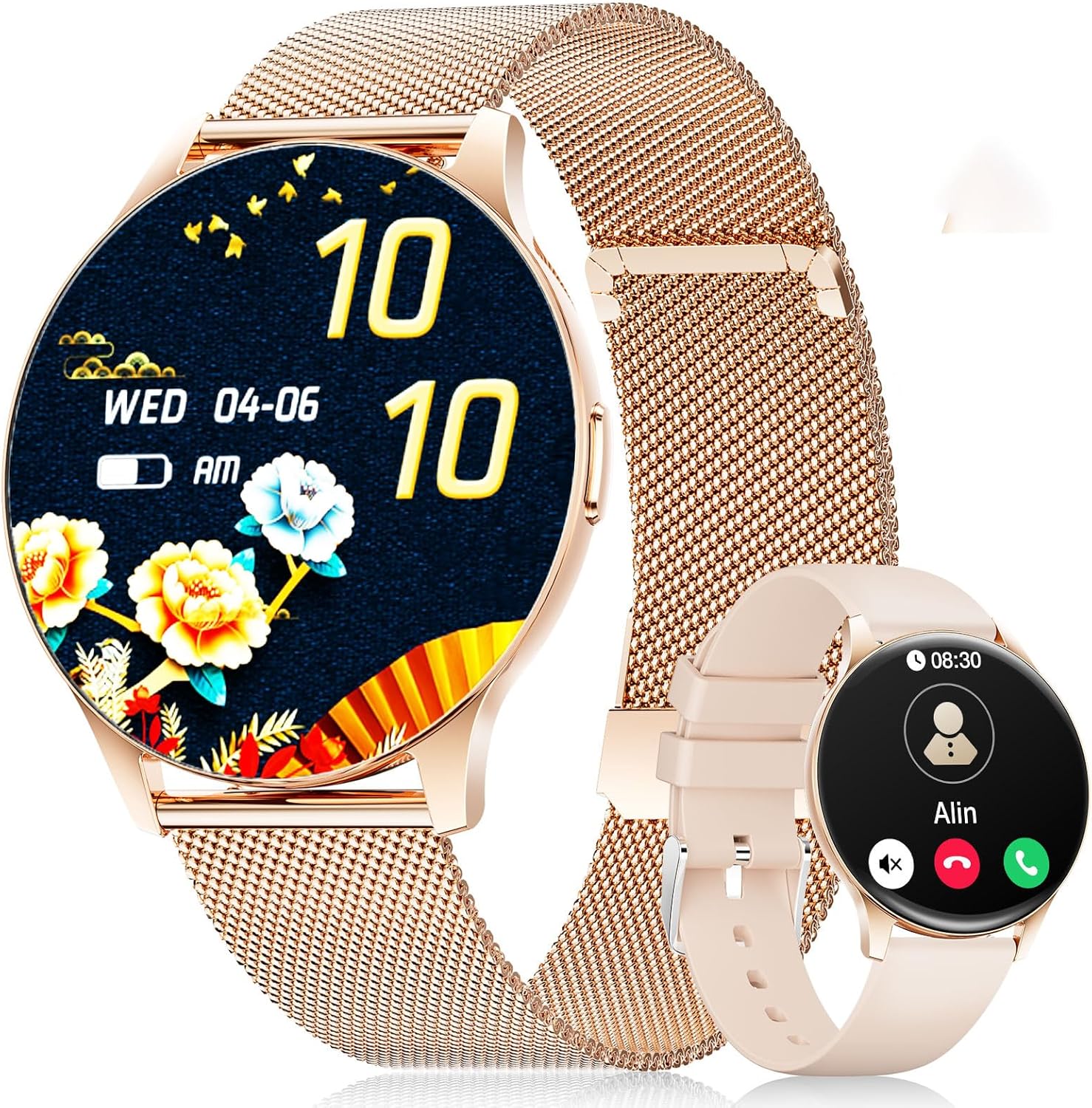
Image: The LIGE FV21-D Smartwatch, showcasing its rose gold casing with a mesh strap and an alternative beige silicone strap. The main display shows a floral watch face, while the smaller inset shows a call interface.
2. د بسته محتويات
مهرباني وکړئ تصدیق کړئ چې ټول توکي ستاسو په کڅوړه کې شتون لري:
- LIGE FV21-D Smartwatch
- Metal Mesh Strap (Rose Gold)
- Silicone Strap (Beige)
- د چارج کیبل
- د کارونکي لارښود (دا لاسوند)
3. ترتیب کول
۴.۱ د سمارټ واچ چارج کول
- د چارج کولو کیبل د سمارټ واچ شاته د چارج کولو پورټ سره وصل کړئ.
- د چارج کولو کیبل USB پای په معیاري USB بریښنا اډاپټر (شامل نه دی) یا د کمپیوټر USB پورټ سره وصل کړئ.
- The watch display will indicate charging status. Ensure the watch is fully charged before first use. A full charge typically takes approximately 2 hours.
۸ پاور آن/بند
- پاور آن: Press and hold the side button for a few seconds until the LIGE logo appears.
- بندول: د غاړې تڼۍ فشار ورکړئ او ونیسئ، بیا په سکرین کې د "بریښنا بند" انتخاب غوره کړئ.
۳.۳ د اپلیکیشن نصب او جوړه کول
To unlock the full functionality of your smartwatch, you need to pair it with your smartphone using the dedicated application.
- اپلیکیشن ډاونلوډ کړئ: لټون "FitCloudPro" in your smartphone's app store (Apple App Store for iOS or Google Play Store for Android) and install it.
- بلوتوث فعال کړئ: ډاډ ترلاسه کړئ چې ستاسو په سمارټ فون کې بلوتوټ فعال دی.
- اپلیکیشن خلاص کړئ: د FitCloudPro اپلیکیشن لانچ کړئ او د حساب جوړولو یا ننوتلو لپاره په سکرین کې لارښوونې تعقیب کړئ.
- وسیله اضافه کړئ: In the app, navigate to the "Device" or "Add Device" section. The app will search for available smartwatches.
- خپل ساعت غوره کړئ: Select "FV21-D" or the corresponding device name from the list.
- جوړه کول تایید کړئ: د جوړې غوښتنه ممکن ستاسو په تلیفون او سمارټ واچ دواړو کې ښکاره شي. په دواړو وسیلو کې جوړه تایید کړئ.
- اجازه ورکول: د بشپړ فعالیت لپاره اپلیکیشن ته اړینې اجازې (د بیلګې په توګه، خبرتیاوې، موقعیت، اړیکې) ورکړئ.
Note: The smartwatch supports Android 4.4+ and iOS 9.0+ operating systems.
4. عملیاتي لارښوونې
4.1 بنسټیز نیویګیشن
- ټچ سکرین: The 1.43-inch HD AMOLED touch display allows for intuitive interaction.
- پورته / ښکته سوائپ: د مینو او خبرتیاو له لارې سکرول وکړئ.
- کیڼ/ښي خوا ته سوپ کړئ: چټکو دندو یا مختلفو ویجټونو ته لاسرسی ومومئ.
- ټایپ: یو توکي غوره کړئ یا یو عمل تایید کړئ.
- د غاړې تڼۍ: Press to return to the home screen or wake the display. Long press for power options.
۲.۴ د څار مخونو تنظیمول
Your smartwatch offers over 200 customizable watch faces. You can change them directly on the watch or through the FitCloudPro app.
- په څار کې: Long-press the home screen, then swipe left or right to browse available watch faces. Tap to select.
- د اپلیکیشن له لارې: Open the FitCloudPro app, go to the "Watch Faces" section, and choose from the gallery. You can also upload your own photos to create custom watch faces.
4.3 Phone Function (Bluetooth Call)
Once paired, you can make and receive calls directly from your smartwatch.
- زنګ وهل: Access the "Dialer" or "Contacts" function on the watch to initiate a call.
- تلیفونونه ترلاسه کول: When a call comes in, the watch will display the caller ID. You can answer or reject the call directly from the watch screen.
4.4 سپورت موډونه
The smartwatch supports over 120 sports modes, including yoga, cycling, running, and more. To start a workout:
- Navigate to the "Sports" or "Workout" menu on your watch.
- خپل مطلوب فعالیت غوره کړئ.
- Tap to start tracking. The watch will record data such as duration, calories burned, and heart rate.
- To end a workout, swipe or tap the screen and select the "End" option.
4.5 د روغتیا څارنه
The FV21-D smartwatch provides comprehensive health tracking features:
- د زړه ضربان څارونکی: په دوامداره توګه د ورځې په اوږدو کې ستاسو د زړه ضربان څاري. View په ساعت کې د ریښتیني وخت معلومات یا په ایپ کې تفصيلي رجحانات.
- د خوب تعقیبونکی: Automatically monitors your sleep patterns, including deep sleep, light sleep, and wake times. Access sleep analysis in the FitCloudPro app.
- پیډومر: Tracks your daily steps taken.
- Calorie Measurement: Estimates calories burned based on activity and personal data.
- SpO2 (Blood Oxygen) Monitor: ستاسو د وینې د اکسیجن د اشباع کچه اندازه کوي.
- د میاشتني دورې تعقیب: For female users, the app can track and predict menstrual cycles.
یادونه: دا وسیله طبي وسیله نه ده. د روغتیا معلومات یوازې د حوالې لپاره دي او باید د طبي تشخیص یا درملنې لپاره ونه کارول شي.
۴.۴ خبرتیاوې او یادونې
Receive notifications directly on your wrist:
- زنګونه او پیغامونه: Get alerts for incoming calls, SMS, and messages from various apps (e.g., WhatsApp, Facebook). Configure app notifications in the FitCloudPro app.
- د الارم ساعت: Set alarms through the app to vibrate on your wrist.
- بې ځایه یادونه: دا ساعت کولی شي تاسو ته د بې فعالیتۍ وروسته د حرکت کولو یادونه وکړي.
- د هوا معلومات: View current weather conditions and forecasts (requires app synchronization).
- د غږ همکار: د خپل سمارټ فون غږ معاون ته مستقیم له ساعت څخه لاسرسی ومومئ.
۶.۱ د اوبو مقاومت (IP68)
The FV21-D smartwatch is IP68 waterproof, meaning it is resistant to dust and can withstand immersion in water up to 1.5 meters for 30 minutes. It is suitable for daily use, such as washing hands, rain, and sweating during exercise. However, it is not recommended for hot showers, saunas, or diving, as steam and hot water can damage the seals.
5. ساتنه
5.1 Cleaning the Smartwatch
- د ساعت سکرین او بدن د نرم، لینټ نه پاک ټوکر سره پاک کړئ.
- که اړتیا وي، لږ څه دampټوکر د اوبو سره ومینځئ. د سختو کیمیاوي موادو یا خړوبونکو موادو کارولو څخه ډډه وکړئ.
- د چارج کولو دمخه ډاډ ترلاسه کړئ چې ساعت په بشپړه توګه وچ دی.
۳.۲ د پټې بدلول
Your smartwatch comes with two interchangeable straps: a metal mesh strap and a silicone strap. To replace them:
- د چټک خوشې کولو پنونه د پټې په لاندې برخه کې ومومئ چیرې چې دا د ساعت بدن سره وصل کیږي.
- د تسمې د جلا کولو لپاره پن دننه خوا ته وغورځوئ.
- Align the new strap with the watch lugs and insert one end of the pin into the hole.
- Slide the quick-release pin inwards, position the strap, and release the pin to secure it. Ensure both ends of the pin are properly seated.
5.3 د بیټرۍ پاملرنه
- د بیټرۍ په مکرر ډول د بشپړ چارج کولو څخه ډډه وکړئ.
- ساعت په منظم ډول چارج کړئ، حتی که په کارولو کې نه وي، د بیټرۍ روغتیا ساتلو لپاره.
- ساعت په یخ او وچ ځای کې وساتئ کله چې د اوږدې مودې لپاره نه کارول کیږي.
6. ستونزه حل کول
| مسله | احتمالي حل |
|---|---|
| ساعت نه چالانېږي. | ډاډ ترلاسه کړئ چې ساعت په بشپړه توګه چارج شوی دی. لږترلږه د 30 دقیقو لپاره یې چارجر سره وصل کړئ. |
| د سمارټ فون سره جوړه نشي کیدی. |
|
| خبرتیاوې نه ترلاسه کیږي. |
|
| د روغتیا په اړه ناسم معلومات. |
|
| د بیټرۍ لنډ ژوند. |
|
که تاسو له هغو ستونزو سره مخ شئ چې دلته لیست شوي ندي یا نورو مرستې ته اړتیا لرئ، مهرباني وکړئ د ملاتړ برخې ته مراجعه وکړئ.
7. مشخصات
| فیچر | تفصیل |
|---|---|
| د ماډل شمیره | FV21-D |
| ښودل | 1.43 Inch HD AMOLED (466 x 466) |
| ابعاد | 1.81 x 1.81 x 0.87 انچه |
| د توکي وزن | 6.7 اونس |
| ارتباط | بلوتوث |
| د عملیاتي سیسټم مطابقت | Android 4.4+ او iOS 9.0+ |
| د اوبو مقاومت | IP68 |
| د بیټرۍ ډول | لیتیم پولیمر (۱ اړین دی، شامل دی) |
| ځانګړي ځانګړتیاوې | Pedometer, Fitness Tracker, Multi-Sport Tracker, Heart Rate Monitor, Oximeter (SpO2), Sleep Tracker, Bluetooth Call, Music Player, Voice Assistant, Reminders, Alarm Clock, Text Messages, Notifications, Sedentary Reminder, Cycle Tracking. |
| د حافظې د ذخیره کولو ظرفیت | 256 MB |
| GPS | د سمارټ فون له لارې GPS |
8. تضمین او ملاتړ
LIGE is committed to ensuring your satisfaction with the FV21-D Smartwatch. Should you have any questions, require technical support, or encounter any issues with your device, please do not hesitate to contact our customer service team.
Please refer to the contact information provided with your purchase documentation or visit the official LIGE webد ملاتړ توضیحاتو لپاره سایټ.