
1. محصول ختم شوview
The Hisense 65E7Q QLED Smart TV offers a premium viewing experience with its 65-inch QLED display. This television integrates advanced technologies such as Dolby Vision and Dolby Atmos for immersive audio-visuals, AI Smooth Motion for fluid images, and dedicated modes for gaming and sports. Powered by the VIDAA operating system, it provides easy access to a wide range of streaming content and smart features, including voice control.

مخکی view of the Hisense 65E7Q QLED Smart TV.
کلیدي ځانګړتیاوې:
- د QLED رنګ: Experience rich, vibrant, and realistic colors.
- AI Smooth Motion: Advanced MEMC and 3D Noise Reduction for fluid, blur-free images.
- Dolby Vision & Dolby Atmos: Cinematic picture and immersive sound for an enhanced entertainment experience.
- د لوبې حالت پلس: Reduces input lag to 16ms, with 60Hz VRR and ALLM for ultra-fluid gaming.
- د AI سپورټ حالت: Optimizes picture and sound for sports content, reducing motion blur and enhancing stadium-like audio.
- د AI 4K لوړ سکیلر: Enhances blurry images to near-4K quality.
- VIDAA Smart TV OS: Fast, secure, and intuitive operating system with access to popular streaming applications.
- د غږ کنټرول: Integrated Alexa and VIDAA Voice for convenient operation.
2. د خوندیتوب معلومات
Please read all safety instructions carefully before using your TV. Keep this manual for future reference. Always ensure the TV is placed on a stable surface to prevent tipping. Do not expose the TV to rain or moisture. Refer to the full safety guidelines in the included safety manual.
3. د بسته محتويات
ډاډ ترلاسه کړئ چې ټول توکي په بکس کې شتون لري:
- Hisense 65E7Q QLED Smart TV
- د بریښنا کیبل
- Remote Control (with 1 AAAA battery included)
- د تلویزیون سټینډ (۲ ټوټې)
- د سټینډ اسمبلۍ لپاره پیچونه
- د کارونکي لارښود (دا لاسوند)
- د تضمین کارت
4. ترتیب کول
۱.۲ د سټینډ راټولول
- د تلویزیون سکرین په احتیاط سره په نرم او فلیټ سطح کې کیږدئ ترڅو د زیان مخه ونیول شي.
- د سټینډ ټوټې د تلویزیون په ښکته برخه کې د اړوندو سلاټونو سره سم کړئ.
- د چمتو شویو پیچونو په کارولو سره د سټینډ ټوټې خوندي کړئ. ډاډ ترلاسه کړئ چې دوی په کلکه ټینګ شوي دي.

Diagram illustrating TV dimensions and stand installation points.
4.2 دیوال نصبول
If you plan to wall mount your TV, ensure you use a VESA-compatible wall mount kit (not included). The Hisense 65E7Q supports a VESA mounting standard of 600 x 400 mm. Follow the instructions provided with your wall mount kit for safe installation.
4.3 د پردیو سره نښلول
Connect your external devices to the TV's ports as needed. Refer to the port diagram below:

شاته view showing available ports and connections.
- د HDMI پورټونه (x3): Connect Blu-ray players, game consoles, and other HDMI devices. One port supports eARC for enhanced audio return.
- د USB پورټونه (x2): Connect USB flash drives for media playback. (1x USB 3.0, 1x USB 2.0)
- Antenna Inputs (x2): خپل ځمکنی یا کیبل انتن وصل کړئ.
- ایترنیټ (LAN): د تار لرونکي شبکې اتصال لپاره.
- آپټیکل آډیو آوټ: د ډیجیټل آډیو لپاره د غږ بار یا آډیو ریسیور سره وصل شئ.
- د سر غوږ جیک: د شخصي اوریدلو لپاره.
- د AV داخلونه: د زړو وسیلو د نښلولو لپاره د جامع ویډیو او سټیریو آډیو کیبلونو په کارولو سره.
4.4 ابتدايي پاور آن
- د بریښنا کیبل تلویزیون او بیا د بریښنا سایټ سره وصل کړئ.
- په ریموټ کنټرول یا تلویزیون کې د بریښنا تڼۍ فشار ورکړئ.
- د لومړني تنظیم بشپړولو لپاره په سکرین کې لارښوونې تعقیب کړئ، پشمول د ژبې انتخاب، د شبکې اتصال، او د چینل سکین کول.
5. ستاسو د تلویزیون چلول
5.1 ریموٹ کنټرول
The included remote control allows you to navigate the TV's features. Insert the provided AAAA battery into the remote. The remote supports voice control for convenient operation.
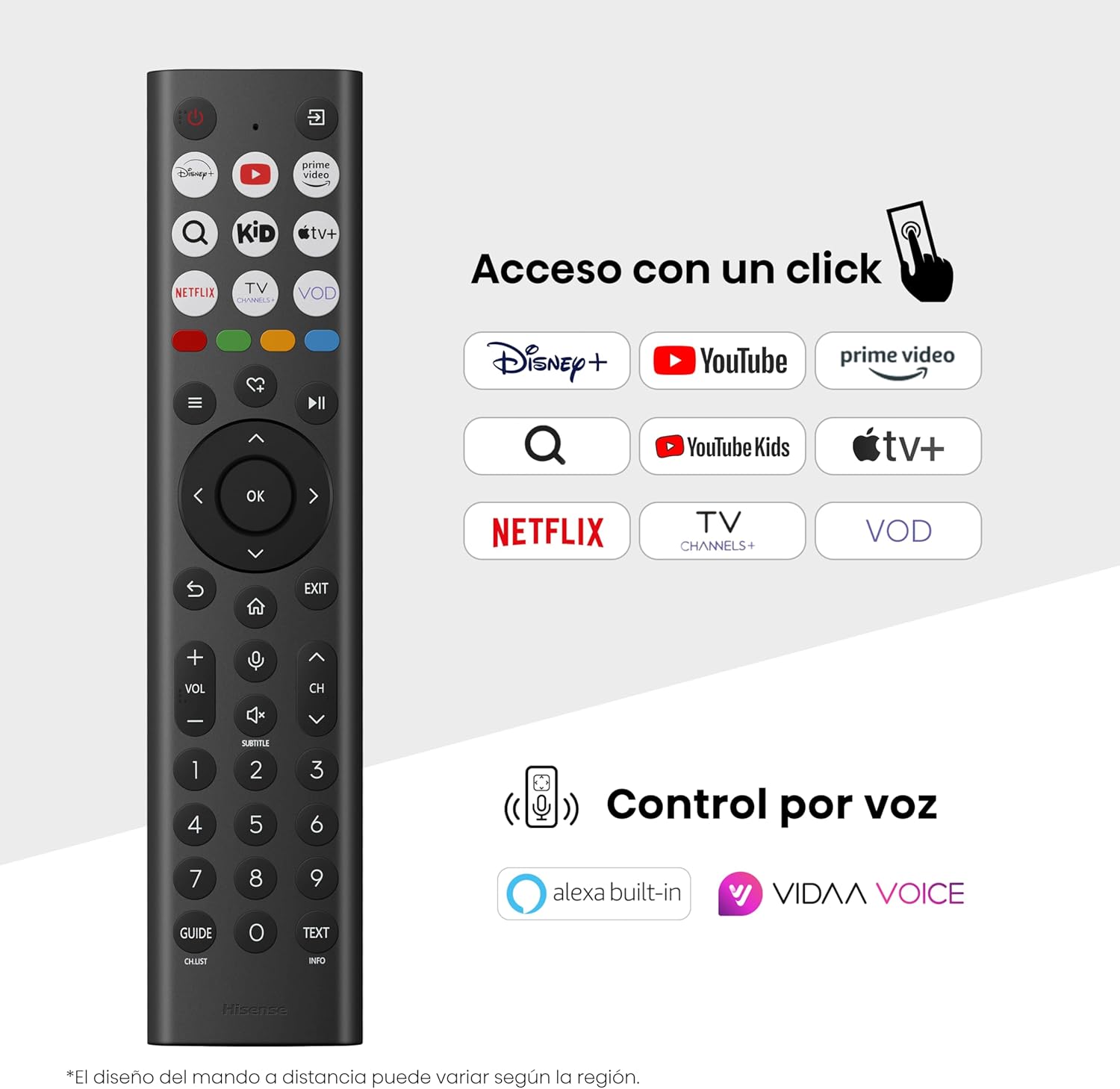
Hisense Smart TV remote control with dedicated app buttons and voice control.
5.2 د سمارټ تلویزیون ځانګړتیاوې (VIDAA OS)
Your Hisense TV runs on the VIDAA operating system, offering a user-friendly interface for accessing various applications and services.

The VIDAA Smart TV interface with popular streaming applications.
- غوښتنلیکونه: Access pre-installed apps like Netflix, YouTube, Prime Video, and more.
- د غږ کنټرول: Use the remote's voice function to search for content, adjust settings, or interact with Alexa built-in and VIDAA Voice.
- Screen Mirroring (AirPlay): Share content from your Apple devices directly to the TV.
- په تلویزیون کې شریک کړئ: Easily send content from your mobile devices to the TV.
5.3 د عکس تنظیمات
خپل اصلاح کړئ viewing experience with various picture enhancement technologies:
- د QLED رنګ: Delivers over a billion shades of vibrant, lifelike colors.
- د AI 4K لوړ سکیلر: Automatically enhances lower-resolution content to near-4K quality.
- AI Smooth Motion: Reduces motion blur in fast-paced scenes, ensuring clear and fluid visuals.
- دولبي ویژن: Provides stunning brightness, contrast, and color for a dramatic visual experience.
- د فلم جوړونکي حالت: Preserves the original aspect ratio, colors, and frame rates to display movies as intended by the director.
- د مصنوعي ذهانت رڼا سینسر: Intelligently adjusts screen brightness based on ambient light for optimal viewد انرژۍ موثریت او ګټې.
- د سترګو پاملرنې حالت: Reduces blue light emission to minimize eye strain.
- د بریښنا خوندي کول: Optimizes power consumption without significantly compromising picture quality.

QLED technology delivers over a billion vibrant color tones.

AI 4K Upscaler enhances lower resolution content to near 4K clarity.

AI Smooth Motion ensures fluid images without blur, especially in fast-moving scenes.

Filmmaker Mode presents content exactly as the director intended.
5.4 د غږ تنظیمات
Enhance your audio experience with:
- Dolby Atmos: Immersive, multi-dimensional sound that fills your room.
- مربوط سپیکر: Built-in speakers with a maximum output of 1 Watt per channel.
- ایز پلی: Seamlessly control compatible Hisense soundbars directly from your TV screen.

Dolby Vision and Dolby Atmos combine for a spectacular audio-visual experience.
۴.۳ د لوبو ځانګړتیاوې
د لوبغاړو لپاره، تلویزیون وړاندې کوي:
- د لوبې حالت پلس: Reduces input lag to 16ms, ensuring responsive gameplay.
- ۱۴۴ هرټز VRR (متغیر تازه کولو کچه): Synchronizes the TV's refresh rate with the game console's output to prevent screen tearing.
- ALLM (د اتومات ټیټ ځنډ حالت): Automatically switches the TV to low-latency mode when a game is detected.
- د لوبې بار: An integrated control center for quick access to game settings and real-time performance monitoring.

Game Mode Plus provides ultra-fluid, lag-free gaming.

The Game Bar offers centralized control for game settings.
5.6 Sports Features
- د AI سپورټ حالت: Automatically detects sports content and optimizes picture and sound settings for a stadium-like experience, enhancing clarity and audio effects.
6. ساتنه
۴.۱ د تلویزیون پاکول
- تل د پاکولو دمخه تلویزیون خلاص کړئ.
- د سکرین او تلویزیون بدن په نرمۍ سره پاکولو لپاره یو نرم، وچ، له لینټ څخه پاک ټوکر وکاروئ.
- د سختو نښو لپاره، په نرمۍ سرهampټوکر د اوبو یا ځانګړي سکرین کلینر سره ومینځئ (مستقیم په سکرین مه سپری کوئ).
- د کثافاتو پاکوونکو، الکولو، بینزین، یا پتلوونکو کارولو څخه ډډه وکړئ، ځکه چې دا کولی شي د تلویزیون سطح ته زیان ورسوي.
6.2 د سافټویر تازه معلومات
ستاسو تلویزیون ممکن د فعالیت ښه کولو او نوي ځانګړتیاو اضافه کولو لپاره په دوره یي ډول سافټویر تازه معلومات ترلاسه کړي. ډاډ ترلاسه کړئ چې ستاسو تلویزیون د دې تازه معلوماتو ترلاسه کولو لپاره انټرنیټ سره وصل دی. تاسو معمولا کولی شئ د تلویزیون د ترتیباتو مینو کې په لاسي ډول د تازه معلوماتو لپاره وګورئ.
7. ستونزه حل کول
که تاسو په خپل تلویزیون کې ستونزې سره مخ شئ، لاندې عام حلونو ته مراجعه وکړئ:
- ځواک نشته: وګورئ چې د بریښنا کیبل په خوندي ډول وصل دی او د بریښنا آوټ لیټ کار کوي. یو بل آوټ لیټ هڅه وکړئ.
- انځور/غږ نشته: ډاډ ترلاسه کړئ چې د ننوتلو سمه سرچینه غوره شوې ده. د کیبل ټولې اړیکې (HDMI، انټینا) وګورئ.
- ریموټ کنټرول کار نه کوي: Check the battery (1 AAAA battery). Ensure there are no obstructions between the remote and the TV.
- د شبکې د اتصال ستونزې: د خپل وای فای پټنوم یا ایترنیټ کیبل اتصال تایید کړئ. خپل روټر بیا پیل کړئ.
- د انځور کمزوری کیفیت: د انځور ترتیبات تنظیم کړئ (روښانتیا، برعکس، تیزوالی). ډاډ ترلاسه کړئ چې د ننوتلو سرچینه د لوړ کیفیت سیګنال چمتو کوي.
- د غږ تحریف: Check audio settings. If using external speakers, ensure they are connected correctly.
For more detailed troubleshooting, consult the full electronic user manual or contact Hisense customer support.
8. مشخصات
Detailed technical specifications for the Hisense 65E7Q QLED Smart TV:
| فیچر | مشخصات |
|---|---|
| د ماډل شمیره | 65E7Q |
| د سکرین اندازه | ۷۸۷ انچه |
| ټیکنالوژي ښکاره کول | QLED |
| قرارداد | 4K (3840 x 2160) |
| د تازه کولو نرخ | 60 Hz |
| د HDR بmatه ملاتړ | دولبي ویژن |
| Motion Enhancement Technology | د AI سموچ حرکت |
| د انځور کیفیت لوړول | AI 4K Upscaler, AI Smooth Motion, QLED Colour |
| د غبرګون وخت | 100 ملی ثانیه |
| د شاتنۍ څراغ ترتیب | Direct Illumination, Dimming |
| د سپیکر توضیحات | Integrated speaker with Dolby Atmos |
| د سپیکر اعظمي تولید ځواک | 1 واټ |
| آډیو چینلونه | ملټي چینل |
| Surround Sound Format | Dolby Atmos |
| عملیاتي سیسټم | د VIDAA پاڼې اړوند نور معلومات په فسبوک کې اوګورئ |
| د حافظې د ذخیره کولو ظرفیت | 1 جي بي |
| د کنټرول طریقه | غږ |
| د ارتباط ټیکنالوژي | بلوتوث، HDMI، وای فای |
| Internet Applications | Netflix, YouTube, Prime Video, AirPlay 2 |
| د HDMI بندرونه | 3 (including HDMI 2.1 with eARC) |
| USB بندرونه | ۳ (۲x USB ۲.۰، ۱x USB ۳.۰) |
| بې سیم ټیکنالوژي | وای فای |
| Screen Mirroring Technology | AirPlay |
| د VESA نصبولو معیاري | 600 x 400 mm |
| د محصول ابعاد (DxWxH) | 7.6 x 145.3 x 83.8 سانتي متره |
| د محصول وزن | 15.2 کیلو ګرامه (د موقف سره) |
| د انرژي موثریت ټولګي | E |
| د انرژۍ کلنۍ مصرف | ۱۶.۰۰ kWh/۱۰۰۰h (SDR)، ۲۸.۰۰ kWh/۱۰۰۰h (HDR) |
| ځواک | 1 Watt (standby) |
| والیtage | 100-240 VCA 50-60 Hz |
| شاملې برخې | د بریښنا کیبل، ریموټ کنټرول، موقف |
| د ماډل کال | 2025 |
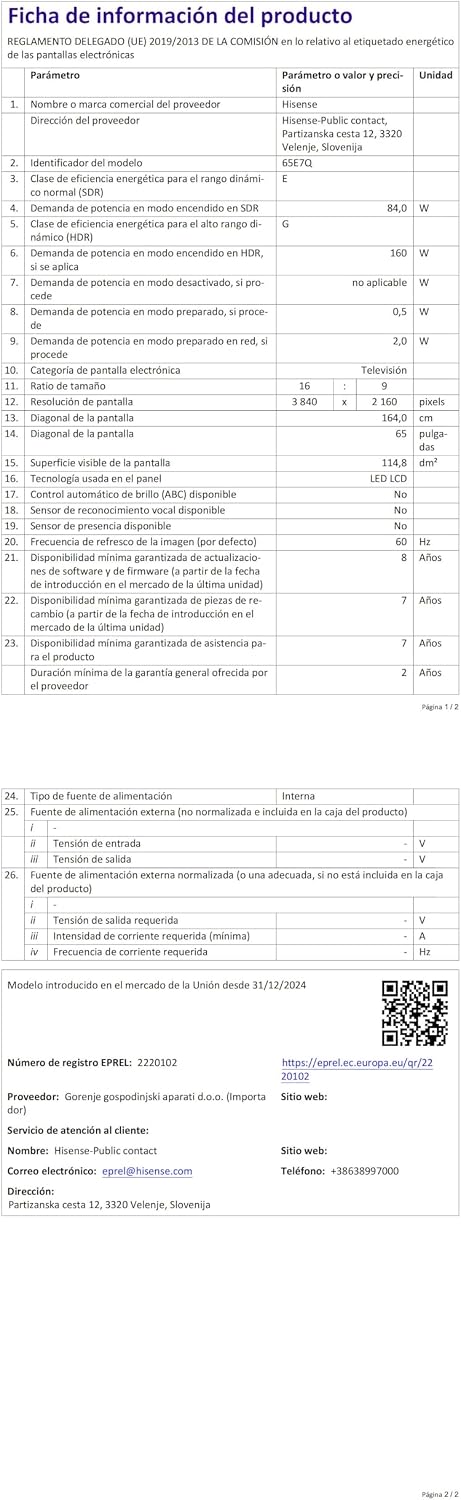
Energy label for the Hisense 65E7Q TV.
د نورو تفصيلي محصول معلوماتو لپاره، مهرباني وکړئ د EPREL ډیټابیس ته مراجعه وکړئ: https://eprel.ec.europa.eu/qr/2220102
9. تضمین او ملاتړ
9.1 د محصول تضمین
This Hisense TV comes with a د 3 کلن محصول تضمینمهرباني وکړئ د تضمین ادعاوو لپاره د پیرود ثبوت وساتئ.
۸.۱ د پرزو شتون
Spare parts for this model are guaranteed to be available in the EU for a duration of ۵ کاله from the product's market introduction.
9.3 د پیرودونکي ملاتړ
For technical assistance, troubleshooting, or warranty service, please contact Hisense customer support. Refer to the contact information provided in your warranty card or visit the official Hisense webستاسو د سیمې لپاره سایټ.