
1. پیژندنه
This manual provides detailed instructions for the installation and operation of the Generic Canbus Box VW-RZ-08. This device is designed to facilitate the integration of aftermarket Android car radio multimedia systems with various Volkswagen vehicle models, ensuring proper communication and functionality between the new head unit and the vehicle's existing electronic systems.
2. محصول ختم شوview
The Canbus Box VW-RZ-08 acts as an interface, translating signals between your Volkswagen vehicle's Canbus system and an aftermarket Android car radio. It ensures that functions such as steering wheel controls, ignition power, and reverse gear detection are correctly transmitted to the new head unit.

انځور 1: مخکی view of the Canbus Box VW-RZ-08. This image shows the compact black box with a label indicating its model number and compatibility.
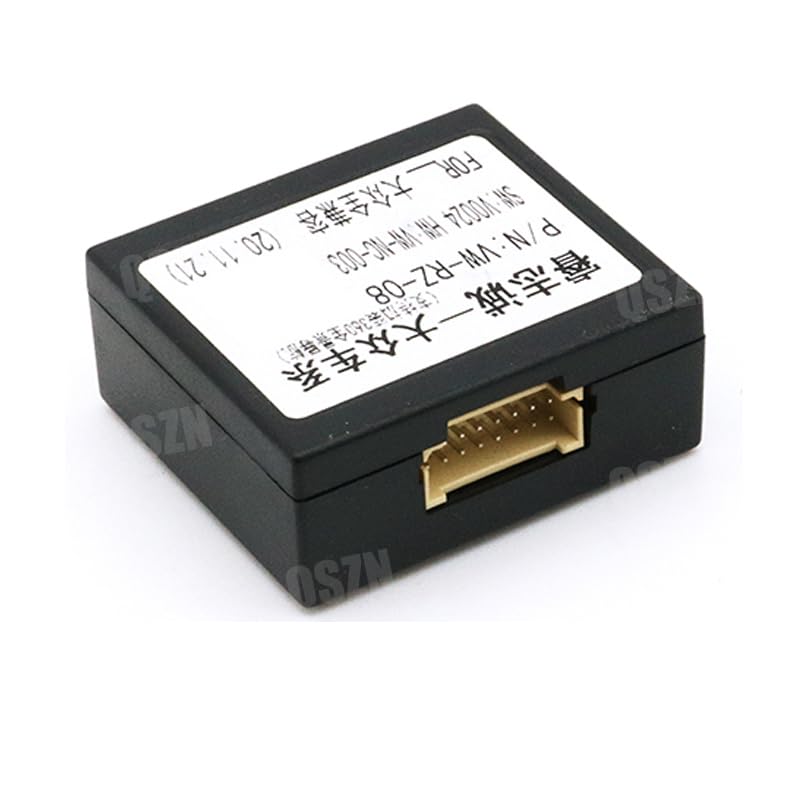
انځور ۲.۱: ښکته view of the Canbus Box VW-RZ-08, showing the multi-pin connector port for the wiring harness.
3. مطابقت
This Canbus Box and accompanying cable set are compatible with various Volkswagen models. Please verify your vehicle's model and year against the list below:
- For VW Golf Seven: 2013-present
- For VW Lamando: 2014-present
- For VW Passat: 2017-present
- For VW Lavida: 2018-present
- For VW Touran L: 2015-present
- Also compatible with Volkswagen Golf 5/6, Polo, Jetta, and Tiguan models.
4. د بسته محتويات
په بسته کې معمولا لاندې برخې شاملې وي:
- 1x Canbus Box VW-RZ-08
- 1x 16-PIN Wiring Harness Power Cable

Image 3: The Canbus Box VW-RZ-08 shown with the included 16-PIN wiring harness, illustrating the complete set.
5. د نصب لارښود
Installation of the Canbus Box and wiring harness requires careful attention to connections. It is recommended that installation be performed by a qualified professional if you are unfamiliar with car audio wiring.
5.1 د خوندیتوب احتیاطونه
- د هر ډول بریښنایی کار پیل کولو دمخه د موټر بیټرۍ قطع کړئ.
- ډاډ ترلاسه کړئ چې ټولې اړیکې خوندي دي ترڅو د لنډ سرکټ مخه ونیول شي.
- Refer to your vehicle's specific wiring diagrams if available.
5.2 د پیوستون مرحلې
- Remove the existing car radio: Carefully remove the factory car radio from the dashboard.
- Connect the Canbus Box: Plug the multi-pin connector from the wiring harness into the corresponding port on the Canbus Box.
- Connect the wiring harness to the vehicle: Connect the vehicle-specific end of the 16-PIN wiring harness to the car's factory wiring harness. Ensure a snug fit.
- Connect to the aftermarket radio: Connect the other end of the wiring harness (typically ISO connectors or bare wires) to your aftermarket Android car radio according to its installation instructions. Match wire colors and functions carefully (e.g., power, ground, speakers, Canbus data lines).
- د ازموینې فعالیت: Before fully reassembling the dashboard, reconnect the vehicle battery and test the basic functions of the new radio, including power on/off, audio, and steering wheel controls.
- Secure and reassemble: Once confirmed working, secure the Canbus Box and excess wiring, then reassemble the dashboard components.
Video 1: This video demonstrates the general connection process for an aftermarket stereo wire harness, which is similar to connecting the provided 16-PIN harness. It shows how to identify and connect various wires.
Video 2: This video provides another example of connecting an ISO wire harness for car radios, offering visual guidance on the wiring process.
6. Wiring Diagram Overview
The 16-PIN wiring harness connects the Canbus Box to both the vehicle's electrical system and the aftermarket head unit. Each wire is color-coded and serves a specific function. While a detailed diagram is typically provided with the aftermarket radio, common connections include:
- Power (Yellow/Red): Constant 12V and Switched 12V (Ignition).
- ځمکه (تور): Vehicle chassis ground.
- Speaker Wires (Various colors, often twisted pairs): For front left, front right, rear left, and rear right speakers.
- Canbus Data (Twisted pair, e.g., Orange/Brown): For data communication between the vehicle and the radio.
- Accessory Wires (e.g., Blue/White): لپاره amplifier remote turn-on, antenna power.
- Reverse Signal (e.g., Purple/White): For backup camera activation.
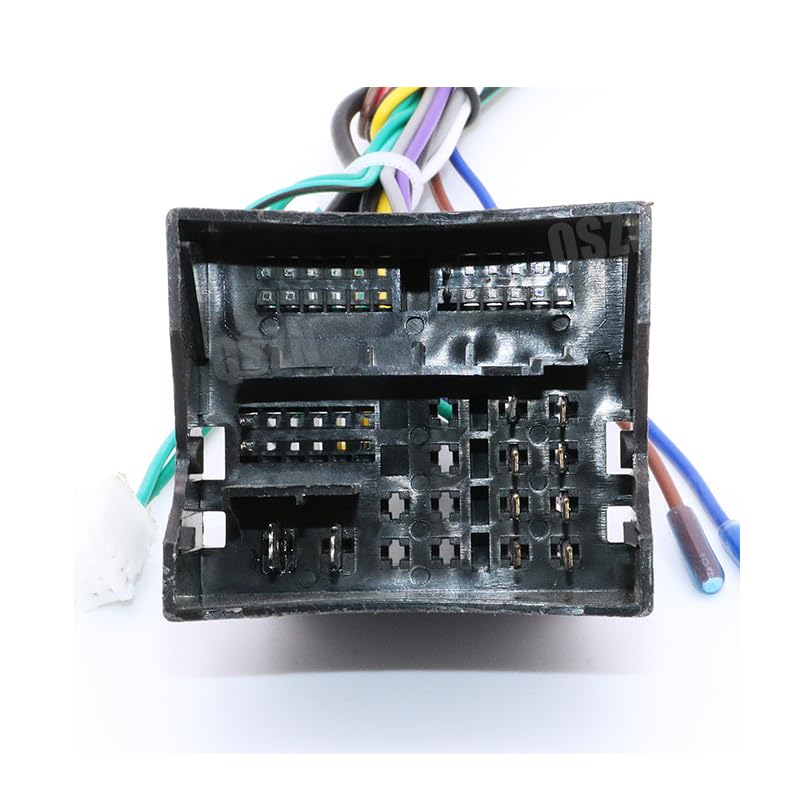
انځور ۳.۱: نږدې انځور view of the 16-PIN wiring harness, showing the individual color-coded wires and their connections.
7. مشخصات
| فیچر | تفصیل |
|---|---|
| ماډل | VW-RZ-08 |
| د توکي وزن | 0.1 کیلو ګرامه |
| والیtage | 12V |
| اصل | مینلینډ چین |
| د توکو ډول | کیبلونه، اډاپټرونه او ساکټونه |
| جوړونکی | هنټان |
8. ستونزه حل کول
که تاسو د نصبولو وروسته له ستونزو سره مخ شئ، نو لاندې د ستونزو حل کولو ګامونه په پام کې ونیسئ:
- راډیو ته بریښنا نشته:
- Check all power connections (constant 12V, switched 12V, ground).
- Verify vehicle fuses are intact.
- Ensure the Canbus Box is correctly connected and receiving power.
- د سټیرینګ ویل کنټرولونه کار نه کوي:
- Confirm the Canbus Box is properly connected to the vehicle's Canbus lines.
- Check the aftermarket radio's settings for steering wheel control configuration.
- Ensure the radio supports Canbus integration for steering wheel controls.
- غږ نشته:
- Verify all speaker wires are correctly connected and not shorted.
- Check the radio's audio settings and volume levels.
- که یو بهرنی amplifier is used, ensure its remote turn-on wire is connected.
- موقتي فعالیت:
- ټول اتصالونه د نرموالي یا زنګ وهلو لپاره معاینه کړئ.
- مناسبه ځمکه تضمین کړئ.
9. تضمین او ملاتړ
For warranty information or technical support, please refer to the seller's contact details or the product listing where this item was purchased. Keep your proof of purchase for any warranty claims.