
Brilluxa H6
Smart Voice Call Doorbell Kit H6 User Manual
نښه: Brilluxa
ماډل: H6
1. پیژندنه
Thank you for choosing the Brilluxa Smart Voice Call Doorbell Kit H6. This manual provides detailed instructions for the setup, operation, and maintenance of your new doorbell system. Please read this manual thoroughly before use to ensure proper functionality and safety.
د بسته محتويات:
- 2 x Doorbell Units (one indoor, one outdoor)
- 2 x چپکونکي سټیکرونه
- 1 x د کارونکي لارښود
2. کلیدي ځانګړتیاوې
- Extra Long Operating Distance: Features long-range transmission with high-strength signal and sensitivity, offering a maximum open distance of 200 meters (approximately 656 feet).
- Voice Conversation: Enables real-time two-way voice communication, ensuring you can hear and respond to visitors promptly.
- اسانه نصب کول: Designed for simple setup using adhesive tape, allowing direct attachment to a wall without complex wiring.
- پراخه غوښتنلیک: Versatile for use in various environments including homes, apartments, schools, villas, offices, warehouses, hotels, factories, and hospitals.
- Adjustable Speaker: Equipped with an adjustable speaker that provides clear and loud audio, allowing the device to function effectively as a mobile intercom.
3. د محصول اجزا
Familiarize yourself with the main components of your Smart Voice Call Doorbell Kit H6.
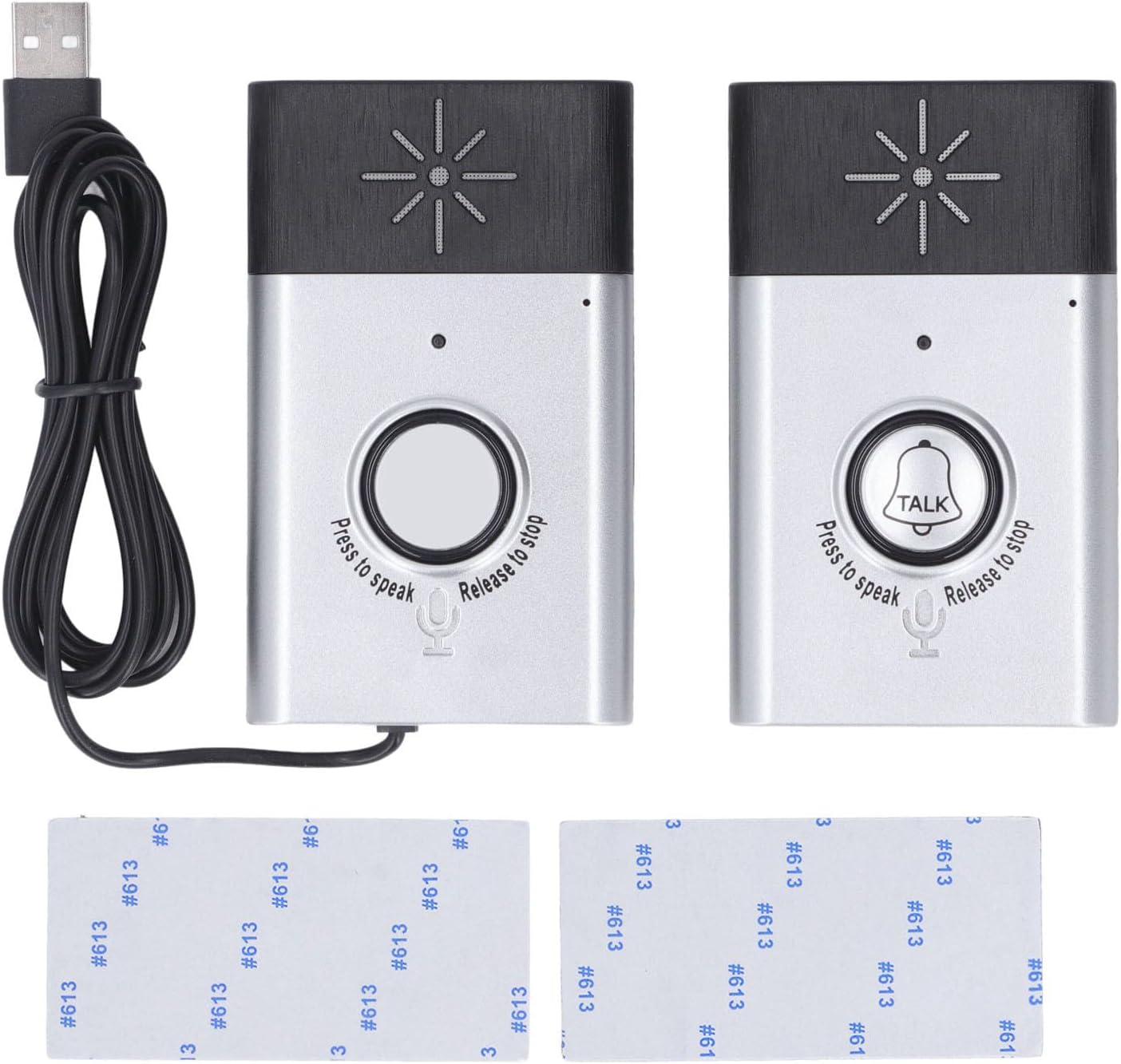
شکل 3.1: اوورview of the Smart Voice Call Doorbell Kit H6, showing two main units, a USB charging cable, and two adhesive mounting pads. One unit features a plain call button, while the other has a 'TALK' button, indicating their respective functions as outdoor and indoor units.
- بیرونی واحد: Typically features a plain call button. This unit is placed outside the door.
- داخلي واحد: Features a 'TALK' button and is used for two-way communication from inside.
- د USB چارج کیبل: For powering the indoor unit.
- Adhesive Pads: For mounting the units.
- سپیکر ګریل: Located at the top of each unit for audio output.
- مایکروفون: Located near the bottom of each unit for voice input.
- د رڼا شاخص: A small LED light on each unit to indicate status.

شکل 3.2: یو تړلی view of the indoor doorbell unit's main button, clearly labeled "TALK" with a bell icon. Below it, a microphone icon and the text "Press to speak" and "Release to stop" indicate the interactive voice function.
4. ترتیب او نصب کول
4.1 د بریښنا رسول
- داخلي واحد: Power the indoor unit using the provided USB DC 5V 1A cable. Connect it to a compatible USB power adapter (not included).
- بیرونی واحد: The outdoor unit requires 4 x AAA batteries (not included). Open the battery compartment on the back of the outdoor unit and insert the batteries, ensuring correct polarity.
۳.۲ د واحدونو نصبول
- Choose a suitable location for both the indoor and outdoor units. Ensure the outdoor unit is placed where visitors can easily see and reach it, and the indoor unit is within hearing range inside your premises.
- Clean the mounting surface thoroughly to ensure good adhesion.
- Peel off the protective film from one side of the adhesive sticker and apply it firmly to the back of the doorbell unit.
- Peel off the protective film from the other side of the adhesive sticker.
- Press the doorbell unit firmly against the desired mounting surface for at least 30 seconds.
- Repeat the process for the second unit.

شکل 4.1: Illustration demonstrating the simple adhesive-based installation method for the wireless voice intercom doorbell. The image highlights the ease of attaching the unit directly to a wall.
For optimal performance, ensure the units are within the specified transmission distance (up to 200m in open space, 5-50m through walls).
5. عملیاتي لارښوونې
5.1 Making a Call (Outdoor Unit)
- When a visitor presses the call button on the outdoor unit, the indoor unit will ring to alert you.
5.2 Two-Way Communication (Indoor Unit)
- To speak to the visitor, press and hold the "TALK" button on the indoor unit.
- په مایکروفون کې په واضح ډول خبرې وکړئ.
- Release the "TALK" button to listen for the visitor's response.
- فشار ته دوام ورکړئ او خوشې کړئasing the button as needed for a conversation.

شکل 5.1: This image illustrates the long-press intercom function and highlights the impressive 200-meter remote control distance of the doorbell system, emphasizing its extended range capabilities.
۴.۳ د سپیکر حجم تنظیمول
The doorbell features an adjustable speaker for clear and loud sound. Refer to the specific controls on your indoor unit for volume adjustment, if available. (Note: Specific volume control buttons are not detailed in product description, assume automatic or internal adjustment).
6. ساتنه
- پاکول: واحدونه په نرم، وچ ټوکر سره پاک کړئ. د کثافاتو پاکوونکي یا محلولونه مه کاروئ.
- د بیټرۍ بدلول (بهرنی واحد): When the outdoor unit's battery is low, replace all 4 AAA batteries simultaneously to ensure optimal performance.
- د چاپیریال شرایط: While designed for outdoor use, avoid exposing the outdoor unit to extreme weather conditions (e.g., heavy rain, direct prolonged sunlight, extreme temperatures) to prolong its lifespan.
7. ستونزه حل کول
If you encounter issues with your doorbell kit, please refer to the following common solutions:
| ستونزه | احتمالي لامل | د حل لاره |
|---|---|---|
| No sound from indoor unit when outdoor button is pressed. |
|
|
| Voice communication is unclear or distorted. |
|
|
| Adhesive not holding units firmly. |
|
|
8. تخنیکي مشخصات
| فیچر | تفصیل |
|---|---|
| د توکو ډول | Smart Voice Call Doorbell |
| ماډل | H6 |
| مواد | ABS |
| د داخلي واحد بریښنا رسولو | د USB DC 5V 1A |
| د بهرنۍ واحد بریښنا رسولو | 4 x AAA بیټرۍ (شامل ندي) |
| د عملیاتي حرارت درجه | -20 ℃ تر 55 ℃ (-4 ° F څخه 131 ° F) |
| د لیږد واټن | 200m (open space), 5-50m (through wall) |
| عملیاتي فریکونسی | 467MHz |
| Operating Duration (Outdoor Unit) | Approx. 4 months (on batteries) |
| د کڅوړې ابعاد | 17 x 12 x 3 سانتي متره (6.7 x 4.7 x 1.2 انچه) |
| د محصول وزن | 140 ګرامه (0.31 پونډه) |
| د تولید کونکي ماډل شمیره | Brilluxaz8e52436gf |
Ask a question about this manual
Ask about setup, troubleshooting, compatibility, parts, safety, or missing instructions. Manuals+ will review the question and use this page’s manual context to help answer it.