
Brilluxa FJ3373
FanJu FJ3373 Digital Weather Station User Manual
Model: FJ3373 | Brand: Brilluxa
پیژندنه
The FanJu FJ3373 Digital Weather Station is a versatile device designed to provide comprehensive weather information and timekeeping functions. It features a wireless sensor for outdoor temperature and humidity, displaying indoor and outdoor conditions, weather forecasts, barometric pressure trends, moon phases, and a digital clock with alarm capabilities. This manual provides detailed instructions for setting up, operating, and maintaining your weather station.

انځور: The FanJu FJ3373 weather station, highlighting its multifunctionality as a wireless sensor weather clock. It displays indoor and outdoor temperature and humidity, weather forecast, and moon phase.
د خوندیتوب معلومات
- Do not expose the main unit or sensor to extreme temperatures, direct sunlight, or moisture.
- Use only the specified power adapter (DC 5V) for the main unit.
- Ensure correct battery polarity when inserting batteries into the outdoor sensor.
- وسیله د قوي مقناطیسي ساحو څخه لرې وساتئ.
- د واحد د جلا کولو یا ترمیم کولو هڅه مه کوئ. د خدماتو لپاره وړ پرسونل سره اړیکه ونیسئ.
- زاړه بیټرۍ د ځایی مقرراتو سره سم په مسؤلیت سره تصفیه کړئ.
د بسته محتويات
مهرباني وکړئ د بسته بندۍ محتويات وګورئ ترڅو ډاډ ترلاسه کړئ چې ټول توکي شتون لري:
- 1 x FanJu FJ3373 Weather Station
- 1 x بیروني سینسر
- ۱ x د USB بریښنا تار
- 1 x User Manual (English, German, French, Italian, Spanish)
یادونه: AA batteries are not included and must be purchased separately for the outdoor sensor.
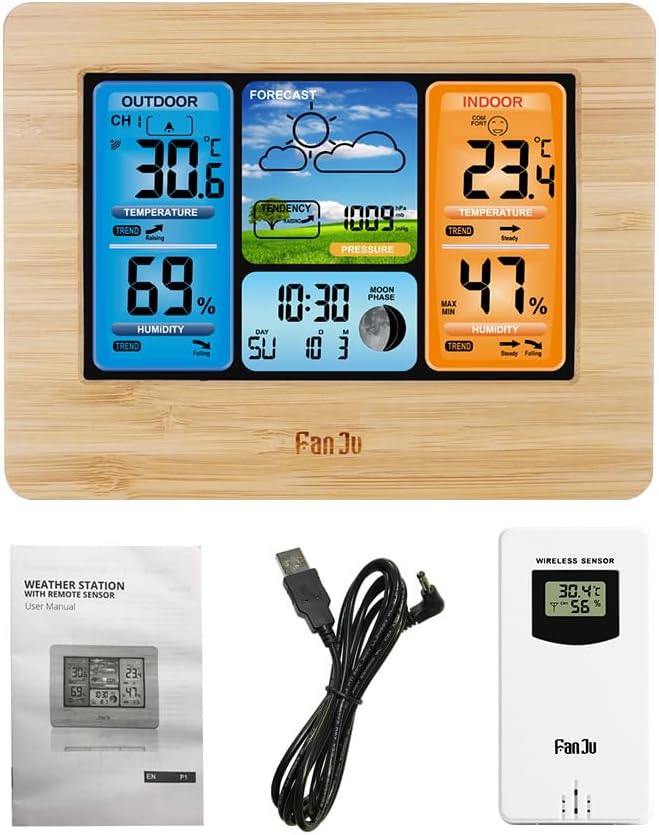
انځور: The main weather station unit, the wireless outdoor sensor, the USB power cord, and the multi-language user manual, illustrating the complete package contents.
محصول پای ته ورسیدview
The FanJu FJ3373 consists of a main display unit and a wireless outdoor sensor. The main unit displays all collected data, while the outdoor sensor transmits external temperature and humidity readings.
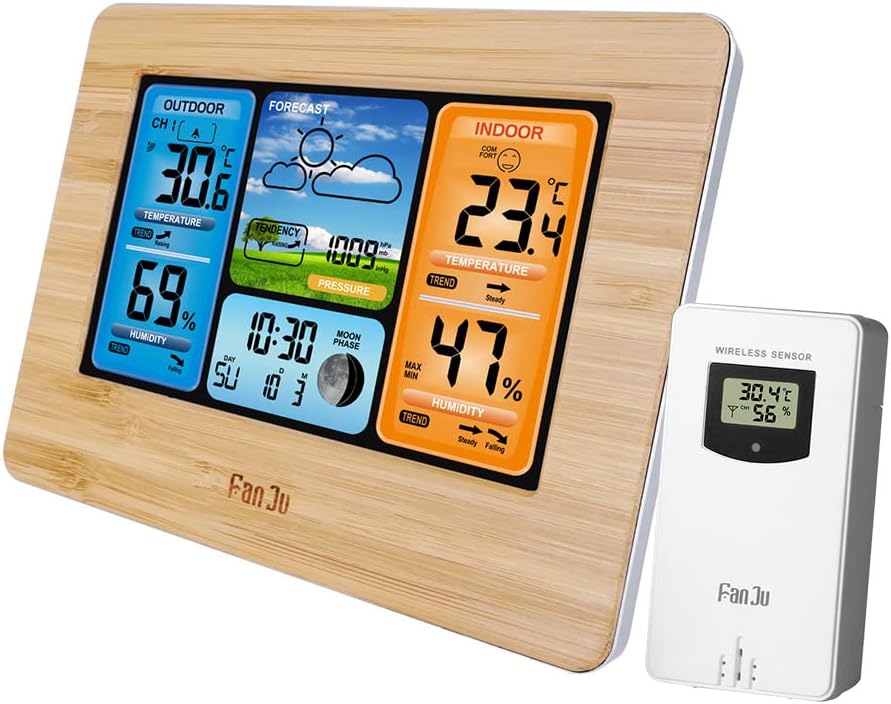
انځور: The FanJu FJ3373 weather station main unit with its wooden frame and the separate white wireless outdoor sensor, showing both components together.
Main Unit Display Functions

انځور: A detailed diagram of the FanJu FJ3373 display, labeling key functions such as outdoor temperature, outdoor humidity, weather forecast, air pressure, comfort display, indoor temperature, indoor humidity, date and week indicator, and moon phase.
- دباندې تودوخه او رطوبت: Displays current readings from the wireless sensor.
- د هوا وړاندوینه: Icon-based prediction (sunny, cloudy, rainy, etc.).
- د هوا فشار: Current barometric pressure and trend.
- راحتي ښودنه: Indicates indoor comfort level based on indoor temperature and humidity (5 levels).
- د کور دننه تودوخه او رطوبت: Displays current readings from the main unit's internal sensors.
- Date & Week Indicator: Current date and day of the week (in 7 selectable languages).
- د سپوږمۍ پړاو: د سپوږمۍ اوسنی پړاو ښيي.
- وخت: 12/24 hour format option.
- Alarm/Snooze: Programmable alarm with snooze function.
- شاته رڼا: Adjustable display backlight.
ابعاد

انځور: Technical drawing showing the dimensions of the FanJu FJ3373 weather station, including its width (167mm), height (129mm), and depth (30mm), for both wood and black color variants.
The main unit measures approximately 16.7 x 12.9 x 3 cm (6.6 x 5.1 x 1.2 inches). The outdoor sensor measures approximately 9.6 x 5 x 3.4 cm (3.8 x 2 x 1.3 inches).
چمتو کول
۳.۱. د اصلي واحد ځواک ورکول
- Connect the supplied USB power cord to the DC 5V port on the back of the main unit.
- Plug the other end of the USB power cord into a compatible USB power adapter (not included) or a USB port.
- The display will light up, and the unit will enter initial setup mode.
2. په بهرني سینسر کې د بیټرۍ نصب کول
- د بیروني سینسر په شا کې د بیټرۍ کڅوړه خلاصه کړئ.
- د قطبي نښانونو (+/-) سره سم 2 x AA بیټرۍ (شامل نه دي) دننه کړئ.
- د بیټرۍ کڅوړه په خوندي ډول وتړئ.
- The sensor will automatically start transmitting data.
۳. د بهرني سینسر جوړه کول
The main unit and outdoor sensor should pair automatically within a few minutes of being powered on. Ensure both units are within range (up to 60 meters in open area) and not obstructed by thick walls or metal objects.
- If the outdoor readings do not appear, press and hold the "CHANNEL" or "SEARCH" button (refer to specific button layout on your unit if available) on the main unit to initiate a manual search for the sensor.
- The outdoor sensor can be placed on a flat surface or mounted on a wall using the integrated hanging hole.

انځور: An illustration showing the FanJu FJ3373 weather station main unit placed indoors and the wireless outdoor sensor positioned outdoors, demonstrating the wireless connectivity and recommended placement for accurate readings.
4. Initial Settings (Time, Date, Language, Units)
After successful pairing, you may need to set the time, date, and preferred units.
- Press the "MODE" or "SET" button to enter setting mode.
- Use the "UP" and "DOWN" buttons to adjust values.
- Press "MODE" or "SET" again to confirm and move to the next setting.
- Settings typically include:
- Time format (12/24 hour)
- ساعت
- دقیقه
- کال
- میاشت
- ورځ
- Day of week language (English, German, Italian, French, Spanish, Dutch, Danish)
- د تودوخې واحد (°C/°F)
- Barometric pressure unit (hPa/mb)
- Exit setting mode by pressing the "MODE" or "SET" button repeatedly until the normal display resumes, or wait for automatic timeout.
عملیاتي لارښوونې
د ښودلو پوهه
Refer to the "Product Overview" section and the "Function Declaration" image for a visual guide to the display elements.
- Temperature & Humidity Trends: Arrows next to temperature and humidity readings indicate rising, steady, or falling trends.
- د آرامۍ کچه: The indoor comfort icon changes based on indoor temperature and humidity, indicating dry, comfortable, or wet conditions. There are 5 levels of comfort indication.
- د هوا وړاندوینه: The forecast icon predicts weather for the next 12-24 hours based on barometric pressure changes.
- د سپوږمۍ پړاو: د سپوږمۍ اوسنی پړاو ښيي.
د الارم او سنوز فنکشن
- د الارم ترتیب کول: د "الارم" تڼۍ کېکاږئ ترڅو view alarm time. Press and hold "ALARM" to enter alarm setting mode. Use "UP/DOWN" to adjust hour and minute. Press "ALARM" to confirm.
- د الارم فعالول/غیر فعالول: Press "ALARM" repeatedly to toggle the alarm ON/OFF. An alarm icon will appear when active.
- سنوز: When the alarm sounds, press any button (except "ALARM OFF" if available) to activate snooze. The alarm will sound again after a few minutes (typically 5-10 minutes).
- د بندیدو الارم: To stop the alarm completely, press the designated "ALARM OFF" button or let it ring for a set duration until it automatically stops.
Temperature/Humidity Alerts
The FJ3373 supports high/low temperature alerts for outdoor readings, including a frost alert.
- Press the "ALERT" button (or similar) to enter alert setting mode.
- Select the desired alert type (e.g., Outdoor High Temp, Outdoor Low Temp, Frost).
- Use "UP/DOWN" to set the alert threshold.
- Activate the alert. An alert icon will appear when active.
- When the temperature reaches the set threshold, an audible alarm will sound, and the corresponding reading will flash.
ساتنه
پاکول
- اصلي واحد او سینسر د نرم، d سره پاک کړئamp ټوکر
- د کثافاتو پاکوونکي یا محلول مه کاروئ.
- Ensure no moisture enters the battery compartment or other openings.
Battery Replacement (Outdoor Sensor)
- When the battery indicator on the main unit shows low battery for the outdoor sensor, replace the batteries promptly.
- Open the battery compartment on the outdoor sensor.
- زاړه بیټرۍ لرې کړئ او په سمه توګه یې تصفیه کړئ.
- Insert new 2 x AA batteries, observing correct polarity.
- Close the compartment. The sensor will re-establish connection with the main unit.
د ستونزو حل کول
| ستونزه | احتمالي لامل | د حل لاره |
|---|---|---|
| په اصلي واحد کې هیڅ ښودنه نشته | No power or power cord issue. | Ensure USB power cord is securely connected and power adapter is working. Try a different USB port/adapter. |
| بهرنۍ لوستل نه ښودل کیږي یا ناسم وي | Sensor not paired, out of range, low battery, or interference. |
|
| غلط وخت/نیټه | په سمه توګه نه دی تنظیم شوی. | Manually set time and date using the "MODE" or "SET" buttons as described in the "Setup" section. |
| د هوا وړاندوینه سمه نه ده | Unit needs time to calibrate, or local conditions differ from barometric pressure trends. | Allow 7-14 days for the unit to learn local barometric pressure patterns for more accurate forecasts. Forecasts are based on pressure changes, not real-time weather. |
مشخصات
| فیچر | تفصیل |
|---|---|
| برانډ | Brilluxa (Product: FanJu) |
| ماډل | FJ3373 (Manufacturer Model No.: Brilluxa7q56kcas4f-8Z) |
| اصلي مواد | ABS |
| د ښودلو ډول | LCD Positive Display |
| د داخلي حرارت درجه | -10 ℃ ~ +50 ℃ (14 ℉ ~ 122 ℉) |
| د بیروني تودوخې درجه | -20 ℃ ~ +60 ℃ (-4 ℉ ~ 140 ℉) |
| د تودوخې دقت | 0.1 ℃ |
| د رطوبت حد (د کور دننه او بهر) | 20 R RH ~ 95 R RH |
| د رطوبت دقت | 1٪ RH |
| د بارومیتریک فشار سلسله | 600hPa/mb ~ 1100hPa/mb |
| د بارومیتریک فشار دقت | 1hPa/mb |
| د اصلي واحد ځواک | DC 5V via USB power cord |
| د بهرني سینسر بریښنا | 2 x AA بیټرۍ (شامل ندي) |
| بې سیم فریکونسی | 433.92 MHz |
| د لیږد حد | 60 متره (خلاصه سیمه) |
| د اصلي واحد ابعاد | 16.7 x 12.9 x 3 سانتي متره (6.6 x 5.1 x 1.2 انچه) |
| د بیروني سینسر ابعاد | 9.6 x 5 x 3.4 سانتي متره (3.8 x 2 x 1.3 انچه) |
| د توکي وزن | 460 ګرامه (16.2 اوز) |
| د بسته وزن | 480 ګرامه (16.9 اوز) |
| Day of Week Languages | English, German, Italian, French, Spanish, Dutch, Danish |
تضمین او ملاتړ
Information regarding specific warranty terms and customer support contact details for the Brilluxa FanJu FJ3373 Weather Station is not provided in the product description. Please refer to the documentation included in your product package or contact the seller/manufacturer directly for warranty claims and technical support.
For general inquiries, you may visit the Brilluxa brand page on Amazon: Brilluxa on Amazon
Ask a question about this manual
Ask about setup, troubleshooting, compatibility, parts, safety, or missing instructions. Manuals+ will review the question and use this page’s manual context to help answer it.