
Brilluxa FJ3373 / Brilluxa7q56kcas4f-8Z
Digital Weather Station User Manual
Model: FJ3373 / Brilluxa7q56kcas4f-8Z
Brand: Brilluxa
1. پیژندنه
د پیرودلو لپاره مننهasing the Brilluxa Digital Weather Station. This device is designed to provide accurate indoor and outdoor temperature and humidity readings, along with a weather forecast, moon phase, and standard clock functions. Please read this manual carefully before use to ensure proper operation and longevity of your device.
کلیدي ځانګړتیاوې:
- Multifunction digital weather clock with weather forecast and moon phase.
- تر ۲۰۹۹ کال پورې دایمي جنتري.
- Day of week in 7 user-selectable languages: English, German, Italian, French, Spanish, Netherlands, and Danish.
- وخت په اختیاري 12/24 ساعتونو بڼه.
- د کور دننه او بهر د تودوخې او رطوبت ښودنه.
- Barometric pressure tendency display.
- Outdoor high/low temperature and frost alert.
- Indoor comfort level indicator (5 levels).
- Wireless outdoor sensor with 433.92MHz RF transmitting frequency and 60 meters transmission range (open area).
- RF Through the Wall Technology for reliable sensor communication.
د بسته محتويات:
مهرباني وکړئ د بسته بندۍ محتويات وګورئ ترڅو ډاډ ترلاسه کړئ چې ټول توکي شتون لري:
- 1 x FanJu FJ3373 Weather Station (Main Unit)
- 1 x بیروني سینسر
- ۱ x د USB بریښنا تار
- 1 x User Manual (English, German, French, Italian, Spanish)
Note: AA batteries are not included and must be purchased separately for both the main unit and the outdoor sensor.
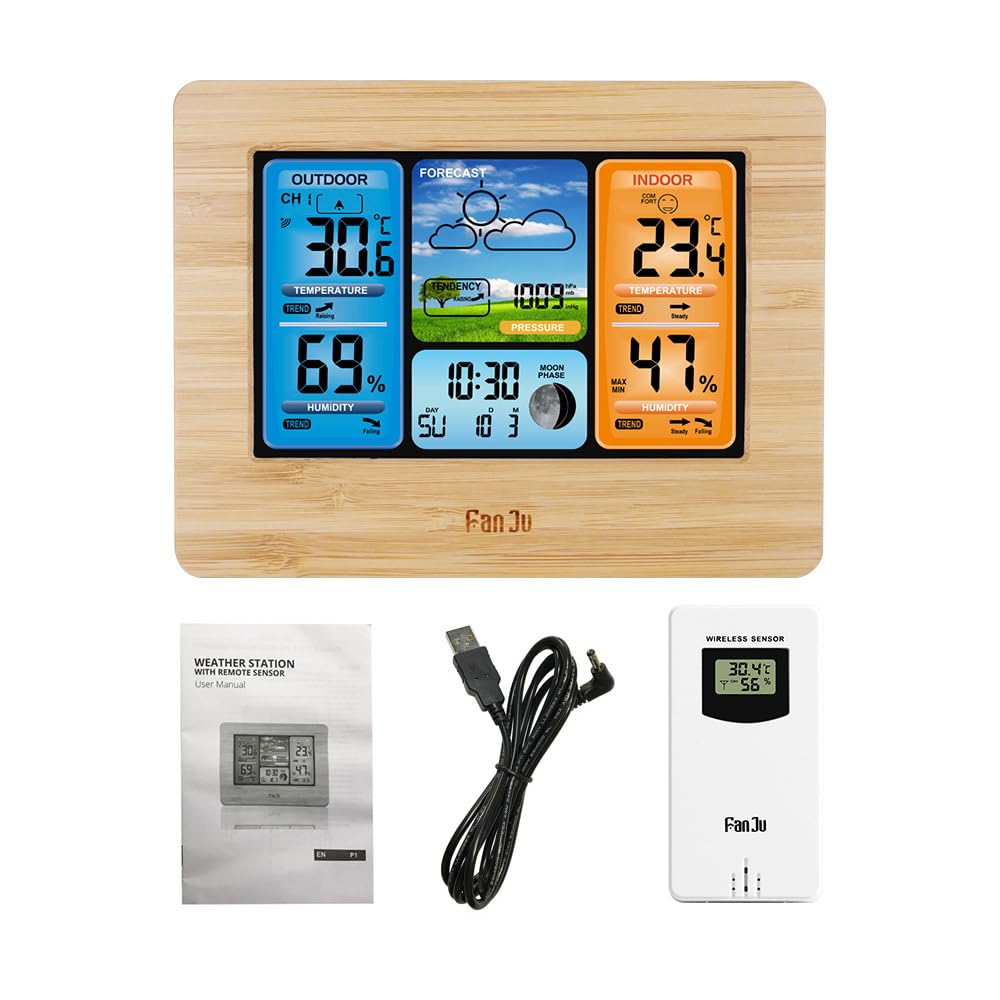
Image: Package contents of the Brilluxa Digital Weather Station. This image displays the main weather station unit, the wireless outdoor sensor, a USB power cable, and the multi-language user manual, illustrating what is included in the box.
2. ترتیب او نصب کول
۲.۱ د اصلي واحد ځواک ورکول
- Battery Installation (Optional/Backup): Open the battery compartment on the back of the main unit. Insert 2 x LR6 AA batteries, observing the correct polarity (+/-).
- USB Power Connection (Recommended): Connect the provided USB power cord to the DC 5V port on the main unit and plug the other end into a compatible USB power adapter (not included) or a USB port. The display will light up.
Note: Using the USB power cord is recommended for continuous backlight and optimal performance. Batteries serve as a backup in case of power outage.
۵.۱ د بیروني سینسر ځواک ورکول
- د بیروني سینسر په شا کې د بیټرۍ کڅوړه خلاصه کړئ.
- Insert 2 x LR6 AA batteries, observing the correct polarity (+/-).
- د بیټرۍ کڅوړه په خوندي ډول وتړئ.
2.3 د سینسر ځای په ځای کول
For accurate outdoor readings, place the wireless sensor in a sheltered location outdoors, away from direct sunlight and precipitation. Ensure it is within 60 meters (197 feet) of the main unit, avoiding large metal objects or thick walls that may interfere with the RF signal.

Image: The main weather station unit placed indoors, wirelessly connected to the outdoor sensor positioned outside. This illustrates the effective range and placement for optimal signal reception between the two units.
2.4 Automatic Sensor Pairing
Once both the main unit and the outdoor sensor are powered on, the main unit will automatically attempt to connect with the outdoor sensor. The outdoor temperature and humidity readings should appear on the main unit's display within a few minutes. If connection fails, refer to the Troubleshooting section.
3. عملیاتي لارښوونې

Image: A detailed diagram of the Brilluxa weather station's display, highlighting and labeling various functions such as outdoor temperature, humidity, weather forecast, air pressure, indoor temperature, comfort display, indoor humidity, date, week indicator, and moon phase.
3.1 د تڼۍ دندې
The main unit typically has several buttons on the back or top for setting and adjusting functions. Common buttons include:
- موډ/سیټ: Used to switch between display modes and enter setting mode.
- پورته/+: د ارزښتونو د زیاتولو یا مینو نیویګیټ کولو لپاره کارول کیږي.
- ښکته/-: د ارزښتونو کمولو یا مینو نیویګیټ کولو لپاره کارول کیږي.
- خبرتیا: Used to set or check alarms/alerts.
- MEM/MAX/MIN: کارول view maximum/minimum temperature/humidity records.
- لنډیز / ر /ا: Used to activate snooze function for alarm or adjust backlight brightness.
3.2 د وخت او نیټې ټاکل
- فشار ورکړئ او ونیسئ MODE/SET د وخت تنظیم کولو حالت ته د ننوتلو لپاره د 3 ثانیو لپاره تڼۍ.
- The hour digit will flash. Use the UP/+ or ښکته/- د ساعت تنظیم کولو لپاره تڼۍ.
- مطبوعاتي MODE/SET again to confirm and move to the next setting (minute, year, month, day, 12/24 hour format, language for day of week).
- Repeat the adjustment process for each setting.
- مطبوعاتي MODE/SET د ترتیب حالت څخه د وتلو لپاره یو وروستی ځل.
۴.۳ د الارم تنظیم کول
- فشار ورکړئ MODE/SET button repeatedly until the alarm time is displayed.
- فشار ورکړئ او ونیسئ MODE/SET for 3 seconds. The alarm hour will flash.
- کارول UP/+ or ښکته/- د الارم ساعت تنظیمولو لپاره.
- مطبوعاتي MODE/SET to confirm and move to alarm minute. Adjust as needed.
- مطبوعاتي MODE/SET د وتلو لپاره
- د الارم فعال/غیر فعالولو لپاره، فشار ورکړئ UP/+ button while the alarm time is displayed. An alarm icon will appear/disappear.
3.4 د هوا وړاندوینه
The weather station analyzes barometric pressure changes to predict weather conditions for the next 12-24 hours. The display will show icons such as Sunny, Partly Cloudy, Cloudy, Rainy, or Snowy. This is a prediction and may not always match current outdoor conditions.
۳.۴ د تودوخې او رطوبت ښودنه
- The main unit displays indoor temperature and humidity.
- The outdoor sensor transmits outdoor temperature and humidity to the main unit.
- فشار ورکړئ UP/+ button to switch between Celsius (°C) and Fahrenheit (°F) temperature units.
۴.۳ اعظمي/منټ ریکارډونه
فشار ورکړئ MEM/MAX/MIN تڼۍ ته view the maximum and minimum indoor/outdoor temperature and humidity recorded since the last reset. Press again to cycle through MAX, MIN, and current readings. To clear the records, press and hold the MEM/MAX/MIN د 3 ثانیو لپاره ت buttonۍ viewing the MAX/MIN values.
۵.۵ د آرامۍ کچې شاخص
The indoor comfort level is indicated by an icon on the display, based on indoor temperature and humidity. There are 5 levels, typically ranging from Dry to Wet, with an optimal "Comfort" level in between.
3.8 شالید
When powered by the USB cable, the backlight is continuously on. Press the ننوتل / روښانه کول button to adjust backlight brightness levels. When powered by batteries only, the backlight will illuminate briefly when any button is pressed.
4. ساتنه
- پاکول: اصلي واحد او سینسر د نرم، d سره پاک کړئamp ټوکر د کثافاتو پاکوونکي یا محلول مه کاروئ.
- د بیټرۍ بدلول: کله چې د ټیټ بیټرۍ شاخص په ډسپلې کې څرګند شي نو په اصلي واحد او بهرني سینسر دواړو کې بیټرۍ بدل کړئ. سمه قطبي حالت ډاډمن کړئ.
- ذخیره کول: که چیرې وسیله د اوږدې مودې لپاره ذخیره کوئ، نو د لیکیدو مخنیوي لپاره ټولې بیټرۍ لرې کړئ.
5. ستونزه حل کول
| ستونزه | احتمالي لامل | د حل لاره |
|---|---|---|
| په اصلي واحد کې هیڅ ښودنه نشته. | Batteries are dead or incorrectly inserted; USB power not connected or faulty. | Check battery polarity and replace if necessary. Ensure USB power cord is securely connected and power source is active. |
| Outdoor readings not displayed or flashing. | سینسر له حد څخه بهر دی؛ د سینسر بیټرۍ مړه دي؛ مداخله؛ سینسر جوړه نه ده. | Move sensor closer to the main unit. Replace sensor batteries. Relocate away from electronic devices. Re-pair the sensor (usually by removing batteries from both units, then reinserting sensor batteries first, then main unit batteries). |
| د تودوخې/رطوبت ناسمې شمېرې. | Sensor exposed to direct sunlight/rain; poor ventilation; near heat/cold sources. | Relocate sensor to a sheltered, well-ventilated area. Ensure main unit is not near windows, vents, or appliances that affect temperature. |
| Weather forecast is incorrect. | Weather forecast is a prediction based on barometric pressure changes, not real-time. | This is normal. The forecast is for the next 12-24 hours and may not always align with current conditions. Allow time for the unit to learn local pressure patterns. |
6. مشخصات
| فیچر | تفصیل |
|---|---|
| برانډ | Brilluxa (FanJu for model FJ3373) |
| ماډل | FJ3373 / Brilluxa7q56kcas4f-8Z |
| اصلي مواد | اکریلونایتریل بوټاډین سټیرین (ABS) |
| د سکرین ډول | Positives LCD |
| د داخلي حرارت درجه | -10℃ ~ +50℃ (14℉ ~ 122℉) |
| د بیروني تودوخې درجه | -20℃ ~ +60℃ (-4℉ ~ 140℉) |
| د تودوخې دقت | 0.1℃ |
| د رطوبت اندازه | 20 R RH ~ 95 R RH |
| د رطوبت دقت | 1% RH |
| د بارومیتریک فشار سلسله | 600hPa/mb ~ 1100hPa/mb |
| د بارومیتریک فشار دقت | 1hPa/mb |
| بې سیم فریکونسی | 433.92MHz RF |
| د لیږد حد | په خلاصه سیمه کې ۱۰۰ متره (۳۰۰ فوټه) |
| د برېښنا رسونه (اصلي واحد) | 2 x LR6 AA batteries / DC 5V power adapter (USB Power Cord included) |
| د بریښنا رسولو (بهرنی سینسر) | 2 X LR6 AA بیټرۍ |
| د هوا د سټیشن اندازه | ۲۰.۵ * ۱۳ * ۳ سانتي متره (۸.۰۷ * ۵.۱۲ * ۱.۱۸ انچه) |
| د بیروني سینسر اندازه | ۲۰.۵ * ۱۳ * ۳ سانتي متره (۸.۰۷ * ۵.۱۲ * ۱.۱۸ انچه) |
| د توکي وزن | 460g / 16.2oz |

Image: Detailed dimensions of the Brilluxa weather station main unit (167mm x 129mm x 30mm) and a view of its back panel, showing the battery compartment and stand.
7. تضمین او ملاتړ
This product comes with a standard manufacturer's warranty. For specific warranty terms and conditions, please refer to the documentation included with your purchase or contact Brilluxa customer support directly.
If you encounter any issues or have questions regarding the operation or maintenance of your Digital Weather Station, please contact Brilluxa customer service for assistance. Contact information can typically be found on the product packaging or the official Brilluxa webسایټ
Ask a question about this manual
Ask about setup, troubleshooting, compatibility, parts, safety, or missing instructions. Manuals+ will review the question and use this page’s manual context to help answer it.