
پیژندنه
This manual provides comprehensive instructions for the setup, operation, maintenance, and troubleshooting of your QRD Spark N5 Wireless Controller. Please read this manual carefully before using the product to ensure optimal performance and longevity.
محصول پای ته ورسیدview
The QRD Spark N5 Wireless Controller is designed for a versatile gaming experience across multiple platforms. It features advanced Hall Effect technology for precise control, customizable macro functions, and immersive vibration feedback.

شکل 1: مخکی view of the QRD Spark N5 Wireless Controller, showcasing its ergonomic design and illuminated buttons.
کلیدي ځانګړتیاوې:
- Hall Effect Joysticks & Analog Triggers: Provides drift-free and highly accurate control with less than 0.1mm accuracy.
- ملټي فنکشن ټچ پیډ: Supports touch control for PS4 and acts as a mouse on other compatible platforms.
- 6-Axis Gyroscope & Motion Sensor: Integrated for immersive gaming experiences and precise motion control.
- دوه ګونی وایبریشن موټرې: Adjustable vibration levels (0%, 30%, 70%, 100%) for realistic feedback.
- Macro Back Paddles (N1 & N2): Customizable for assigning complex shortcuts and executing multiple actions.
- د ټربو دنده: Adjustable turbo speed with auto and manual modes for various buttons.
- 3.5mm Audio Port, Speaker & Mic: Enables audio output and communication during gameplay.
- د تار او بې سیم مطابقت: Supports Bluetooth 5.3 for wireless connection and USB-C for wired connection (D-input default, X-input available).
تنظیم او پیوستون
د کنټرولر چارج کول:
Before first use, fully charge the controller using the provided USB-C cable. Connect the USB-C end to the controller and the USB-A end to a compatible power source (e.g., console, PC, USB wall adapter).
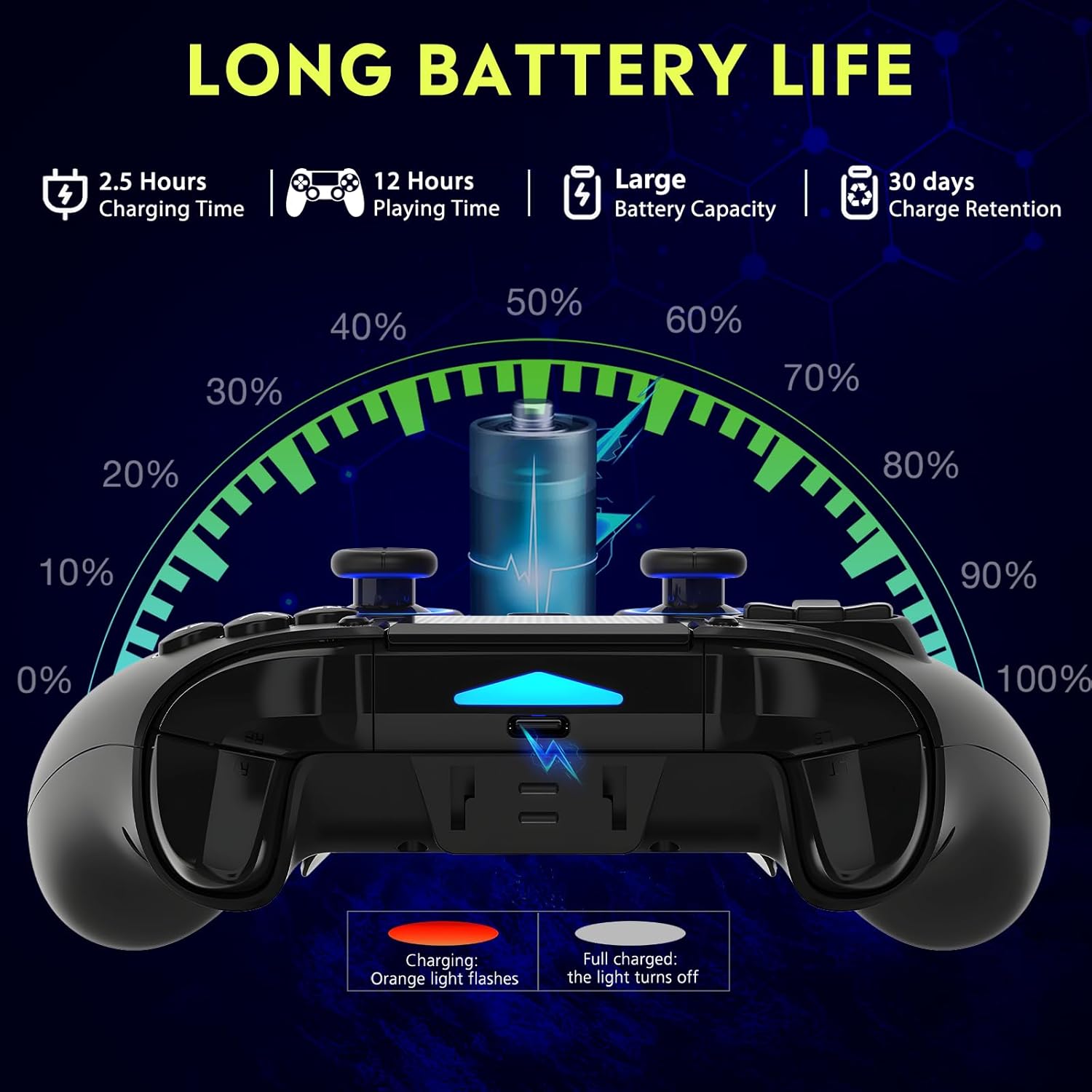
شکل 2: Battery life illustration. The orange light flashes during charging and turns off when fully charged. A full charge takes approximately 2.5 hours and provides up to 12 hours of playing time.
بېسیم اتصال (بلوتوث ۵.۳):
The controller supports wireless connection via Bluetooth 5.3 for PS4, PS3, PS2, Steam Deck, PC (Windows/macOS), iOS, and Android TV Box/phones. For PS5 compatibility, a separate QRD Wireless Converter is required.

شکل 3: مطابقت ختم شوview showing the controller connecting to Windows, PS4, Steam, Mobile, PS3.
- ډاډ ترلاسه کړئ چې کنټرولر چارج شوی.
- Turn on the controller by pressing the "Q" (Home) button.
- په خپل وسیله کې، د بلوتوټ ترتیباتو ته لاړ شئ.
- Select "Spark N5" or similar from the list of available devices to pair.
- یوځل چې جوړه شي، په کنټرولر کې د شاخص څراغونه به ثبات ومومي.
یادونه: For PS5 games, an additional QRD Wireless Converter is necessary. This converter allows the Spark N5 controller to function with PS5 titles, expanding your gaming options.
ویډیو 1: This video demonstrates the QRD Spark N5 Wireless Controller's compatibility with various game devices, including setup and initial connection steps.
د تار سره وصل (USB-C):
Connect the controller directly to your PC or console using the provided USB-C cable. The controller will operate in D-input mode by default. X-input mode is available for PC connections only.
عملیاتي لارښوونې
بنسټیز کنټرولونه:
The controller features standard gamepad buttons, joysticks, and triggers. Familiarize yourself with the layout for optimal gameplay.

شکل 4: The multi-function touchpad on the controller, which can be used for navigation and specific game interactions.
د هال اغیزې جویسټیکس او محرکونه:
The Hall Effect technology ensures precise, drift-free input for both joysticks and triggers. This provides enhanced accuracy and responsiveness in games.

شکل 5: چاودنه وشوه view of the Hall Effect Joystick, illustrating its magnetic sensing mechanism for drift-free operation.

شکل 6: Illustration of the Hall Sensing Analog Triggers, highlighting their sub-millimeter accuracy for precise control.
Macro Back Paddles (N1 & N2):
The N1 and N2 back paddles can be programmed to execute complex actions or button combinations with a single press. This feature is useful for competitive gaming or simplifying repetitive tasks.

شکل 7: شاته view of the controller showing the N1 and N2 macro back paddles, which can be assigned to perform complex combos.
Refer to the controller's quick start guide or the official QRD website for detailed instructions on programming macro functions.
د ټربو دنده:
The Turbo function allows for rapid, continuous input of a button press. You can set three different turbo speeds for most buttons (excluding macro paddles) and choose between auto and manual turbo modes.
Consult the quick start guide for specific button combinations to activate and adjust turbo settings.
د تنظیم وړ وایبریشن:
The dual vibration motors provide haptic feedback. You can adjust the intensity to your preference: 0% (off), 30%, 70% (default), or 100%.

شکل 8: Visual representation of the dual vibration shock feature and its adjustable intensity levels.
Instructions for adjusting vibration intensity are typically found in the quick start guide or by holding specific button combinations.
6-Axis Gyroscope & Motion Sensor:
The integrated 6-axis gyroscope and motion sensor enable precise motion control in supported games, enhancing immersion and aiming accuracy.

شکل 9: Depiction of the 6-axis gyroscope and motion control, showing how controller movements translate into in-game actions.
آډیو ب Featuresې:
The controller includes a 3.5mm audio port for headphones, a built-in speaker, and a microphone. This allows for in-game audio, voice chat, and immersive sound effects.
ویډیو 2: This video demonstrates the smartphone connection and gaming experience with the QRD Spark N5 Wireless Controller, including audio functionality.
ساتنه
- پاکول: د کنټرولر پاکولو لپاره نرم، وچ ټوکر وکاروئ. د سختې خاورې لپاره، یو څه damp ټوکر کارول کیدی شي، مګر ډاډ ترلاسه کړئ چې رطوبت په بندرونو یا درزونو کې نه ننوځي.
- ذخیره کول: کنټرولر په یخ او وچ ځای کې د مستقیم لمر وړانګو او سختې تودوخې څخه لرې وساتئ.
- د بیټرۍ پاملرنه: د بیټرۍ د ژوند اوږدولو لپاره، د کنټرولر په مکرر ډول په بشپړه توګه چارج کولو څخه ډډه وکړئ. په منظم ډول یې چارج کړئ، حتی که په دوامداره توګه نه وي.
- د اغیزو څخه ډډه وکړئ: کنټرولر مه غورځوئ یا یې قوي اغیزو ته مه اړوئ، ځکه چې دا کولی شي داخلي برخې زیانمنې کړي.
د ستونزو حل کول
| ستونزه | احتمالي لامل | د حل لاره |
|---|---|---|
| کنټرولر نه چالانېږي. | ټیټ بیټرۍ یا هیڅ چارج نشته. | Charge the controller using the provided USB-C cable. |
| بېسیمه نښلول کېدای نشي. | Bluetooth not enabled on device; controller not in pairing mode; interference. | Ensure Bluetooth is on. Press and hold the "Q" button to enter pairing mode. Move closer to the device. Restart both controller and device. |
| Input lag or unresponsive buttons. | Low battery; wireless interference; outdated firmware. | Charge the controller. Reduce wireless interference. Check QRD website for firmware updates. Try wired connection. |
| Joysticks or triggers drifting. | Calibration issue; rare hardware defect. | The Hall Effect technology minimizes drift. If persistent, try recalibrating (refer to quick start guide) or contact customer support. |
| د وایبریشن فیډبیک نشته. | Vibration setting is off (0%); game does not support vibration. | Adjust vibration intensity to 30%, 70%, or 100%. Ensure the game supports vibration. |
مشخصات
- ماډل: Spark N5
- ارتباط: Bluetooth 5.3 (Wireless), USB-C (Wired)
- مطابقت: PS4, PS4 Slim, PS4 Pro, PS3, PS2, Steam Deck, PC (Windows, macOS), iOS, Android TV Box, Phone. (PS5 via separate converter)
- Joysticks/Triggers: د هال اغیزه
- د حرکت سینسر: ۳-محور ګیروسکوپ
- وایبریشن: Dual Motors, Adjustable (0%, 30%, 70%, 100%)
- آډیو: 3.5mm Audio Port, Built-in Speaker, Microphone
- ځانګړي ځانګړتیاوې: Multi-function Touchpad, Macro Back Paddles (N1, N2), Turbo Function
- بیټرۍ: 1 لیتیم پولیمر بیټرۍ (شامل)
- د چارج کولو وخت: تقریبا 2.5 ساعته
- د لوبې وخت: تر 12 ساعتونو پورې
- ابعاد: 6.38 x 4.06 x 2.56 انچه
- وزن: 13.7 اونس
تضمین او ملاتړ
QRD products are designed for durability and performance. For warranty information and technical support, please refer to the official QRD webسایټ ته مراجعه وکړئ یا مستقیم د دوی د پیرودونکو خدماتو سره اړیکه ونیسئ.
- رسمي Webسایټ: QRD Store on Amazon
- د پیرودونکو خدمت: Contact information may be available on the product packaging or the official webسایټ
مهرباني وکړئ د هر ډول تضمین ادعا لپاره د پیرود ثبوت وساتئ.