
1. پیژندنه
Thank you for choosing the Dafit ZL02CPRO Smart Watch. This device is designed to enhance your daily life with advanced health monitoring, communication features, and smart assistant capabilities. Please read this manual carefully to ensure proper use and optimal performance of your new smart watch.
۲. په بکس کې څه دي؟
Upon opening your Dafit ZL02CPRO Smart Watch package, you should find the following items:
- Dafit ZL02CPRO Smart Watch
- Wristbands (pre-attached or separate, depending on model)
- د چارج کیبل
- د کارونکي لارښود (دا لاسوند)
3. محصول ختم شوview
The Dafit ZL02CPRO Smart Watch features a 1.28-inch round TFT screen and is available with either a metal or silicone strap. It includes a side button for navigation and interaction.

Image: Dafit ZL02CPRO Smart Watch with a black metal mesh band, displaying time, date, steps, and heart rate data.
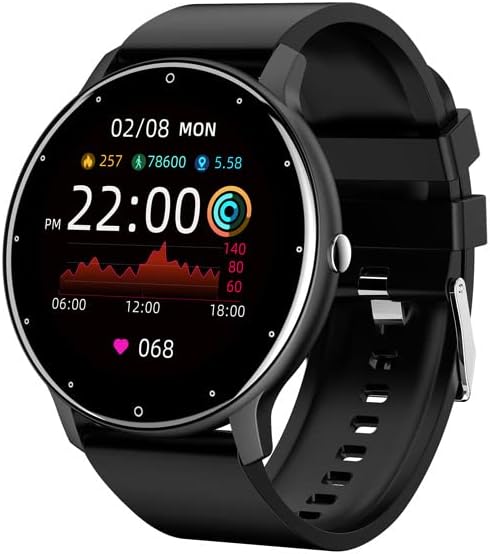
Image: Dafit ZL02CPRO Smart Watch with a black silicone band, showing a similar display with health metrics.

Image: A selection of over 100 stylish digital watch faces available for the Dafit ZL02CPRO Smart Watch, demonstrating customization options.
4. د تنظیم کولو لارښود
4.1 د وسیلې چارج کول
Before first use, fully charge your smart watch. Connect the magnetic charging cable to the charging points on the back of the watch and plug the USB end into a standard USB power adapter (not included) or a computer USB port. A full charge typically takes about 2 hours.
4.2 د اپلیکیشن ډاونلوډ کول
To unlock the full functionality of your smart watch, download the companion application. لټون "Dafit" in your smartphone's app store (Google Play Store for Android or Apple App Store for iOS). The app supports Android 5.0 and above, and Apple iOS 9.0 or later.
۵.۳ ستاسو د سمارټ فون سره جوړه کول
- Ensure your smart watch is charged and powered on.
- په خپل سمارټ فون کې بلوتوټ فعال کړئ.
- Open the Dafit app on your smartphone.
- Follow the in-app instructions to search for and connect to your ZL02CPRO watch. The app will guide you through the pairing process.
- Once paired, you can synchronize data, customize settings, and receive notifications.
5. عملیاتي لارښوونې
5.1 بنسټیز نیویګیشن
- ټچ سکرین: د مینو او ځانګړتیاو له لارې د نیویګیټ کولو لپاره کیڼ/ښي، پورته/ښکته سوائپ کړئ. د غوره کولو لپاره ټایپ کړئ.
- د غاړې تڼۍ: د کور سکرین ته د بیرته راستنیدو یا وسیله د بیدارولو لپاره فشار ورکړئ. د بریښنا اختیارونو لپاره اوږد فشار ورکړئ.
۵.۲ د بلوتوث زنګ وهلو فعالیت
After successful pairing, your watch can make and receive calls directly. Ensure the Bluetooth connection is stable and within 10 meters of your phone.
- زنګ وهل: د زنګ وهلو لپاره په ساعت کې د ډایل پیډ یا د اړیکو لیست ته لاسرسی ومومئ.
- تلیفونونه ترلاسه کول: کله چې زنګ راشي، نو ساعت به د زنګ وهونکي ID ښکاره کړي. د زنګ ځوابولو یا ردولو لپاره ټایپ کړئ.
5.3 خبرتیاوې
Receive notifications for calls, SMS messages, and various app alerts directly on your watch. Enable desired app notifications within the Dafit app settings on your smartphone.
۵.۶ د موسیقۍ او کیمرې کنټرول
- د موسیقۍ کنټرول: په خپل سمارټ فون کې د موسیقۍ غږول کنټرول کړئ (غږول، بندول، ټریکونه پریښودل) مستقیم له خپل ساعت څخه.
- د کیمرې ریموٹ: د خپل سمارټ فون کیمرې لپاره خپل ساعت د ریموټ شټر په توګه وکاروئ.
۲. د روغتیا څارنې ځانګړتیاوې
The Dafit ZL02CPRO Smart Watch provides comprehensive health and fitness tracking capabilities:
- د فعالیت تعقیبونکی: Monitors step number, calories burned, and distance traveled.
- د زړه ضربان څارنه: په دوامداره توګه ستاسو د زړه ضربان د ورځې په اوږدو کې تعقیبوي.
- د خوب څارنه: ستاسو د خوب نمونې تحلیل کوي، په شمول د ژور خوب، سپک خوب، او ویښیدو وختونه.
- څو سپورتي حالتونه: Supports various sport modes to track specific exercise data, including GPS movement track (requires smartphone GPS).
7. Smart Assistant Features
Beyond health tracking, your smart watch offers several convenient smart assistant functions:
- د هوا راپور: د هوا په اړه په ریښتیني وخت کې تازه معلومات ترلاسه کړئ.
- بې ځایه یادونه: کله چې تاسو د ډیر وخت لپاره غیر فعال یاست نو تاسو ته خبرداری ورکوي.
- د الارم ساعت: له خپل ساعت څخه مستقیم الارمونه تنظیم کړئ.
- تمځاي: د فعالیتونو د وخت ټاکلو لپاره یو جوړ شوی سټاپ واچ.
- د روښانتیا سمون: د سکرین روښانتیا د مطلوب لپاره تنظیم کړئ viewing.
- د بریښنا خوندي کولو حالت: د اړتیا په وخت کې د بیټرۍ ژوند زیات کړئ.
8. Water Resistance and Battery Life
۵.۴ IP68 د اوبو مقاومت
The Dafit ZL02CPRO Smart Watch is IP68 waterproof, meaning it is resistant to dust and can withstand immersion in water up to 1.5 meters for 30 minutes. It can be worn when washing hands or in the rain. مهم: Do not use the watch in showers, saunas, hot tubs, or during diving, as steam and hot water can damage the device.
8.2 د بیټرۍ ژوند
With a full charge, the watch can be used for approximately 5-7 days, depending on usage patterns and features enabled. Charging time is approximately 2 hours.
9. ساتنه
To ensure the longevity and proper functioning of your Dafit ZL02CPRO Smart Watch, follow these maintenance guidelines:
- پاکول: Regularly wipe the watch screen and body with a soft, dry cloth. If necessary, use a slightly damp ټوکر او بیا په ښه توګه وچ کړئ.
- د پټو ساتنه: Clean silicone straps with mild soap and water. For metal straps, use a soft brush to remove debris. Ensure straps are dry before wearing.
- د کیمیاوي موادو څخه ډډه وکړئ: سخت کیمیاوي مواد، د پاکولو محلولونه، یا قوي صابون مه کاروئ، ځکه چې دوی ممکن د ساعت پای یا داخلي برخو ته زیان ورسوي.
- ذخیره کول: کله چې د اوږدې مودې لپاره نه کارول کیږي، ساعت په یخ او وچ ځای کې د مستقیم لمر وړانګو څخه لرې وساتئ.
10. ستونزه حل کول
If you encounter issues with your Dafit ZL02CPRO Smart Watch, please refer to the following common solutions:
| ستونزه | احتمالي حل |
|---|---|
| ساعت نه چالانېږي | Ensure the watch is fully charged. Connect to the charging cable and wait a few minutes before attempting to power on again. |
| د سمارټ فون سره جوړه نشي کیدی | Check that Bluetooth is enabled on your phone. Ensure the watch is within Bluetooth range (10m). Restart both the watch and your phone. Try unpairing and re-pairing through the Dafit app. |
| خبرتیاوې ندي ترلاسه شوي | Verify that notifications are enabled in the Dafit app settings for specific applications. Ensure the watch is connected via Bluetooth. Check your phone's notification settings. |
| د روغتیا ناسم معلومات | ډاډ ترلاسه کړئ چې ساعت ستاسو په لاس کې په کلکه اغوستل شوی وي، د لاس د هډوکي څخه شاوخوا د یوې ګوتې په اندازه پورته. د ساعت په شا کې سینسر پاک کړئ. |
| د بیټرۍ لنډ ژوند | Reduce screen brightness, disable continuous heart rate monitoring if not needed, and use power-saving mode. Limit frequent screen wake-ups. |
که ستونزه دوام ومومي، مهرباني وکړئ د نورو مرستو لپاره د پیرودونکو ملاتړ سره اړیکه ونیسئ.
11. مشخصات
Below are the technical specifications for the Dafit ZL02CPRO Smart Watch:
| فیچر | تفصیل |
|---|---|
| ماډل | ZL02CPRO |
| د سکرین ډول وښیه | د TFT سکرین |
| د سکرین اندازه | 1.28 Inches (Round Screen) |
| د ارتباط ټیکنالوژي | بلوتوث |
| د بې سیمه مواصلاتو معیار | بلوتوث |
| عملیاتي سیسټم | Wear OS (compatible with Android 5.0+ / iOS 9.0+) |
| د بیټرۍ ظرفیت | 230 ملیونهamp ساعتونه |
| د بیټرۍ ژوند | ۱۰-۱۴ ورځې (معمولي استعمال) |
| د چارج کولو وخت | نږدې 2 ساعته |
| د اوبو مقاومت | IP68 |
| د توکي وزن | 80 ګرامه (2.82 اونس) |
| GPS | د سمارټ فون له لارې GPS |
| ملاتړ شوي ژبې | Chinese, English, German, Spanish, French, Russian, Arabic, Ukrainian, Italian, Portuguese |
12. تضمین او ملاتړ
For warranty information, please refer to the documentation included with your purchase or contact the retailer. If you have any questions or require technical support, please reach out to the manufacturer's customer service. Contact details are typically available on the product packaging or the official brand webسایټ