
پیژندنه
The JBL Soundgear Frames are innovative Bluetooth audio glasses designed to provide an immersive audio experience while allowing you to remain aware of your surroundings. Equipped with ultra-slim speakers, an integrated microphone, and touch controls, these frames offer seamless connectivity for music, calls, and video conferences. This manual provides essential information for setting up, operating, and maintaining your Soundgear Frames.
په بکس کې څه دي
Carefully unpack your JBL Soundgear Frames and ensure all items are present:
- JBL Soundgear Frames (Onyx)
- د چارج کیبل
- د جامو پاکول
- د لیږد قضیه
یادونه: اضافي لوازمات په جلا توګه پلورل کیدی شي.
چمتو کول
1. د وسیلې چارج کول
Before first use, fully charge your JBL Soundgear Frames. Connect the provided charging cable to the charging port on the frames and to a USB power source. The LED indicator will show charging status.

انځور: اړخ view of the JBL Soundgear Frames, highlighting the charging port and internal electronics within the temple arms.
- د چارج کولو وخت: د بشپړ چارج لپاره نږدې 2 ساعته.
- د بیټرۍ ژوند: Up to 8 hours of audio playback on a full charge.
2. د بلوتوث جوړه کول
To connect your Soundgear Frames to a Bluetooth-enabled device:
- Ensure the Soundgear Frames are charged and powered off.
- Press and hold the power button (usually located on one of the temple arms) until the LED indicator flashes blue, indicating pairing mode.
- په خپل وسیله (سمارټ فون، ټابلیټ، کمپیوټر) کې، د بلوتوټ ترتیباتو ته لاړ شئ او بلوتوټ فعال کړئ.
- Select "JBL Soundgear Frames" from the list of available devices.
- یوځل چې وصل شي ، د LED شاخص به قوي نیلي شي.
The frames support Bluetooth 5.2 for stable and efficient wireless connectivity.
عملیاتي لارښوونې
پاور آن/بند
- پاور آن: Press and hold the power button for 2 seconds. The LED will light up.
- بندول: د بریښنا تڼۍ د ۳ ثانیو لپاره فشار ورکړئ او ونیسئ. LED به بند شي.
د غږ غږ
Use the touch controls located on the temple arms to manage your audio:
- پلی کول / ودرول: Single tap on either temple arm.
- بله لار: Double tap on the right temple arm.
- مخکینی لار Double tap on the left temple arm.
- حجم پورته کول: Swipe forward on the right temple arm.
- کموالی: Swipe backward on the right temple arm.
د اړیکې مدیریت
The integrated microphone allows for clear hands-free calls:
- ځواب / پای کال: Single tap on either temple arm.
- زنګ رد کړئ: Press and hold either temple arm for 2 seconds.
د غږ معاون
Activate your device's voice assistant (e.g., Siri, Google Assistant) by triple-tapping on either temple arm.

Image: A person wearing the JBL Soundgear Frames outdoors, demonstrating their use in a real-world setting.
ساتنه
پاکول
To maintain the clarity of your lenses and the integrity of the frames:
- د لینزونو او چوکاټونو د نرمۍ سره پاکولو لپاره چمتو شوي پاکونکي ټوکر وکاروئ.
- د سختو داغونو لپاره، د عینکو پاکولو سپرې وکاروئ چې په ځانګړي ډول د سترګو لپاره ډیزاین شوی.
- Avoid using abrasive materials or harsh chemicals, as these can damage the lenses and frame finish.
ذخیره کول
When not in use, store your Soundgear Frames in the provided carrying case to protect them from scratches and impacts.
د بیټرۍ پاملرنه
To prolong battery life, avoid exposing the frames to extreme temperatures. If storing for an extended period, charge the battery to approximately 50% before storage.
د ستونزو حل کول
| ستونزه | د حل لاره |
|---|---|
| Frames do not power on. | ډاډ ترلاسه کړئ چې بیټرۍ چارج شوې ده. د بریښنا سرچینې سره وصل شئ او بیا هڅه وکړئ. |
| د بلوتوث له لارې نشي وصل کېدای. | Make sure the frames are in pairing mode (flashing blue LED). Check your device's Bluetooth settings and forget previous connections if necessary. Restart both devices. |
| غږ نشته یا ټیټ غږ. | Check the volume level on both the frames and your connected device. Ensure the frames are properly paired. |
| د ټچ کنټرولونه غیر ځواب ویونکي دي. | Ensure the touch surface is clean and dry. Restart the frames. |
مشخصات
| فیچر | تفصیل |
|---|---|
| د ماډل شمیره | JBLSNDGEARFMSRONX |
| UPC | 050036399845 |
| رنګ | اونکس |
| د توکي بڼه | ګرد |
| د لینس رنګ | تور |
| د لینس ډول | غیر قطبي |
| د چوکاټ مواد | ترموپلاستیک |
| د چوکاټ پوښښ | بشپړ چوکاټ |
| ارتباط | بلوتوث 5.2 |
| ويناوالو | Ultra-slim 25mm x 9mm |
| مایکروفون | یوځای شوی |
| کنټرولونه | لمس |
| د بیټرۍ ژوند | تر 8 ساعتونو پورې |
| د چارج کولو وخت | تقریبا 2 ساعته |
| د اوبو مقاومت | IP54 (Splash and dust resistant) |
| وړاندیز شوی کارول | د موسیقۍ اوریدل |
| د عمر سلسله | بالغ |
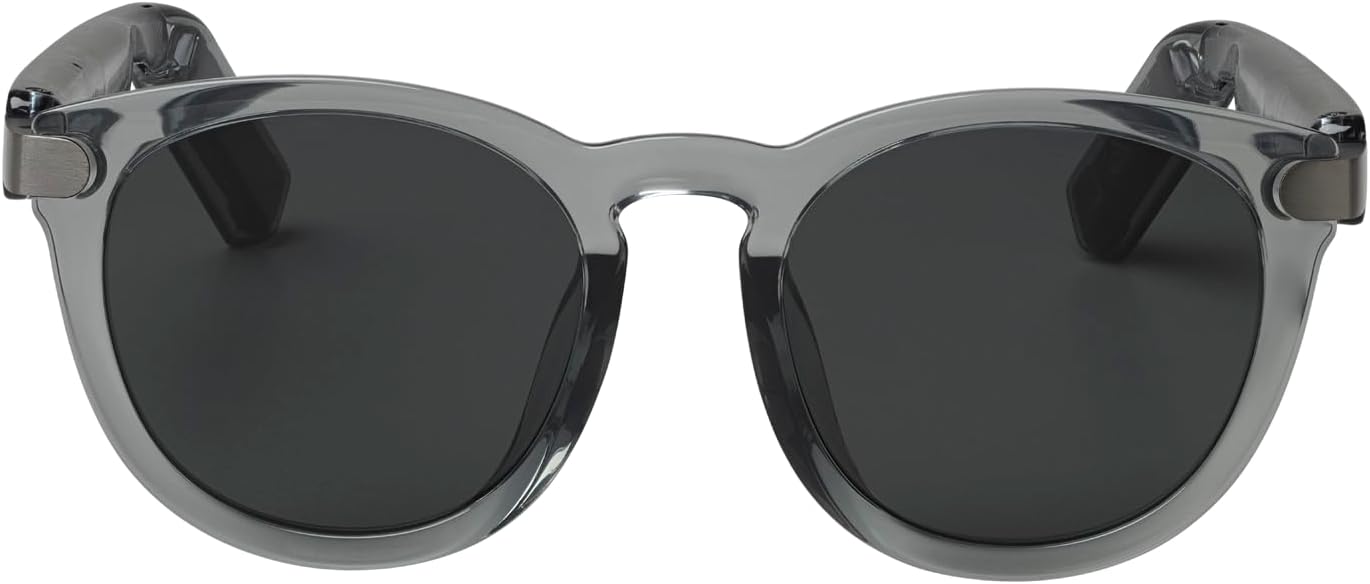
انځور: مخکینۍ برخه view of the JBL Soundgear Frames, showcasing the round, full-frame design and black non-polarized lenses.

انځور: شاته view of the JBL Soundgear Frames, showing the overall structure from the rear.
تضمین او ملاتړ
JBL products are designed for reliability and performance. For warranty information and customer support, please refer to the warranty card included with your product or visit the official JBL webسایټ. تاسو کولی شئ د FAQs او اضافي ملاتړ سرچینې آنلاین هم ومومئ.
آنلاین ملاتړ: www.jbl.com/support