
amazon basics B0CX226DLQ
amazon basics Wireless Bluetooth Keyboard User Manual
Model: B0CX226DLQ
پیژندنه
This manual provides essential information for the setup, operation, and maintenance of your amazon basics Wireless Bluetooth Keyboard. Designed for seamless multi-device connectivity, this keyboard allows you to effortlessly switch between up to three devices running on iOS, Windows, or Android operating systems. Its compact and lightweight design, combined with noiseless keys and a built-in rechargeable battery, makes it an ideal solution for versatile typing needs on the go.

انځور: پورته-ښکته view of the amazon basics Wireless Bluetooth Keyboard, showcasing its compact layout and grey and black color scheme.
د بسته محتويات
د کڅوړې د پرانیستلو پر مهال، ډاډ ترلاسه کړئ چې لاندې ټول توکي شتون لري:
- 1 x amazon basics Wireless Bluetooth Keyboard
- 1 x د USB ډول-C چارج کیبل
- ۱ x د کارونکي لارښود (دا سند)
چمتو کول
1. د کیبورډ چارج کول
The keyboard features a built-in rechargeable battery. Before first use, it is recommended to fully charge the keyboard.
- د کیبورډ په اړخ کې د ټایپ-سي چارج کولو پورټ ومومئ.
- Connect one end of the provided USB Type-C charging cable to the keyboard's charging port.
- د کیبل بل پای د USB بریښنا سرچینې سره وصل کړئ (د مثال په توګه، د کمپیوټر USB پورټ، د USB دیوال اډاپټر).
- د چارج کولو شاخص څراغ به روښانه شي. کله چې په بشپړ ډول چارج شي، رڼا ممکن رنګ بدل کړي یا بنده شي، د ماډل پورې اړه لري.

انځور: یوه نږدې اړخ view of the keyboard, highlighting the Type-C charging port and the ON/OFF power switch.
2. بریښنا کول/بندول
To power on the keyboard, slide the ON/OFF switch located on the side of the keyboard to the "ON" position. To power off, slide it to the "OFF" position.
3. د بلوتوث جوړه کول
The keyboard supports connection to up to three devices simultaneously. Follow these steps to pair your devices:
- ډاډ ترلاسه کړئ چې کیبورډ فعال دی.
- فشار ورکړئ Fn د بلوتوث چینل کیلي سره په ورته وخت کې کیلي (BT1, BT2، یا BT3) for approximately 3-5 seconds until the corresponding indicator light flashes rapidly. This indicates the keyboard is in pairing mode.
- په خپل وسیله (سمارټ فون، ټابلیټ، لیپ ټاپ) کې، د بلوتوټ ترتیباتو ته لاړ شئ او بلوتوټ فعال کړئ.
- لټون available devices. The keyboard will appear as "amazon basics Keyboard" or similar.
- Select the keyboard from the list to connect. If prompted, enter the displayed code on the keyboard and press ننوتل.
- یوځل چې وصل شي، د شاخص څراغ به ځلیدل ودروي او د بندیدو دمخه به د څو ثانیو لپاره ټینګ پاتې شي.
- دا مرحلې د نورو BT چینل کیلي په کارولو سره تر دوو اضافي وسیلو پورې تکرار کړئ.

Image: The keyboard positioned between a laptop, tablet, and smartphone, visually representing its multi-device connectivity feature.
د کیبورډ چلول
۵.۳. د وسیلو ترمنځ بدلول
After pairing multiple devices, you can easily switch between them:
- په ساده ډول فشار ورکړئ Fn key simultaneously with the desired Bluetooth channel key (BT1, BT2، یا BT3) to switch to the corresponding paired device.
- The keyboard will automatically connect to the selected device.
۳. د عملیاتي سیسټم مطابقت
The keyboard is designed to be compatible with various operating systems. Some keys may have dual functions or specific behaviors depending on the OS.
- iOS: Compatible with iPhones and iPads.
- وینډوز: Fully functional with Windows PCs and laptops.
- اندروید: Works seamlessly with Android smartphones and tablets.
- میک OS: Compatible with MacBooks and iMacs.
- کروم OS: Supports Chrome OS devices.
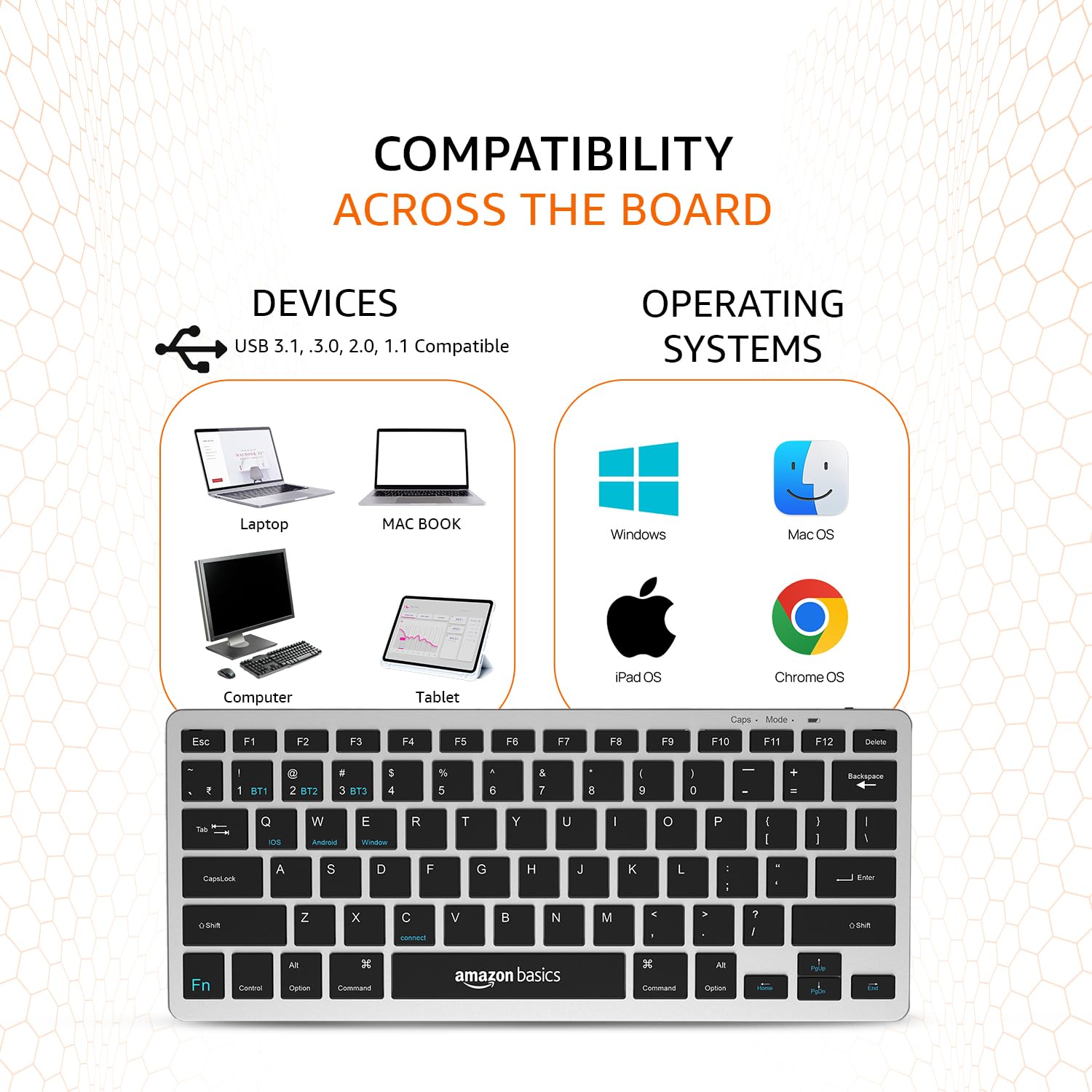
Image: A visual representation of the keyboard's broad compatibility, showing various device types and operating system logos it supports.
3. د ځانګړي فعالیت کیلي
The keyboard features a dedicated Fn key that, when pressed in combination with other keys, activates special functions. Refer to the keycap legends for specific functions (e.g., media controls, volume, screen brightness).
ساتنه
مناسب ساتنه ستاسو د کیبورډ اوږد عمر او غوره فعالیت تضمینوي.
- پاکول: Use a soft, dry, lint-free cloth to wipe the keyboard surface. For stubborn dirt, slightly dampټوکر د اوبو یا یو نرم، غیر خارښونکي پاکونکي سره ومینځئ. د ډیر رطوبت څخه ډډه وکړئ.
- د بیټرۍ پاملرنه: To preserve battery life, avoid fully discharging the keyboard frequently. If storing for an extended period, charge the battery to about 50% and power off the keyboard.
- ذخیره کول: Store the keyboard in a cool, dry place away from direct sunlight, extreme temperatures, and corrosive materials.
- سمبالول: Avoid dropping the keyboard or subjecting it to strong impacts. Do not attempt to disassemble the keyboard, as this will void the warranty.
د ستونزو حل کول
If you encounter issues with your amazon basics Wireless Bluetooth Keyboard, refer to the following common troubleshooting steps:
- کیبورډ نه نښلول کیږي/جوړول کیږي:
- ډاډ ترلاسه کړئ چې کیبورډ فعال دی او په بشپړ ډول چارج شوی دی.
- ډاډ ترلاسه کړئ چې ستاسو په وسیله بلوتوټ فعال شوی.
- Move the keyboard closer to your device to ensure it's within range.
- Forget or remove the keyboard from your device's Bluetooth list and attempt to re-pair it.
- Try pairing with a different device to rule out an issue with your primary device's Bluetooth.
- Keys Not Responding or Double Typing:
- Check the keyboard's battery level and recharge if low.
- Ensure the keyboard is properly connected to your device. Try switching to another BT channel and back.
- Clean the keys and surrounding areas to remove any debris that might be obstructing key presses.
- کیبورډ (بریښنا بند/چالو) او خپل وصل شوی وسیله دواړه بیا پیل کړئ.
- ځنډ یا ځنډېدلی ځواب:
- ډاډ ترلاسه کړئ چې نور قوي بېسیم سیګنالونه یا وسایل د بلوتوث اتصال سره مداخله نه کوي.
- د کیبورډ او خپل وسیله ترمنځ واټن کم کړئ.
- Check for any pending software updates on your device that might improve Bluetooth performance.
- د چارج کولو مسلې:
- Verify that the Type-C cable is securely connected to both the keyboard and the power source.
- د مختلف USB پورټ یا بریښنا اډاپټر کارولو هڅه وکړئ.
- ډاډ ترلاسه کړئ چې د چارج کولو کیبل خراب شوی نه وي.
If the issue persists after trying these steps, please contact amazon basics customer support for further assistance.
مشخصات
| فیچر | تفصیل |
|---|---|
| برانډ | د ایمیزون اساسات |
| ماډل | Wireless Bluetooth Keyboard (B0CX226DLQ) |
| د ارتباط ټیکنالوژي | بلوتوث |
| کلیدي ترتیب | د ۶۱ کیلي کمپیکټ ترتیب |
| کلیدي ډول | Noiseless Keys |
| مطابقت لرونکې وسیلې | لپ ټاپ، ټابلیټ، سمارټ فون |
| د عملیاتي سیسټم مطابقت | iOS, Windows, Android, Mac OS, Chrome OS |
| د بیټرۍ ډول | Built-in Rechargeable Lithium Polymer |
| د بیټرۍ د انرژۍ محتوا | د واټ ساعتونه |
| د چارج کولو بندر | د USB ډول-C |
| مواد | لوړ کیفیت لرونکی ABS |
| د محصول ابعاد (LxWxH) | 28.5 cm x 12 cm x 1.45 cm |
| د توکي وزن | 290 ګرامه |
| د اصلي هیواد | هند |
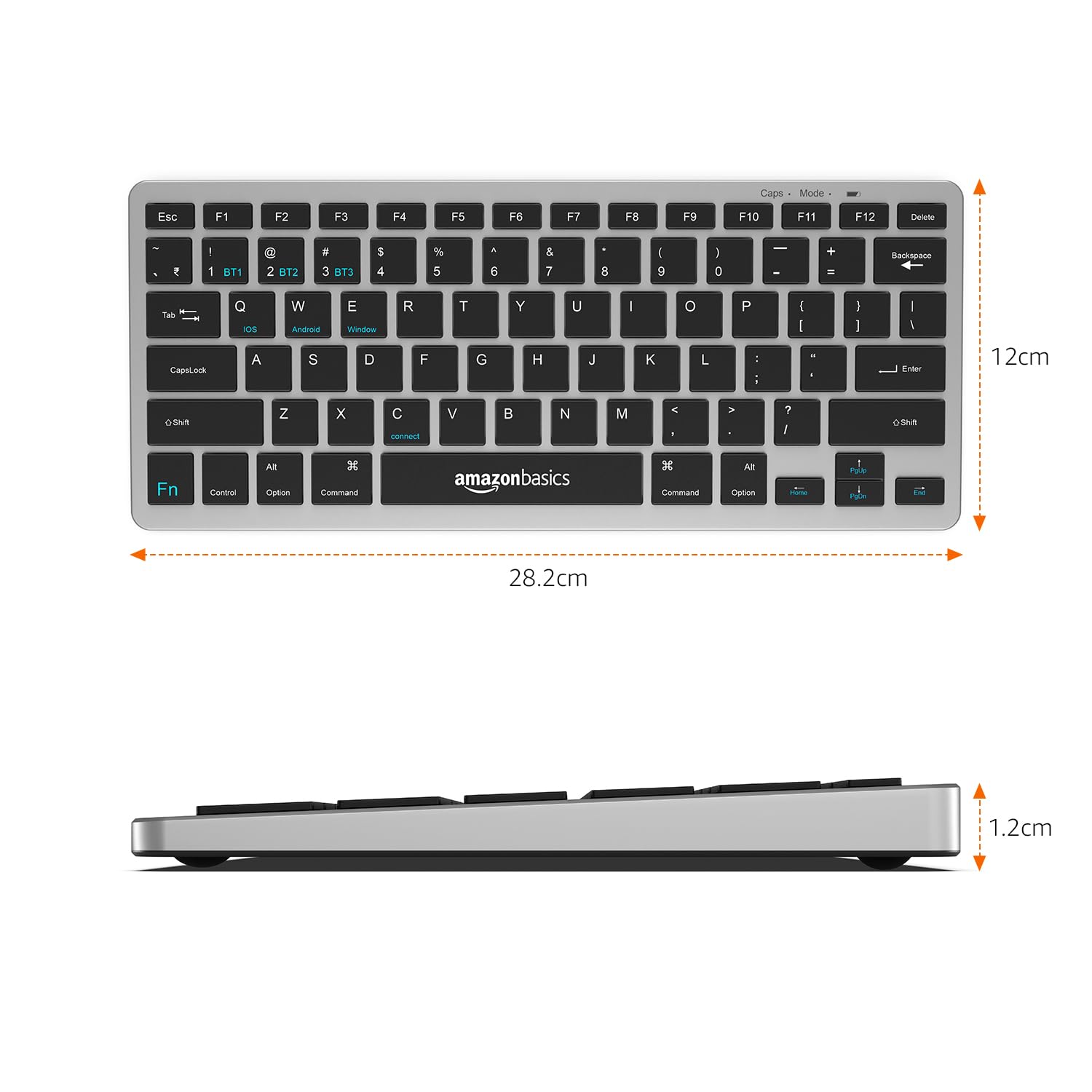
Image: The keyboard with overlaid measurements indicating its length (28.5 cm), width (12 cm), and thickness (1.2 cm).
تضمین او ملاتړ
For information regarding the product warranty, please refer to the warranty card included in your package or contact amazon basics customer support directly. Warranty terms and conditions may vary by region and purchase date.
If you require further assistance, have questions, or need to report an issue that cannot be resolved using the troubleshooting guide, please contact amazon basics customer support through their official webسایټ یا د اړیکې معلومات ستاسو د پیرود سره چمتو شوي.
For the latest support information and FAQs, visit the official amazon basics support page.