
پیژندنه
This manual provides essential information for the safe and efficient use of your HP 15 Professional Slim High-Performance Laptop. Please read these instructions carefully before using your device. Keep this manual for future reference.
1. ابتدايي ترتیب
1.1 Unboxing and Connecting Power
Carefully remove the laptop and all accessories from the packaging. Connect the provided AC adapter to the laptop's power port and then to a power outlet. It is recommended to fully charge the battery before first use.

Image: The HP 15 laptop shown from the front, with the power adapter connected to the side. This illustrates the initial connection for charging.
۴.۲ لومړی بوټ او د عملیاتي سیسټم تنظیم کول
Press the power button to turn on the laptop. Follow the on-screen instructions to complete the Windows 11 Home operating system setup. This includes selecting your region, connecting to a Wi-Fi network, and creating a user account.

Image: The HP 15 laptop open, displaying the Windows 11 desktop interface, indicating successful operating system initialization.
۳. ستاسو د لپ ټاپ چلول
۲.۱ د بریښنا فعال/بند او د خوب حالت
- پاور آن: د کیبورډ ډیک کې موقعیت لرونکي د بریښنا تڼۍ فشار ورکړئ.
- بندول: Click the Start button, then Power, and select "Shut down."
- د خوب حالت: Close the lid or click the Start button, then Power, and select "Sleep."
۳.۳ کیبورډ او ټچ پیډ
The laptop features a full-size island-style QWERTY keyboard and a multi-touch touchpad. Use the touchpad for navigation and gestures. Refer to Windows 11 settings for touchpad customization.
2.3 نښلول
Your HP 15 laptop offers various connectivity options:
- وای فای: Supports Realtek Killer Wi-Fi 6 (802.11ax) for high-speed wireless internet access.
- بلوتوث: Integrated Bluetooth 5.3 for connecting wireless peripherals like headphones and mice.
- USB پورټونه:
- Two (2) USB 3.2 Gen 1.0 Type-A ports (5 Gbps signaling rate).
- One (1) USB 3.2 Gen 1.0 Type-C port (5 Gbps signaling rate, data transfer only; charging or external monitors not supported).
- HDMI: One (1) HDMI v1.4b output port for connecting to external displays.
- آډیو جیک: One (1) headphone/microphone combo port.
انځور: یوه خوا view of the HP 15 laptop, highlighting the various input/output ports for external device connectivity.
۳.۳ آډیو او کیمره
- آډیو: Equipped with dual speakers for audio output and HD Audio support.
- کمره: Features an HP True Vision 720p HD camera with integrated dual array digital microphones, suitable for video calls and online meetings.

Image: The HP 15 laptop displaying a video conference call, demonstrating the use of the integrated camera and microphone.
3. ساتنه او پالنه
۴.۱ د خپل لپ ټاپ پاکول
- سکرین: د نرم، لینټ پاک ټوکر څخه په روښانه توګه کار واخلئampپه اوبو یا د سکرین پاکونکي سره مینځل شوی. په مستقیم ډول په سکرین باندې مایع مه سپری کوئ.
- کیبورډ او چیسس: د نرم او وچ ټوکر څخه کار واخلئ. د سختې خاورې لپاره، یو څه damp ټوکر کارول کیدی شي، ډاډ ترلاسه شي چې رطوبت په سوریو کې نه ننوځي.
- پلورونکي: Periodically check and gently clean the ventilation openings to prevent dust buildup, which can affect cooling.
3.2 د بیټرۍ پاملرنه
To maximize battery lifespan, avoid extreme temperatures and prolonged full discharge or full charge states. For long-term storage, charge the battery to approximately 50%.
3.3 د سافټویر تازه معلومات
Regularly check for and install Windows updates and HP driver updates to ensure optimal performance, security, and compatibility. Access Windows Update via Settings > Windows Update.
3.4 د چاپیریال په اړه نظرونه
This laptop is built with recycled materials, including ocean-bound plastic. Please dispose of the device and its components responsibly at the end of its life cycle, following local regulations for electronic waste.
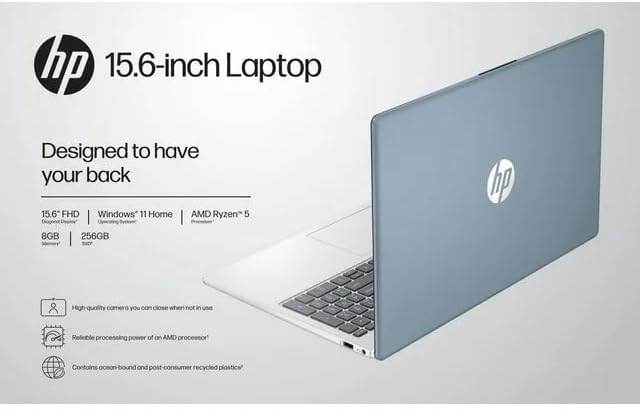
Image: The HP 15 laptop shown from the rear, illustrating its design and potential ventilation areas for maintenance.
4. د عامو مسلو حل کول
This section addresses common problems you might encounter. For more complex issues, refer to the HP support webسایټ
4.1 No Power or Laptop Not Turning On
- ډاډ ترلاسه کړئ چې د AC اډاپټر په خوندي ډول د لپ ټاپ او د کار کولو بریښنا سایټ دواړو سره وصل دی.
- د بل وسیلې په لګولو سره د بریښنا آوټ لیټ فعال دی تصدیق کړئ.
- د بریښنا یو بل ځای هڅه وکړئ.
- که چیرې بیټرۍ په بشپړه توګه وچه شوې وي، نو د بریښنا د فعالولو هڅه کولو دمخه یې لږ تر لږه د 30 دقیقو لپاره چارج کولو ته اجازه ورکړئ.
4.2 د ښودلو مسلې
- خالي پرده: Connect an external monitor via HDMI to check if the issue is with the laptop's display or the graphics output.
- خړ نمایش: Adjust screen brightness using the function keys (usually F2/F3 or similar icons) or through Windows display settings.
- ناسم حل: Adjust the display resolution in Windows Settings > System > Display.
۵.۳ د وای فای یا بلوتوث اتصال ستونزې
- Ensure Wi-Fi and Bluetooth are enabled in Windows Settings > Network & internet or Devices > Bluetooth & devices.
- د وای فای ستونزو لپاره خپل روټر/موډیم بیا پیل کړئ.
- Update wireless drivers through HP Support Assistant or Device Manager.
- Forget and reconnect to the Wi-Fi network or re-pair the Bluetooth device.
4.4 Audio Not Working
- Check volume levels in Windows and ensure speakers are not muted.
- Verify that the correct audio output device is selected in Windows Sound settings.
- د آډیو چلوونکي تازه کړئ.
- Test with headphones to determine if the issue is with the internal speakers or the audio output.
5. د محصول مشخصات
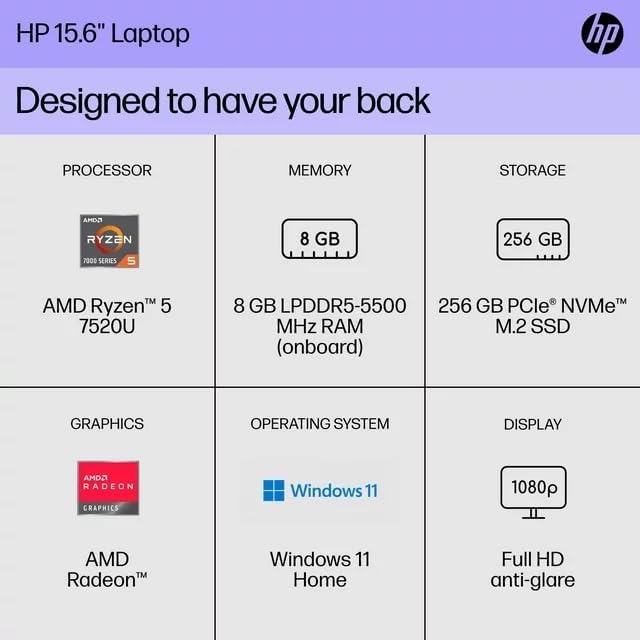
The following are the technical specifications for the HP 15 Professional Slim High-Performance Laptop (Model 15):
| فیچر | تفصیل |
|---|---|
| د ماډل نوم | HP 15 |
| پروسیسر | AMD Ryzen 5 7520U (up to 4.3 GHz max boost, 4 cores, 8 threads) |
| ګرافیک | د AMD Radeon ګرافیک (مدغم) |
| حافظه (RAM) | 8GB DDR4 SDRAM |
| ذخیره کول | ۵۱۲ جي بي پي سي آی اې NVMe M.2 SSD |
| ښودل | 15.6-inch diagonal, Full HD (1920 x 1080), micro-edge, anti-glare, 250 nits, 45% NTSC |
| عملیاتي سیسټم | د وینډوز 11 کور |
| بې سیم ارتباط | Realtek Killer Wi-Fi 6 (2x2), Bluetooth 5.3 |
| بندرونه |
|
| کیمره | د HP ریښتیني ویژن 720p HD کیمره د مربوط دوه سري ډیجیټل مایکروفونونو سره |
| آډیو | Dual speakers, HD Audio |
| کیبورډ | Full-size island-style QWERTY keyboard |
| بریښنا توکی | AC اډاپټر |
| UPC | 196337455771 |
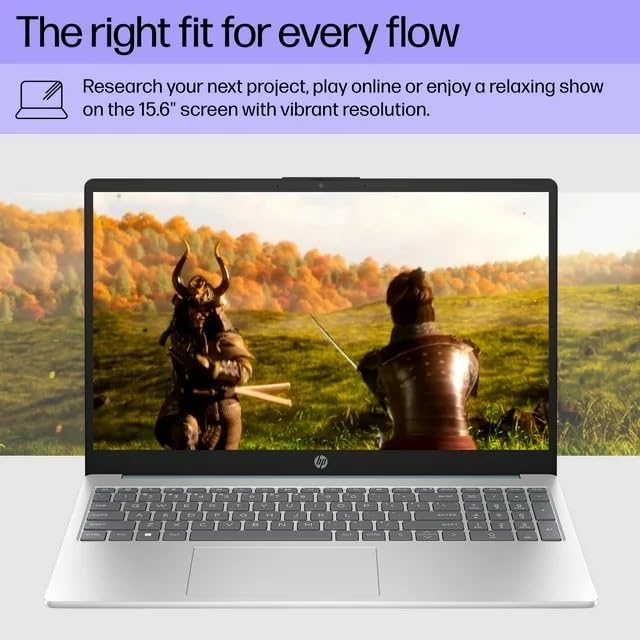
Image: A visual representation of the HP 15 laptop, complementing the detailed specifications listed.
6. د تضمین معلومات
This HP 15 laptop is a renewed product and comes with a د 90 ورځو محدود تضمین. This warranty covers defects in materials and workmanship under normal use. For specific terms and conditions, please refer to the warranty documentation included with your product or contact HP support.
7. د پیرودونکي ملاتړ
د نورو مرستو، تخنیکي ملاتړ، یا د تازه شوي ډرایورانو او سافټویر ډاونلوډ کولو لپاره، مهرباني وکړئ د HP رسمي ملاتړ ته مراجعه وکړئ. website. You can typically find support resources by searching for "HP Support" and your specific model number (HP 15) on their webسایټ
آنلاین سرچینې: https://support.hp.com