
1. پیژندنه
د پیرودلو لپاره مننهasing the NiZ Mini84-pro Wireless Keyboard. This keyboard features an 84-key layout, electrostatic capacitive switches, and multiple connectivity options. It is designed for comfortable and efficient typing across various operating systems.
This manual provides essential information for setting up, operating, and maintaining your keyboard. Please read it carefully before use.

2. ترتیب کول
2.1 د بسته محتويات
مخکې له دې چې تاسو پیل کړئ، مهرباني وکړئ ډاډ ترلاسه کړئ چې ټول توکي په کڅوړه کې شتون لري:
- NiZ Mini84-pro Wireless Keyboard
- د USB ډول-C ته د USB ډول-A کیبل
- 2.4G USB رسیدونکی
- کیکیپ پلر
- Additional Springs (for key weight adjustment)
- د کارن لارښود

۳.۱ د ارتباط اختیارونه
The NiZ Mini84-pro keyboard supports three connection modes: Bluetooth 5.0, 2.4G USB Receiver, and Wired USB Type-C.
2.2.1 Bluetooth 5.0 Connection (Up to 2 devices)
- فشار ورکړئ او ونیسئ Fn کلیدي او یا هم F9 or F10 simultaneously to enter Bluetooth pairing mode. The indicator light will flash.
- On your device (PC, smartphone, tablet), navigate to Bluetooth settings and select "NIZ BT5.2" to connect.
- د جوړه شوي بلوتوث وسیلو ترمنځ د بدلولو لپاره، لنډ فشار ورکړئ Fn + F9 or Fn + F10.

2.2.2 2.4G USB Receiver Connection (1 device)
- د 2.4G USB ریسیور په خپل کمپیوټر کې موجود USB پورټ کې دننه کړئ.
- فشار ورکړئ او ونیسئ Fn کلیدي او F11 simultaneously. The keyboard will automatically recognize and connect to the receiver.
- To switch to the 2.4G connection, short press Fn + F11.

2.2.3 Wired USB Type-C Connection
Connect the keyboard to your computer using the provided USB Type-C to USB Type-A cable. The keyboard will function as a wired keyboard and charge simultaneously.

۸ پاور آن/بند
Locate the power switch on the side of the keyboard to turn it on or off.
3. عملیاتي لارښوونې
3.1 د OS مطابقت
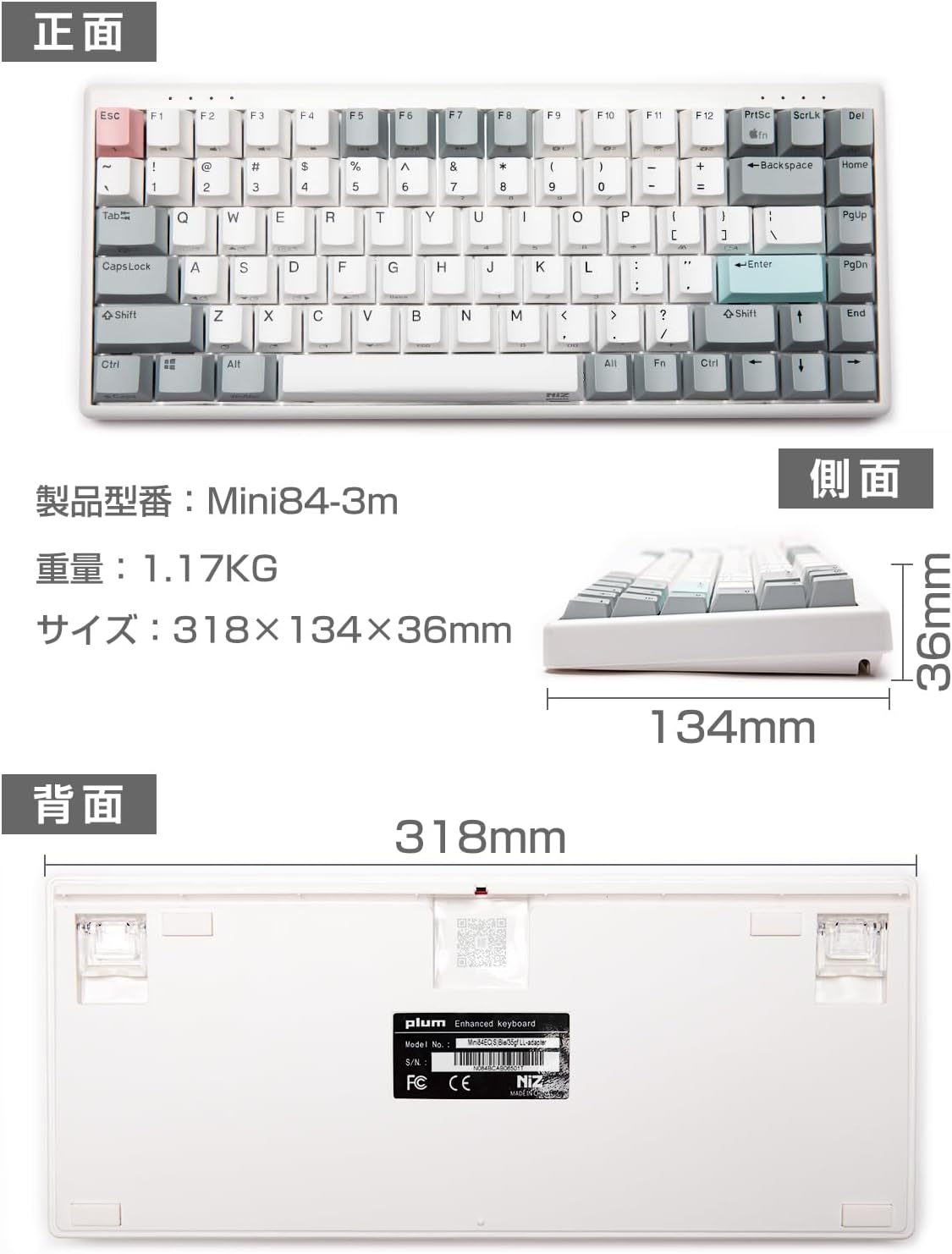
The NiZ Mini84-pro keyboard is compatible with Windows, macOS, Android, and Linux operating systems. You can seamlessly switch between Windows and Mac layouts using specific key combinations.

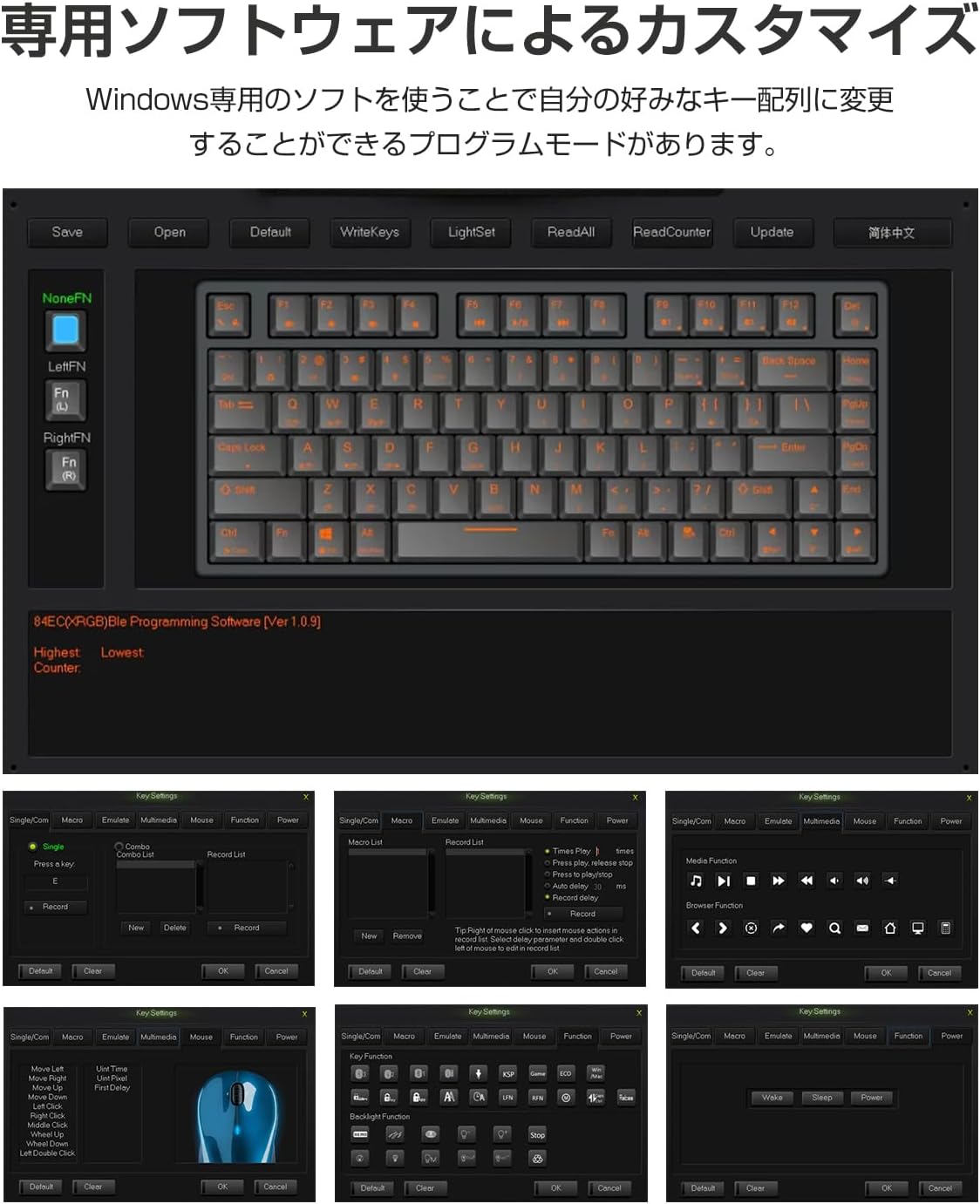
3.2 Key Mapping and Customization
The keyboard offers high customization through its dedicated software (Windows only). This software allows you to:
- Change key assignments (key remapping).
- Create Combo functions.
- Set up Macro functions.
Once settings are saved using the Windows software, they will apply when using the keyboard with Mac devices as well.
3.3 APC (Actuation Point Change) Function
The APC function allows you to adjust the actuation point (the depth at which a key press is registered) for each key. This can be set to High (2mm), Medium (2.5mm), or Low (3mm) to suit your typing preference.

3.4 Key Weight Adjustment
The keyboard comes with a default key weight of 35g. For users who prefer a heavier key feel, additional springs are included to increase the key weight to 45g. To adjust, carefully remove the keycap using the provided keycap puller and insert the spring onto the switch stem before replacing the keycap.


4. ساتنه
4.1 پاکول
To clean your keyboard, power it off and disconnect it from any devices. Use a soft, lint-free cloth slightly dampened with water or a mild cleaning solution. Avoid spraying liquids directly onto the keyboard. For cleaning between keycaps, use a can of compressed air.
۳.۲ د کیلي کیپ بدلول
The PBT two-color molded keycaps are durable and resistant to wear. If you wish to replace keycaps, use the provided keycap puller to gently remove them. Ensure proper alignment when pressing new keycaps back onto the switches.

4.3 د بیټرۍ معلومات
The keyboard features a built-in 3000mAh battery. When the battery is low, connect the keyboard via the USB Type-C cable to charge. The indicator light will show charging status.
5. ستونزه حل کول
- Keyboard not connecting via Bluetooth/2.4G: Ensure the keyboard is powered on and in the correct pairing mode (Fn+F9/F10 for Bluetooth, Fn+F11 for 2.4G). Check your device's Bluetooth settings or try re-inserting the 2.4G USB receiver.
- کیلي ځواب نه ورکوي: Check the connection (wired, Bluetooth, 2.4G). Ensure the keyboard is charged. If using wireless, try connecting via USB cable.
- Typing lag or intermittent connection: Ensure the keyboard is within range of your device. Avoid interference from other wireless devices. Try switching to a different connection mode or restarting the keyboard and your device.
- Keyboard feels unstable on a flat surface: The keyboard chassis may sometimes experience slight warping during shipping. Gently hold both ends of the keyboard and apply slight opposing pressure to straighten it.
- د اصلاح کولو سافټویر کار نه کوي: The dedicated software is for Windows only. Ensure you are running it on a Windows operating system.
6. مشخصات
| فیچر | تفصیل |
|---|---|
| برانډ | AKEEYO (NiZ) |
| د ماډل شمیره | NIZ-Mini84-pro |
| د ارتباط ټیکنالوژي | Bluetooth 5.0, 2.4G Wireless, USB Type-C Wired |
| کلیدي شمیره | 84 کیلي |
| د سویچ ډول | Electrostatic Capacitive (Cherry MX compatible) |
| Key Weight | 35g (Adjustable to 45g with included springs) |
| د کیکیپ مواد | PBT (Two-color molded) |
| ترتیب | English (QWERTY) |
| مطابقت لرونکې وسیلې | Windows, macOS, Android, Linux |
| ابعاد (L x W x H) | 31.8 cm x 13.4 cm x 3.6 cm |
| د بریښنا سرچینه | 3000mAh د چارج وړ بیټرۍ |
| ځانګړي ځانګړتیاوې | Customizable Key Mapping, APC Function, Silent Operation |

7. تضمین او ملاتړ
This product comes with a 1-year warranty from the date of purchase. If you encounter any issues or have questions, please contact customer support. For support inquiries, please refer to the contact information provided by AKEEYO, the seller.