
1. پیژندنه
This manual provides essential information for the safe and efficient use of your Amazon Basics 24 Inch FHD 100Hz Monitor. Please read these instructions carefully before operating the device and retain them for future reference.
The Amazon Basics 24 Inch Monitor features a 23.8-inch viewable IPS panel with Full HD (1080p) resolution and a maximum refresh rate of 100Hz. It includes built-in speakers and is VESA compatible for flexible mounting options. The monitor is designed for various uses, including office work, entertainment, and gaming.

مخکی view of the Amazon Basics 24 Inch FHD 100Hz Monitor.
2. د بسته محتويات
ډاډ ترلاسه کړئ چې ټول توکي په کڅوړه کې شتون لري:
- Amazon Basics 24 Inch Monitor
- ودريده بيس
- ولاړه غاړه
- د بریښنا اډاپټر
- HDMI کیبل

Image showing the monitor's package contents: stand base, stand neck, power adapter, and HDMI cable.
۴. د تنظیم لارښوونې
3.1 د سټینډ سره نښلول
- Insert the stand neck into the stand base until it clicks securely into place.
- Align the assembled stand with the mounting slot on the back of the monitor. Push the stand into the slot until it locks. Ensure it is firmly attached.
3.2 د کیبلونو نښلول
The monitor features multiple input ports for connectivity:
- DP 1.2: DisplayPort input for high-resolution video and audio.
- HDMI1.4: HDMI input for video and audio from compatible devices.
- VGA: VGA input for analog video signals.
- په آډیو کې: 3.5mm audio input for external audio sources.
- د اوریدو غږ: د هیډفونونو یا بهرني سپیکرو لپاره د 3.5 ملي میتر آډیو آوټ پټ.
- Connect the provided HDMI cable from your computer's video output port to the HDMI input port on the monitor. Alternatively, use a DisplayPort or VGA cable if your device supports those connections.
- Connect the power adapter to the monitor's power input port, then plug the power adapter into a wall outlet.
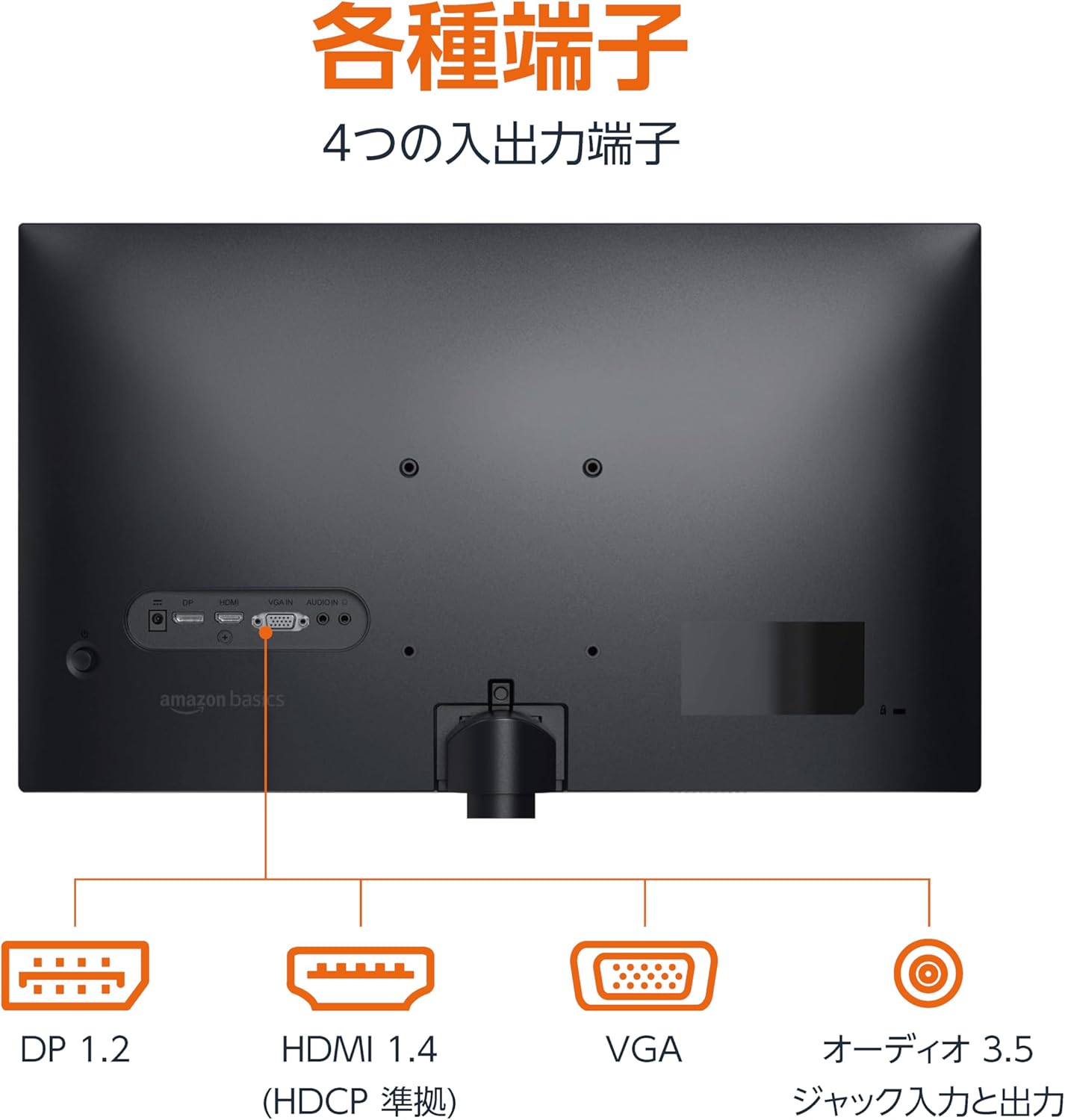
شاته view of the monitor displaying various input and output ports.
3.3 فعالول
Press the power button located on the back or bottom of the monitor to turn it on. The monitor will automatically detect the active input signal.
3.4 د خښتو سمون
The monitor allows for tilt adjustment to achieve an optimal viewing angle. Gently hold the top and bottom edges of the monitor and tilt it forward or backward. The tilt range is approximately -5° to 20°.

Monitor demonstrating its tilt adjustment capability.
3.5 Optional: VESA Mounting and Cable Lock
The monitor is VESA compatible, allowing it to be mounted on a wall or an adjustable arm (mounting hardware sold separately). Refer to the VESA mount's instructions for installation.
An optional cable lock slot is available on the rear of the monitor to secure it to a stable object, preventing theft.
۵.۳ د تنظیم کولو ویډیو لارښود
For a visual guide on setting up your Amazon Basics monitor, please watch the video below:
This video demonstrates the assembly of the stand, connecting cables, and basic adjustments for the Amazon Basics monitor.
4. عملیاتي لارښوونې
۳.۱ د پردې پرده ښودنه (OSD) مینو
The monitor features an On-Screen Display (OSD) menu for adjusting various settings. Use the buttons located on the back or bottom of the monitor to navigate the menu. Common settings include:
- روښانتیا/ تضاد: د نندارې د روښانتیا او برعکس کچه تنظیم کړئ.
- د رنګ ترتیبات: د رنګ تودوخه، رنګ، او اشباع تعدیل کړئ.
- د ننوتلو انتخاب: Manually switch between DP, HDMI, and VGA inputs.
- آډیو: د جوړ شوي سپیکرو یا وصل شوي هیډفونونو لپاره حجم تنظیم کړئ.
- د انځور حالت: Select from preset display modes (e.g., Standard, Game, Movie).
4.2 Using Built-in Speakers
The monitor includes integrated speakers. Audio will be played through these speakers when connected via HDMI or DisplayPort. If using a VGA connection, ensure an audio cable is connected to the 'AUDIO IN' port on the monitor and your computer's audio output.
5. مشخصات
| فیچر | مشخصات |
|---|---|
| برانډ | د ایمیزون اساسات |
| د ماډل شمیره | 24M2020DJP |
| د سکرین اندازه | 24 Inches (23.8 inch viewوړ) |
| د پینل ډول | IPS |
| قرارداد | د FHD ۱۰۸۰p (۱۹۲۰ x ۱۰۸۰) |
| د تازه کولو نرخ | اعظمي 100 Hz |
| د اړخ نسبت | 16:9 |
| جوړ شوي سپیکرونه | هو |
| د VESA مطابقت | هو |
| د ننوتلو بندرونه | 1x DisplayPort 1.2, 1x HDMI 1.4, 1x VGA, 1x Audio In (3.5mm) |
| د تولید بندرونه | 1x Audio Out (3.5mm) |
| د محصول وزن | 2.8 کیلو ګرامه |
| د Bezel ضخامت | 1.44 mm (slim bezel) |
| تضمین | د 1 کال محدود تضمین |
5.1 ابعاد
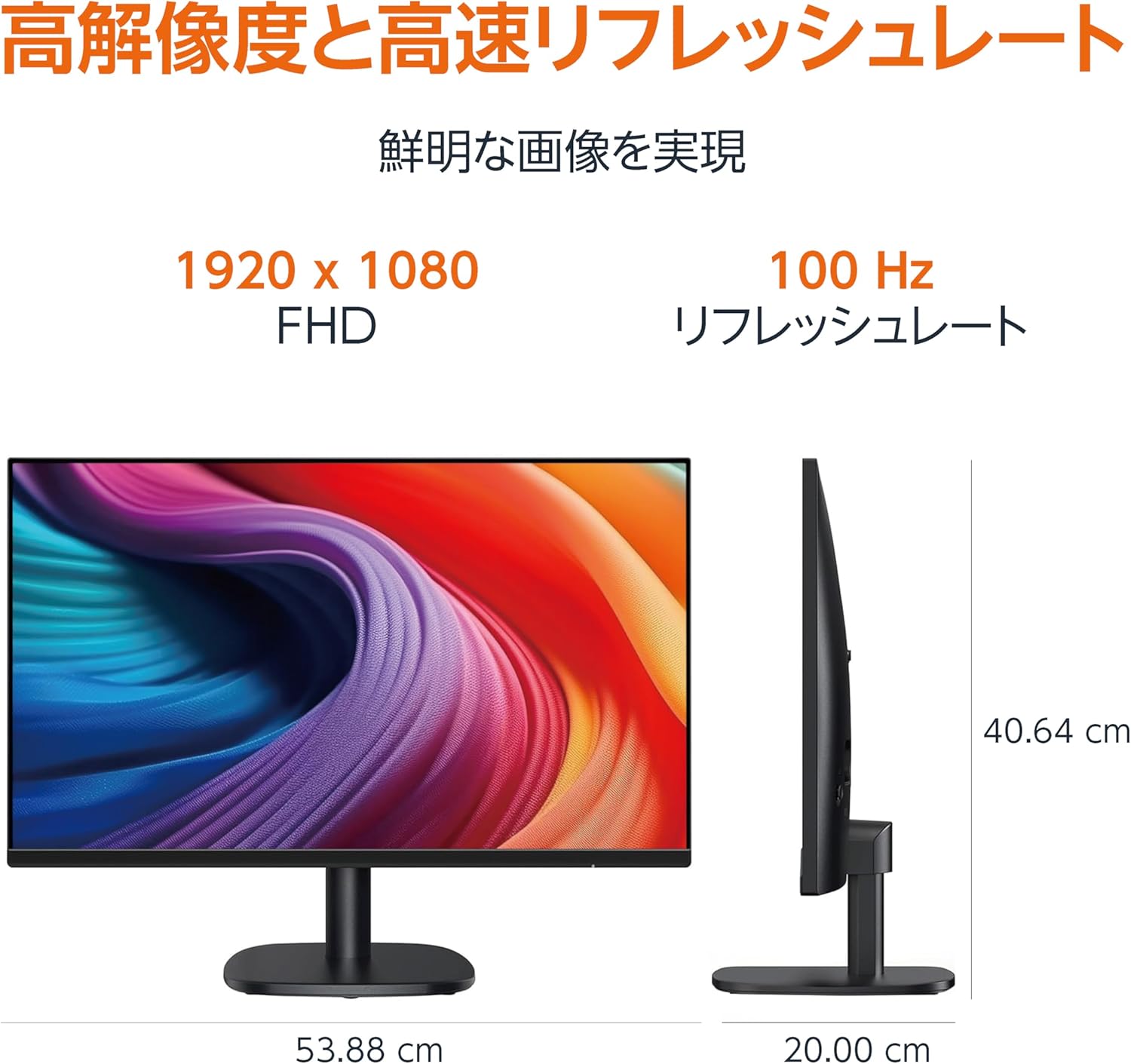
Diagram showing the monitor's dimensions (Width: 53.88 cm, Height: 40.64 cm, Depth: 20.00 cm).
5.2 Slim Bezel Design

Detail showing the monitor's slim bezel design, measuring 1.44 mm.
6. ستونزه حل کول
که تاسو د خپل مانیټر سره ستونزې سره مخ شئ، لاندې عام حلونو ته مراجعه وکړئ:
- ځواک نشته: Ensure the power cable is securely connected to both the monitor and a working power outlet. Check if the power adapter's indicator light is on.
- هیڅ سیګنال نشته: Verify that the video cable (HDMI, DP, or VGA) is firmly connected to both the monitor and your computer. Ensure the correct input source is selected in the monitor's OSD menu. Try restarting your computer.
- ځلیدونکی سکرین: Check the video cable for damage or loose connections. Ensure your computer's graphics driver is up to date. Adjust the refresh rate in your computer's display settings.
- د سپیکرو څخه هیڅ غږ نشته: If using HDMI or DisplayPort, ensure the audio output is set to the monitor in your computer's sound settings. If using VGA, confirm the 3.5mm audio cable is connected. Check the volume level on both the monitor and your computer.
- د انځور کیفیت مسلې: Adjust brightness, contrast, and color settings via the OSD menu. Ensure the display resolution on your computer matches the monitor's native resolution (1920 x 1080).
که چیرې د دې ګامونو له هڅه کولو وروسته هم ستونزه دوام ومومي، د پیرودونکو ملاتړ سره اړیکه ونیسئ.
7. ساتنه
Proper maintenance helps ensure the longevity and performance of your monitor:
- د سکرین پاکول: په نرمۍ سره سکرین د نرم، لینټ نه پاک ټوکر سره پاک کړئ. د سختو نښو لپاره، په نرمۍ سرهampټوکر د اوبو یا ځانګړي سکرین پاکونکي سره ومینځئ. د سخت کیمیاوي موادو، الکول، یا خړوبونکي موادو کارولو څخه ډډه وکړئ.
- د سي پاکولasing: د مانیټر د پاکولو لپاره نرم، وچ ټوکر وکاروئasing.
- وینټیلیشن: ډاډ ترلاسه کړئ چې د مانیټر د هوا د تودوخی د مخنیوي لپاره د هوا د تودوخی دروازې بندې نه وي.
- کله چې په استعمال کې نه وي بریښنا بند کړئ: کله چې مانیټر د اوږدې مودې لپاره نه کارول کیږي نو بند کړئ ترڅو انرژي خوندي کړئ او د هغې عمر اوږد کړئ.
8. تضمین او ملاتړ
This Amazon Basics monitor comes with a د 1 کلن محدود تضمین د پیرود نیټې څخه. دا تضمین د عادي استعمال لاندې د تولید نیمګړتیاوې او کاري وړتیا پوښي.
For warranty claims, technical support, or further assistance, please refer to the Amazon Basics support page or contact Amazon customer service directly. Keep your proof of purchase for warranty validation.