
1. پیژندنه
The Grandstream GWN7002 is a multi-WAN Gigabit VPN router designed to provide robust and secure network solutions for businesses. It features a built-in firewall and supports comprehensive wired, wireless, and VPN networks across single or multiple locations. This manual provides essential information for setting up, operating, and maintaining your GWN7002 router.
2. محصول ختم شوview
The GWN7002 router offers a versatile set of ports and features to meet diverse networking requirements.
2.1 مخکښ پینل
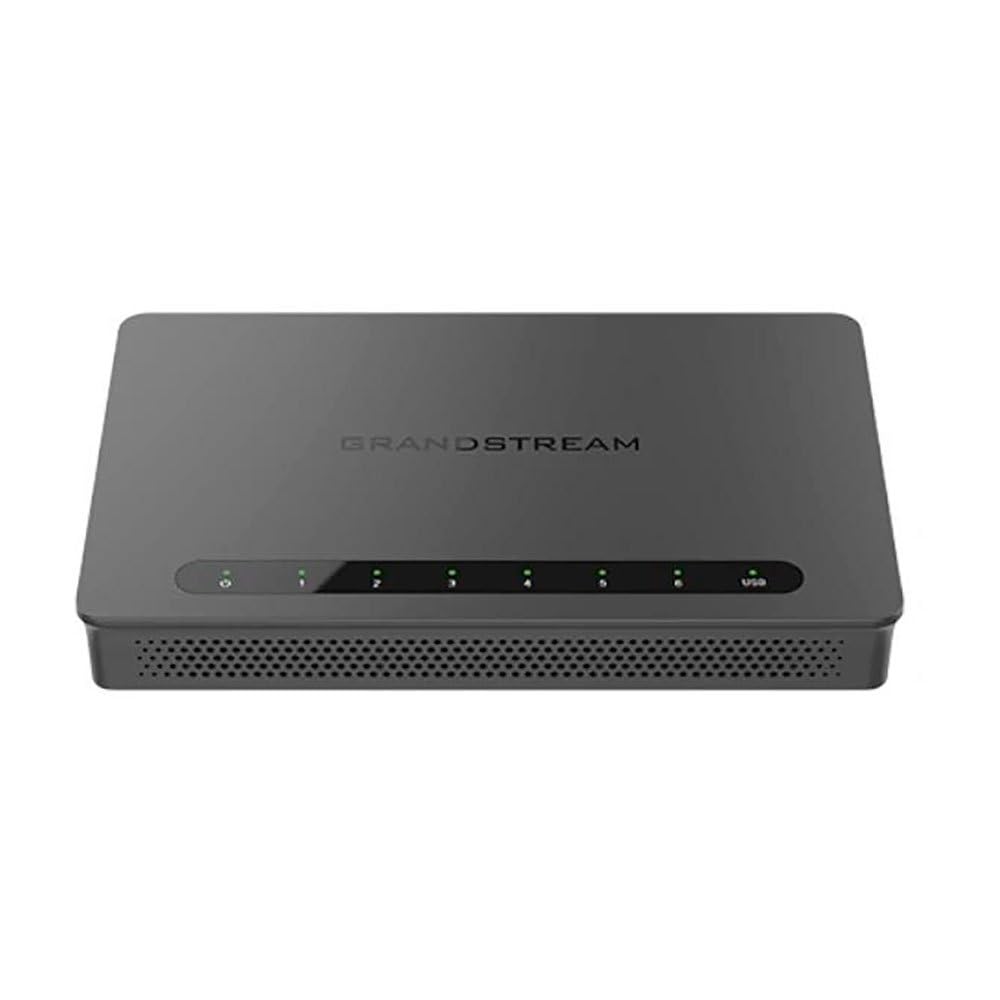
The front panel of the GWN7002 features LED indicators for power, system status, and port activity, providing a quick visual status of the device's operation.
۳.۲ شاته پینل او بندرونه
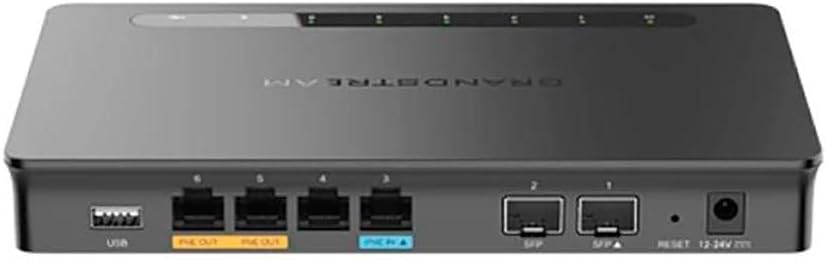
په شا پینل کې د ارتباط لپاره مختلف بندرونه شامل دي:
- د WAN/LAN بندرونه: Multiple Gigabit RJ45 ports for flexible WAN/LAN configuration.
- د PoE داخلول: One GbE RJ45 port with IEEE 802.3af/at PoE Input, allowing the router to be powered via Ethernet.
- د PoE محصول: Two GbE RJ45 ports with 48V Passive PoE output or IEEE 802.3af, capable of powering compatible devices.
- د SFP بندرونه: Gigabit SFP ports for fiber optic connectivity.
- USB پورټ: د بهرني ذخیره کولو یا نورو USB وسیلو سره وصل کولو لپاره.
- د بیا تنظیم تڼۍ: د فابریکې ډیفالټ ته د وسیلې بیا تنظیمولو لپاره کارول کیږي.
- د بریښنا ننوتل: DC power input (12-24V) for standard power adapter connection.
3. ترتیب کول
Follow these steps for initial setup of your Grandstream GWN7002 router.
3.1 د بسته محتويات
ډاډ ترلاسه کړئ چې ستاسو کڅوړه لاندې توکي لري:
- GWN7002 Router Unit
- د بریښنا اډاپټر
- د چټک پیل لارښود (یا ورته اسناد)
3.2 د هارډویر نصب کول
- بریښنا وصل کړئ: Connect the provided power adapter to the router's DC power input. Alternatively, if using PoE, connect an Ethernet cable from a PoE switch or injector to the PoE Input port.
- WAN سره وصل کړئ: Connect your internet service provider's modem or main network line to one of the configurable WAN ports using an Ethernet cable.
- د LAN وسایل وصل کړئ: Connect your local network devices (computers, switches, access points) to the LAN ports using Ethernet cables.
- پاور آن: Ensure all connections are secure, then power on the router. Wait for the system LED indicators to stabilize.
3.3 ابتدايي ترتیب
روټر ته لاسرسی ومومئ web-based configuration interface for initial setup:
- له LAN سره وصل شئ: Ensure your computer is connected to a LAN port of the GWN7002.
- لاسرسی Web UI: خلاص a web براوزر او ډیفالټ IP پته دننه کړئ (معمولا
192.168.1.1or check the Quick Start Guide) in the address bar. - ننوتل: Enter the default username and password (typically 'admin' for both, or as specified in the guide).
- وزرډ تعقیب کړئ: The router may present an initial setup wizard. Follow the on-screen prompts to configure basic network settings, including WAN connection type, LAN IP address, and Wi-Fi settings (if applicable).
4. چلول
This section covers key operational aspects of the GWN7002 router.
4.1 د شبکې ترتیبات
- DHCP سرور: Configure the DHCP server to automatically assign IP addresses to devices on your local network.
- جامد IP: Assign static IP addresses to specific devices if needed.
- VLANs: Create and manage Virtual Local Area Networks (VLANs) for network segmentation and improved security.
4.2 Multi-WAN Configuration
The GWN7002 supports multiple WAN connections for enhanced reliability and bandwidth.
- د بار توازن: Distribute internet traffic across multiple WAN links to optimize bandwidth utilization.
- ناکامي: Configure a backup WAN connection to automatically take over if the primary connection fails, ensuring continuous internet access.
۵.۲ د VPN ملاتړ
Utilize the built-in VPN capabilities for secure remote access and site-to-site connections.
- د VPN سرور: Set up the router as a VPN server to allow remote users to securely connect to your local network.
- د VPN مراجع: Configure the router to connect to an external VPN server.
- ملاتړ شوي پروتوکولونه: The router supports various VPN protocols, including IPsec, L2TP, and OpenVPN.
۴.۵ فایر وال او امنیت
- د پاکټ فلټر کول: Configure rules to filter incoming and outgoing network packets based on various criteria.
- د لاسرسي کنټرول: Manage network access for specific devices or users.
- QoS (د خدماتو کیفیت): Prioritize network traffic for critical applications to ensure optimal performance.
5. ساتنه
Regular maintenance ensures the optimal performance and security of your router.
5.1 د فرم ویئر لوړول
Keep your router's firmware updated to benefit from the latest features, security patches, and performance improvements. Download the latest firmware from the Grandstream website and follow the instructions in the web UI to perform the upgrade.
۷.۲ د بیک اپ او بیا رغونې ترتیب
Regularly back up your router's configuration settings. This allows you to quickly restore your settings in case of a factory reset or device replacement.
5.3 د فابریکې ری سیٹ
To restore the router to its factory default settings, press and hold the Reset button on the rear panel for approximately 10 seconds while the device is powered on. Release the button when the system LEDs begin to flash. The router will reboot with default settings.
6. ستونزه حل کول
This section addresses common issues you might encounter with your GWN7002 router.
۱۶.۶ د انټرنیټ اتصال نشته
- ډاډ ترلاسه کړئ چې ستاسو موډیم په سمه توګه کار کوي او فعال انټرنیټ اتصال لري.
- Check the Ethernet cable connection between the modem and the router's WAN port.
- Ensure the WAN settings in the router's web UI are correctly configured (e.g., DHCP, Static IP, PPPoE).
۸.۲ د شبکې ورو سرعت
- د خپل انټرنیټ خدمت چمتو کونکي سرعت وګورئ.
- Ensure all Ethernet cables are Cat5e or higher for Gigabit speeds.
- Monitor network traffic in the router's web UI to identify any bandwidth-intensive applications or devices.
- Adjust QoS settings to prioritize critical traffic.
6.3 VPN Connection Issues
- Verify VPN server/client settings, including IP addresses, authentication methods, and encryption.
- Check firewall rules to ensure VPN traffic is not being blocked.
- Ensure the remote network is reachable.
7. مشخصات
| د محصول ابعاد | 9.25 x 9.84 x 2.17 انچه |
| د توکي وزن | ۲.۴۵ پونډه |
| د توکي ماډل شمیره | gns7002 |
| جوړونکی | دانه |
| د ارتباط ټیکنالوژي | Wi-Fi (Note: This is a wired router, Wi-Fi connectivity refers to its ability to manage Wi-Fi access points) |
| ځانګړی ځانګړنه | QoS |
| بندرونه | Multiple Gigabit RJ45 ports (1x PoE Input, 2x PoE Output), Gigabit SFP ports, USB port |
| د VPN ملاتړ | Built-in VPN support for secure access |
| ملټي وان | Supports multiple WAN connections for load balancing and failover |
| رنګ | تور |
8. د خوندیتوب معلومات
مهرباني وکړئ لاندې خوندیتوب احتیاطي تدابیر په پام کې ونیسئ ترڅو وسیله ته زیان ونه رسېږي یا ځان ته زیان ونه رسوي:
- وسیله د اوبو یا رطوبت سره مه ښکاره کوئ.
- وسیله د تودوخې سرچینو ته نږدې یا مستقیم لمر کې مه کیږدئ.
- یوازې د وسیلې سره چمتو شوي بریښنا اډاپټر وکاروئ.
- د ډیر تودوخې مخنیوي لپاره د وسیلې شاوخوا مناسب هوا ورکول ډاډمن کړئ.
- د وسیله د ځان خلاصولو یا ترمیم کولو هڅه مه کوئ. د خدماتو وړ پرسونل ته مراجعه وکړئ.
9. تضمین او ملاتړ
For warranty information and technical support, please refer to the documentation included with your product or visit the official Grandstream webسایټ د تضمین ادعاګانو لپاره خپل د پیرود رسید وساتئ.