
1. پیژندنه
This manual provides detailed instructions for the setup, operation, maintenance, and troubleshooting of your Cosmic Byte ARES Wired Controller for PC. Designed for an enhanced gaming experience, this controller features Hall Effect joysticks and triggers, dual vibration, and customizable Turbo functions.
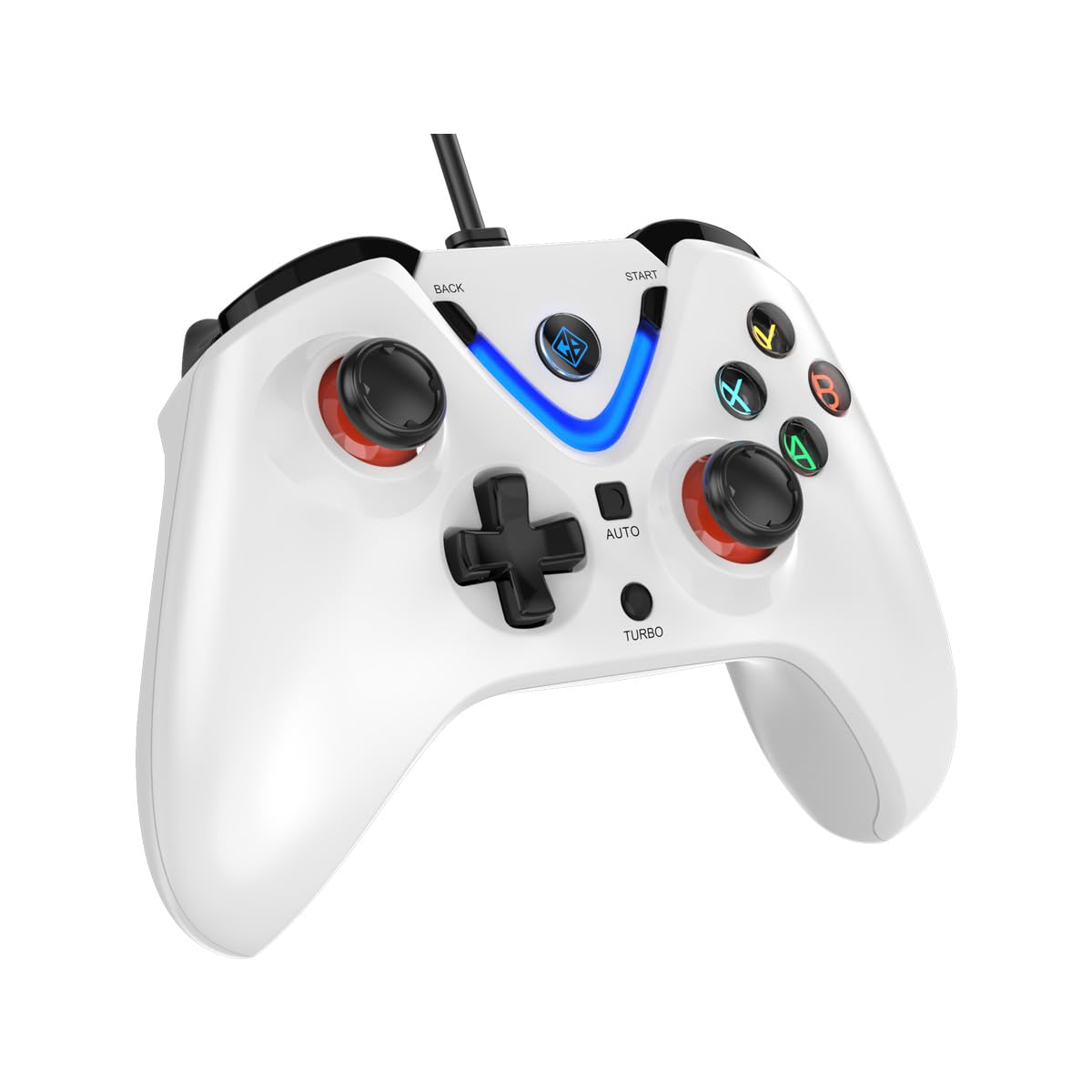
Image 1: The Cosmic Byte ARES Wired Controller in white, showcasinد هغې ایرګونومیک ډیزاین.
۴. د تنظیم لارښوونې
2.1 د کمپیوټر سره نښلول
- ډاډ ترلاسه کړئ چې ستاسو کمپیوټر فعال دی.
- په خپل کمپیوټر کې موجود USB پورټ ومومئ.
- Plug the USB connector of the Cosmic Byte ARES Wired Controller into the USB port.
- عملیاتي سیسټم به په اتوماتيک ډول اړین چلوونکي کشف او نصب کړي. دا پروسه ممکن څو دقیقې وخت ونیسي.
- Once installation is complete, the controller is ready for use.

Image 2: The controller connected via its wired USB connection, ensuring fast response.
3. عملیاتي لارښوونې
3.1 بنسټیز کنټرولونه
The Cosmic Byte ARES controller features standard gamepad layouts, including:
- Left and Right Analog Joysticks: د دقیق حرکت او کیمرې کنټرول لپاره.
- D-pad: د لارښوونې ان پټ لپاره، ډیری وختونه په مینو کې یا د ځانګړو لوبو کړنو لپاره کارول کیږي.
- د عمل تڼۍ (A، B، X، Y): For primary game interactions.
- د اوږو تڼۍ (L1، R1) او محرکونه (L2، R2): For various in-game functions like shooting, aiming, or accelerating.
- د پیل او شا تڼۍ: For pausing games, accessing menus, or specific in-game commands.
- د توربو تڼۍ: For activating rapid-fire functions.
- د اتومات تtonۍ: For activating automatic rapid-fire functions.
۶.۳ د هال اغیزې جویسټیکس او محرکونه
The controller is equipped with Hall Effect joysticks and triggers, which use magnetic sensors instead of physical contacts. This technology provides:
- ښه دقیقیت: More accurate and responsive input.
- د دوام زیاتوالی: Reduces wear and tear, preventing stick drift over time.
- اسانه عملیات: Consistent and linear response for triggers, allowing for nuanced control in games.

انځور ۳.۲: یوه چاودنه view illustrating the Hall Effect joystick mechanism and the Hall Effect triggers.
۴.۲ دوه ګونی وایبریشن فیډبیک
The controller features dual vibration motors that provide tactile feedback during gameplay, enhancing immersion by simulating in-game events such as impacts, explosions, or engine rumbling.
3.4 Backlit LED Buttons
The action buttons (A, B, X, Y) and the central V-shaped indicator feature LED backlighting, providing visibility in low-light conditions and adding to the controller's aesthetic.

Image 4: The controller with its LED buttons illuminated and visual representation of vibration effects.
3.5 Turbo and Auto Turbo Functions
The Turbo and Auto Turbo functions allow for rapid, repeated input of a button press without continuously pressing the button.
- د ټربو فعالول: Press and hold the desired action button (e.g., A) and then press the توربو button. The button will now rapidly repeat its input as long as you hold it down.
- Activating Auto Turbo: Press and hold the desired action button (e.g., A) and then press the اتومات button. The button will now rapidly repeat its input automatically without needing to be held down.
- Deactivating Turbo/Auto Turbo: To deactivate, repeat the activation steps for the specific button, or press the روښانه button (if available) or disconnect and reconnect the controller.

Image 5: Close-up of the controller showing the Turbo and Auto function buttons.
4. ساتنه
- پاکول: د کنټرولر پاکولو لپاره نرم، وچ ټوکر وکاروئ. د سختې خاورې لپاره، یو څه damp cloth can be used, ensuring no liquid enters the controller. Avoid harsh chemicals or abrasive cleaners.
- ذخیره کول: کنټرولر په یخ او وچ ځای کې د مستقیم لمر وړانګو او سختې تودوخې څخه لرې وساتئ. په کنټرولر باندې د درنو شیانو له ایښودلو څخه ډډه وکړئ.
- د کیبل پاملرنه: Do not sharply bend or pull the USB cable. Always grasp the plug when disconnecting from the PC.
5. ستونزه حل کول
- کنټرولر نه پیژندل شوی:
- Ensure the USB cable is securely connected to both the controller and the PC.
- هڅه وکړئ چې کنټرولر په بل USB پورټ کې ولګوئ.
- خپل کمپیوټر بیا پیل کړئ.
- Check Device Manager on Windows to see if the controller is listed and if there are any driver issues.
- Buttons/Joysticks Not Responding:
- Verify the controller is recognized by your PC (see above).
- Test the controller in a different game or a controller testing utility to rule out game-specific issues.
- ډاډ ترلاسه کړئ چې نور د ننوتلو وسایل مداخله نه کوي.
- وایبریشن کار نه کوي:
- د لوبې دننه ترتیبات وګورئ ترڅو ډاډ ترلاسه کړئ چې د وایبریشن فیډبیک فعال شوی دی.
- Some games may not support vibration or may have limited vibration effects.
6. مشخصات
| فیچر | تفصیل |
|---|---|
| برانډ | کاسمیک بایټ |
| د ماډل نوم | اریس |
| مطابقت لرونکې وسیلې | PC |
| د کنټرولر ډول | د لوبې پیډ |
| د ارتباط ټیکنالوژي | USB |
| د محصول ځانګړتیاوې | ارګونومیک |
| د تڼۍ مقدار | 16 |
| د هارډویر پلیټ فارم | PC |
| د ځواک سرچینې ډول | بریښنایی تار، USB کیبل |
| د توکي وزن | 220 ګرامه |
| د توکي ابعاد | 6 x 10 x 4 سانتي متره |
| رنګ | سپین |
| د اصلي هیواد | چین |

Image 6: A comparison table highlighting features of different ARES controller models.
7. تضمین او ملاتړ
7.1 د تضمین معلومات
The Cosmic Byte ARES Wired Controller comes with a د تولیدي نیمګړتیاوو په وړاندې د 1 کال تضمین د پیرود نیټې څخه. مهرباني وکړئ د تضمین ادعاوو لپاره د پیرود ثبوت وساتئ.
7.2 د تولید کونکي سره د اړیکو معلومات
For support, service, or warranty inquiries, please contact:
کاسمیک بایټPrakash Warehousing, S. No.163, Hissa No 1-2-3-4-5A-5B/2/1,
Phursungi, Pune 412308, Maharashtra, India
For further assistance, please visit the official Cosmic Byte webسایټ یا د دوی پیرودونکي خدمت سره اړیکه ونیسئ.