
Amazon Basics DP-882
Amazon Basics 88-Key Semi-Weighted Digital Piano User Manual
ماډل: DP-882
پیژندنه
This manual provides detailed instructions for the setup, operation, maintenance, and troubleshooting of your Amazon Basics 88-Key Semi-Weighted Digital Piano. Designed for performance, this digital piano offers a realistic playing experience with its semi-weighted keys and a wide array of features to enhance your musical journey.
کلیدي ځانګړتیاوې عبارت دي له:
- Realistic semi-weighted 88-key keyboard for authentic piano touch.
- Versatile 1/4" audio output for ampلایفیر او سپیکر.
- Expansive music library with 140 tones, 200 rhythms, and 16 demonstration songs.
- Educational features like automatic chords, beginner split keyboard function, and dual timbre functions.
- User-friendly USB MIDI and USB-A ports for smart device connectivity and recording.
چمتو کول
د بسته بندۍ او اجزاو پیژندنه
په احتیاط سره د بسته بندۍ څخه ټولې برخې لرې کړئ. ډاډ ترلاسه کړئ چې ټولې برخې شتون لري:
- Amazon Basics 88-Key Digital Piano
- د پیډل دوام
- د بریښنا رسولو اډاپټر
- USB کیبلونه
- د موسیقۍ موقف

Image: All components included with the Amazon Basics 88-Key Digital Piano.
Secure and Easy Setup
The piano is packaged securely with styrofoam. The power adapter is attached within the styrofoam for quick access.

Image: Digital piano secured in packaging with power adapter.
Connecting the Sustain Pedal and Power Supply
Locate the sustain pedal port on the rear of the piano. Ensure the piano is powered off before connecting or disconnecting the sustain pedal. Connect the power supply adapter to the DC IN port and plug it into a wall outlet.

انځور: شاته view of the piano showing connectivity ports.
د میوزیک سټینډ سره ضمیمه کول
د پیانو په پورتنۍ تخته کې ټاکل شوي سلاټونو کې د موسیقۍ سټینډ دننه کړئ.
عملیاتي لارښوونې
بریښنا پر / بند او د حجم کنټرول
To power on the piano, press the 'ON/OFF Power' button. Adjust the master volume using the 'MIN/MAX Master Volume' knob to your desired level.

Image: Control panel with master volume and function buttons.
د غږونو او تالونو غوره کول
The piano offers 140 tones and 200 rhythms. Use the dedicated buttons on the control panel to select different instrument sounds (e.g., Piano, Electronic Church Organ, Guitar, Bass, Strings) and rhythms. The clear LED display will show your current selection.
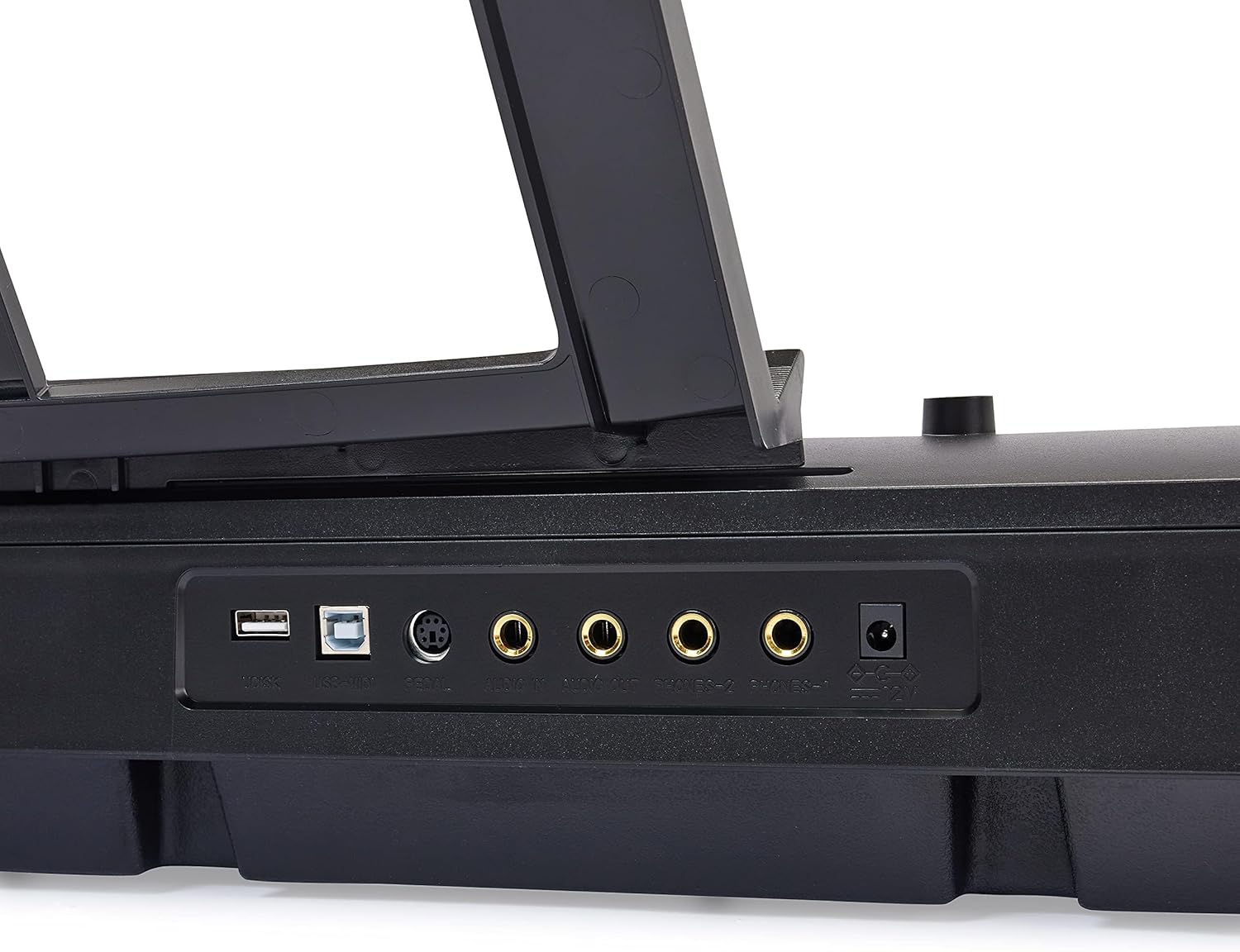
Image: Hand interacting with the piano keys and control panel.
تعلیمي ځانګړتیاوې
Enhance your learning with features such as:
- د لوست حالت: Utilize the beginner split keyboard function for guided practice.
- Automatic Chords: Simplify chord playing for beginners.
- Dual Timbre: Layer two different instrument sounds simultaneously for richer tones.
- میټروینوم: Use the built-in metronome for rhythm training.

انځور: اوورview of learning tools and features.
د USB نښلول
The piano features USB MIDI and USB-A ports, allowing for simple integration with smart devices. You can connect to compatible software for recording your music or expanding your creative possibilities.
ساتنه
پاکول
To clean the piano, use a soft, dry cloth. Do not use abrasive cleaners, waxes, or solvents as they may damage the finish. For stubborn marks, a slightly damp ټوکر کارول کیدی شي، او سمدلاسه وروسته وچ ټوکر واچوئ.
ذخیره کول
Store the piano in a cool, dry place away from direct sunlight, extreme temperatures, and high humidity. Avoid placing heavy objects on the keyboard.
د ستونزو حل کول
نه غږ
- Ensure the piano is powered on and the power adapter is securely connected to both the piano and a working electrical outlet.
- د ماسټر حجم نوب وګورئ او ډاډ ترلاسه کړئ چې پورته شوی دی.
- If external speakers or headphones are connected, ensure they are properly plugged in and their volume is adjusted.
دوامدار پیډل کار نه کوي
- Verify that the sustain pedal is fully inserted into its designated port on the back of the piano.
- Always ensure the piano is powered OFF before connecting or disconnecting the sustain pedal to prevent potential issues.
Keys Not Responding or Incorrect Sound
- Try selecting a different instrument tone to see if the issue persists across all sounds.
- Power off the piano, wait a few seconds, and then power it back on to reset the system.
مشخصات
| فیچر | تفصیل |
|---|---|
| د ماډل شمیره | DP-882 |
| د کلیدونو شمیر | 88 |
| کلیدي ډول | Semi-Weighted |
| ابعاد (D x W x H) | ۱۶"د x ۲۶"وچ x ۴۷"ح |
| د توکي وزن | ۲.۴۵ پونډه |
| د بریښنا سرچینه | د بریښنا تار شوی |
| د ارتباط ټیکنالوژي | USB (USB MIDI, USB-A) |
| رنګ | تور |
| د مهارت کچه | ټول |
| ځانګړی ځانګړنه | د پورټ وړ |
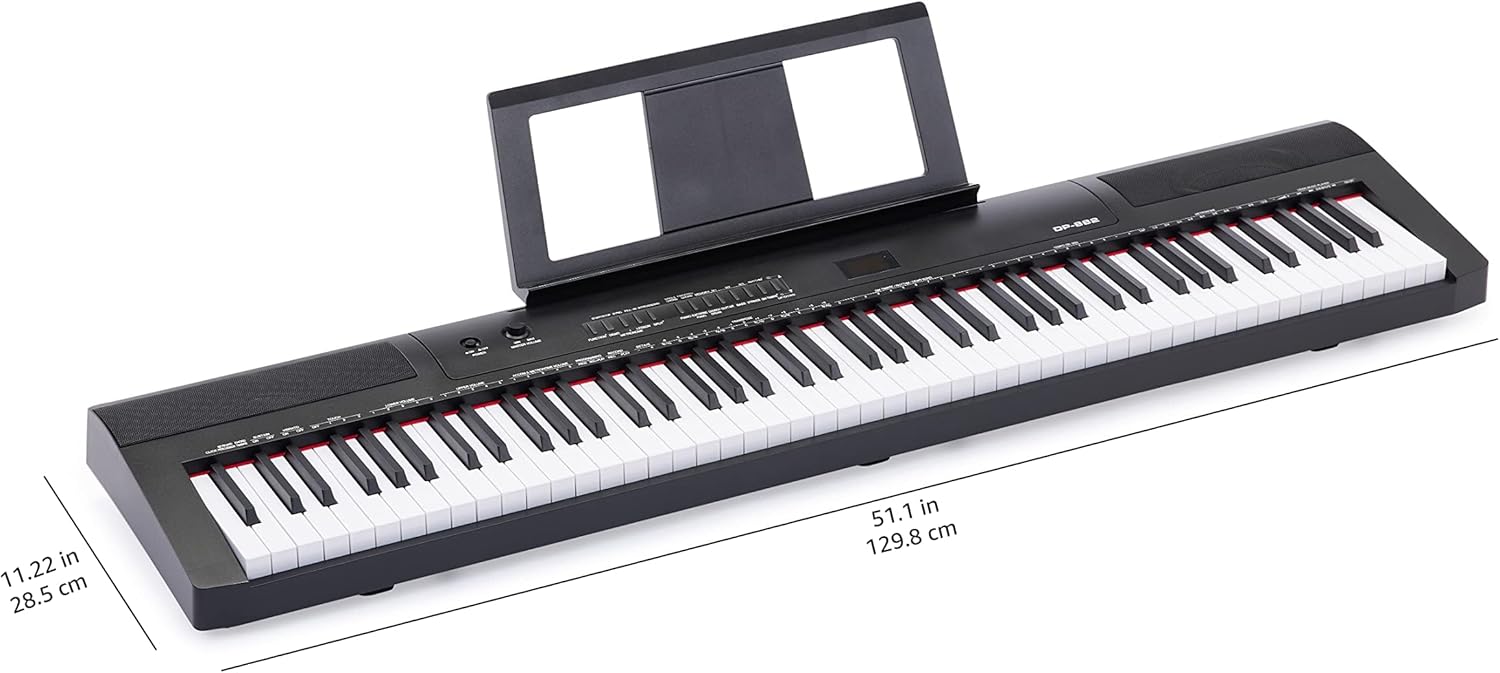
Image: Digital piano with key dimensions.
تضمین او ملاتړ
د کارونکي لارښود او تضمین معلومات
For additional details and comprehensive warranty information, please refer to the official PDF documents:
د ساتنې پلانونه
Extended protection plans may be available for your product. Please check the product listing or your purchase documentation for details on available plans, such as 3-Year or 4-Year Protection Plans.
د پیرودونکي ملاتړ
د نورو مرستو، تخنیکي ملاتړ، یا خدماتو پوښتنو لپاره، مهرباني وکړئ لیدنه وکړئ د ایمیزون اساساتو پلورنځی یا مستقیم د ایمیزون پیرودونکي خدماتو سره اړیکه ونیسئ.