
پیژندنه
Thank you for choosing the Continu.us R230D2 Master TV Remote. This remote control is specifically designed to provide comprehensive control over RCA and Continu.us brand televisions, including access to commercial menus. Its intuitive layout ensures ease of use for all essential TV functions.

شکل 1: مخکی view of the R230D2 Master TV Remote, showing all buttons.
چمتو کول
Before using your new remote, you will need to install batteries.
د بیټرۍ نصب کول
- د ریموټ کنټرول شاته د بیټرۍ کڅوړه ومومئ.
- د بیټرۍ د خونې پوښ ښکته خوا ته وغورځوئ او پورته یې کړئ.
- دوه (2) AA بیټرۍ دننه کړئ، ډاډ ترلاسه کړئ چې مثبت (+) او منفي (-) ټرمینلونه د خونې دننه د نښانونو سره سمون لري.
- د بیټرۍ د برخې پوښ بیرته خپل ځای ته د سلایډ کولو سره بدل کړئ تر هغه چې په خوندي ډول کلیک وکړي.

شکل 2: شاته view of the R230D2 Master TV Remote, illustrating the battery compartment.
ابتدايي استعمال
The R230D2 Master TV Remote is pre-programmed for RCA and Continu.us televisions and typically requires no code entry or complex synchronization. Simply point the remote at your television and press the پاور button. If the TV responds, the remote is ready for use.
عملیاتي لارښوونې
This section details the functions of the buttons on your R230D2 remote control.
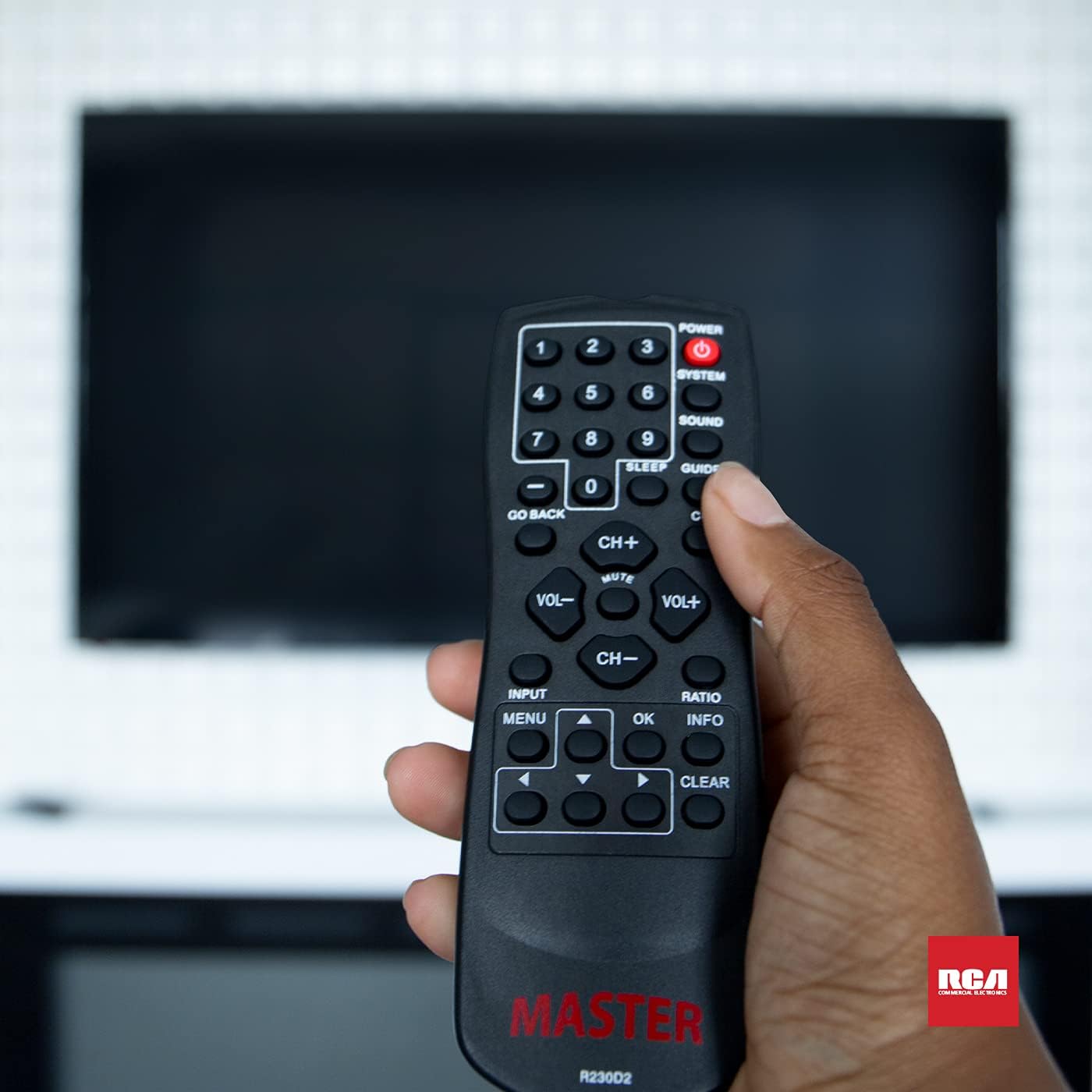
Figure 3: Using the R230D2 Master TV Remote with a television.
- پاور: ټلویزیون چالان یا بندوي.
- سیسټم: Accesses system-specific functions or menus.
- غږ: Adjusts sound modes or settings.
- لارښود: د برېښنايي پروګرام لارښود (EPG) ښکاره کوي.
- خوب: Sets a timer for the TV to automatically turn off.
- سي سي (تړل شوی سرلیک): Toggles closed captions on or off.
- بیرته تګ: Returns to the previous channel or menu screen.
- د شمېرې تڼۍ (0-9): Directly input channel numbers.
- CH+ / CH-: چینلونه پورته یا ښکته بدلوي.
- VOL + / VOL-: Increases or decreases volume.
- خاموش: د تلویزیون غږ خاموش یا غیر خاموش کوي.
- INPUT: Selects the input source (e.g., HDMI 1, AV).
- مینو: Opens the television's main menu.
- OK: Confirms a selection or enters a submenu.
- معلومات: د اوسني پروګرام یا ان پټ په اړه معلومات ښیې.
- نسبت: د سکرین د اړخ تناسب تنظیموي.
- روښانه: Clears input or exits certain functions.
- د نیویګیشن تیرونه (پورته، ښکته، کیڼ، ښي): د مینو او انتخابونو له لارې نیویګیټ کوي.
Accessing Commercial Menus
The R230D2 remote is designed to access commercial menus on compatible RCA and Continu.us televisions. The specific button or sequence to access these menus may vary by TV model. Typically, this function is integrated within the سیسټم or مینو buttons, or a combination thereof. Refer to your television's specific user manual for detailed instructions on accessing its commercial menu features.
ساتنه
د خپل ریموټ کنټرول د اوږد عمر او غوره فعالیت ډاډمن کولو لپاره، د ساتنې دا ساده لارښوونې تعقیب کړئ:
- پاکول: ریموټ د نرم او وچ ټوکر سره پاک کړئ. د سختې خاورې لپاره، یو څه نرم کړئampټوکر د اوبو یا یو نرم، غیر خارښونکي پاکوونکي سره ومینځئ. سخت کیمیاوي مواد مه کاروئ یا ریموټ په مایع کې مه ډوبوئ.
- د بیټرۍ بدلول: کله چې د ریموټ غبرګون سست شي یا کار ودروي نو بیټرۍ بدلې کړئ. تل دواړه بیټرۍ په ورته وخت کې د نوي AA بیټرۍ سره بدل کړئ. زاړه او نوي بیټرۍ، یا د بیټرۍ مختلف ډولونه مه ګډوئ.
- ذخیره کول: ریموټ په یخ او وچ ځای کې د مستقیم لمر وړانګو، سختې تودوخې او لوړې رطوبت څخه لرې وساتئ.
- له څاڅکو ډډه وکړئ: ریموټ کنټرول د فزیکي اغیزو څخه خوندي کړئ، ځکه چې څاڅکي کولی شي داخلي برخو ته زیان ورسوي.
د ستونزو حل کول
If you encounter issues with your R230D2 remote, try the following solutions:
- ریموټ ځواب نه ورکوي:
- وګورئ چې ایا بیټرۍ په سمه توګه د سم قطبیت سره داخل شوي دي.
- بیټرۍ د تازه سره بدل کړئ.
- ډاډ ترلاسه کړئ چې د ریموټ کنټرول او د تلویزیون انفراریډ سینسر ترمنځ هیڅ خنډ شتون نلري.
- ډاډ ترلاسه کړئ چې تاسو د تلویزیون د IR ریسیور مؤثر حد کې یاست.
- TV Not Turning On/Off:
- Confirm the TV is plugged into a working power outlet.
- Try turning the TV on/off using its physical power button.
- ځانګړي دندې چې کار نه کوي:
- Some functions may require the TV's menu to be open or a specific input selected.
- ډاډ ترلاسه کړئ چې ریموټ مستقیم تلویزیون ته متوجه دی.
- Remote Still Not Working:
- If the remote was recently dropped or exposed to moisture, internal damage may have occurred.
- د نورو مرستې لپاره د پیرودونکي ملاتړ سره اړیکه ونیسئ.
مشخصات
| فیچر | تفصیل |
|---|---|
| برانډ | ادامه |
| د ماډل شمیره | R230D2 |
| مطابقت لرونکې وسیلې | RCA and Continu.us Televisions |
| د ارتباط ټیکنالوژي | انفراریډ |
| د بریښنا سرچینه | 2 AA بیټرۍ (شامل ندي) |
| د توکي وزن | 1.76 اونس |
| د محصول ابعاد | 6 x 2 x 1 انچه |
| د ملاتړ شوي وسایلو اعظمي شمیر | 1 |
تضمین او ملاتړ
Continu.us products are designed and tested to high standards. We pride ourselves on offering excellent customer support.
د پیرودونکي ملاتړ
If you require assistance with your R230D2 Master TV Remote, our support and technical team are available to help. Please reach out via phone or email for any pressing issues or questions.
For the most up-to-date contact information, please visit the official Continu.us webسایټ ته مراجعه وکړئ یا د محصول بسته بندۍ ته مراجعه وکړئ.
د تضمین معلومات
Specific warranty details for the R230D2 remote are typically provided with the product packaging or can be found on the Continu.us official webسایټ. مهرباني وکړئ د تضمین ادعاوو لپاره د پیرود ثبوت وساتئ.