
1. پیژندنه
د پیرودلو لپاره مننهasing the Goshyda AEQ96761 Fixed Telephone. This manual provides detailed instructions for the proper setup, operation, and maintenance of your new telephone. Please read this manual thoroughly before using the product to ensure optimal performance and longevity.
2. د بسته محتويات
مهرباني وکړئ د لاندې توکو لپاره په بسته کې وګورئ:
- 1 x Goshyda AEQ96761 Fixed Telephone
- 1 x Handset Coiled Cord
- ۱ x د ټیلیفون لاین تار
- 1 x د لارښوونې لارښود
- 1 x Telephone Stand
3. محصول ختم شوview
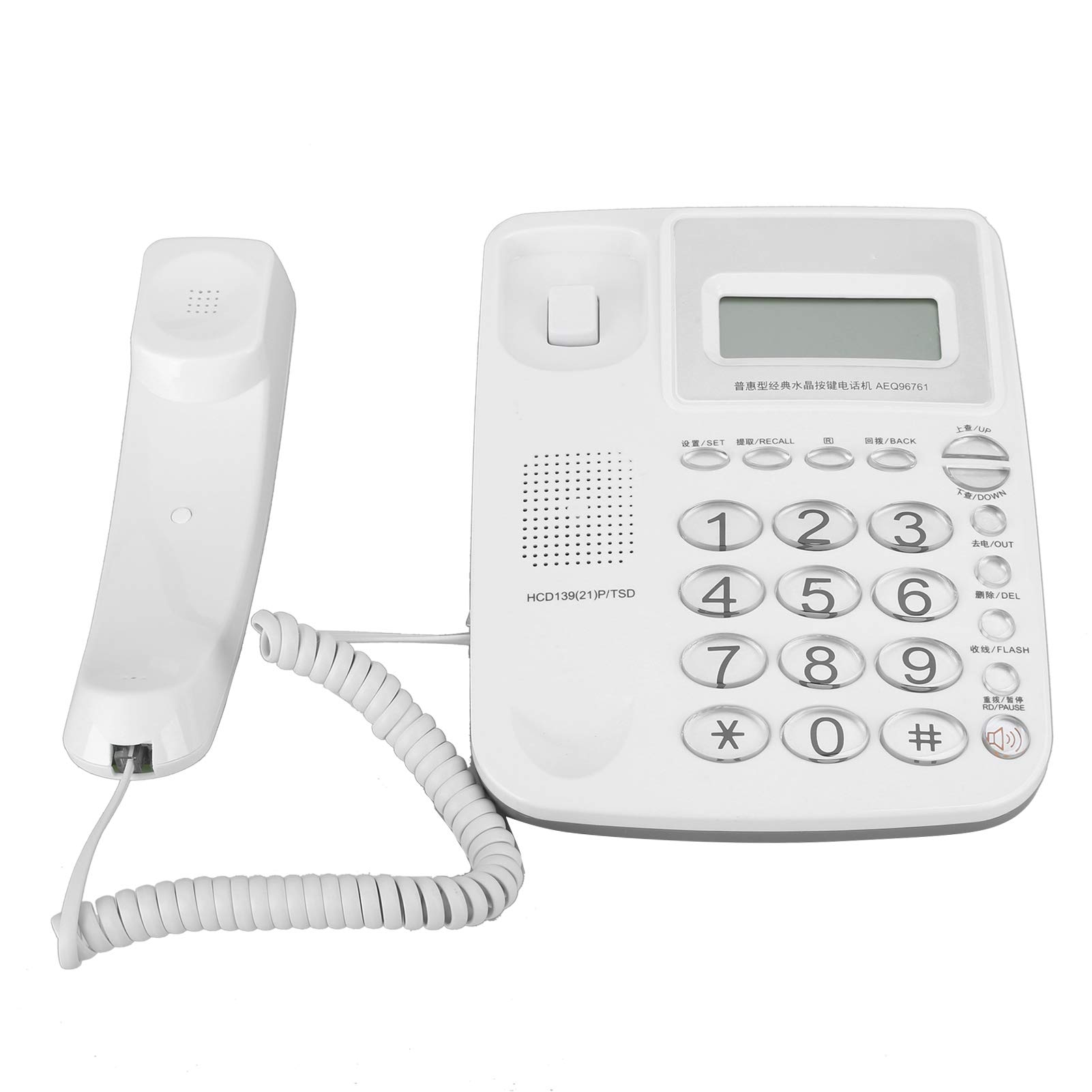
Figure 3.1: Goshyda AEQ96761 Fixed Telephone, a white corded phone with a digital display and keypad.

Figure 3.2: The telephone's LCD display shows real-time date and week, with brightness adjustable in 5 levels.

Figure 3.3: The telephone supports DTMF/FSK dual system caller ID.

Figure 3.4: Close-up of the durable glass buttons on the telephone keypad.

Figure 3.5: The included telephone line cable for connection.
4. ترتیب کول
- هینډسیټ وصل کړئ: Plug one end of the coiled cord into the handset and the other end into the jack labeled with a handset icon on the side of the telephone base.
- د ټیلیفون لاین وصل کړئ: Plug one end of the telephone line cord into the jack labeled 'LINE' on the back of the telephone base and the other end into your wall telephone jack.
- Place the Telephone: Position the telephone on a flat, stable surface or mount it on a wall using the integrated wall mount holes (if applicable). Ensure the telephone stand is securely attached if using it for desk placement.
- ابتدايي ځواک: The telephone is powered via the telephone line. Once connected, the display should activate.
5. عملیاتي لارښوونې
5.1 زنګ وهل
- هینډسیټ پورته کړئ یا فشار ورکړئ Hands-Free/Speaker تڼۍ
- د کیپډ په کارولو سره مطلوب تلیفون شمیره ډایل کړئ.
- د زنګ وهلو لپاره انتظار وکړئ.
- د زنګ د پای ته رسولو لپاره، هینډسیټ بدل کړئ یا فشار ورکړئ Hands-Free/Speaker بیا تڼۍ.
5.2 زنګ وهل
- When the telephone rings, lift the handset or press the Hands-Free/Speaker د ځواب لپاره تڼۍ.
- د زنګ د پای ته رسولو لپاره، هینډسیټ بدل کړئ یا فشار ورکړئ Hands-Free/Speaker تڼۍ
5.3 Caller ID Function
The telephone supports DTMF/FSK dual system caller ID. When an incoming call is received, the caller's number (and name, if available and stored) will be displayed on the LCD screen.
- د کارولو پورته/ ښکته buttons to scroll through incoming call records.
- فشار ورکړئ بهر تڼۍ ته view د وتلو زنګونو ریکارډونه.
۳.۴ د لاسونو څخه پاک عملیات
فشار ورکړئ Hands-Free/Speaker button to activate the speakerphone function. You can adjust the hands-free volume using the dedicated volume controls (if available) or during a call.
5.5 R Key Function
د R key (Flash key) is used for network services such as call waiting or transferring calls, depending on your telephone service provider's features.
۳.۴ د حافظې دندې
The telephone features 10 groups of dual-key memory for frequently dialed numbers. Refer to the detailed instructions in the included manual for programming these memory slots.
5.7 د الارم فعالیت
The telephone includes 3 alarm groups, each with different alarm sounds. Consult the full instruction manual for setting up and managing these alarm functions.
6. ځانګړتیاوې
- DTMF/FSK dual system caller ID.
- ۱۰ د انتخاب وړ زنګونونه.
- وړتیا لري view incoming and outgoing call information.
- 3 alarm groups, each with distinct alarm sounds.
- 10 groups of dual-key memory function for speed dialing.
- Hands-free volume control.
- R key function for network services.
- Automatic line take-up.
- Super anti-thunder protection.
- Parallel anti-theft features.
- 1-99 hours Do Not Disturb function.
7. ساتنه
- پاکول: ټیلیفون په نرم، دamp ټوکر د کثافاتو پاکوونکي یا محلول مه کاروئ.
- ذخیره کول: ټیلیفون په یخ او وچ ځای کې د مستقیم لمر وړانګو او سختې تودوخې څخه لرې وساتئ.
- د مایعاتو څخه ډډه وکړئ: Do not expose the telephone to water or other liquids.
- په احتیاط سره سمبالول: Avoid dropping the telephone or subjecting it to strong impacts.
8. ستونزه حل کول
- د ډایل ټون نشته:
- Ensure all cables (handset and line cord) are securely connected.
- Test the wall jack with another working telephone.
- نه ښودنه:
- Verify the telephone line cord is properly connected to the wall jack. The phone draws power from the line.
- Caller ID Not Working:
- ډاډ ترلاسه کړئ چې تاسو د خپل تلیفون چمتو کونکي څخه د زنګ وهونکي ID خدمت کې ګډون کړی دی.
- Check if the telephone line connection is stable.
- Cannot Hear or Be Heard:
- Check the handset coiled cord connection.
- Adjust the volume settings during a call.
9. مشخصات
| فیچر | مشخصات |
|---|---|
| برانډ | ګوشیدا |
| د ماډل شمیره | د AEQ96761 معرفي کول |
| د تلیفون ډول | Corded Fixed Telephone |
| مواد | اکریلونایتریل بوټاډین سټیرین (ABS) |
| رنګ | سپین |
| د بریښنا سرچینه | Electric Cable (Line Powered) |
| د ډایلر ډول | واحد کیپډ |
| د توکي ابعاد (L x W x H) | 10 x 10 x 10 ملی متره |
| د توکي وزن | 621 ګرامه |
| د زنګ وهونکي ID | Yes (DTMF/FSK Dual System) |
| د ځواب ورکولو سیسټم ډول | ډیجیټل |
| د اصلي هیواد | چین |
10. تضمین او ملاتړ
For warranty information and technical support, please refer to the documentation included with your purchase or contact your retailer. Keep your purchase receipt as proof of purchase for any warranty claims.